That would be good. Let’s do that.
I’m also having this problem repeatedly over a series of attempts over several weeks.
File size is 44.2MB
I’ve done some testing with @DrNostromo over the past week and fixed what I believe was the problem.
If you have a file you couldn’t upload, please now try again and tell me the filename and approximate time you tried uploading it so I can check the logs for your attempt.
File name: CCTheGreatWar-3.22.0.vmod
Time: 22:10 UTC
File size: 44.2 MB
Upload Speed test result: 18.7 Mbps upload
File uploaded for roughly 5 minutes before reporting APIError: 408 : , with upload bar reaching roughly 2/3 green fill.
Hey Joel,
I just tried my Assault: Sicily Gela module (260MB) and it failed. Not sure at what point it failed as I had to leave the room during the upload attempt.
-Joel T.
Everyone having an upload problem, please run this speed test and report back on your upload speed. This speed test is for the datacenter our server is in.
I’m seeing 20Mbps myself.
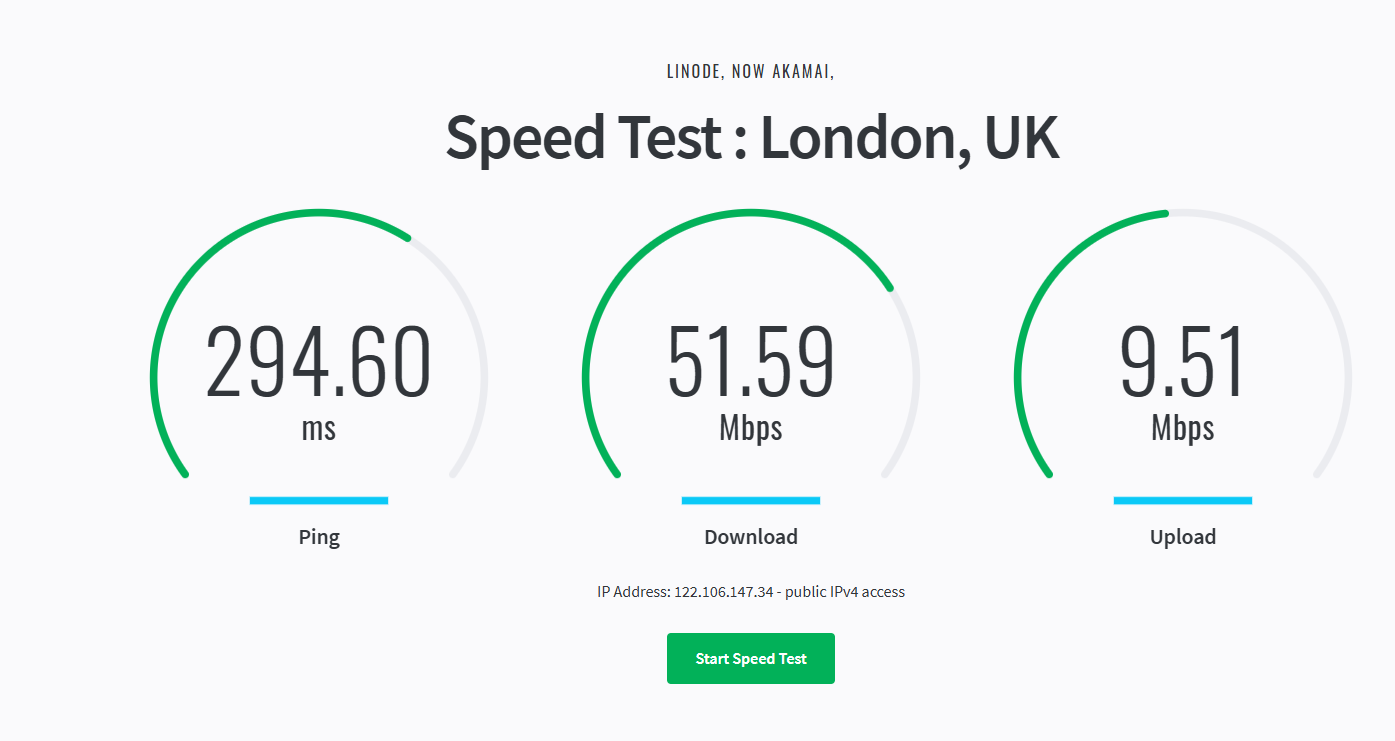
I just (5/3/2026 around 07:55 CET) successfully uploaded a module - BattleForMoscowGDW-1.0.1.vmod - 8.9 MB large. The speed test showed
| Test | Speed |
|---|---|
| Ping | 49.86 ms |
| Download | 212.02 Mbps |
| Upload | 58.35 Mbps |
Hopefully that can be of some help.
Yours,
Christian
9318081 bytes took 16.6s, which is 4.2Mbs. I cannot account for why you’re getting such a poor upload speed. Do you have any suggestions about what we should look into?

As a random guess, some sort of upload source authentication protocol that is repeatedly interrupting the upload to authenticate the source. A shot in the dark really.
More to the point, is there a work around that can be put into place?
9318081 bytes = 74544648 bits
74544648 bits / 16.6 s = 4490641.44578313253012048192 bits / s (ridiculous precision - I know)
4490641.44578313253012048192 bits / s / 1024^2 bit / mega-bits  = 4.28260941103280308734 ~ 4.3 Mbs (by normal rounding rules)
That’s a reduction by more than an order of magnitude compared to the speed test. That is a lot.
I find it hard to believe that that would cause such a dramatic decrease in speed.
If the end-point of the speed test is the same as the end-point of an upload, then I think it seems more likely that something at the end-point is causing the slow-down. At some point Joel, you mentioned something about calculating the hash of the upload on-the-fly as the data comes in. Do you still do that? Could that explain at least part of the degradation? Is there something in the Rust code that is used to receive the uploads that can cause such severe delays? Perhaps in some third-party library?
Have you seen similar degradations in other cases?
Anyway, just thinking out loud.
Yours,
Christian
I don’t know what kind of thing that would be. We’re not running anything like that.
I’ve now set the upload timeout to 30 minutes. That’s not ideal and I want not to leave it that way.
I’ve tried all of the following:
- Writing the request stream to a file wrapped in a hashing
InspectWriter, usingtokio::io::copy. (The example provided by axum, the HTTP framework we’re using, usestokio::io::copy.) - Reading the request stream in a loop using
StreamExt::next()and passing theByteswe get from that on to the hashingInspectWriter. - Writing the request stream to a file wrapped in a hashing
InspectWriter, usingtokio::io::copy_buf, with aBufReaderwrapping the stream. - Reading from the stream into a buffer in one task, writing from a buffer to the hashing
InspectWriterin another task, and swapping buffers when each is finished, so that reading and writing can happen concurrently. - Reading from the stream into a buffer in one task, writing from a second buffer to the hasher and the file each in their own tasks, so that writing to the file and hashing additionally happen concurrently.
- Spawning a blocking task which polls the stream and writes to a
std::fs::Fileinstead of atokio::fs::File, to avoid the overhead of going in and out of the tokio runtime for each write to disk. (This was suggested to me in the tokio Discord as something that could write to disk slightly more efficiently.) - Varying the buffer sizes.
- Delaying hashing until after the file is written to disk.
I see minimal difference among these when I upload files. I get around 14.2Mbps in all cases. This isn’t that far off from the 20Mbps I get from the speed test.
When I transfer the same file to our server using scp, I get around 17.6Mbps. I’m not sure what accounts for the difference, but this is also not awful. I see the same upload speed with scp for two other servers I admin in the same datacenter.
Our server is not overloaded. The 1-, 5-, and 15-minute load averages is are under 1. More than half of the RAM is free. According to the dashboard, we’re averaging 62.55Kb/s inbound on IPv4 and 94.12Kb/s inbound on IPv6. That’s barely anything at all.
Some people having slow uploads are using IPv4, some IPv6. That seems to make no difference.
I spotted just now that our server is in the London 2 zone, not London, so this is the correct speed test, not the one I posted earlier. (I doubt you’ll get much different results from it, though.)
For me, hardly any difference.
| Set-up | Effect on upload speed? |
|---|---|
tokio::io::copy |
|
StreamExt.next |
|
tokio::io::copy_buf |
|
| 2 buffers | |
| 2 buffers - 3rd hasher task | |
Blocking task, poll to std::fs::File |
|
| Variable buffer sizes | |
| Hash when write complete |
is that more or less accurately summarised?
What if you read from the input stream but never passed the data along - i.e., the data is never read or written internally - do you get the expected throughput? Perhaps disconnecting the backend code (write, hash, etc.) and simply checking at what rate the data can be read from the input stream, could narrow down the problem. Just a thought.
Yours,
Christian
Reading the stream and throwing away the data is the same speed for me. I doubt that the problem is in our code or even on our server at this point.
I’ve submitted a support ticket to our host to see what they say.
I’ve now set the upload timeout to 30 minutes.
that has done the trick for me. Took a while, but the module uploaded at last. Thanks.
I need someone (preferably everyone) having an upload problem or slow connection to let me know what IP address you’re trying to connect from and run
mtr -rwzbc100 172.237.96.19
and report back with the results. (172.237.96.19 is the IP address of our server.) mtr may take a few minutes to produce output. Note that you probably won’t have mtr available if you’re not using Unix.