# Global Hotkey passing PieceName?
**URL:** https://forum.vassalengine.org/t/global-hotkey-passing-piecename/2518
**Category:** Module Design
**Created:** [November 6, 2009, 8:11am UTC](https://forum.vassalengine.org/t/global-hotkey-passing-piecename/2518 "2009-11-06T08:11:59Z")
**Posts on this page:** 14
**Page:** 1
### Author:  [@mycenae](https://forum.vassalengine.org/u/mycenae)
#### Post date: [November 6, 2009, 8:11am UTC](https://forum.vassalengine.org/t/global-hotkey-passing-piecename/2518/1 "2009-11-06T08:11:59Z")
I have a module with a dedicated Attack roll button–it’s just a dice roller button that messages “$PlayerName$ rolls an Attack. Result: $result$.” when clicked.
Players can also trigger the Attack button with a Global Hotkey on a Piece. The Global Hotkey will still return, for example, “Bill rolls an attack. Result: 7.” This is accurate and will serve, but it’s not quite what I’d like to do.
What I’d like it to do, is when the player triggers the Global Hotkey on the piece, include the name of the piece in the message, that is: “Bill rolls an attack with a Battleship. Result: 7.” Then there’s no doubt which piece is actually making the attack.
So for the message, I was assuming I’d be able to use something like “$playername$ rolls an attack with $PieceName$. Result: $result$”
Thing is, $PieceName$ and $BasicName$ don’t show up in the message. They’re both blank, so you get “Bill rolls an attack with. Result: 7.” Neither of these piece properties appears to be passed by the Global Hotkey trait.
Is there another property I should use instead that can be passed along? Or is this just not the way to accomplish what I’m trying to do?
---
### Author:  [@Brent\_Easton](https://forum.vassalengine.org/u/Brent_Easton)
#### Post date: [November 6, 2009, 8:49am UTC](https://forum.vassalengine.org/t/global-hotkey-passing-piecename/2518/2 "2009-11-06T08:49:37Z")
> [@](#):
>
> So for the message, I was assuming I’d be able to use something like
> “$playername$ rolls an attack with $PieceName$. Result: $result$”
Exactly which component is generating the message?
> [@](#):
>
> Thing is, $PieceName$ and $BasicName$ don’t show up in the message.
> They’re both blank, so you get “Bill rolls an attack with. Result: 7.”
> Neither of these piece properties appears to be passed by the Global
> Hotkey trait.
I don’t understand what you mean by a property being ‘passed’ by the Global Hotkey trait. No trait ‘passes’ any property to anything else unless you specifically do it via Global properties.
B.
* * *
Messages mailing list
[Messages@forums.vassalengine.org](mailto:Messages@forums.vassalengine.org)
[forums.vassalengine.org/mailman/ … engine.org](http://forums.vassalengine.org/mailman/listinfo/messages_forums.vassalengine.org)
Post generated using Mail2Forum ([mail2forum.com](http://www.mail2forum.com))
---
### Author:  [@mycenae](https://forum.vassalengine.org/u/mycenae)
#### Post date: [November 6, 2009, 8:53am UTC](https://forum.vassalengine.org/t/global-hotkey-passing-piecename/2518/3 "2009-11-06T08:53:00Z")
The component generating the message is the die roller (Attack) button.
What I’d like it to do is include the name of the piece the player triggered the GH, on in the message returned by the die roller button.
---
### Author:  [@Brent\_Easton](https://forum.vassalengine.org/u/Brent_Easton)
#### Post date: [November 6, 2009, 9:00am UTC](https://forum.vassalengine.org/t/global-hotkey-passing-piecename/2518/4 "2009-11-06T09:00:29Z")
> [@](#):
>
> The component generating the message is the die roller (Attack) button.
>
> What I’d like it to do is include the name of the piece the player
> triggered the GH, on in the message returned by the die roller button.
You will need to use a Trigger and set the name of the piece into a Global Property (say called DieTarget) using a Set Global Property trait prior to issuing the Global Hotkey. You can set the Global property to $PieceName$, so the Trigger can be in a prototype. Then, your die roller reports
Attack die rolled by $DieTarget$
B.
* * *
Messages mailing list
[Messages@forums.vassalengine.org](mailto:Messages@forums.vassalengine.org)
[forums.vassalengine.org/mailman/ … engine.org](http://forums.vassalengine.org/mailman/listinfo/messages_forums.vassalengine.org)
Post generated using Mail2Forum ([mail2forum.com](http://www.mail2forum.com))
---
### Author:  [@mycenae](https://forum.vassalengine.org/u/mycenae)
#### Post date: [November 6, 2009, 4:33pm UTC](https://forum.vassalengine.org/t/global-hotkey-passing-piecename/2518/5 "2009-11-06T16:33:42Z")
That worked great, Brent! Thanks!
---
### Author:  [@Gunslinger](https://forum.vassalengine.org/u/Gunslinger)
#### Post date: [March 19, 2010, 9:55am UTC](https://forum.vassalengine.org/t/global-hotkey-passing-piecename/2518/6 "2010-03-19T09:55:40Z")
I want to do the exact same thing, but can’t get it to work.
My prototype have three traits for this.
Trigger, listens for CTRL-6 and performs CTRL-P and ALT-6
The CTRL-P triggers a “Set global property”: Set value directly, selectedUnit=$PieceName$
Also, there is a global property on the module level called selectedUnit.
The ALT-6 triggers a “Global hotkey” that performs a SHIFT-6.
My dice button listens for SHIFT-6 and the report includes $selectedUnit$.
He… now that I tried it again, it worked. Maybe I had to close and start a new game?
---
### Author:  [@DrNostromo](https://forum.vassalengine.org/u/DrNostromo)
#### Post date: [March 19, 2010, 1:52pm UTC](https://forum.vassalengine.org/t/global-hotkey-passing-piecename/2518/7 "2010-03-19T13:52:11Z")
Yeah, many changes in the editor can be tested as you make them but others need a restart. I would imagine fooling with Global Properties would require a restart in most cases as these are normally initiated on start (if Vassal works like other programming code I’ve worked with).
I’ve gotten into the habit of always restarting before testing as I had problems in the past that actually didn’t exist.
---
### Author:  [@Rodzilla68](https://forum.vassalengine.org/u/Rodzilla68)
#### Post date: [February 6, 2025, 2:24pm UTC](https://forum.vassalengine.org/t/global-hotkey-passing-piecename/2518/8 "2025-02-06T14:24:03Z")
This is not working for me. I’ve got a prototype called Chit with these traits:
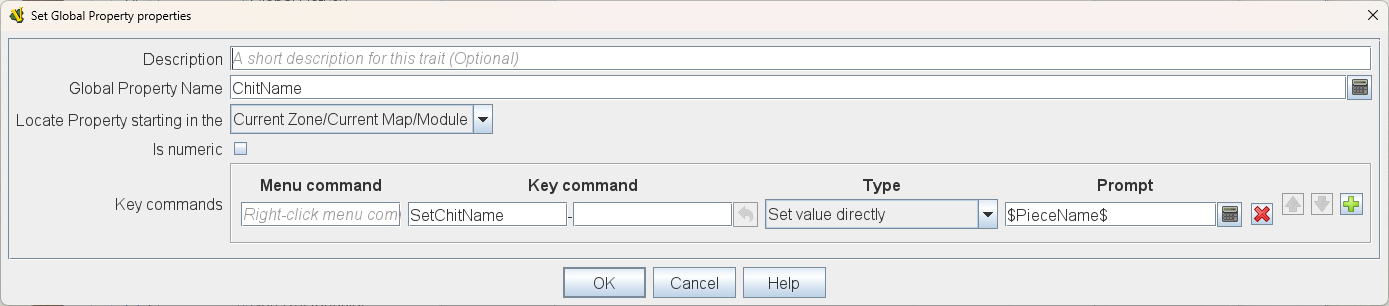
and
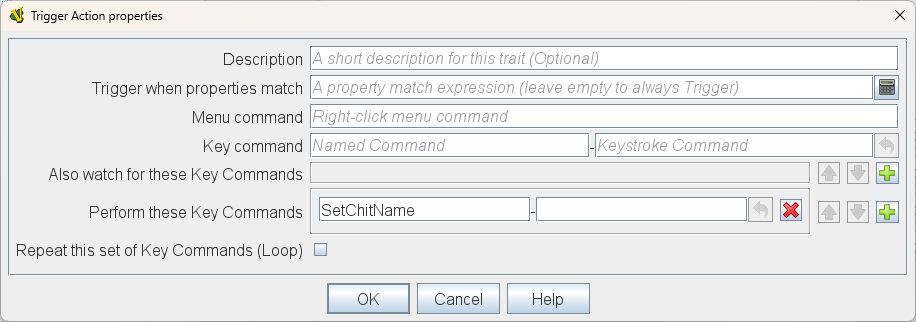
and a GKC that reports:
$PlayerName$ drew $ChitName$
but the $ChitName$ displays as blank.
---
### Author:  [@JoelCFC25](https://forum.vassalengine.org/u/JoelCFC25)
#### Post date: [February 6, 2025, 2:32pm UTC](https://forum.vassalengine.org/t/global-hotkey-passing-piecename/2518/9 "2025-02-06T14:32:17Z")
In your second graphic, that Trigger Action _will not function_ without at least one of the following two items set:
- Key command
- Also watch for these Key Commands
---
### Author:  [@Rodzilla68](https://forum.vassalengine.org/u/Rodzilla68)
#### Post date: [February 6, 2025, 3:54pm UTC](https://forum.vassalengine.org/t/global-hotkey-passing-piecename/2518/10 "2025-02-06T15:54:16Z")
Thanks, @JoelCFC25. I added a key command for “Sendtogrid” which is the GKC to draw a chit. However, the report is 1 chit behind. I.e. the first chit is reported as blank, the second chit drawn says it’s the first one, and so on.
---
### Author:  [@marktb1961](https://forum.vassalengine.org/u/marktb1961)
#### Post date: [February 6, 2025, 5:35pm UTC](https://forum.vassalengine.org/t/global-hotkey-passing-piecename/2518/11 "2025-02-06T17:35:54Z")
> [@Rodzilla68](#):
>
> However, the report is 1 chit behind. I.e. the first chit is reported as blank, the second chit drawn says it’s the first one, and so on.
A GKC reports in advance of the action, as you have found. To report the chit drawn, add a Report Action after the GKC.
---
### Author:  [@Rodzilla68](https://forum.vassalengine.org/u/Rodzilla68)
#### Post date: [February 6, 2025, 6:27pm UTC](https://forum.vassalengine.org/t/global-hotkey-passing-piecename/2518/12 "2025-02-06T18:27:57Z")
Thanks, Mark. I had no idea displaying the name of a counter would be so complicated! LOL
Here is what the prototype looks like to draw a chit and report which chit was drawn:
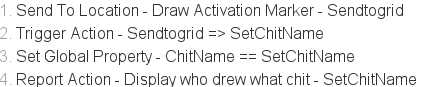
I also had to make sure the map setting for “Auto-report format for units modified on this map” was set to $message$
---
### Author:  [@Jardic](https://forum.vassalengine.org/u/Jardic)
#### Post date: [February 6, 2025, 8:47pm UTC](https://forum.vassalengine.org/t/global-hotkey-passing-piecename/2518/13 "2025-02-06T20:47:38Z")
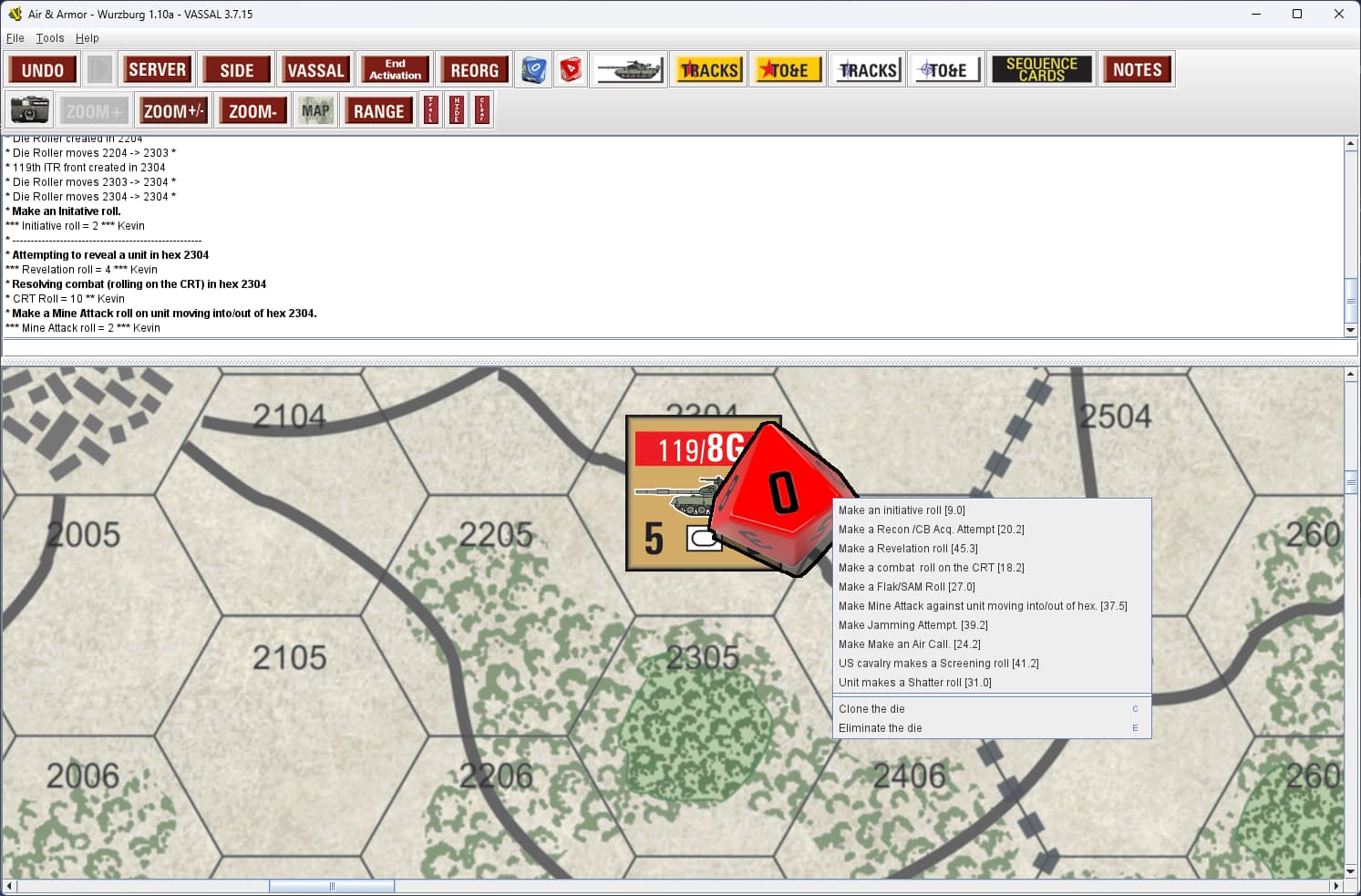
What I did for ‘Air & Armor - Wurzburg’ is to create a Die counter. players move it to target hex and select the type of dice roll they want. Mostly for PBEM players to save typing.
---
### Author:  [@cholmcc](https://forum.vassalengine.org/u/cholmcc)
#### Post date: [February 10, 2025, 9:48am UTC](https://forum.vassalengine.org/t/global-hotkey-passing-piecename/2518/14 "2025-02-10T09:48:15Z")
- Suppose you have a [`Dice Button`](https://vassalengine.org/doc/latest/ReferenceManual/DiceButton.html#top) (or [`Symbolic Dice Button`](https://vassalengine.org/doc/latest/ReferenceManual/SpecialDiceButton.html#top)) that listens for the `key command` `rollDice` (or perhaps a hotkey like `Alt-6`) and has a name like `Dice`
- Note that if the name is a not a valid Java identifier - e.g., starts with a number as in `1d6`, then you will need to use `GetProperty` below.
1. Create a [`Prototype`](https://vassalengine.org/doc/latest/ReferenceManual/Prototypes.html#top) - say `Dice roller prototype`
Depending on whether you need to store the die roll value or not do one of the below.
1. If you do _not_ need to store the die roll, then
- Add [`Global Hotkey`](https://vassalengine.org/doc/latest/ReferenceManual/GlobalHotKey.html#top) trait to the `Dice roller prototype`
- `Global Hotkey` set to `rollDice` (or `Alt-6`)
- Set the `Key Command` to something like `rollDice`
- Give it a meaningful description e.g., “`Roll the dice`”
- Add a [`Calculated Property`](https://vassalengine.org/doc/latest/ReferenceManual/CalculatedProperty.html#top) trait
- Set the name to say `DiceRoll`
- Set the expression to `{Dice_result}`
- If your [`Dice Button`](https://vassalengine.org/doc/latest/ReferenceManual/DiceButton.html#top) (or [`Symbolic Dice Button`](https://vassalengine.org/doc/latest/ReferenceManual/SpecialDiceButton.html#top)) name is not a valid Java identifier e.g., starts with a number like in `1d6`, then the expression should use `GetProperty` as in `{GetProperty("1d6_result")}`.
2. If you _do_ need to store the die roll value, then
- Add [`Global Hotkey`](https://vassalengine.org/doc/latest/ReferenceManual/GlobalHotKey.html#top) trait to the `Dice roller prototype`
- `Global Hotkey` set to `rollDice` (or `Alt-6`)
- Set the `Key Command` to something like `rollDiceTrampoline`
- Give it a meaningful description e.g., “`Trampoline to global die roll`”
- Add a [`Dynamic Property`](https://vassalengine.org/doc/latest/ReferenceManual/DynamicProperty.html#top) trait
- Set `Property Name` to `DiceRoll`
- Set `Key commands` to
- `Key command`: `storeDiceRoll`
- `Type`: `Set value directly`
- `Prompt`: `{Dice_result}` (or f.ex. `{GetProperty("1d6_result")}`
- Add a [`Trigger Action`](https://vassalengine.org/doc/latest/ReferenceManual/TriggerAction.html#top) trait to the prototype
- `Key command`: `rollDice`
- `Perform these keys`: `rollDiceTrampoline`, `storeDiceRoll`
You can now use your `Die Roller prototype` in any piece (or prototype) that should be able to roll the dice. You could have, for example, a piece with
- A `Trigger Action` trait with
- `Menu Command`: `Roll dice`
- `Key Command`: For example `Ctrl-6`
- `Perform these keys`: `rollDice`
- A [`Report Action`](https://vassalengine.org/doc/latest/ReferenceManual/ReportChanges.html#top) trait with
- `Report on these keys`: `Ctrl-6`
- `Report format`: Something like `{"!"+BasicName+" rolled "+DiceRoll}`
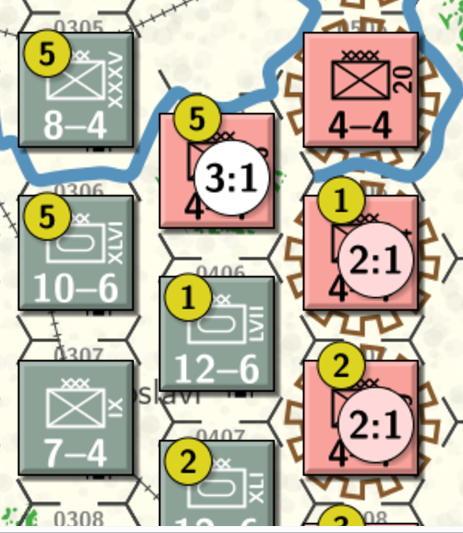
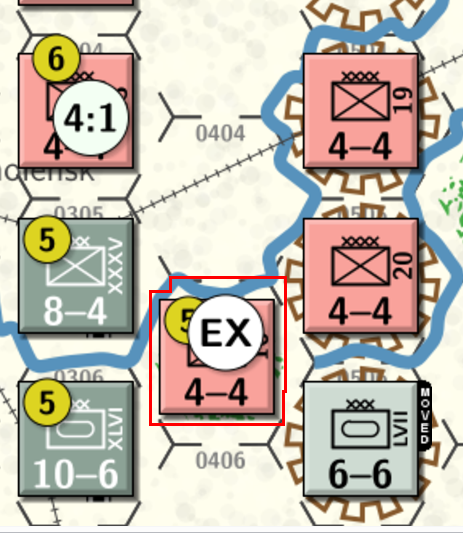
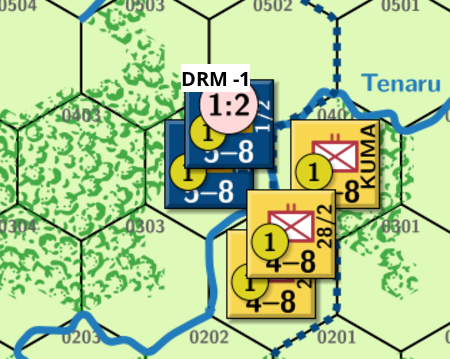
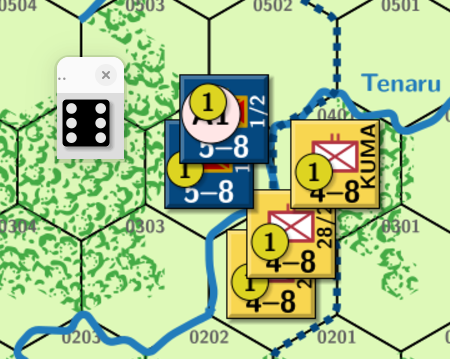
You can of course make more complicated actions take place according to the die roll and what the initiating command was. I use, for example, a similar approach in most of the [modules I made](https://vassalengine.org/wiki/User:Cholmcc) to do automatised battle resolutions. That is, an _Odds marker_ can roll a die, and based on the die roll, the combat resolution is automatically resolved.
From [Battle for Moscow `ch-1.*`](https://vassalengine.org/wiki/Module:Battle_for_Moscow); Combat **5** at odds 3:1 is resolved to **EX**
From [First Blood](https://vassalengine.org/wiki/Module:First_Blood:_The_Guadalcanal_Campaign): Combat **1** at odds 1:2 with a `-1` Die Roll Modifier (DRM) is resolved to **A1** on a die roll of **6**.
Note that the `Dice Roller prototype` can also be used as a basis for other prototypes - e.g., `Morale Checker prototype`, or similar.
The point is to keep the code in _one_ place and not copy it it to many pieces making it harder to maintain.
Yours,
_Christian_