# How do I start vassal in Linux?
**URL:** https://forum.vassalengine.org/t/how-do-i-start-vassal-in-linux/78250
**Category:** General Discussion
**Created:** [November 14, 2023, 5:19pm UTC](https://forum.vassalengine.org/t/how-do-i-start-vassal-in-linux/78250 "2023-11-14T17:19:25Z")
**Posts on this page:** 20
**Page:** 1
### Author:  [@pbibler](https://forum.vassalengine.org/u/pbibler)
#### Post date: [November 14, 2023, 5:19pm UTC](https://forum.vassalengine.org/t/how-do-i-start-vassal-in-linux/78250/1 "2023-11-14T17:19:26Z")
Ok, this is probably an easy one, but I searched and couldn’t find. Running a Chromebook with android Version 118.0.5993.124 (Official Build) (64-bit). Enabled linux, downloaded the linux files and unpacked. How do I execute the vassal.sh file? I am a first time linux user. Sincere apologies if I’ve missed something obvious. Usually google will provide an answer, but too many unknowns for me to decipher.
I dd successfully install Java per the instructions as well.
---
### Author:  [@uckelman](https://forum.vassalengine.org/u/uckelman)
#### Post date: [November 14, 2023, 5:58pm UTC](https://forum.vassalengine.org/t/how-do-i-start-vassal-in-linux/78250/3 "2023-11-14T17:58:46Z")
You run `VASSAL.sh` in a terminal, like any shell script. E.g., from the directory where, `VASSAL.sh`, is:
```auto
./VASSAL.sh
```
---
### Author:  [@pbibler](https://forum.vassalengine.org/u/pbibler)
#### Post date: [November 14, 2023, 6:50pm UTC](https://forum.vassalengine.org/t/how-do-i-start-vassal-in-linux/78250/4 "2023-11-14T18:50:12Z")
Success! There was a little more to it than executing, I found out, but after a few hundred trial and errors, got it working. Joel, thanks for the help, it gave me enough of a clue that I could keep going. Sometimes that’s all it takes. Really appreciated.
---
### Author:  [@uckelman](https://forum.vassalengine.org/u/uckelman)
#### Post date: [November 14, 2023, 7:08pm UTC](https://forum.vassalengine.org/t/how-do-i-start-vassal-in-linux/78250/5 "2023-11-14T19:08:24Z")
Would you mind explaining what you did, for anyone else who sees this thread?
---
### Author:  [@pbibler](https://forum.vassalengine.org/u/pbibler)
#### Post date: [November 14, 2023, 7:51pm UTC](https://forum.vassalengine.org/t/how-do-i-start-vassal-in-linux/78250/6 "2023-11-14T19:51:40Z")
Sure, should have thought of that too. Basically, I had to:
1. learn the command line syntax, e.g. cd, ls, etc., enough to be able to change directories and list out files.
2. Figure out the file structure of the chromebook, which (on mine) is mnt/chromeos/[MyID]/Myfiles and so on. The vassal.sh file helped clue me in on that. Double clicking on the vassal.sh file resolved to the correct path, which then I could navigate to.
3. Realize it’s case sensitive, I’m used to working in the opposite
The breakthrough was really #2, once I had that, was just a matter of navigating to the right place.
I’ve gotten so used to point and click that my command line skills were seriously rusty. And to think at one time, that’s how we all worked.
Once again, the community saves the day! 🥳
---
### Author:  [@Grognard](https://forum.vassalengine.org/u/Grognard)
#### Post date: [December 7, 2023, 4:03am UTC](https://forum.vassalengine.org/t/how-do-i-start-vassal-in-linux/78250/7 "2023-12-07T04:03:39Z")
Would like to add for other Linux beginners like myself that, depending on your distro or desktop environment, you may be able to add Vassal to the equivalent of the Start menu and not have to rely exclusively on the terminal to launch the program.
In Linux Mint Cinnamon edition for example, I was able to do that by right clicking on the start button, then click Configure, then select Menu tab, then click Open The Menu Editor where you will see a list of Applications categories. One can click Games, then New Item, then give it a name like Vassal, browse to and choose the Vassal.sh file in the Command input box, then add a checkmark to Launch in Terminal?, then click the icon on the upper left and browse to and select the Vassal.svg file for the custom icon and then finally click OK to finish.
Now, you will see Vassal with its custom icon in your menu under Games as well as All Applications to make it easy to launch Vassal without the terminal. It’s convenient for keyboard focused use as well since you can just hit the Super key and start to type V-A and the menu selection should come up automatically for easy selection without using a mouse.
---
### Author:  [@marktb1961](https://forum.vassalengine.org/u/marktb1961)
#### Post date: [December 9, 2023, 6:02pm UTC](https://forum.vassalengine.org/t/how-do-i-start-vassal-in-linux/78250/8 "2023-12-09T18:02:15Z")
This is a test for RobS.
---
### Author:  [@dan77](https://forum.vassalengine.org/u/dan77)
#### Post date: [December 26, 2023, 10:35am UTC](https://forum.vassalengine.org/t/how-do-i-start-vassal-in-linux/78250/9 "2023-12-26T10:35:12Z")
i bought a Chromebook to play vassal on. i didn’t realise it wasn’t straight forward using Linux. does anybody know if there are any step by step guides to setting it up ? my Chromebook has almost gone out the window a couple of times ! :))
---
### Author:  [@uckelman](https://forum.vassalengine.org/u/uckelman)
#### Post date: [December 26, 2023, 6:09pm UTC](https://forum.vassalengine.org/t/how-do-i-start-vassal-in-linux/78250/10 "2023-12-26T18:09:59Z")
Have you tried this? [Getting Vassal to work on my Chromebook](https://forum.vassalengine.org/t/getting-vassal-to-work-on-my-chromebook/11580)
---
### Author:  [@dan77](https://forum.vassalengine.org/u/dan77)
#### Post date: [December 26, 2023, 9:58pm UTC](https://forum.vassalengine.org/t/how-do-i-start-vassal-in-linux/78250/11 "2023-12-26T21:58:43Z")
Yes i get exactly the same result as Robert1 did in the thread
---
### Author:  [@pbibler](https://forum.vassalengine.org/u/pbibler)
#### Post date: [December 27, 2023, 12:36am UTC](https://forum.vassalengine.org/t/how-do-i-start-vassal-in-linux/78250/12 "2023-12-27T00:36:12Z")
I am going from my experience muddling through it, but from the result you referenced, I think you have to navigate to the directory where the file is to run it like that. for example, on mine the file is located at /mnt/chromeos/MyFiles/VASSAL. You can see where the downloaded file is in the Files app.
Sorry if you knew this already, but I had the problem, and just needed to understand the file structure in the chromebook. I hope this helps.
---
### Author:  [@dan77](https://forum.vassalengine.org/u/dan77)
#### Post date: [December 27, 2023, 1:09am UTC](https://forum.vassalengine.org/t/how-do-i-start-vassal-in-linux/78250/13 "2023-12-27T01:09:45Z")
my file is here /mnt/chromeos/archive/VASSAL-3.7.6-linux.tar.bz2/VASSAL-3.7.6
but i dont know what to do with this infomation
im out of my depth here i dont know what im doing
---
### Author:  [@dwalls70](https://forum.vassalengine.org/u/dwalls70)
#### Post date: [December 27, 2023, 2:46am UTC](https://forum.vassalengine.org/t/how-do-i-start-vassal-in-linux/78250/14 "2023-12-27T02:46:42Z")
you probably need to extract the files in the tar.bz2 file. It looks like you are trying to run VASSAL while it is still in the tar and zipped file.
---
### Author:  [@pbibler](https://forum.vassalengine.org/u/pbibler)
#### Post date: [December 27, 2023, 5:04pm UTC](https://forum.vassalengine.org/t/how-do-i-start-vassal-in-linux/78250/15 "2023-12-27T17:04:49Z")
Try this:
from your prompt: cd /mnt/chromeos/archive
You should then see the name of that directory come up. Then run the tar command to unzip. You have to be in the same directory as the file you’re unzipping, and this should get you there.
---
### Author:  [@Heric](https://forum.vassalengine.org/u/Heric)
#### Post date: [February 23, 2024, 11:09am UTC](https://forum.vassalengine.org/t/how-do-i-start-vassal-in-linux/78250/16 "2024-02-23T11:09:27Z")
I think chromebook comes with a GUI 😉
[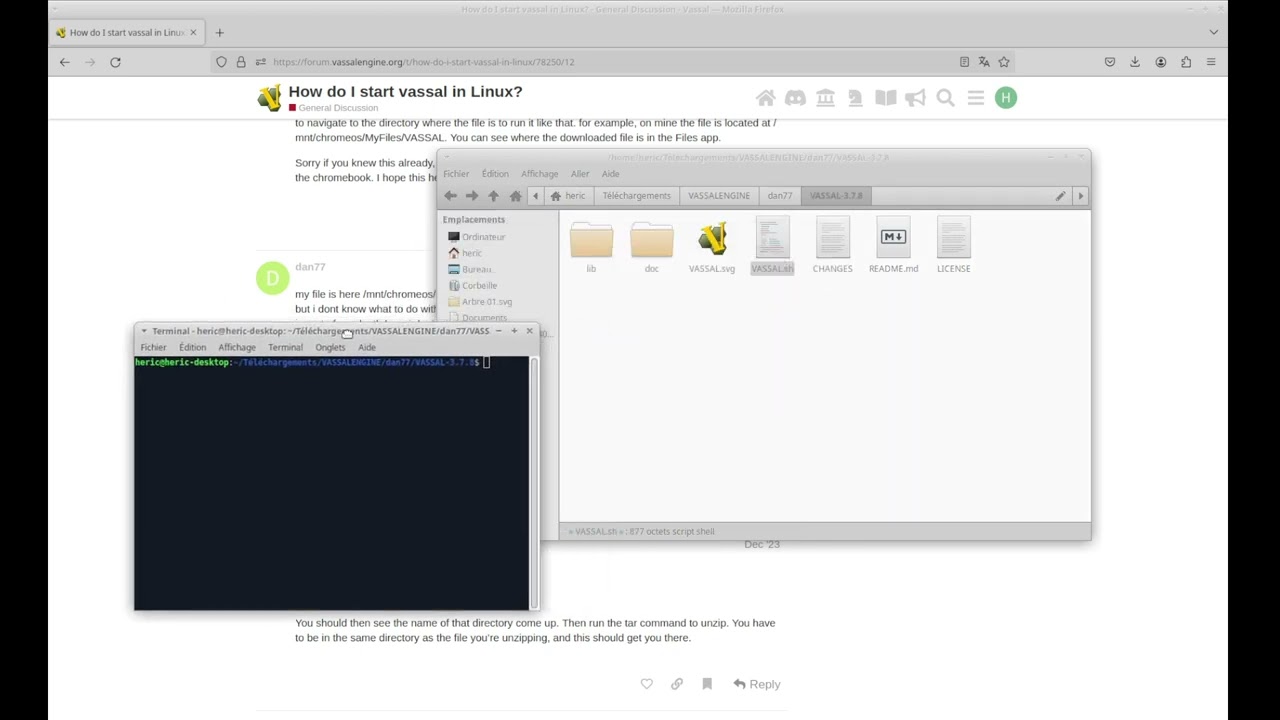 ](https://www.youtube.com/watch?v=W-T0Sl-rhC8)
(My interface is in french but it’s easy to understand what’s going on)
Maybe the /mnt/chromeos/archive directory is not a user directory, i expected something like “/home/dan77/Downloads/VASSAL-3.7.6-linux.tar.bz2”
---
### Author:  [@cholmcc](https://forum.vassalengine.org/u/cholmcc)
#### Post date: [February 25, 2024, 9:46am UTC](https://forum.vassalengine.org/t/how-do-i-start-vassal-in-linux/78250/17 "2024-02-25T09:46:12Z")
Hi there,
A few things on VASSAL and GNU/Linux (including ChromeBooks).
- When you download VASSAL it will typically end up in `~/Downloads` as something like `VASSAL-3.7.8-linux.tar.bz2`.
- The rest will use the terminal. To open a terminal open your application menu and search for `Terminal`.
- To navigate to your home directory, simple do one of
- To go to your `Downloads` directory, do one of
- There’s no concept of _drives_ on Un\*x. Filesystems, whether on disk, remote, or an archive are _mounted_ into the filesystems rooted in - well - the root `/`
- To install VASSAL properly, go to your downloads directory
- Note you will typically not see the file `~/.bash_aliases` when you list files in the current directory
because the file name starts with a dot `.`. To see _all_ files, pass the option
```
ls -a
```
- The above does not register VASSAL and VASSAL module files as connected. To do that, you need to register a custom mime-type and a handler for that mimetype.
@uckelman Perhaps you could distribute the above mime and desktop files with VASSAL?
Ideally, all this would be done for you automatically when you install VASSAL. However, since VASSAL does not come as a distribution package (`.deb`, `.rpm`, …) these steps are unfortunately needed for better desktop integration.
Hope the above is useful to some.
Yours,
_Christian_
---
### Author:  [@uckelman](https://forum.vassalengine.org/u/uckelman)
#### Post date: [February 25, 2024, 11:20am UTC](https://forum.vassalengine.org/t/how-do-i-start-vassal-in-linux/78250/18 "2024-02-25T11:20:47Z")
> [@cholmcc](#):
>
> ```auto
> bzip2 -dc VASSAL-3.7.6-linux.tar.bz2 | tar -xf - -C ~/applications
>
> ```
Much simpler is:
```auto
tar -xvf VASSAL-3.7.6-linux.tar.bz2
```
Any remotely modern version of tar automatically detects bzip2 compression.
---
### Author:  [@cholmcc](https://forum.vassalengine.org/u/cholmcc)
#### Post date: [February 25, 2024, 1:06pm UTC](https://forum.vassalengine.org/t/how-do-i-start-vassal-in-linux/78250/19 "2024-02-25T13:06:00Z")
> [@uckelman](#):
>
> Much simpler is:
There was actually a point to showing how one can pipe-line several small applications into a larger whole. That’s really the power of the command line. But of course, you are right that it is simpler, albeit less pædagogical 😄
> [@cholmcc](#):
>
> @uckelman Perhaps you could distribute the above mime and desktop files with VASSAL?
Will you add these small files to the distribution? Perhaps with a script like (named e.g., `desktop-integration.sh` or something like that)
```auto
#!/bin/sh
dest=/usr/local
mode=install
usage() {
echo "Usage: $0 [install|uninstall] [--user|--system|--destination PREFIX]"
}
while test $# -gt 0 ; do
case $1 in
-h|--help) usage ; exit 0 ;;
install) mode=install ;;
uninstall) mode=uninstall ;;
-u|--user) dest=$HOME/.local ;;
-s|--system) dest=/usr/local ;;
-d|--destination) dest=$2 ; shift ;;
*) echo "$0: Unknown argument: $1" ; exit 1 ;;
esac
shift
done
if test "x$mode" == "xinstall" ; then
EXEC_PATH=$(realpath "$0")
INSTALL_DIR=$(dirname "${EXEC_PATH}")
sed "s|$$INSTALL_DIR|$INSTALL_DIR|" < vassal.desktop > tmp.desktop
sed "s|$$INSTALL_DIR|$INSTALL_DIR|" < applications-x-vassal.xml > tmp.xml
mkdir -p $dest/applications
mkdir -p $dest/mime/packages
mkdir -p $dest/bin
mv tmp.desktop $dest/applications/vassal.desktop
mv tmp.xml $dest/mime/packages/application-x-vassal.xml
update-mime-database $dest/mime
update-desktop-database $dest/
(cd $dest/bin && ln -s $EXEC_PATH vassal)
else
rm -f $dest/mime/packages/application-x-vassal.xml
rm -f $dest/applications/vassal.desktop
rm -f $dest/bin/vassal
rmdir -p --ignore-fail-on-non-empty $dest/applications
rmdir -p --ignore-fail-on-non-empty $dest/mime/packages
rmdir -p --ignore-fail-on-non-empty $dest/bin
fi
```
A user can then easily install the integration - either system-wide or for the user only.
Yours,
_Christian_
---
### Author:  [@uckelman](https://forum.vassalengine.org/u/uckelman)
#### Post date: [February 27, 2024, 12:14am UTC](https://forum.vassalengine.org/t/how-do-i-start-vassal-in-linux/78250/20 "2024-02-27T00:14:48Z")
It would be preferable to distribute a .deb and a .rpm for people who want them; I suspect hardly anyone would use a desktop integration script manually.
---
### Author:  [@Grognard](https://forum.vassalengine.org/u/Grognard)
#### Post date: [February 27, 2024, 12:44am UTC](https://forum.vassalengine.org/t/how-do-i-start-vassal-in-linux/78250/21 "2024-02-27T00:44:48Z")
I always learn something when someone more experienced shows a way to do something with a script or in the command line. I described a much simpler way to add Vassal to the menu on Linux Mint Cinnamon earlier in the thread. I assume it would work similarly for others to add a menu entry for Vassal to their Linux laptop or desktop in other distros and desktop environments.
[Next page](https://forum.vassalengine.org/t/how-do-i-start-vassal-in-linux/78250.md?page=2)