# How do I start vassal in Linux?
**URL:** https://forum.vassalengine.org/t/how-do-i-start-vassal-in-linux/78250
**Category:** General Discussion
**Created:** [November 14, 2023, 5:19pm UTC](https://forum.vassalengine.org/t/how-do-i-start-vassal-in-linux/78250 "2023-11-14T17:19:25Z")
**Posts on this page:** 20
**Page:** 2
### Author:  [@rayb](https://forum.vassalengine.org/u/rayb)
#### Post date: [February 29, 2024, 10:34am UTC](https://forum.vassalengine.org/t/how-do-i-start-vassal-in-linux/78250/22 "2024-02-29T10:34:08Z")
Hi,
Interesting how to. First what is a tar.bz2??
2nd not having any electric i was intrigued when i saw vassal had a linux version. Thought maybe to get an install on a tablet. I believe there are some linux versions on the site. 3 of them i believe. Picked debian for some reason. Was amazed that it installed. Only thing is is the load command is not highlighted. So what does that mean?
So i have linux installed got the tar available but still not able to do the afore mentioned hints.
Since there is a fount of linux info here answer another newbies queries.
If debian isnt going to work which version would be best on a tablet?? Also is android a GUI sitting on linux ?? Any rules of thumb there aside from not doing any root work?
Tks RAy.
---
### Author:  [@rayb](https://forum.vassalengine.org/u/rayb)
#### Post date: [February 29, 2024, 10:39am UTC](https://forum.vassalengine.org/t/how-do-i-start-vassal-in-linux/78250/23 "2024-02-29T10:39:36Z")
Also while i am here and the fount is flowing any chance of a 3D version. If anyone has sketchup someone did SL boards 1,2 and 3. Looks interesting and dangerous and would be ready made for hypercard.
RAy.
---
### Author:  [@cholmcc](https://forum.vassalengine.org/u/cholmcc)
#### Post date: [February 29, 2024, 3:53pm UTC](https://forum.vassalengine.org/t/how-do-i-start-vassal-in-linux/78250/24 "2024-02-29T15:53:52Z")
> [@rayb](#):
>
> Interesting how to. First what is a tar.bz2??
[TAR](https://en.wikipedia.org/wiki/Tar_(computing)) is a Tape ARchive - a collection of one or more files into a single file. Sometimes called a tar-ball.
[BZ](https://en.wikipedia.org/wiki/Bzip2) (short for BZip2) is a compressor.
Thus, a file ending in `.tar.bz2` is a compressed archive of files. It is similar to a [ZIP](https://en.wikipedia.org/wiki/ZIP_(file_format)) in that respect.
> [@rayb](#):
>
> 2nd not having any electric i was intrigued when i saw vassal had a linux version. Thought maybe to get an install on a tablet. I believe there are some linux versions on the site. 3 of them i believe. Picked debian for some reason. Was amazed that it installed. Only thing is is the load command is not highlighted. So what does that mean?
VASSAL is not particularly well suited on mobile devices because touch gestures are not particularly well supported (right click f.ex.).
Which kind of tablet did you install on? OS?
> [@rayb](#):
>
> So i have linux installed got the tar available but still not able to do the afore mentioned hints.
For tablets, where the command line is probably hidden away, you probably need some app that can handle the tar-ball.
> [@rayb](#):
>
> Since there is a fount of linux info here answer another newbies queries.
> If debian isnt going to work which version would be best on a tablet??
You can install Debian GNU/Linux - or any other Linux distro - on a tablet, but for VASSAL you should probably have an external mouse. Which Linux distro is best suited depends on the tablet. Perhaps search on [XDA](https://www.xda-developers.com/).
VASSAL for linux is distributed as a Java ARchive [JAR](https://en.wikipedia.org/wiki/JAR_(file_format)) and as long as you have Java Runtime Environment [JRE](https://en.wikipedia.org/wiki/Java_(software_platform)#Java_Runtime_Environment) installed on the tablet, then you should be able to run it (with the aforementioned caveats). So you need
- A Linux distro that can run on your tablet
- And that distro should have JRE
> [@rayb](#):
>
> Also is android a GUI sitting on linux ?? Any rules of thumb there aside from not doing any root work?
Even though Android is written in Java it is not a real JRE, and the Android Java engine cannot execute VASSAL directly. Also, the kernel of Android is indeed Linux, but it is not exactly like other OSs that uses Linux. All apps are sandboxed and run in the Android Virtual Machine.
If you don’t want to root your tablet, you should see if it is possible to install a Linux distribution as an application on your tablet. Then, you can install VASSAL (and a JRE) into that Linux installation.
If it will work for you, I’m sure a lot of people like to know how you did it. Playing VASSAL games on a tablet would indeed be very nice.
Yours,
_Christian_
---
### Author:  [@rayb](https://forum.vassalengine.org/u/rayb)
#### Post date: [March 1, 2024, 10:46am UTC](https://forum.vassalengine.org/t/how-do-i-start-vassal-in-linux/78250/25 "2024-03-01T10:46:42Z")
Wow gadzooks more linux back talk than i can handle (HAHA). Might have been a samsung 3 lite. Have to get back to u on that. Got the tar waiting but the load command is not highlighted. So cant try to load anything. But need to unzip the tar. Dont know if i did that or not. If the open or load command is not highlighted whats ur gut tell u?? I had a tab that could do a full sized keyboard. I have one with a touch pad but its logitech and needs a gizmo. Keep the light on for me be back soon with the os info. Be nice if i could do this on a motorola zoom. I do have an att tab that the touch screen is out and needs a mouse but i have one of those PALM like keyboards with a touch pad. All the parts, now the savvy to flog them together. One more query. Java on a tab is that available. Wow almost some light at the end of the tuunel. Tks.
RAy
---
### Author:  [@rayb](https://forum.vassalengine.org/u/rayb)
#### Post date: [March 1, 2024, 10:50am UTC](https://forum.vassalengine.org/t/how-do-i-start-vassal-in-linux/78250/26 "2024-03-01T10:50:30Z")
One more thing. How do u log out???
Tks RAy.
---
### Author:  [@cholmcc](https://forum.vassalengine.org/u/cholmcc)
#### Post date: [March 1, 2024, 1:49pm UTC](https://forum.vassalengine.org/t/how-do-i-start-vassal-in-linux/78250/27 "2024-03-01T13:49:21Z")
Discussion on tablet etc. moved to [this thread](https://forum.vassalengine.org/t/vassal-on-a-tablet-android-or-linux/79098/2) to not hijack current discussion.
---
### Author:  [@JohnS](https://forum.vassalengine.org/u/JohnS)
#### Post date: [September 24, 2024, 6:46pm UTC](https://forum.vassalengine.org/t/how-do-i-start-vassal-in-linux/78250/28 "2024-09-24T18:46:55Z")
Hi all,
I’m probably a little late, but I for the life of me cannot lauch VASSAL from the terminal or GUI - nothing simply happens. It’s the third distro that fails me, so I must be doing something wrong - would really appreciate any help, otherwise I am stuck playing on Windows laptop
I am running Alt Linux with GNOME desktop environment (POP!\_OS before and Debian before that). For terminal I use Console instead of whatever is there by default. I made sure to allow .sh file to be executed as a program - both via GUI (it was laready on actually) and with chmod +x. When I launch the shell script (VASSAL.sh) in any way, the terminal opens and something does happen - a lot of text logging a configuration process, it seems - but no conclusion follows, no error messages as well. And the program does not launch. I am stuck and seem to be the only person with this problem, most other posters on the net seem to not know what to do with an archive, but don’t fail to lauch it.
TL;DR: VASSAL.sh does something in the terminal, but not launch the program, no errors are given, don’t know what to do. Would appreciate any advice.
---
### Author:  [@uckelman](https://forum.vassalengine.org/u/uckelman)
#### Post date: [September 24, 2024, 6:56pm UTC](https://forum.vassalengine.org/t/how-do-i-start-vassal-in-linux/78250/29 "2024-09-24T18:56:34Z")
> [@JohnS](#):
>
> When I launch the shell script (VASSAL.sh) in any way, the terminal opens and something does happen - a lot of text logging a configuration process, it seems
Would you paste that output here?
Also please paste here the output from running `java --version`.
---
### Author:  [@cholmcc](https://forum.vassalengine.org/u/cholmcc)
#### Post date: [September 25, 2024, 6:23am UTC](https://forum.vassalengine.org/t/how-do-i-start-vassal-in-linux/78250/30 "2024-09-25T06:23:52Z")
> [@uckelman](#):
>
> Would you paste that output here?
>
> Also please paste here the output from running `java --version`.
Best way to do this - in a terminal:
```
./VASSAL.sh > vassal.log 2>&1
java -version > java.log 2>&1
```
and attach to post. Perhaps also attach `~/.VASSAL/errorLog-VASSALVERSION` where `VASSALVERSION` is the version of VASSAL you are attempting to execute.
> [@JohnS](#):
>
> the terminal opens and something does happen
I assume this - “terminal opens” - only applies when you double click the `VASSAL.sh` script from the file browser. No terminal should open if you execute `./VASSAL.sh` in the terminal.
Yours,
_Christian_
---
### Author:  [@jrwatts](https://forum.vassalengine.org/u/jrwatts)
#### Post date: [September 25, 2024, 9:15am UTC](https://forum.vassalengine.org/t/how-do-i-start-vassal-in-linux/78250/31 "2024-09-25T09:15:16Z")
On both my Kubuntu systems, VASSAL only ever stays open if I open it from the terminal–if I try to open it from a desktop icon, it always closes immediately. I must admit I’ve been too lazy to troubleshoot, and just always open it from the terminal.
---
### Author:  [@JohnS](https://forum.vassalengine.org/u/JohnS)
#### Post date: [September 26, 2024, 6:56pm UTC](https://forum.vassalengine.org/t/how-do-i-start-vassal-in-linux/78250/32 "2024-09-26T18:56:38Z")
First, thanks everyone for replying, and on such short notice!
So, I should clarify a problem a bit:
1. When I double-click VASSAL.sh it opens as a .txt file in the editor.
2. When I lauch it as a program through right-click menu, it opens the terminal and gives an output
3. When I lauch it through the terminal, it gives the same output.
4. In cases 2 and 3, the terminal does not allow any further input on my part, neither does it terminate whatever is happening. I am not handy with a terminal, but pressing “q” or “Ctrl-C” does not exit this state, when usually in other cases it does something of the sort (like in TUI apps).
5. It seems that the contents of “vassal.log” are the same output that I get in my terminal.
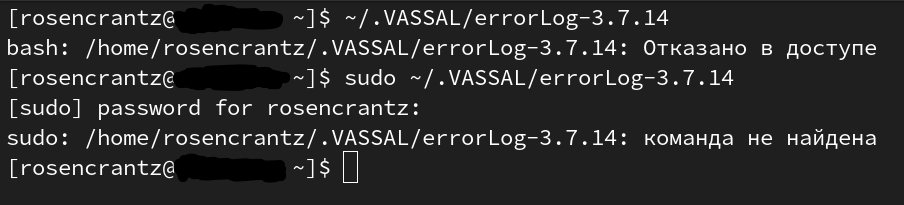
6. Can’t manage to produce this one - the terminal gives the message “Access denied”, launching with sudo gives “command not found”. I don’t really understand the syntax of bash very well, so I may have mistyped something. I replaced VASSALVERSION with 3.7.14
> [@cholmcc](#):
>
> Perhaps also attach `~/.VASSAL/errorLog-VASSALVERSION` where `VASSALVERSION` is the version of VASSAL you are attempting to execute.
As of writing this, I cannot find the option to attach a file that is not an image, so I am posting this in hopes that I may be able to attach vassal.log and java.log files in editing. Apologies for inconvenience
---
### Author:  [@uckelman](https://forum.vassalengine.org/u/uckelman)
#### Post date: [September 26, 2024, 7:06pm UTC](https://forum.vassalengine.org/t/how-do-i-start-vassal-in-linux/78250/33 "2024-09-26T19:06:12Z")
> [@JohnS](#):
>
> - When I double-click VASSAL.sh it opens as a .txt file in the editor.
It sounds like your desktop environment is set to edit shell scripts instead of run them.
> [@JohnS](#):
>
> - In cases 2 and 3, the terminal does not allow any further input on my part, neither does it terminate whatever is happening. I am not handy with a terminal, but pressing “q” or “Ctrl-C” does not exit this state, when usually in other cases it does something of the sort (like in TUI apps).
That’s unexpected. Ctrl+C should kill the program running in the terminal.
> [@JohnS](#):
>
> - It seems that the contents of “vassal.log” are the same output that I get in my terminal.
Would you please copy and paste that output here? It’s text. It should be selectable, and then you can copy and paste it into a post here. (Surround the output with triple backticks ````` to make it appear as code in a fixed-width font.)
> [@JohnS](#):
>
> - Can’t manage to produce this one - the terminal gives the message “Access denied”, launching with sudo gives “command not found”.
What are you referring to here?
It would still be helpful to have the output of `java --version`, so that we can verify that java works on your system.
---
### Author:  [@JohnS](https://forum.vassalengine.org/u/JohnS)
#### Post date: [September 26, 2024, 7:09pm UTC](https://forum.vassalengine.org/t/how-do-i-start-vassal-in-linux/78250/34 "2024-09-26T19:09:32Z")
> [@uckelman](#):
>
> Would you please copy and paste that output here? It’s text. It should be selectable, and then you can copy and paste it into a post here. (Surround the output with triple backticks ````` to make it appear as code in a fixed-width font.)
Sure, I was on my way to do that.
1. vassal.log contents:
```auto
21:43:09,413 |-INFO in ch.qos.logback.classic.LoggerContext[default] - This is logback-classic version 1.5.7
21:43:09,414 |-INFO in ch.qos.logback.classic.util.ContextInitializer@6d026701 - No custom configurators were discovered as a service.
21:43:09,414 |-INFO in ch.qos.logback.classic.util.ContextInitializer@6d026701 - Trying to configure with ch.qos.logback.classic.joran.SerializedModelConfigurator
21:43:09,415 |-INFO in ch.qos.logback.classic.util.ContextInitializer@6d026701 - Constructed configurator of type class ch.qos.logback.classic.joran.SerializedModelConfigurator
21:43:09,421 |-INFO in ch.qos.logback.classic.LoggerContext[default] - Could NOT find resource [logback-test.scmo]
21:43:09,422 |-INFO in ch.qos.logback.classic.LoggerContext[default] - Could NOT find resource [logback.scmo]
21:43:09,432 |-INFO in ch.qos.logback.classic.util.ContextInitializer@6d026701 - ch.qos.logback.classic.joran.SerializedModelConfigurator.configure() call lasted 7 milliseconds. ExecutionStatus=INVOKE_NEXT_IF_ANY
21:43:09,432 |-INFO in ch.qos.logback.classic.util.ContextInitializer@6d026701 - Trying to configure with ch.qos.logback.classic.util.DefaultJoranConfigurator
21:43:09,433 |-INFO in ch.qos.logback.classic.util.ContextInitializer@6d026701 - Constructed configurator of type class ch.qos.logback.classic.util.DefaultJoranConfigurator
21:43:09,433 |-INFO in ch.qos.logback.classic.LoggerContext[default] - Could NOT find resource [logback-test.xml]
21:43:09,439 |-INFO in ch.qos.logback.classic.LoggerContext[default] - Found resource [logback.xml] at [jar:file:/home/rosencrantz/AppImages/VASSAL-3.7.14/lib/Vengine.jar!/logback.xml]
21:43:09,446 |-INFO in ch.qos.logback.core.joran.spi.ConfigurationWatchList@78aa1f72 - URL [jar:file:/home/rosencrantz/AppImages/VASSAL-3.7.14/lib/Vengine.jar!/logback.xml] is not of type file
21:43:09,499 |-WARN in ch.qos.logback.core.joran.action.ConversionRuleAction - [converterClass] attribute is deprecated and replaced by [class]. See element [conversionRule] near line 29
21:43:09,552 |-INFO in ch.qos.logback.core.model.processor.ModelInterpretationContext@1f75a668 - value "errorLog-3.7.14" substituted for "errorLog-${git.version}"
21:43:09,814 |-INFO in ch.qos.logback.core.model.processor.conditional.IfModelHandler - Condition [isDefined("VASSAL.conf")] evaluated to false on line 5
21:43:09,819 |-INFO in ch.qos.logback.core.model.processor.conditional.IfModelHandler - Condition [property("os.name").toLowerCase().startsWith("windows")] evaluated to false on line 10
21:43:09,822 |-INFO in ch.qos.logback.core.model.processor.conditional.IfModelHandler - Condition [property("os.name").toLowerCase().startsWith("mac")] evaluated to false on line 15
21:43:09,822 |-INFO in ch.qos.logback.core.model.processor.ModelInterpretationContext@1f75a668 - value "/home/rosencrantz/.VASSAL" substituted for "${user.home}/.VASSAL"
21:43:09,822 |-INFO in ch.qos.logback.core.model.processor.ConversionRuleModelHandler - registering conversion word pid with class [VASSAL.tools.logging.ProcessIDConverter]
21:43:09,824 |-INFO in ch.qos.logback.core.model.processor.AppenderModelHandler - Processing appender named [FILE]
21:43:09,824 |-INFO in ch.qos.logback.core.model.processor.AppenderModelHandler - About to instantiate appender of type [ch.qos.logback.core.FileAppender]
21:43:09,832 |-INFO in ch.qos.logback.core.model.processor.ModelInterpretationContext@1f75a668 - value "/home/rosencrantz/.VASSAL/errorLog-3.7.14" substituted for "${CONF_DIR}/${LOG_FILE}"
21:43:09,877 |-INFO in ch.qos.logback.core.FileAppender[FILE] - File property is set to [/home/rosencrantz/.VASSAL/errorLog-3.7.14]
21:43:09,878 |-INFO in ch.qos.logback.core.model.processor.AppenderModelHandler - Processing appender named [CHATTER]
21:43:09,878 |-INFO in ch.qos.logback.core.model.processor.AppenderModelHandler - About to instantiate appender of type [VASSAL.build.module.ConsoleAppender]
21:43:09,880 |-INFO in ch.qos.logback.classic.model.processor.RootLoggerModelHandler - Setting level of ROOT logger to INFO
21:43:09,880 |-INFO in ch.qos.logback.core.model.processor.AppenderRefModelHandler - Attaching appender named [FILE] to Logger[ROOT]
21:43:09,880 |-INFO in ch.qos.logback.core.model.processor.AppenderRefModelHandler - Attaching appender named [CHATTER] to Logger[ROOT]
21:43:09,881 |-INFO in ch.qos.logback.core.model.processor.DefaultProcessor@35399441 - End of configuration.
21:43:09,881 |-INFO in ch.qos.logback.classic.joran.JoranConfigurator@4b7dc788 - Registering current configuration as safe fallback point
21:43:09,881 |-INFO in ch.qos.logback.classic.util.ContextInitializer@6d026701 - ch.qos.logback.classic.util.DefaultJoranConfigurator.configure() call lasted 448 milliseconds. ExecutionStatus=DO_NOT_INVOKE_NEXT_IF_ANY
```
1. java.log contents:
```auto
openjdk version "21.0.4" 2024-07-16
OpenJDK Runtime Environment (Red_Hat-21.0.4.0.7-alt2) (build 21.0.4+7)
OpenJDK 64-Bit Server VM (Red_Hat-21.0.4.0.7-alt2) (build 21.0.4+7, mixed mode)
```
> [@uckelman](#):
>
> What are you referring to here?
I meant the
```auto
~/.VASSAL/errorLog-VASSALVERSION
```
potential logfile. Couldn’t produce it, possibly misunderstood the entire command, most probably my bad.
---
### Author:  [@JohnS](https://forum.vassalengine.org/u/JohnS)
#### Post date: [September 26, 2024, 7:16pm UTC](https://forum.vassalengine.org/t/how-do-i-start-vassal-in-linux/78250/35 "2024-09-26T19:16:16Z")
Oh and just in case, here is the output I get in the terminal (the one I suspect is the exact copy of a logfile):
```auto
21:39:37,748 |-INFO in ch.qos.logback.classic.LoggerContext[default] - This is logback-classic version 1.5.7
21:39:37,750 |-INFO in ch.qos.logback.classic.util.ContextInitializer@6d026701 - No custom configurators were discovered as a service.
21:39:37,750 |-INFO in ch.qos.logback.classic.util.ContextInitializer@6d026701 - Trying to configure with ch.qos.logback.classic.joran.SerializedModelConfigurator
21:39:37,752 |-INFO in ch.qos.logback.classic.util.ContextInitializer@6d026701 - Constructed configurator of type class ch.qos.logback.classic.joran.SerializedModelConfigurator
21:39:37,760 |-INFO in ch.qos.logback.classic.LoggerContext[default] - Could NOT find resource [logback-test.scmo]
21:39:37,760 |-INFO in ch.qos.logback.classic.LoggerContext[default] - Could NOT find resource [logback.scmo]
21:39:37,773 |-INFO in ch.qos.logback.classic.util.ContextInitializer@6d026701 - ch.qos.logback.classic.joran.SerializedModelConfigurator.configure() call lasted 8 milliseconds. ExecutionStatus=INVOKE_NEXT_IF_ANY
21:39:37,773 |-INFO in ch.qos.logback.classic.util.ContextInitializer@6d026701 - Trying to configure with ch.qos.logback.classic.util.DefaultJoranConfigurator
21:39:37,773 |-INFO in ch.qos.logback.classic.util.ContextInitializer@6d026701 - Constructed configurator of type class ch.qos.logback.classic.util.DefaultJoranConfigurator
21:39:37,774 |-INFO in ch.qos.logback.classic.LoggerContext[default] - Could NOT find resource [logback-test.xml]
21:39:37,780 |-INFO in ch.qos.logback.classic.LoggerContext[default] - Found resource [logback.xml] at [jar:file:/home/rosencrantz/AppImages/VASSAL-3.7.14/lib/Vengine.jar!/logback.xml]
21:39:37,788 |-INFO in ch.qos.logback.core.joran.spi.ConfigurationWatchList@78aa1f72 - URL [jar:file:/home/rosencrantz/AppImages/VASSAL-3.7.14/lib/Vengine.jar!/logback.xml] is not of type file
21:39:37,841 |-WARN in ch.qos.logback.core.joran.action.ConversionRuleAction - [converterClass] attribute is deprecated and replaced by [class]. See element [conversionRule] near line 29
21:39:37,897 |-INFO in ch.qos.logback.core.model.processor.ModelInterpretationContext@1f75a668 - value "errorLog-3.7.14" substituted for "errorLog-${git.version}"
21:39:38,172 |-INFO in ch.qos.logback.core.model.processor.conditional.IfModelHandler - Condition [isDefined("VASSAL.conf")] evaluated to false on line 5
21:39:38,178 |-INFO in ch.qos.logback.core.model.processor.conditional.IfModelHandler - Condition [property("os.name").toLowerCase().startsWith("windows")] evaluated to false on line 10
21:39:38,181 |-INFO in ch.qos.logback.core.model.processor.conditional.IfModelHandler - Condition [property("os.name").toLowerCase().startsWith("mac")] evaluated to false on line 15
21:39:38,181 |-INFO in ch.qos.logback.core.model.processor.ModelInterpretationContext@1f75a668 - value "/home/rosencrantz/.VASSAL" substituted for "${user.home}/.VASSAL"
21:39:38,181 |-INFO in ch.qos.logback.core.model.processor.ConversionRuleModelHandler - registering conversion word pid with class [VASSAL.tools.logging.ProcessIDConverter]
21:39:38,183 |-INFO in ch.qos.logback.core.model.processor.AppenderModelHandler - Processing appender named [FILE]
21:39:38,183 |-INFO in ch.qos.logback.core.model.processor.AppenderModelHandler - About to instantiate appender of type [ch.qos.logback.core.FileAppender]
21:39:38,191 |-INFO in ch.qos.logback.core.model.processor.ModelInterpretationContext@1f75a668 - value "/home/rosencrantz/.VASSAL/errorLog-3.7.14" substituted for "${CONF_DIR}/${LOG_FILE}"
21:39:38,238 |-INFO in ch.qos.logback.core.FileAppender[FILE] - File property is set to [/home/rosencrantz/.VASSAL/errorLog-3.7.14]
21:39:38,239 |-INFO in ch.qos.logback.core.model.processor.AppenderModelHandler - Processing appender named [CHATTER]
21:39:38,239 |-INFO in ch.qos.logback.core.model.processor.AppenderModelHandler - About to instantiate appender of type [VASSAL.build.module.ConsoleAppender]
21:39:38,240 |-INFO in ch.qos.logback.classic.model.processor.RootLoggerModelHandler - Setting level of ROOT logger to INFO
21:39:38,241 |-INFO in ch.qos.logback.core.model.processor.AppenderRefModelHandler - Attaching appender named [FILE] to Logger[ROOT]
21:39:38,241 |-INFO in ch.qos.logback.core.model.processor.AppenderRefModelHandler - Attaching appender named [CHATTER] to Logger[ROOT]
21:39:38,241 |-INFO in ch.qos.logback.core.model.processor.DefaultProcessor@35399441 - End of configuration.
21:39:38,242 |-INFO in ch.qos.logback.classic.joran.JoranConfigurator@4b7dc788 - Registering current configuration as safe fallback point
21:39:38,242 |-INFO in ch.qos.logback.classic.util.ContextInitializer@6d026701 - ch.qos.logback.classic.util.DefaultJoranConfigurator.configure() call lasted 469 milliseconds. ExecutionStatus=DO_NOT_INVOKE_NEXT_IF_ANY
```
---
### Author:  [@uckelman](https://forum.vassalengine.org/u/uckelman)
#### Post date: [September 26, 2024, 7:21pm UTC](https://forum.vassalengine.org/t/how-do-i-start-vassal-in-linux/78250/36 "2024-09-26T19:21:54Z")
The output to the terminal from logback is due to our having updated logback without realizing they’d deprecated a property we were using, and that logback logs all messages to the terminal when a warning-level message occurs before a logger is configured. The issue for it is [here](https://github.com/vassalengine/vassal/pull/13558) and the problem is already fixed for the 3.7.15 release.
All of that output is informational; it isn’t related to the problem you’re having.
---
### Author:  [@uckelman](https://forum.vassalengine.org/u/uckelman)
#### Post date: [September 26, 2024, 7:23pm UTC](https://forum.vassalengine.org/t/how-do-i-start-vassal-in-linux/78250/37 "2024-09-26T19:23:50Z")
> [@JohnS](#):
>
> `~/.VASSAL/errorLog-`
You should find an error log in the `~/.VASSAL` directory. If you’re running Vassal 3.7.14, the file will be named `errorLog-3.7.14`.
---
### Author:  [@JohnS](https://forum.vassalengine.org/u/JohnS)
#### Post date: [September 26, 2024, 7:37pm UTC](https://forum.vassalengine.org/t/how-do-i-start-vassal-in-linux/78250/38 "2024-09-26T19:37:22Z")
I got version 3.7.14 from the main page just a couple days ago - have I missed the 3.7.15? Should I try that one?
Attached one will find screenshots of what happens when I try to do the `errorLog` and the directory of VASSAL where it seems the file should be. The first message is “Access denied”, the second is “command not found”. The command seems to refer to Vassal with a dot - is that something like a symbolic/dynamic reference that I heard of? I mean, is it trying to find the folder anywhere on the system? I tried putting the actual path to folder in this command as well, then it simply cannot find the directory. doing `cd` and launching from there also doesn’t seem to do the trick
(The folder where the VASSAL-3.7.14 folder is, is called “AppImages” but it is simply a folder I made and called that, it’s not produced by any external AppImage laucher application. VASSAL is simply not “installed” on the system in the way I am used to, so I put it there along with App Images)

---
### Author:  [@uckelman](https://forum.vassalengine.org/u/uckelman)
#### Post date: [September 26, 2024, 7:42pm UTC](https://forum.vassalengine.org/t/how-do-i-start-vassal-in-linux/78250/39 "2024-09-26T19:42:50Z")
> [@JohnS](#):
>
> I got version 3.7.14 from the main page just a couple days ago - have I missed the 3.7.15? Should I try that one?
3.7.15 hasn’t been released yet.
From your screenshot, it looks like you’re trying to _run_ the error log. What you’re meant to do is _view_ it. You can use `cat` to print it to the terminal:
```auto
cat ~/.VASSAL/errorLog-3.7.14
```
---
### Author:  [@JohnS](https://forum.vassalengine.org/u/JohnS)
#### Post date: [September 26, 2024, 7:42pm UTC](https://forum.vassalengine.org/t/how-do-i-start-vassal-in-linux/78250/40 "2024-09-26T19:42:59Z")
I am mistaken - the .VASSAL folder is a separate one. Here is the content of the file:
```auto
2024-09-26 22:23:31,403 [28799-main] INFO VASSAL.launch.StartUp - Starting
2024-09-26 22:23:31,416 [28799-main] INFO VASSAL.launch.StartUp - OS Linux 6.6.52-un-def-alt1 amd64
2024-09-26 22:23:31,416 [28799-main] INFO VASSAL.launch.StartUp - Java version 21.0.4
2024-09-26 22:23:31,416 [28799-main] INFO VASSAL.launch.StartUp - Java home /usr/lib/jvm/java-21-openjdk-21.0.4.0.7-alt2.x86_64
2024-09-26 22:23:31,416 [28799-main] INFO VASSAL.launch.StartUp - VASSAL version 3.7.14
2024-09-26 22:23:31,487 [28799-AWT-EventQueue-0] INFO VASSAL.launch.ModuleManager - Manager
2024-09-26 22:23:31,505 [28799-AWT-EventQueue-0] ERROR VASSAL.tools.ErrorDialog -
java.lang.ExceptionInInitializerError: null
at VASSAL.launch.ModuleManager.launch(ModuleManager.java:384)
at java.desktop/java.awt.event.InvocationEvent.dispatch(InvocationEvent.java:318)
at java.desktop/java.awt.EventQueue.dispatchEventImpl(EventQueue.java:773)
at java.desktop/java.awt.EventQueue$4.run(EventQueue.java:720)
at java.desktop/java.awt.EventQueue$4.run(EventQueue.java:714)
at java.base/java.security.AccessController.doPrivileged(AccessController.java:400)
at java.base/java.security.ProtectionDomain$JavaSecurityAccessImpl.doIntersectionPrivilege(ProtectionDomain.java:87)
at java.desktop/java.awt.EventQueue.dispatchEvent(EventQueue.java:742)
at java.desktop/java.awt.EventDispatchThread.pumpOneEventForFilters(EventDispatchThread.java:203)
at java.desktop/java.awt.EventDispatchThread.pumpEventsForFilter(EventDispatchThread.java:124)
at java.desktop/java.awt.EventDispatchThread.pumpEventsForHierarchy(EventDispatchThread.java:113)
at java.desktop/java.awt.EventDispatchThread.pumpEvents(EventDispatchThread.java:109)
at java.desktop/java.awt.EventDispatchThread.pumpEvents(EventDispatchThread.java:101)
at java.desktop/java.awt.EventDispatchThread.run(EventDispatchThread.java:90)
Caused by: java.awt.HeadlessException:
No X11 DISPLAY variable was set,
or no headful library support was found,
but this program performed an operation which requires it,
at java.desktop/java.awt.GraphicsEnvironment.checkHeadless(GraphicsEnvironment.java:164)
at java.desktop/java.awt.Window.(Window.java:553)
at java.desktop/java.awt.Frame.(Frame.java:428)
at java.desktop/java.awt.Frame.(Frame.java:393)
at java.desktop/javax.swing.JFrame.(JFrame.java:180)
at VASSAL.launch.ModuleManagerWindow.(ModuleManagerWindow.java:188)
at VASSAL.launch.ModuleManagerWindow.(ModuleManagerWindow.java:186)
... 14 common frames omitted
```
---
### Author:  [@uckelman](https://forum.vassalengine.org/u/uckelman)
#### Post date: [September 26, 2024, 7:47pm UTC](https://forum.vassalengine.org/t/how-do-i-start-vassal-in-linux/78250/41 "2024-09-26T19:47:21Z")
> [@JohnS](#):
>
> ```auto
> Caused by: java.awt.HeadlessException:
> No X11 DISPLAY variable was set,
> or no headful library support was found,
> but this program performed an operation which requires it,
>
> ```
This is your problem. You have a version of Java that’s headless installed, which means it doesn’t have graphics support.
If you’re running an rpm-based distribution (which I believe you are), you can check what openjdk packages you have installed this way:
```auto
rpm -qa | grep openjdk
```
The output I get when I do that myself is:
```auto
aven-openjdk11-3.9.1-3.fc39.noarch
java-11-openjdk-headless-11.0.24.0.8-2.fc39.x86_64
java-17-openjdk-headless-17.0.12.0.7-2.fc39.x86_64
java-latest-openjdk-headless-22.0.2.0.9-1.rolling.fc39.x86_64
java-1.8.0-openjdk-headless-1.8.0.422.b06-2.fc39.x86_64
java-11-openjdk-11.0.24.0.8-2.fc39.x86_64
java-17-openjdk-17.0.12.0.7-2.fc39.x86_64
java-latest-openjdk-22.0.2.0.9-1.rolling.fc39.x86_64
java-latest-openjdk-devel-22.0.2.0.9-1.rolling.fc39.x86_64
java-latest-openjdk-jmods-22.0.2.0.9-1.rolling.fc39.x86_64
java-17-openjdk-devel-17.0.12.0.7-2.fc39.x86_64
java-11-openjdk-devel-11.0.24.0.8-2.fc39.x86_64
java-1.8.0-openjdk-1.8.0.422.b06-2.fc39.x86_64
java-latest-openjdk-javadoc-22.0.2.0.9-1.rolling.fc39.x86_64
java-latest-openjdk-src-22.0.2.0.9-1.rolling.fc39.x86_64
```
It’s probably the case that you have `java-latest-openjdk-headless` installed but not `java-latest-openjdk`. You should be able to solve your problem by installing a java package which isn’t marked as headless.
[Previous page](https://forum.vassalengine.org/t/how-do-i-start-vassal-in-linux/78250.md?page=1)
[Next page](https://forum.vassalengine.org/t/how-do-i-start-vassal-in-linux/78250.md?page=3)