Done. Also noted that the title sort key is no longer editable.
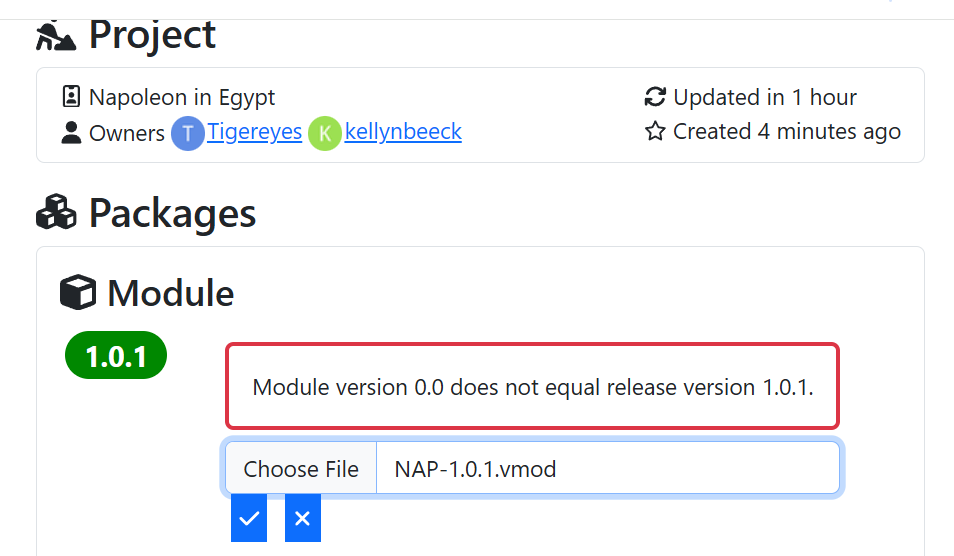
This is because you have the version set to 0.0 inside the module, which doesn’t match the version of the release.
Hi all, have I missed something or are there no longer any specific instructions on how to load a “related” i.e. non module file to a module. Some things that I would like to upload or at least have on the page are:
- Link to online instructions on using the module (google docs mostly). If I can just add a list of links that would be fine, yes I know I can put these into the README section but I was wondering if there was something more formalised.
- Extension files (vmdx).
- Scenario files, which are vsav files.
A couple of the modules that I’m maintaining are moving away from being fat monolithic modules to a slimmer module with extensions, and also removing or de-coupling the scenarios from the module to save space (especially for some modules that have MANY scenarios). In the past I have been making zip files of these and uploading those but I was wondering if there was a general best practice or guide. Ideally it would be good if the library could support these files directly since in some cases there are players that never use some of the extensions, so having each one available to download would save time over a zip file containing all of the extensions (especially when there are many of them). Also I have one game that has over 100 pre-built scenarios now and most players are going to use 10 or those at most.
Thanx
Put links in the README.
Extensions, scenarios, and any other files should be added to the release they are for. The reason the documentation has little to say about this is that there’s little to say about it. 
As to where to put instructions on how to use the module, I recommend bundling those instructions directly into the module as a PDF or HTML file which can be accessed via the module’s Help menu.
This approach better handles the case where the module usage documentation is updated when new versions of the module are published.
For examples of this, see the Empire of the Sun module or the Normandy '44 module.
Cheers,
Jim Hunter.
1 Like
See Adding other information to a release above.
A few things to be aware of
- Saves (
.vsav) and logs (.vlog) must be made with a module that matches the release to which they are posted. For example, if you made a.vsavwith module version1.2.3, then that.vsavmustbe uploaded to a1.2.3` release. - There are no restrictions on extensions (
.vmdx). That is, an extension made with module version1.2.3can be uploaded to a1.2.4release.
Yours,
Christian
Hi Jim,
The upcoming WiF vassal module has an instruction book that’s 83 pages long including diagrams and illustrations, and would be a 20+ MB file if we converted it to PDF and attached it to the module. The module is already over 500MB in size including extensions and we’re trying to slim that down. So embedding the PDF in the module would achieve the exact opposite of what we’re trying to do.
Is there a question in there?
World in Flames is a monster - not only the physical game, but also the Vassal module. Great that you can get it down in size (from 928 MB to 500+ MB) thought it is still big.
Previously there’s been some thoughts on how to make the module smaller. That included
- Scale down images by a factor of 2
- This will not affect the usability of the module - there’s still plenty of resolution to zoom in to at least 300% magnification.
- Do not make embedded definitions of pieces for Place Marker and Replace with Other traits.
- This very much affect the size of the
.vsavfiles - both those embedded in the module and - more significantly - those produced by players. - It also affects the in-memory footprint of the module and the amount of data transferred in networked games, slowing down the module both in local and networked games (especially over long lines of communications - Think moving a Tiger I versus a Mathilda II (image) across North Africa, though not a perfect allegory because of the engine in the Tiger I
 ).
).
- This very much affect the size of the
- …
One thing is how big the module is on disk - quite another how big it is in memory. One would have monitor the memory usage of the Vassal process, when playing the game, to understand that.
There’s no reason why you could not leave out the manual from the module itself, and provide it in a different Package - one that presumably rarely changes.
Similarly, the various embedded .vsav could be extracted and provided as separate files - either in same package as the module or in a different package.
If you adopt a convention that
- The patch version number is incremented when small and non-breaking (i.e., piece or prototype definitions) changes are made.
- The minor version number is incremented when breaking (i.e. piece or prototype definitions) changes are made.
- The major version is incremented on larger overhauls.
Then you could have the packages
Module: This is where the.vmodgoes and will have release numbers like
1.2.3,1.2.4,1.3.0,2.0.0, …Scenarios: This is where the.vsavfiles go. This will only have releases corresponding to minor version increments of the module, e.g.,1.2.0,1.3.0,2.0.0.
then you would not need to upload new .vsav files everytime you change minor things in the module, and you would make it clear to users that a .vsav in release 1.3.0 goes with any module in releases 1.3.X but not with modules in say releases 1.2.X.
This is, more or less, how Semantic Versioning (semver) dictates how version numbers should be treated (OK, semver says the major version number should be incremented on breaking changes, but above I argued that we should move that down to the minor version, and leave the major version to signal radical changes to the modules - changes where the user experience changes significantly.)
Yours,
Christian
Scale down images by a factor of 2
That’s not happening. There are too many fiddly little indicators on counters including things like CVP sizes which are done as overlays on the main CVP counter. Reducing the image sizes makes these unreadable.
Do not make embedded definitions of pieces for Place Marker and Replace with Other traits.
I do know what those are used for. The Place Marker trait is used for marking territory overrun by land units. I’m not the primary module developer and so I don’t know if we can do that another way. Replace With Other is used for HW upgrades which we can probably do without but again I’m not the primary developer so I’ll have to kick that upstream. I don’t know if there’s a different way of swapping units between the map and off map while using less memory.
There’s no reason why you could not leave out the manual from the module itself, and provide it in a different Package - one that presumably rarely changes.
There’s no reason why we could not leave out the manual from the module itself, and leave it on Google Docs which is where it is now. I was just looking for a way to include a link to that from the module library.
I’m a software engineer and have been one for years. There’s no need to explain semantic versioning to me.
Well, in the experiment I did, unfortunately no longer available, scaling down the graphics by a factor 2 did not ruin any resolution - even for old tired eyes. @Gsayhi apparently downloaded a copy. Perhaps @Gsayhi still has it.
I’m not talking about a different way of placing markers or replacing counters. What I am saying is that in the Place Marker and Replace with Other editor, who ever did that, pressed the Define Marker or Define Replacement, rather than the Select button. What that means is, that one will define an entirely new piece which is restricted to the parent piece (or prototype), and that embedded piece will be dragged along with the parent pieces.
Remember, everytime you instantise a piece with a prototype, that prototype gets unpacked into the piece. Thus, if the piece it self takes up X bytes of memory, and the prototype takes up Y bytes of memory, then the instance of the piece will take up X+Y bytes.
Similarly, if Place Marker and Replace with Other embedded piece takes up Z bytes of memory and the parent piece takes up X bytes (possibly including unrolled prototypes), then the instance of the piece will take up X+Z bytes.
Note, the size is increased by Z irrespective of whether the marker was actually placed or not, as it is part of the parent piece definition. And it will apply to all pieces that has such an embedded definition. It is as if you are always moving a Tiger I across North Africa.
On the other hand, if one used the Select button to point Place Marker and Replace with Other and existing piece, then that would only add z bytes - just enough to make a path to the existing piece, and typically z ≪ Z. The parent piece contains a reference to the child piece.
The extra memory for the marker piece, Z, will only be used if a marker was actually made. To continue the allegory: Most of the time you are moving a Mathilda II across the desert, and only sometimes is it towing an artillery piece.
Or perhaps better: With embedded marker definitions, all your Mathilda II are towing artillery pieces, while with referenced definitions, each Mathilda II has a radio so they can call in an artillery piece should they need one.
These size considerations do not only apply to in-memory representations. They also apply to on-disk representations, in particularly in save (.vsav) files. When Vassal encodes pieces in a save file, all bytes are doubled. So if a piece takes up X bytes of memory, then it takes up 2×X in the save file.
For World in Flames this all matters because there are so many pieces and their definitions all have to be written to the .vsav files. ]
If it was up to me, I would remove the Define Marker and Define Replacement Place Marker and Replace with Other traits because they cause more trouble than they are worth - the underlying storage is very fragile and they make the parent pieces explode in size for no particularly good reason.
- Consider that you are not the only audience for forum posts - even if they are in response to your post.
- I know plenty of software engineers, developers, managers, and what not who would be clueless about semantic versioning - including very capable and senior ones.
- The way I described how to use versioning, actually breaks semantic versioning: semantic versioning would have you increment the major version when ever you make a BREAKING change, as for example by changing a piece definition or similar. I would advocate against that, because then there’d be a rapid increase in the major version, and it would be hard to use the version number to signal to users that other, major, user experience changes has happened.
Yours,
Christian