# Marking units as unmoved
**URL:** https://forum.vassalengine.org/t/marking-units-as-unmoved/76535
**Category:** Module Design
**Created:** [February 14, 2023, 6:50pm UTC](https://forum.vassalengine.org/t/marking-units-as-unmoved/76535 "2023-02-14T18:50:20Z")
**Posts on this page:** 10
**Page:** 1
### Author:  [@Rodzilla68](https://forum.vassalengine.org/u/Rodzilla68)
#### Post date: [February 14, 2023, 6:50pm UTC](https://forum.vassalengine.org/t/marking-units-as-unmoved/76535/1 "2023-02-14T18:50:20Z")
I have a set of counters that get drawn from a cup and placed face-down on the map: static counters (locations) and ones that can move (units).
Normally, I have have mark pieces when moved turned on and send a key command called MovementEnd for pieces on the map:
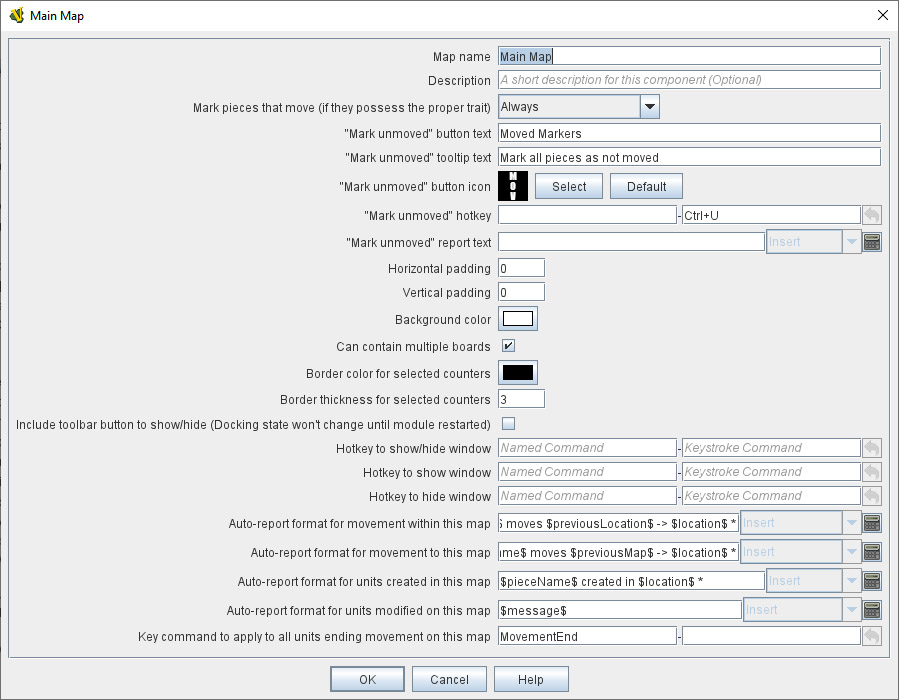
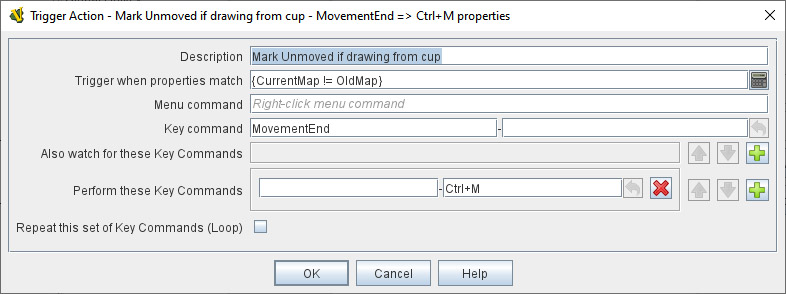
Then I use a trigger on the units so that moving them from the cup to the map means they WON’T get marked as moved:
However, I also have a restrict commands assigned to the counters until they are flipped so it’s not obvious which counters are locations vs. units:
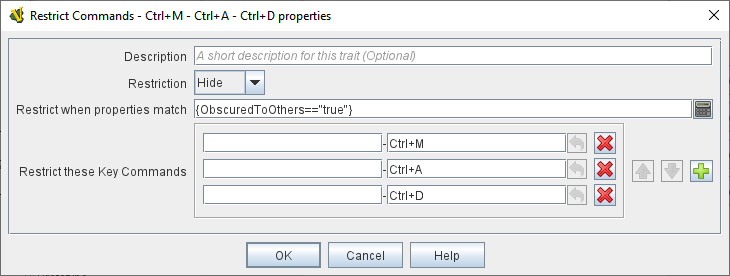
The problem with this setup is that if I drag a unit from the cup, the trigger tries to send a Ctrl+M to toggle the mark as moved, but because that is restricted it doesn’t fire and the counter is marked as moved.
Would there be a way to say if the counter is flipped, add Prototype “Unit” to the list of traits?? All of the COUNTERS have a basic prototype for masking them and then all of the UNITS have a second prototype assigned to them to mark when moved, etc.
---
### Author:  [@JoelCFC25](https://forum.vassalengine.org/u/JoelCFC25)
#### Post date: [February 14, 2023, 8:10pm UTC](https://forum.vassalengine.org/t/marking-units-as-unmoved/76535/2 "2023-02-14T20:10:48Z")
> [@Rodzilla68](#):
>
> Would there be a way to say if the counter is flipped, add Prototype “Unit” to the list of traits??
You can’t add/remove piece traits at run time. I’d probably focus on setting properties on the various pieces and then leveraging those in your property match expressions to tighten up the conditions in which your Trigger will/won’t perform.
---
### Author:  [@jrwatts](https://forum.vassalengine.org/u/jrwatts)
#### Post date: [February 15, 2023, 12:06am UTC](https://forum.vassalengine.org/t/marking-units-as-unmoved/76535/3 "2023-02-15T00:06:08Z")
I would recommend that, instead of using `Restrict Commands`, you use `Trigger Actions` (which requires reversing the restriction condition, since triggers use a “only fire when this condition is met” instead of “restrict firing when this condition is met” field). It means you need a separate Trigger Action for each command you’re restricting, but they’re much more flexible.
---
### Author:  [@Rodzilla68](https://forum.vassalengine.org/u/Rodzilla68)
#### Post date: [February 15, 2023, 12:43am UTC](https://forum.vassalengine.org/t/marking-units-as-unmoved/76535/4 "2023-02-15T00:43:18Z")
@jrwatts Thanks. Not sure I follow. I can create a trigger to match a condition (MarkerType==Unit) which evaluates true when the counter has been flipped. Then I am waiting to see what the command was: Ctrl+M to “mark as moved” for example. But what am I sending as the command and how would this disable Ctrl-M /right-clicking and selecting mark as moved?
---
### Author:  [@jrwatts](https://forum.vassalengine.org/u/jrwatts)
#### Post date: [February 15, 2023, 7:45am UTC](https://forum.vassalengine.org/t/marking-units-as-unmoved/76535/5 "2023-02-15T07:45:33Z")
I meant, for example, remove Ctrl-M from the `Restrict Commands` trait, change your existing `Trigger Action` trait that listens for `MovementEnd` to have condition `{ObscuredToOthers != "true" || CurrentMap != OldMap}`. This Trigger Action would then perform a Ctrl-M to trigger the `Mark when Moved` trait (as it already does). So now, Ctrl-M will only be ignored if the piece is obscured _and_ it wasn’t just moved onto the map.
---
### Author:  [@Rodzilla68](https://forum.vassalengine.org/u/Rodzilla68)
#### Post date: [February 15, 2023, 5:14pm UTC](https://forum.vassalengine.org/t/marking-units-as-unmoved/76535/6 "2023-02-15T17:14:20Z")
> [@jrwatts](#):
>
> {ObscuredToOthers != “true” || CurrentMap != OldMap}
@jrwatts thanks for the reply. It solves the immediate problem that if I drag it to the map, it is not marked as moved. However, if I move it on the map, it is marked as moved. Also, I can right-click and choose mark as moved. So the information is not really hidden and I know that it is a unit vs. a location.
---
### Author:  [@jrwatts](https://forum.vassalengine.org/u/jrwatts)
#### Post date: [February 15, 2023, 10:39pm UTC](https://forum.vassalengine.org/t/marking-units-as-unmoved/76535/7 "2023-02-15T22:39:20Z")
Ah, I see. New idea:
Basically, it looks like you want these pieces to act identically while they’re masked, but then differently once they’re revealed. I think the best way to do that would be to use the [Replace with Other](https://vassalengine.org/doc/latest/ReferenceManual/Replace.html#top) trait instead of the `Mask` trait; make the drawn pieces all identical except for a Replace With Other trait, which will replace the drawn piece with the “real” piece when triggered.
---
### Author:  [@Rodzilla68](https://forum.vassalengine.org/u/Rodzilla68)
#### Post date: [February 16, 2023, 12:25am UTC](https://forum.vassalengine.org/t/marking-units-as-unmoved/76535/8 "2023-02-16T00:25:26Z")
As part of the setup, you have to pick some specific pieces out to be used in a certain scenario. Currently, I have them start in a stack and then you can right-click and select specific pieces which I have you drag to another pile where they all get shuffled. Would the Replace with Other work in this situation?
---
### Author:  [@jrwatts](https://forum.vassalengine.org/u/jrwatts)
#### Post date: [February 16, 2023, 1:05am UTC](https://forum.vassalengine.org/t/marking-units-as-unmoved/76535/9 "2023-02-16T01:05:12Z")
No reason why it shouldn’t. You might need a double Replace with Other setup; the initial set of counters show the individual features, and are then replaced with generic equivalents when you add them to the shuffle pile, then replaced again when revealed. You would have to decide if it makes more sense to just add a Replace with Other trait to the original counters, or have 3 sets of counters; an initial set that only _looks_ like the final set, the “masked” set, and then the final “real” counters.
---
### Author:  [@Rodzilla68](https://forum.vassalengine.org/u/Rodzilla68)
#### Post date: [February 16, 2023, 1:56am UTC](https://forum.vassalengine.org/t/marking-units-as-unmoved/76535/10 "2023-02-16T01:56:59Z")
This is turning into a lot of work for something that would affect at most 6 counters in the game. I think I’ll go back to my original design. The only thing that will be missing is that units will not show that they have moved, but it’s fine because you can manually activate the counters. Thanks for all of your suggestions and ideas, though.