# Simbolic dice button problems
**URL:** https://forum.vassalengine.org/t/simbolic-dice-button-problems/89775
**Category:** Module Design
**Created:** [January 14, 2026, 12:52pm UTC](https://forum.vassalengine.org/t/simbolic-dice-button-problems/89775 "2026-01-14T12:52:43Z")
**Posts on this page:** 18
**Page:** 1
### Author:  [@Segmelo](https://forum.vassalengine.org/u/Segmelo)
#### Post date: [January 14, 2026, 12:52pm UTC](https://forum.vassalengine.org/t/simbolic-dice-button-problems/89775/1 "2026-01-14T12:52:43Z")
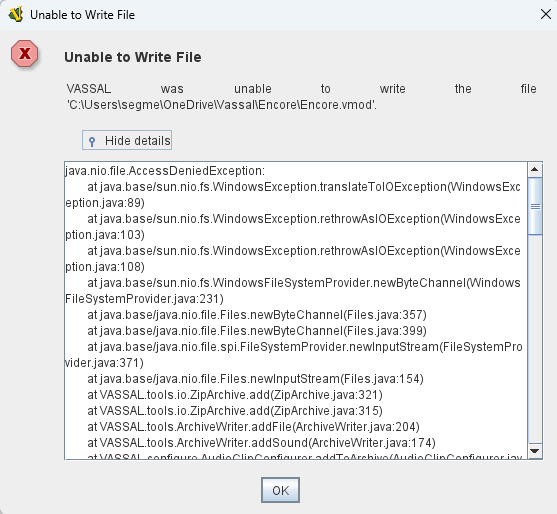
In version 3.7.19, When trying edit or include a new simbolic dice button, this window is showed.
Some suggestions? The button works, if previous exist, but don’t oermit any modifications
---
### Author:  [@uckelman](https://forum.vassalengine.org/u/uckelman)
#### Post date: [January 14, 2026, 2:22pm UTC](https://forum.vassalengine.org/t/simbolic-dice-button-problems/89775/2 "2026-01-14T14:22:54Z")
~~Please post the complete error log.~~
Wait, never mind. The problem is that something else has the file you’re trying to write to open and Windows doesn’t allow writing to an already open file.
I can see from and the path that you’re trying to write to a file in cloud storage. Cloud storage like OneDrive has background processes which open files for synchronization with cloud storage. You can avoid the problem by keeping the file you’re editing in local storage.
---
### Author:  [@rlament](https://forum.vassalengine.org/u/rlament)
#### Post date: [January 14, 2026, 3:08pm UTC](https://forum.vassalengine.org/t/simbolic-dice-button-problems/89775/3 "2026-01-14T15:08:37Z")
This looks like issue [14418](https://github.com/vassalengine/vassal/issues/14418) “Unable to Write File” errors when clicking on a component in the Editor
It’s related to the changes in the new release of Java.
---
### Author:  [@uckelman](https://forum.vassalengine.org/u/uckelman)
#### Post date: [January 14, 2026, 3:17pm UTC](https://forum.vassalengine.org/t/simbolic-dice-button-problems/89775/4 "2026-01-14T15:17:12Z")
> [@rlament](#):
>
> This looks like issue [14418](https://github.com/vassalengine/vassal/issues/14418) “Unable to Write File” errors when clicking on a component in the Editor
It’s not. Look at the exception type. The exception type in 14418 is an `IOException`. The exception type here is an `AccessDeniedException`.
---
### Author:  [@rlament](https://forum.vassalengine.org/u/rlament)
#### Post date: [January 14, 2026, 3:32pm UTC](https://forum.vassalengine.org/t/simbolic-dice-button-problems/89775/5 "2026-01-14T15:32:52Z")
On Mac it’s `IOException`,` on Windows `AccessDeniedException`
---
### Author:  [@Segmelo](https://forum.vassalengine.org/u/Segmelo)
#### Post date: [January 14, 2026, 5:59pm UTC](https://forum.vassalengine.org/t/simbolic-dice-button-problems/89775/6 "2026-01-14T17:59:16Z")
> [@Segmelo](#):
>
> 3.7.
OK, but I’ve always stored my files on OneDrive, and this didn’t happen in version 3.7.18.
---
### Author:  [@Segmelo](https://forum.vassalengine.org/u/Segmelo)
#### Post date: [January 14, 2026, 6:31pm UTC](https://forum.vassalengine.org/t/simbolic-dice-button-problems/89775/7 "2026-01-14T18:31:35Z")
And it only happens with the “Symbolic Dice Button,” no other
---
### Author:  [@Wyldman68](https://forum.vassalengine.org/u/Wyldman68)
#### Post date: [January 21, 2026, 9:28pm UTC](https://forum.vassalengine.org/t/simbolic-dice-button-problems/89775/8 "2026-01-21T21:28:31Z")
I also receive this Error with Symbolic Dice and my files are local, D Drive. Went back to Vassal 3.7.18 and I can edit without issue. I also updated my Java.
Error:
"Unable to Write File
VASSAL was unable to write the file ‘D:\Users\Tim\Downloads\Congress\_of\_Vienna\_1.0.8.vmod’.
java.nio.file.AccessDeniedException:
at java.base/sun.nio.fs.WindowsException.translateToIOException(WindowsException.java:89)
at java.base/sun.nio.fs.WindowsException.rethrowAsIOException(WindowsException.java:103)
at java.base/sun.nio.fs.WindowsException.rethrowAsIOException(WindowsException.java:108)
at java.base/sun.nio.fs.WindowsFileSystemProvider.newByteChannel(WindowsFileSystemProvider.java:231)
at java.base/java.nio.file.Files.newByteChannel(Files.java:357)
at java.base/java.nio.file.Files.newByteChannel(Files.java:399)
at java.base/java.nio.file.spi.FileSystemProvider.newInputStream(FileSystemProvider.java:371)
at java.base/java.nio.file.Files.newInputStream(Files.java:154)
at VASSAL.tools.io.ZipArchive.add(ZipArchive.java:321)
at VASSAL.tools.io.ZipArchive.add(ZipArchive.java:315)
at VASSAL.tools.ArchiveWriter.addFile(ArchiveWriter.java:204)
at VASSAL.tools.ArchiveWriter.addSound(ArchiveWriter.java:174)
at VASSAL.configure.AudioClipConfigurer.addToArchive(AudioClipConfigurer.java:71)
at VASSAL.configure.FileConfigurer.setValue(FileConfigurer.java:98)
at VASSAL.configure.AudioClipConfigurer.setValue(AudioClipConfigurer.java:168)
at VASSAL.configure.FileConfigurer.setValue(FileConfigurer.java:116)
at VASSAL.configure.AudioClipConfigurer.setValue(AudioClipConfigurer.java:179)
at VASSAL.configure.AutoConfigurer.(AutoConfigurer.java:92)
at VASSAL.build.AbstractConfigurable.getConfigurer(AbstractConfigurable.java:212)
at VASSAL.configure.ConfigureTree.updateEditMenu(ConfigureTree.java:1833)
at VASSAL.configure.ConfigureTree.valueChanged(ConfigureTree.java:1800)
at java.desktop/javax.swing.JTree.fireValueChanged(JTree.java:3019)
at java.desktop/javax.swing.JTree$TreeSelectionRedirector.valueChanged(JTree.java:3520)
at java.desktop/javax.swing.tree.DefaultTreeSelectionModel.fireValueChanged(DefaultTreeSelectionModel.java:650)
at java.desktop/javax.swing.tree.DefaultTreeSelectionModel.notifyPathChange(DefaultTreeSelectionModel.java:1120)
at java.desktop/javax.swing.tree.DefaultTreeSelectionModel.setSelectionPaths(DefaultTreeSelectionModel.java:306)
at java.desktop/javax.swing.tree.DefaultTreeSelectionModel.setSelectionPath(DefaultTreeSelectionModel.java:200)
at java.desktop/javax.swing.JTree.setSelectionPath(JTree.java:1709)
at java.desktop/javax.swing.plaf.basic.BasicTreeUI.selectPathForEvent(BasicTreeUI.java:2820)
at java.desktop/javax.swing.plaf.basic.BasicTreeUI$Handler.handleSelection(BasicTreeUI.java:4158)
at java.desktop/javax.swing.plaf.basic.BasicTreeUI$Handler.mousePressedDND(BasicTreeUI.java:4135)
at java.desktop/javax.swing.plaf.basic.BasicTreeUI$Handler.mousePressed(BasicTreeUI.java:4094)
at java.desktop/java.awt.AWTEventMulticaster.mousePressed(AWTEventMulticaster.java:289)
at java.desktop/java.awt.Component.processMouseEvent(Component.java:6573)
at java.desktop/javax.swing.JComponent.processMouseEvent(JComponent.java:3404)
at java.desktop/java.awt.Component.processEvent(Component.java:6341)
at java.desktop/java.awt.Container.processEvent(Container.java:2260)
at java.desktop/java.awt.Component.dispatchEventImpl(Component.java:4958)
at java.desktop/java.awt.Container.dispatchEventImpl(Container.java:2318)
at java.desktop/java.awt.Component.dispatchEvent(Component.java:4790)
at java.desktop/java.awt.LightweightDispatcher.retargetMouseEvent(Container.java:4917)
at java.desktop/java.awt.LightweightDispatcher.processMouseEvent(Container.java:4557)
at java.desktop/java.awt.LightweightDispatcher.dispatchEvent(Container.java:4501)
at java.desktop/java.awt.Container.dispatchEventImpl(Container.java:2304)
at java.desktop/java.awt.Window.dispatchEventImpl(Window.java:2671)
at java.desktop/java.awt.Component.dispatchEvent(Component.java:4790)
at java.desktop/java.awt.EventQueue.dispatchEventImpl(EventQueue.java:725)
at java.desktop/java.awt.EventQueue.dispatchEvent(EventQueue.java:702)
at java.desktop/java.awt.EventDispatchThread.pumpOneEventForFilters(EventDispatchThread.java:203)
at java.desktop/java.awt.EventDispatchThread.pumpEventsForFilter(EventDispatchThread.java:124)
at java.desktop/java.awt.EventDispatchThread.pumpEventsForHierarchy(EventDispatchThread.java:113)
at java.desktop/java.awt.EventDispatchThread.pumpEvents(EventDispatchThread.java:109)
at java.desktop/java.awt.EventDispatchThread.pumpEvents(EventDispatchThread.java:101)
at java.desktop/java.awt.EventDispatchThread.run(EventDispatchThread.java:90)"
---
### Author:  [@cholmcc](https://forum.vassalengine.org/u/cholmcc)
#### Post date: [January 21, 2026, 9:51pm UTC](https://forum.vassalengine.org/t/simbolic-dice-button-problems/89775/9 "2026-01-21T21:51:58Z")
> [@Wyldman68](#):
>
> ```auto
> java.nio.file.AccessDeniedException:
> at java.base/sun.nio.fs.WindowsException.translateToIOException(WindowsException.java:89)
> at java.base/sun.nio.fs.WindowsException.rethrowAsIOException(WindowsException.java:103)
> at java.base/sun.nio.fs.WindowsException.rethrowAsIOException(WindowsException.java:108)
> at java.base/sun.nio.fs.WindowsFileSystemProvider.newByteChannel(WindowsFileSystemProvider.java:231)
> at java.base/java.nio.file.Files.newByteChannel(Files.java:357)
> at java.base/java.nio.file.Files.newByteChannel(Files.java:399)
> at java.base/java.nio.file.spi.FileSystemProvider.newInputStream(FileSystemProvider.java:371)
> at java.base/java.nio.file.Files.newInputStream(Files.java:154)
> at VASSAL.tools.io.ZipArchive.add(ZipArchive.java:321)
> at VASSAL.tools.io.ZipArchive.add(ZipArchive.java:315)
> at VASSAL.tools.ArchiveWriter.addFile(ArchiveWriter.java:204)
> at VASSAL.tools.ArchiveWriter.addSound(ArchiveWriter.java:174)
> at VASSAL.configure.AudioClipConfigurer.addToArchive(AudioClipConfigurer.java:71)
>
> ```
Looks like it happens when the Vassal editor tries to add a file to the Zip file (the `,vmod` file). More specifically, some audio clip.
I believe I’ve seen a similar issue before - also when adding a [Symbolic Dice Button](https://vassalengine.org/doc/latest/ReferenceManual/SpecialDiceButton.html#top). Off-hand, it could seem like _Play a sound_ is configured to `true` and _Sound clip_ is set to some audio file. However, I seem to remember something like the above happining _even if_ _Play a sound_ is configured to `false`. I think the solution was to add a `sounds` directory to the Zip archive. Perhaps try that?
Another possibility could be that Play a sound\_ is configured to `true` and _Sound clip_ is set to some audio file, but you do not have the right permissions to read that audio file (maybe it lives on a remote drive or something). Perhaps check that.
> [@Wyldman68](#):
>
> I also updated my Java
Note, Vassal comes with its own Java installation on Windows (and MacOS), which means it doesn’t really matter which Java you install on the system. You _can_ get Vassal to use the system Java, by replacing
```auto
C:\Program Files\VASSAL-\jre
```
with a link or such to the system JRE - say
```auto
C:\Program Files\OpenJDK-20
```
Or, you can execute the Vassal `Vengine.jar` directly with your system JRE
```auto
> java C:\Program Files\VASSAL-\lib\Vengine.jar
```
> [@uckelman](#):
>
> > [@rlament](#):
> >
> > This looks like issue [14418](https://github.com/vassalengine/vassal/issues/14418) “Unable to Write File” errors when clicking on a component in the Editor
>
> It’s not. Look at the exception type. The exception type in 14418 is an `IOException`. The exception type here is an `AccessDeniedException`.
I think it could be - notice the calls
> [@Wyldman68](#):
>
> ```auto
> at VASSAL.configure.FileConfigurer.setValue(FileConfigurer.java:98)
> at VASSAL.configure.AudioClipConfigurer.setValue(AudioClipConfigurer.java:168)
> at VASSAL.configure.FileConfigurer.setValue(FileConfigurer.java:116)
>
> ```
In the stack trace. If an empty string is passed, that could trigger the Java 25 API issue.
Yours,
_Christian_
---
### Author:  [@Wyldman68](https://forum.vassalengine.org/u/Wyldman68)
#### Post date: [January 22, 2026, 4:36pm UTC](https://forum.vassalengine.org/t/simbolic-dice-button-problems/89775/10 "2026-01-22T16:36:43Z")
Christian, The Sound has nothing to do with the error. The error happened when I was adding Symbolic dice from scratch. After adding symbolic dice, clicking on the Symbolic Dice entry throws the error. It also, happens in other modules as soon as the Symbolic dice entry is clicked on. As I said Editing 3.7.18 works perfect, but 3.7.19 does not work at all. As a retired IT person, the newest Vassal release seems to be the issue, after doing several tests.
Tim
---
### Author:  [@Wyldman68](https://forum.vassalengine.org/u/Wyldman68)
#### Post date: [January 22, 2026, 4:49pm UTC](https://forum.vassalengine.org/t/simbolic-dice-button-problems/89775/11 "2026-01-22T16:49:27Z")
I went back and added a Sound to the Symbolic Dice in Version 3.7.18. Now I can edit the Module in Vassal 3.7.19, without an error. Looks like 3.7.19, does not like not having a sound, tied to the Symbolic dice. FYI, the Symbolic dice were added from scratch when the error occurred.
---
### Author:  [@cholmcc](https://forum.vassalengine.org/u/cholmcc)
#### Post date: [January 22, 2026, 7:14pm UTC](https://forum.vassalengine.org/t/simbolic-dice-button-problems/89775/12 "2026-01-22T19:14:43Z")
> [@Wyldman68](#):
>
> The Sound has nothing to do with the error.
> [@Wyldman68](#):
>
> I went back and added a Sound to the Symbolic Dice in Version 3.7.18. Now I can edit the Module in Vassal 3.7.19, without an error.
I guess this shows that it indeed had something to do with the sound clip configuration of [Symbolic Dice Button](https://vassalengine.org/doc/latest/ReferenceManual/SpecialDiceButton.html#top) 😛 If you read through [14418](https://github.com/vassalengine/vassal/issues/14418) I think there’s a good chance it is related to the change in Java 25 - and not in Vassal proper.
As I said earlier, I seem to remember to seeing a similar issue with previous version of Vassal but using the same version (25) of the JRE. A test of that assertion would be to run the Vassal JAR with an earlier version of the JRE.
> [@Wyldman68](#):
>
> As a retired IT person, …
OK, so I guess you’re comfortable running commands from the commmand line. Fire up your favorite terminal - say `cmd` or `PowerShell`, and do
```auto
cd C:\Program Files\VASSAL-
```
where `` is the version of Vassal installed. Then do
```auto
C:\Program Files\OpenJDK\\bin\java -jar lib\Vengine.jar
```
where `` ins the installed version of OpenJDK, to run the Vassal JAR with a system installed JRE (rather than the one embedded in the Vassal installation).
My guess is, if you run any version of Vassal with OpenJDK 25, you will see the problem you describe. If you run any version of Vassal with an OpenJDK older than 25, you will not see the issue.
You can also take the appropriate installer from [this build of a PR](https://github.com/vassalengine/vassal/actions/runs/20935378920) and see if that works.
Your input on this would be valuable to help resolve the issue.
Yours,
_Christian_
---
### Author:  [@Wyldman68](https://forum.vassalengine.org/u/Wyldman68)
#### Post date: [January 23, 2026, 4:30pm UTC](https://forum.vassalengine.org/t/simbolic-dice-button-problems/89775/13 "2026-01-23T16:30:41Z")
Ran the commands and got this in Vassal and OpenJDK: Error: Unable to access jarfile lib\Vengine.jar
So Java broke this and that is what is installed in the new Version of VASSAL 3.7.19.
I don’t have access to [Fix for change in `java.io.File` API in Java 25 · vassalengine/vassal@e386e6d · GitHub](https://github.com/vassalengine/vassal/actions/runs/20935378920) to download a build.
---
### Author:  [@cholmcc](https://forum.vassalengine.org/u/cholmcc)
#### Post date: [January 24, 2026, 8:50am UTC](https://forum.vassalengine.org/t/simbolic-dice-button-problems/89775/14 "2026-01-24T08:50:55Z")
> [@Wyldman68](#):
>
> Ran the commands and got this in Vassal and OpenJDK: Error: Unable to access jarfile lib\Vengine.jar
Here’s what I did:
- Got Vassal from [the download page](https://vassalengine.org/download.html), and ran the installer. The installation ends up in
```auto
C:\Program Files\VASSAL-3.7.19
```
- Got OpenJDK 24 for Windows from [OpenJDK archive](https://jdk.java.net/archive/), specifically [openjdk-24.0.2\_windows-x64\_bin.zip](https://download.java.net/java/GA/jdk24.0.2/fdc5d0102fe0414db21410ad5834341f/12/GPL/openjdk-24.0.2_windows-x64_bin.zip), and unpacked that ZIP archive to `C:\Program Files`. The JDK ends up in
```auto
C:\Program Files\jdk-24.0.2
```
- Open up a command terminal (Press `Win+R` key and type `cmd`, then press `Enter`)
- In the terminal, I do
```auto
$ C:
$ cd "Program Files\VASSAL-3.7.19"
$ ..\jdk-24.0.2\bin\java.exe -jar lib\Vengine.jar
```
and the Vassal module manager window shows up. If I inspect the log file from **Help** → **Show Error Log** , I see that I’m using my selected JRE:
```auto
YYYY-MM-DD HH:MM:SS,MSS [PID-main] INFO VASSAL.launch.StartUp - Starting
YYYY-MM-DD HH:MM:SS,MSS [PID-main] INFO VASSAL.launch.StartUp - OS Windows 10 10.0 amd64
YYYY-MM-DD HH:MM:SS,MSS [PID-main] INFO VASSAL.launch.StartUp - Java version 24.0.2
YYYY-MM-DD HH:MM:SS,MSS [PID-main] INFO VASSAL.launch.StartUp - Java home c:\Program Files\jdk-24.0.2
YYYY-MM-DD HH:MM:SS,MSS [PID-main] INFO VASSAL.launch.StartUp - VASSAL version 3.7.19
YYYY-MM-DD HH:MM:SS,MSS [PID-AWT-EventQueue-0] INFO VASSAL.launch.ModuleManager - Manager
```
> [@Wyldman68](#):
>
> So Java broke this and that is what is installed in the new Version of VASSAL 3.7.19.
That’s bit of an odd assertion. It is unlikely that “Java broke this”, and more likely that you got something wrong when you tried this.
> [@Wyldman68](#):
>
> I don’t have access to [Fix for change in `java.io.File` API in Java 25 · vassalengine/vassal@e386e6d · GitHub](https://github.com/vassalengine/vassal/actions/runs/20935378920) to download a build.
Ah, OK, you may need to be signed in on GitHub before the download button is visible to you. I think it is enough that you sign in to GitHub - you do not need any special privileges on the Vassal repository. You can try [this direct link](https://github.com/vassalengine/vassal/actions/runs/20935378920/artifacts/5104061476) though I’m not certain it will work. If you cannot sign into GitHub or the link does not work for you, then you can get the patched version of Vassal [from Google Drive here](https://drive.google.com/file/d/18agQXMYpE0GVBbJI3eMt7Or59ZHu7iQQ/view?usp=sharing). But note, I _will_ remove that file from the Google Drive in the very near future, so please pick it up as soon as you can.
Thank you for giving these things a try and your feedback.
Yours,
_Christian_
---
### Author:  [@cholmcc](https://forum.vassalengine.org/u/cholmcc)
#### Post date: [January 24, 2026, 9:47pm UTC](https://forum.vassalengine.org/t/simbolic-dice-button-problems/89775/15 "2026-01-24T21:47:13Z")
Taking your module [Berlim do Somnium](https://vassalengine.org/library/projects/Berlim_do_Somnium) (BTW, it’s “Berlin” in English), opening it up in the editor of Vassal 3.7.19,
```auto
YYYY-MM-DD HH:MM:SS,MMS [%PARSER_ERROR[pid]-main] INFO VASSAL.launch.StartUp - Starting
YYYY-MM-DD HH:MM:SS,MMS [%PARSER_ERROR[pid]-main] INFO VASSAL.launch.StartUp - OS Linux 6.12.11-amd64 amd64
YYYY-MM-DD HH:MM:SS,MMS [%PARSER_ERROR[pid]-main] INFO VASSAL.launch.StartUp - Java version 25.0.1
YYYY-MM-DD HH:MM:SS,MMS [%PARSER_ERROR[pid]-main] INFO VASSAL.launch.StartUp - Java home /usr/lib/jvm/java-25-openjdk-amd64
YYYY-MM-DD HH:MM:SS,MMS [%PARSER_ERROR[pid]-main] INFO VASSAL.launch.StartUp - VASSAL version 3.7.19
```
and trying to add a [Symbolic Dice Button](https://vassalengine.org/doc/latest/ReferenceManual/SpecialDiceButton.html#top) - just _adding_ not doing _any_ configuration, I get
```auto
java.io.IOException: Is a directory
at java.base/sun.nio.ch.UnixFileDispatcherImpl.read0(Native Method)
at java.base/sun.nio.ch.UnixFileDispatcherImpl.read(UnixFileDispatcherImpl.java:51)
at java.base/sun.nio.ch.IOUtil.readIntoNativeBuffer(IOUtil.java:341)
at java.base/sun.nio.ch.IOUtil.read(IOUtil.java:307)
at java.base/sun.nio.ch.IOUtil.read(IOUtil.java:284)
at java.base/sun.nio.ch.FileChannelImpl.implRead(FileChannelImpl.java:251)
at java.base/sun.nio.ch.FileChannelImpl.read(FileChannelImpl.java:231)
at java.base/sun.nio.ch.ChannelInputStream.read(ChannelInputStream.java:90)
at java.base/sun.nio.ch.ChannelInputStream.read(ChannelInputStream.java:119)
at java.base/java.io.InputStream.transferTo(InputStream.java:795)
at java.base/sun.nio.ch.ChannelInputStream.transferTo(ChannelInputStream.java:290)
at VASSAL.tools.io.ZipArchive.add(ZipArchive.java:336)
at VASSAL.tools.io.ZipArchive.add(ZipArchive.java:322)
at VASSAL.tools.io.ZipArchive.add(ZipArchive.java:315)
at VASSAL.tools.ArchiveWriter.addFile(ArchiveWriter.java:204)
at VASSAL.tools.ArchiveWriter.addSound(ArchiveWriter.java:174)
at VASSAL.configure.AudioClipConfigurer.addToArchive(AudioClipConfigurer.java:71)
at VASSAL.configure.FileConfigurer.setValue(FileConfigurer.java:98)
at VASSAL.configure.AudioClipConfigurer.setValue(AudioClipConfigurer.java:168)
at VASSAL.configure.FileConfigurer.setValue(FileConfigurer.java:116)
at VASSAL.configure.AudioClipConfigurer.setValue(AudioClipConfigurer.java:179)
...
```
Doing the same using Java 21,
```auto
YYYY-MD-DD HH:MM:SS:MMS [%PARSER_ERROR[pid]-main] INFO VASSAL.launch.StartUp - Starting
YYYY-MD-DD HH:MM:SS:MMS [%PARSER_ERROR[pid]-main] INFO VASSAL.launch.StartUp - OS Linux 6.12.11-amd64 amd64
YYYY-MD-DD HH:MM:SS:MMS [%PARSER_ERROR[pid]-main] INFO VASSAL.launch.StartUp - Java version 21.0.10-ea
YYYY-MD-DD HH:MM:SS:MMS [%PARSER_ERROR[pid]-main] INFO VASSAL.launch.StartUp - Java home /usr/lib/jvm/java-21-openjdk-amd64
YYYY-MD-DD HH:MM:SS:MMS [%PARSER_ERROR[pid]-main] INFO VASSAL.launch.StartUp - VASSAL version 3.7.19
```
I _do not_ get that problem.
Also, if I use [this build of a PR](https://github.com/vassalengine/vassal/actions/runs/20935378920), I _do not_ see the problem either. So indeed, I think the problem is the same as in [14418](https://github.com/vassalengine/vassal/issues/14418), and that the PR [Fix for change in `java.io.File` API in Java 25](https://github.com/vassalengine/vassal/pull/14433) does indeed fix it.
That you see a `java.nio.file.AccessDeniedException` (Windows) rather than a `java.io.IOException` (Linux) exception is likely due to an implementation detail of `java.nio.file.Files.newInputStream` which, when passed an empty string or path to user’s home directory on Windows throws the `java.nio.file.AccessDeniedException` while on Linux, it succeeds, and the exception doesn’t occur until the directory is read from (which won’t work).
@uckelman - I think this makes it clear that PR [14433](https://github.com/vassalengine/vassal/pull/14433) should likely be merged.
Yours,
_Christian_
---
### Author:  [@cholmcc](https://forum.vassalengine.org/u/cholmcc)
#### Post date: [February 9, 2026, 8:47am UTC](https://forum.vassalengine.org/t/simbolic-dice-button-problems/89775/16 "2026-02-09T08:47:12Z")
With the [Vassal 3.7.20 Released](https://forum.vassalengine.org/t/vassal-3-7-20-released/89864/10) the issue should be fixed.
Please remember to tick of the appropriate post to mark the issue as solved. That will help others find solutions to similar problems. Only the original poster can do that.
Yours,
_Christian_
---
### Author:  [@Segmelo](https://forum.vassalengine.org/u/Segmelo)
#### Post date: [February 10, 2026, 12:29pm UTC](https://forum.vassalengine.org/t/simbolic-dice-button-problems/89775/17 "2026-02-10T12:29:37Z")
> [@cholmcc](#):
>
> [Vassal 3.7.20](https://forum.vassalengine.org/t/vassal-3-7-20-released/89864/10)
Indeed, with Vassal version 3.7.20, the problem is solved.
---
### Author:  [@cholmcc](https://forum.vassalengine.org/u/cholmcc)
#### Post date: [February 10, 2026, 6:04pm UTC](https://forum.vassalengine.org/t/simbolic-dice-button-problems/89775/18 "2026-02-10T18:04:46Z")
> [@Segmelo](#):
>
> Indeed, with Vassal version 3.7.20, the problem is solved.
Great!
Please remember to mark the post that solves the issue - only you can do it. That helps other users find solutions to their problems.
Yours,
_Christian_