I got the engine to work on Windows 11. There were a few surprises.
It is best practice to be able to build the engine for all platforms on a single platform. The single platform is Linux. Cross-compilers must exist on Linux that can build the other platforms.
I will go through the Windows 11 version of the engine.
Downloaded the Windows version of Luau (/0.671/luau-windows.zip) from Luau.
Extracted to folder luau.
In folder luau README.md describes how to build the libs.
Cmake must be installed. A cross-compiler must be installed. The obvious choice is g+±mingw-w64.
Read about g+±mingw-w64 here.
Set the compiler Cmake uses like this:
cmake .. -DCMAKE_C_COMPILER=x86_64-w64-mingw32-gcc -DCMAKE_CXX_COMPILER=x86_64-w64-mingw32-g++ -DCMAKE_BUILD_TYPE=RelWithDebInfo
The Windows versions of libLuau.VM.a, libLuau.Compiler.a, libLuau.Ast.a and libisocline.a are made.
You now need to compile the engine source code with the cross-compiler.
First download the Windows version of Qt. In a previous post I described how this is done. Click Windows x64 under Download Qt for open source use. The downloaded installer is called qt-online-installer-windows-x64-4.9.0.exe. Run it (with Wine) and log in to your Qt account.
Compile the engine with:
CPLUS_INCLUDE_PATH=/data/Utvikling/Alben/Windows/Qt/6.9.0/mingw_64/include;export CPLUS_INCLUDE_PATH

LD_LIBRARY_PATH=/usr/bin/x86_64-w64-mingw32-g++:/data/Utvikling/Alben/Windows/Qt/6.9.0/mingw_64/lib;export LD_LIBRARY_PATH

x86_64-w64-mingw32-g++ -Wall -static-libgcc -static-libstdc++ -o main main.cpp luau.cpp counter.cpp window.cpp repository.cpp frame.cpp overlay.cpp io.cpp scale.cpp toolbar.cpp settings.cpp -I/data/Utvikling/Alben/Windows/luau/VM/include -I/data/Utvikling/Alben/Windows/luau/Compiler/include -I/data/Utvikling/Alben/Windows/Qt/6.9.0/mingw_64/include/QtWidgets -Wl,--copy-dt-needed-entries -L/data/Utvikling/Alben/Windows/Qt/6.9.0/mingw_64/lib -lQt6Core -lQt6Gui -lQt6Widgets -L/data/Utvikling/Alben/Windows/luau/cmake -lLuau.VM -lLuau.Compiler -lLuau.Ast -lisocline
The flags -static-libgcc and -static-libstdc++ are for portability.
Now the great surprise. When I compiled I got an error in io.cpp line 142
if (Settings::playerSide == "")
{
	Settings::playerSide == findSide();
	Luau::updateSide(Settings::playerSide.c_str());
}
It should of course be
if (Settings::playerSide == "")
{
	Settings::playerSide = findSide();
	Luau::updateSide(Settings::playerSide.c_str());
}
This was just a typo but it was x86_64-w64-mingw32-g++ who detected it. g++ just ignored it !!
This corrected, another error showed up on line 385:
string filename{i->path().relative_path()};
This was a type mismatch and was corrected to:
string filename = string(i->path().relative_path().generic_string());
In both cases g++ never issued a warning or error. I am very impressed with x86_64-w64-mingw32-g++.
A main.exe is made, the Windows version of the engine.
Copy main.exe to your Windows 11 platform. Make sure Qt for Windows is on the Windows platform. For me it is in C:\Qt.
Open a cmd and write this:
set PATH=%PATH%;C:\Qt\6.9.0\mingw_64\bin
so that main.exe can find the Qt dlls.
When I first ran main.exe I got this message:
The program can't start because MSVCP140.dll is missing from your computer.
Try reinstalling the program to fix this problem.
The missing dll is a Visual C++ 2015, 2017 and 2019 redistributable.
Choose the X64 version. With the dll installed, the engine ran. But now came another problem. Many of the the resources (images) were not found. The resource names had back-slashes. Good, old Windows with back-slashes in its file path that can be mistaken for escape characters … lol.
In io.cpp line 374 this:
string str = i->path().parent_path().string() + "/" + i->path().stem().string();
was replaced by this:
string str = i->path().parent_path().string();

// convert back-slashes to fore-slashes
std::replace(str.begin(), str.end(), '\\', '/');

str = str + "/" + i->path().stem().string();
The engine now ran and looked like this:
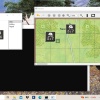
But what? No menu bar? Only an arrow to the right? The menu items were found there:
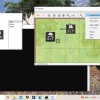
I realized that the problem had to do with the height of the menu bar. In line 224 of main.cpp I changed this:
menuBar->setFixedHeight(20);
to this:
menuBar->setFixedHeight(22);
That was it. The engine works under Windows. Wow !!!
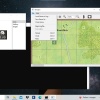
I am glad this was possible with little hassle. The code that runs under Windows is exactly the same as the code that runs under Linux. The small changes made had no influence on how the engine ran on Linux. This is very important from a practical point of view. No different versions of code for different platforms … arrg.
Regarding Windows 7 it is clearly stated that Qt6 does not support Windows 7.
It is possible to use the old Qt5 … but I do not want to use time on that now.
Besides platforms I wanted to look at deployment. I wanted to check out how the engine could run independently, not only in my development environment.
The first thing to do was to collect all needed files in one folder. They are:
- The resource files __images and images
- The Luau script files
- main
- The needed Qt libraries
By using ldd I could see the dependencies of the Qt .so-files. I ended up with this collection:
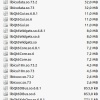
This is a complete list of all Qt files needed to run the engine. The file libicudata.so.73.2 is the largest at 32 MB.
The total size of all the needed files for the engine (the size of the folder) was 75,9 MB (72 items).
Fortunately this size can be reduced substantially by using compression. There is a tool called makeself (https://makeself.io/) that can both compress and run a script when decompressed. I call the compressed file main.run. It is generated by this call:
makeself --nox11 ./makeself ./main.run "Game engine" ./run.sh
The --nox11 option is there to not show a terminal. The 75,9 MB folder is called ./makeself.
./run.sh is a script that is run after decompression. It is:
#! /bin/bash
export LD_LIBRARY_PATH=/usr/lib/x86_64-linux-gnu:./Qt
export QT_PLUGIN_PATH=./Qt
export QT_QPA_PLATFORM_PLUGIN_PATH=./Qt
./main
It sets needed environment variables relative to ./makeself and calls main.
makeself creates a self-decompressing and self-starting application called ./main.run. In order to run ./main.run create a Linux launcher shortcut as:
/home/me/Utvikling/Alben/main.run &
The ‘&’ has the effect of starting a new thread for main. The downside is that the user clicks on the shortcut and “nothing” happens for a second or two while the decompression takes splace. I am sure there are other ways of doing the deployment than makeself.
main.run is 32,1 MB, substantially less than 75,9 MB. Yet, a module will always have about this size. With hard disks of 1 TB and download speeds of 10+ Mbps this should not pose a problem today. main.run is totally self-contained. It has its own copy of the Qt library, which means that the module never becomes “out of date”. Only the computer runtime can make a module not run anymore.
Obviously more work has to be done regarding platform and deployment. I have shown that the engine can run on a major platform besides Linux. I have shown that the engine can run on a platform without Luau or Qt installed.
Now comes what I look forward to: a prototype for a totally new game, Paths of Glory. This game is of course far more popular that Verdun: A Generation Lost.
It will still just be a prototype, not a full game. In this prototype cards will be introduced.