# VASSAL on a tablet (Android or Linux)
**URL:** https://forum.vassalengine.org/t/vassal-on-a-tablet-android-or-linux/79098
**Category:** Technical Support & Bugs
**Created:** [March 1, 2024, 1:16pm UTC](https://forum.vassalengine.org/t/vassal-on-a-tablet-android-or-linux/79098 "2024-03-01T13:16:07Z")
**Posts on this page:** 20
**Page:** 1
### Author:  [@cholmcc](https://forum.vassalengine.org/u/cholmcc)
#### Post date: [March 1, 2024, 1:16pm UTC](https://forum.vassalengine.org/t/vassal-on-a-tablet-android-or-linux/79098/1 "2024-03-01T13:16:07Z")
This is a re-post of a discussion from [another thread](https://forum.vassalengine.org/t/how-do-i-start-vassal-in-linux/78250/26), so as to no hijack that thread.
> [@How do I start vassal in Linux?](https://forum.vassalengine.org/t/how-do-i-start-vassal-in-linux/78250/24):
>
> > [@How do I start vassal in Linux?](https://forum.vassalengine.org/t/how-do-i-start-vassal-in-linux/78250/22):
> >
> > Interesting how to. First what is a tar.bz2??
>
> [TAR](https://en.wikipedia.org/wiki/Tar_(computing)) is a Tape ARchive - a collection of one or more files into a single file. Sometimes called a tar-ball.
>
> [BZ](https://en.wikipedia.org/wiki/Bzip2) (short for BZip2) is a compressor.
>
> Thus, a file ending in `.tar.bz2` is a compressed archive of files. It is similar to a [ZIP](https://en.wikipedia.org/wiki/ZIP_(file_format)) in that respect.
>
> > [@How do I start vassal in Linux?](https://forum.vassalengine.org/t/how-do-i-start-vassal-in-linux/78250/22):
> >
> > 2nd not having any electric i was intrigued when i saw vassal had a linux version. Thought maybe to get an install on a tablet. I believe there are some linux versions on the site. 3 of them i believe. Picked debian for some reason. Was amazed that it installed. Only thing is is the load command is not highlighted. So what does that mean?
>
> VASSAL is not particularly well suited on mobile devices because touch gestures are not particularly well supported (right click f.ex.).
>
> Which kind of tablet did you install on? OS?
>
> > [@How do I start vassal in Linux?](https://forum.vassalengine.org/t/how-do-i-start-vassal-in-linux/78250/22):
> >
> > So i have linux installed got the tar available but still not able to do the afore mentioned hints.
>
> For tablets, where the command line is probably hidden away, you probably need some app that can handle the tar-ball.
>
> > [@How do I start vassal in Linux?](https://forum.vassalengine.org/t/how-do-i-start-vassal-in-linux/78250/22):
> >
> > Since there is a fount of linux info here answer another newbies queries.
> > If debian isnt going to work which version would be best on a tablet??
>
> You can install Debian GNU/Linux - or any other Linux distro - on a tablet, but for VASSAL you should probably have an external mouse. Which Linux distro is best suited depends on the tablet. Perhaps search on [XDA](https://www.xda-developers.com/).
>
> VASSAL for linux is distributed as a Java ARchive [JAR](https://en.wikipedia.org/wiki/JAR_(file_format)) and as long as you have Java Runtime Environment [JRE](https://en.wikipedia.org/wiki/Java_(software_platform)#Java_Runtime_Environment) installed on the tablet, then you should be able to run it (with the aforementioned caveats). So you need
>
> - A Linux distro that can run on your tablet
> - And that distro should have JRE
>
> > [@How do I start vassal in Linux?](https://forum.vassalengine.org/t/how-do-i-start-vassal-in-linux/78250/22):
> >
> > Also is android a GUI sitting on linux ?? Any rules of thumb there aside from not doing any root work?
>
> Even though Android is written in Java it is not a real JRE, and the Android Java engine cannot execute VASSAL directly. Also, the kernel of Android is indeed Linux, but it is not exactly like other OSs that uses Linux. All apps are sandboxed and run in the Android Virtual Machine.
>
> If you don’t want to root your tablet, you should see if it is possible to install a Linux distribution as an application on your tablet. Then, you can install VASSAL (and a JRE) into that Linux installation.
>
> If it will work for you, I’m sure a lot of people like to know how you did it. Playing VASSAL games on a tablet would indeed be very nice.
>
> Yours,
> _Christian_
---
### Author:  [@cholmcc](https://forum.vassalengine.org/u/cholmcc)
#### Post date: [March 1, 2024, 1:48pm UTC](https://forum.vassalengine.org/t/vassal-on-a-tablet-android-or-linux/79098/2 "2024-03-01T13:48:33Z")
> [@How do I start vassal in Linux?](https://forum.vassalengine.org/t/how-do-i-start-vassal-in-linux/78250/25):
>
> Wow gadzooks more linux back talk than i can handle (HAHA). Might have been a samsung 3 lite.
Perhaps search [XDA](https://www.xda-developers.com/) for more information on that device, and how to set-up Linux on that.
> [@How do I start vassal in Linux?](https://forum.vassalengine.org/t/how-do-i-start-vassal-in-linux/78250/25):
>
> Have to get back to u on that. Got the tar waiting but the load command is not highlighted.
I’m not sure what you mean by “load”. Could you please elaborate on that? Please use a little time to make your questions, comments, etc. clear.
> [@How do I start vassal in Linux?](https://forum.vassalengine.org/t/how-do-i-start-vassal-in-linux/78250/25):
>
> So cant try to load anything. But need to unzip the tar. Dont know if i did that or not. If the open or load command is not highlighted whats ur gut tell u??
There are loads of apps that can unpack various compressed (or not) archives out there - both for Android and Linux. Perhaps you can be a bit more explicit about what it is you are trying to do.
> [@How do I start vassal in Linux?](https://forum.vassalengine.org/t/how-do-i-start-vassal-in-linux/78250/25):
>
> I had a tab that could do a full sized keyboard. I have one with a touch pad but its logitech and needs a gizmo. Keep the light on for me be back soon with the os info. Be nice if i could do this on a motorola zoom.
The Motorola One Zoom should be able to run GNU/Linux natively - especially because it is not locked down. Another option is Motorola Xoom (10" tablet) which does have a bit older hardware.
Perhaps you could try to install [DebianNoRoot](https://play.google.com/store/apps/details?id=com.cuntubuntu&hl=en&gl=US) on your device and see if you can get it working with that. DebianNoRoot does provide _some_ mouse emulation and perhaps that is good enough for VASSAL.
> [@How do I start vassal in Linux?](https://forum.vassalengine.org/t/how-do-i-start-vassal-in-linux/78250/25):
>
> I do have an att tab that the touch screen is out and needs a mouse but i have one of those PALM like keyboards with a touch pad. All the parts, now the savvy to flog them together.
For keyboards and mice I would get some Bluetooth devices - they will most likely work just fine.
> [@How do I start vassal in Linux?](https://forum.vassalengine.org/t/how-do-i-start-vassal-in-linux/78250/25):
>
> One more query. Java on a tab is that available. Wow almost some light at the end of the tuunel. Tks.
Are you thinking about something like [this](https://play.google.com/store/apps/details?id=com.coobbi.jre.pro&hl=en_IE)? That won’t work for VASSAL as the Java Graphical User Interface (GUI) is not supported. A GUI needs to run in some graphical environment (X or Wayland on Un\*x, Cocao on MacOSX, Win32 on Windows, Android UI for Android, etc.). The Android UI does _not_ support the Java GUI (swing) as used by VASSAL.
This is why you most likely need a GNU/Linux virtual machine running on your Tablet or mobile device. Here, DebianNoRoot seems like a good solution. Of course, if you have a device to spare you can probably also get it to run GNU/Linux directly on the hardware. If you do get [DebianNoRoot running](https://www.makeuseof.com/tag/how-to-linux-on-android/#how-to-install-linux-on-android-without-root) you should
- Open a terminal (see the linked article above)
- Download VASSAL Linux `tar.bz2` from the virtual Linux machine
- In your Linux virtual machine in a terminal
and then follow the steps outlined in [this thread](https://forum.vassalengine.org/t/how-do-i-start-vassal-in-linux/78250/16)
If I have the time, I might try this myself, but no promises 😕
Yours,
_Christian_
---
### Author:  [@Chrompe](https://forum.vassalengine.org/u/Chrompe)
#### Post date: [March 1, 2024, 9:57pm UTC](https://forum.vassalengine.org/t/vassal-on-a-tablet-android-or-linux/79098/3 "2024-03-01T21:57:10Z")
I installed Arch on a surface tablet and use it for Vassal, now I can play 40k anywhere
It works well on the Surface. Microsoft should stick to making hardware rather than software
---
### Author:  [@rayb](https://forum.vassalengine.org/u/rayb)
#### Post date: [March 3, 2024, 10:55am UTC](https://forum.vassalengine.org/t/vassal-on-a-tablet-android-or-linux/79098/4 "2024-03-03T10:55:41Z")
ok it was a samsung 3 lite.
i had a tab that had lots of vassal dialog boxes. was looking for it but one had to be reset so maybe that was it. when i saw the vassal dialogs i thought i was getting close. so i must have unzipped the tar.
will any unzipper work with the tar?
i also once saw the command line. so if the load command is dimmed out can the unzipped tar be tried from the command line?
samsung version is 4.2.2. to cpt kirk thats a star date. vassal-3.2.17-linux.tar.bz2.
what is a vassal-3.2.17-linux.tar.1?
all the boxes look opened. downloaded several.
one caveat. make sure the tabs usb port is live.
the one on the sam 3 lite is charge only.
motorola zoom is not. i had seen a discussion on how to live it but was out of my ken.
im old school will have to print this out. need to be able to see several things at once.
where will i find the JRE if its on the tab? i think that might be the snick up.
[sourceforge.net](http://sourceforge.net) is where i think i got the debian.
touch padding with the linux open is sort of tedius. a 10 inch tab will be better.
i looked st the sd card and saw all but no vassal dialogs. had to have unzipped the tar once to even see them. if any unzipper will work will have to give it a go.
one more thing, might be reaching gor straws but in linux will the open command only work with linux files?? sometimes demos have something disabled. mostly save. anyway having installed linux on a tab for me is a success. getting vassal to run would be overjoyment.
RAy.
---
### Author:  [@uckelman](https://forum.vassalengine.org/u/uckelman)
#### Post date: [March 3, 2024, 1:07pm UTC](https://forum.vassalengine.org/t/vassal-on-a-tablet-android-or-linux/79098/5 "2024-03-03T13:07:42Z")
> [@rayb](#):
>
> vassal-3.2.17-linux.tar.bz2.
Would you point me to whatever suggested that you download version 3.2.17 so I can correct it? The hasn’t been the current release since 2020.
You should use the current release—which is 3.7.9 as I type this—unless you have a specific reason for using an older release.
---
### Author:  [@cholmcc](https://forum.vassalengine.org/u/cholmcc)
#### Post date: [March 3, 2024, 3:07pm UTC](https://forum.vassalengine.org/t/vassal-on-a-tablet-android-or-linux/79098/6 "2024-03-03T15:07:42Z")
Hi Ray,
Please do consider to make your comments, questions, etc. easier to read. With that, it will be easier to understand what you mean and to give you appropriate comments. Thank you.
> [@rayb](#):
>
> ok it was a samsung 3 lite.
The relevant [XDA forum](https://xdaforums.com/c/samsung-galaxy-tab-3.2397/)
> [@rayb](#):
>
> i had a tab[ that had lots of vassal dialog boxes. was looking for it but one had to be reset so maybe that was it. when i saw the vassal dialogs i thought i was getting close. so i must have unzipped the tar.
I’m not sure I understand what it is you are trying to accomplish or what your issue is.
Let’s take a step back.
- One option is to install [DebianNoRoot](https://play.google.com/store/apps/details?id=com.cuntubuntu&hl=en&gl=US). Did you do that?
- If you did, did you follow the [video](https://www.makeuseof.com/tag/how-to-linux-on-android/#how-to-install-linux-on-android-without-root)? It gives a number of pointers on how to use your newly installed Linux environment.
- If so, do you understand how to open a terminal in the virtual Linux environment?
- If so, did you manange to install the Java Runtime Environment?
- If so, did you open a browser in your virtual Linux environment and download the latest [VASSAL distribution for Linux](https://github.com/vassalengine/vassal/releases/download/3.7.9/VASSAL-3.7.9-linux.tar.bz2)? You should find that in your `Downloads` folder. In a terminal do
- If you did download VASSAL, did you uncompress and unpack it? In a terminal in your Linux environment
- Then, did you manage to start VASSAL in your Linux environment? In terminal in your Linux environment
If you did all this, you can start to download VASSAL modules and open them using the VASSAL module manager.
> [@rayb](#):
>
> will any unzipper work with the tar?
No, only those that support TAR _and_ BZip2.
> [@rayb](#):
>
> i also once saw the command line. so if the load command is dimmed out can the unzipped tar be tried from the command line?
Not sure what you mean by “dimmed out” and “be tried from the command line”?
> [@rayb](#):
>
> samsung version is 4.2.2. to cpt kirk thats a star date. vassal-3.2.17-linux.tar.bz2.
> what is a vassal-3.2.17-linux.tar.1?
> all the boxes look opened. downloaded several.
Please elaborate - not sure what you mean. If it helps, you can take screenshots and append them your posts.
> [@rayb](#):
>
> one caveat. make sure the tabs usb port is live.
>
> the one on the sam 3 lite is charge only.
If you have Bluetooth Keyboards or Mice, then that should work too.
> [@rayb](#):
>
> where will i find the JRE if its on the tab? i think that might be the snick up.
In a terminal in your Linux environment, do
```
dpkg -l default-jre
```
it should give a line that starts with `ii` if the package is installed.
> [@rayb](#):
>
> [sourceforge.net](http://sourceforge.net) is where i think i got the debian.
[Debian GNU/Linux](https://debian.org) is a full Linux distribution and does not reside on a sourceforge. DebianNoRoot is an Android app that sets up a virtual machine and installs Debian GNU/Linux in that virtual machine.
> [@rayb](#):
>
> touch padding with the linux open is sort of tedius. a 10 inch tab will be better.
Clearly a larger screen (Galaxy 3Lite is 7") will be nicer. For the pointer, have you tried to pair your tablet with a Bluetooth mouse? I’m sure that will make the experience a lot nicer.
> [@rayb](#):
>
> i looked st the sd card and saw all but no vassal dialogs. had to have unzipped the tar once to even see them. if any unzipper will work will have to give it a go.
What do you mean by “vassal dialogs”? I’m not sure I understand the rest of the sentences either.
> [@rayb](#):
>
> one more thing, might be reaching gor straws but in linux will the open command only work with linux files??
What do you mean by “open command”? What are you trying to do?
What do you mean by “linux files”? There’s no such thing as specific files for Linux.
_Applications_ (or programs) are typically specific for operating systems and chip architectures. An application can be built for MacOSX on ARM but will not work on Intel, another application is built for Windows, but does not work on other system. But that’s the _application_ - the _data_ that the application works on is _typically_ agnostic as to the system, though often _specific_ for the application. Thus, typically, if an application runs on multiple systems (MacOSX, Windows, Linux, …), then the _data_ can be worked on.
Point in question: VASSAL is a JAVA application, which is executed by a Java Virtual Machine (JVM - the Java Runtime Environment). As long as a JVM can run on a system, then it can in principle execute _any_ JAVA application. In other words, the application that you download from VASSAL is the _same_ for all systems, because it is really just _data_ for the JVM.
More, so, the VASSAL modules (VMOD) are _data_ to the VASSAL application and are _independent_ of the executing platform (in fact, it is at least 2 levels of abstraction away from the underlying system) and are therefore not specific to any system.
I’m not sure that’s what you asked, though, so if that did not answer your question, please elaborate.
> [@rayb](#):
>
> sometimes demos have something disabled. mostly save.
Yes, in the Evil world of non-open-source that is often the case. Not so in the OpenSource world that VASSAL and Linux are very much part of.
> [@rayb](#):
>
> anyway having installed linux on a tab for me is a success. getting vassal to run would be overjoyment.
Try following the steps outlined above. If you have problems in any of the steps, try to describe _exactly_ what it is you do, possibly taking screenshots, and then people may be able to help you out.
If you do get it working, I’m sure a description of the process would be very welcome in the VASSAL wiki pages.
Yours,
_Christian_
---
### Author:  [@rayb](https://forum.vassalengine.org/u/rayb)
#### Post date: [March 4, 2024, 10:50am UTC](https://forum.vassalengine.org/t/vassal-on-a-tablet-android-or-linux/79098/7 "2024-03-04T10:50:06Z")
it may be that long since i tried to vassal a tablet.
just reporting what i had on the tab.
RAy.
---
### Author:  [@rayb](https://forum.vassalengine.org/u/rayb)
#### Post date: [March 4, 2024, 11:12am UTC](https://forum.vassalengine.org/t/vassal-on-a-tablet-android-or-linux/79098/8 "2024-03-04T11:12:11Z")
ok. open command on my linux install is not highlighted so i cant load anything. all else is working. so if i unzip the tar i couldnt load it to run. why i asked about the unzip programs. i have not unzipped the tar. so what will it look like unzipped?
i found the 161 jpg vassal dialog boxes on the att tab. there are 1 linux installer there but wants root permission. not using that. an Anlinux installer. dont know where i got it but since it lists many distros must need to be online to install.
the vassal dilogs are the screens to load game parts. like picking side. counters. maps etc. when i saw these i thought i was on my way. but they are just the screens.
tks for all the info. tuesday ill try to get this thread printed out.
these 161 screens are on the att tab. a gpad f i think. its filled to the gunwales. i dont dare do anything until i transfer stuff to a card. i dont have linux installed but must have unzipped a tar to even see these.
later RAy.
---
### Author:  [@rayb](https://forum.vassalengine.org/u/rayb)
#### Post date: [March 5, 2024, 11:04am UTC](https://forum.vassalengine.org/t/vassal-on-a-tablet-android-or-linux/79098/9 "2024-03-05T11:04:11Z")
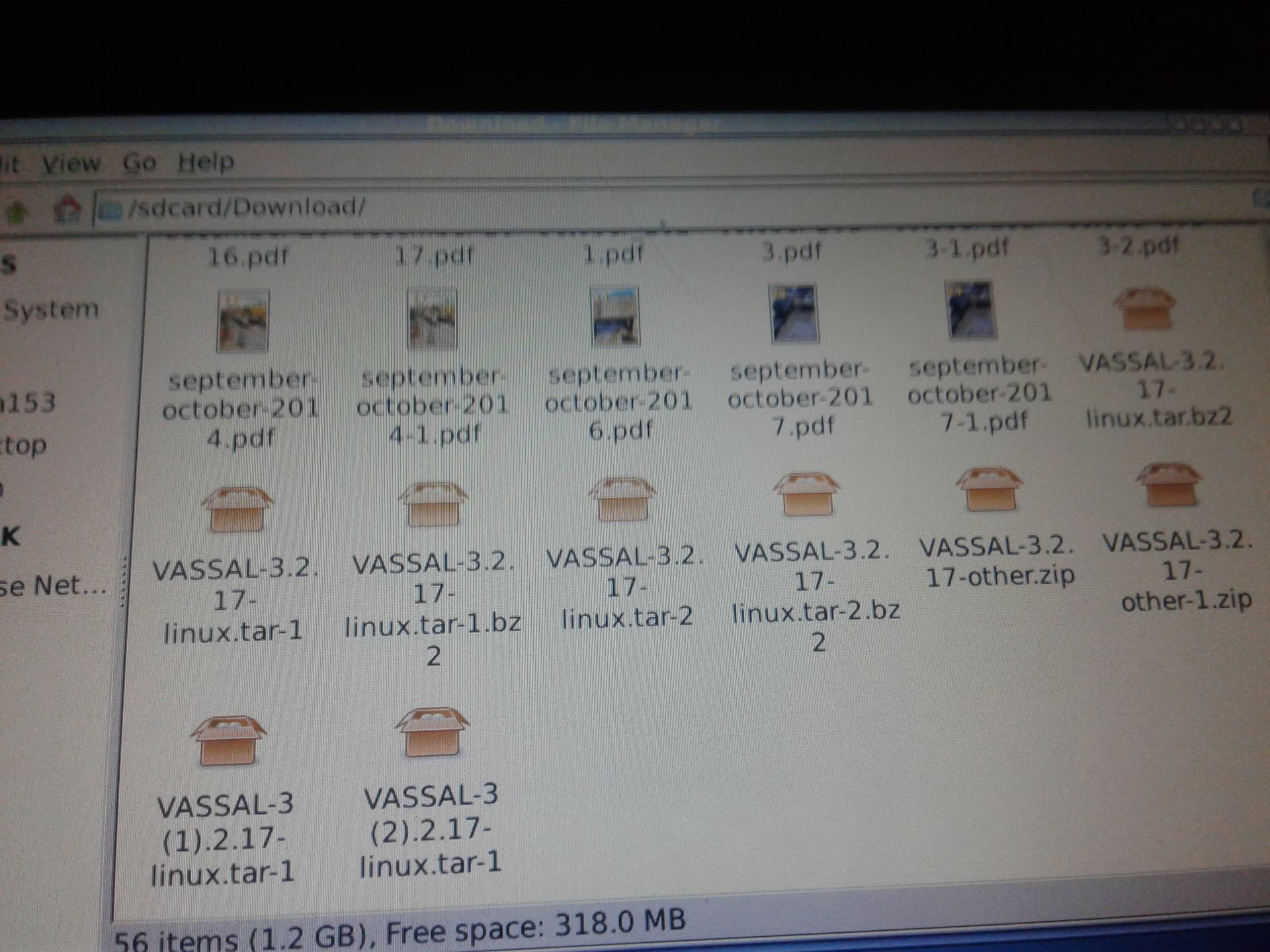
this photo is of Debian file mgr. all tar boxes are open. i didnt unzip them with a tar unzipper. so what is it and where do i get it?
where do i view this video?
will be at the library today and will print this thread. hard using 2 machines at a time. need some hard copy to look at.
bare with me. succeeded in uploading the linux photo so thats a hooray for me.
later RAy.
---
### Author:  [@cholmcc](https://forum.vassalengine.org/u/cholmcc)
#### Post date: [March 5, 2024, 12:53pm UTC](https://forum.vassalengine.org/t/vassal-on-a-tablet-android-or-linux/79098/10 "2024-03-05T12:53:09Z")
> [@rayb](#):
>
> ok. open command on my linux install is not highlighted so i cant load anything. all else is working. so if i unzip the tar i couldnt load it to run. why i asked about the unzip programs. i have not unzipped the tar. so what will it look like unzipped?
If you double-click one of the files, does it open an application? If so, look for a command, button, menu-entry, … called something like `Extract`
> [@rayb](#):
>
> i found the 161 jpg vassal dialog boxes on the att tab. there are 1 linux installer there but wants root permission. not using that. an Anlinux installer. dont know where i got it but since it lists many distros must need to be online to install.
Sorry, don’t get that. What do you mean by “jpg vassal dialog boxes”? Please elaborate.
In terms of permissions - are you perhaps trying to extract to some system destination like `/`?
> [@rayb](#):
>
> the vassal dilogs are the screens to load game parts. like picking side. counters. maps etc. when i saw these i thought i was on my way. but they are just the screens.
Again, not clear what you are doing. Please elaborate.
> [@rayb](#):
>
> tks for all the info. tuesday ill try to get this thread printed out.
> these 161 screens are on the att tab. a gpad f i think. its filled to the gunwales. i dont dare do anything until i transfer stuff to a card. i dont have linux installed but must have unzipped a tar to even see these.
Have you figured out how to open a terminal in your Linux virtual environment?
If so, have you tried running
```
cd /sdcard/Downloads
```
and then
```
tar -xjvf VASSAL-3.2.17-linux.tar.bz2
```
and then
```
cd VASSAL-3.2.17
```
and then
```
./VASSAL.sh
```
That should fire up VASSAL as per normal.
> [@rayb](#):
>
> this photo is of Debian file mgr. all tar boxes are open.
What do you mean by “open”? The icon may show an open box but that does not mean that you have “opened” the file.
You should remove all these `.tar.bz2` files and download the latest and greatest VASSAL for Linux distribution. Then try to double click it. It will likely bring up a new window from where you can execute (button, menu entry) some `Extract` command. If no window is opened try following the procedure outlined above using a Terminal.
> [@rayb](#):
>
> i didnt unzip them with a tar unzipper. so what is it and where do i get it?
Follow the steps outlined above.
> [@rayb](#):
>
> where do i view this video?
Which video? The one I referenced earlier - follow [this link](https://www.makeuseof.com/tag/how-to-linux-on-android/#how-to-install-linux-on-android-without-root) (click the blue text).
If you are having trouble finding the terminal, look for some sort of “Start menu” like button on the Desktop of your virtual Linux machine. Then click that and see if you can find “Terminal” in some menu (typically a sub-menu like “Utilities”). Then click that menu entry to open up the terminal application. In that terminal, type in the commands given above - line by line and executed by hitting `Return`.
Yours,
_Christian_
---
### Author:  [@rayb](https://forum.vassalengine.org/u/rayb)
#### Post date: [March 6, 2024, 10:20am UTC](https://forum.vassalengine.org/t/vassal-on-a-tablet-android-or-linux/79098/11 "2024-03-06T10:20:39Z")
i have opened a page that i call the command line. there are 2 terninal icons. 1 for rooted and 1 for not.
been there but didnt have any commands to enter.
will try the above suggestions before i try and download anything. i havent been able to get online with this tab since 2019 or so. all the linux stuff was 2017 18.
at the library one of the girls got it on line. i have to try it myself first.
why i want to try what i have first.
the icon boxes look like they are open but nothing is.
tks RAy.
---
### Author:  [@rayb](https://forum.vassalengine.org/u/rayb)
#### Post date: [March 7, 2024, 10:26am UTC](https://forum.vassalengine.org/t/vassal-on-a-tablet-android-or-linux/79098/12 "2024-03-07T10:26:23Z")
ok watched the video. i have the Anlinux on the att tab. requires on line. video fills in some gaps.
tks agn. more later RAy.
---
### Author:  [@rayb](https://forum.vassalengine.org/u/rayb)
#### Post date: [March 7, 2024, 10:29am UTC](https://forum.vassalengine.org/t/vassal-on-a-tablet-android-or-linux/79098/13 "2024-03-07T10:29:19Z")
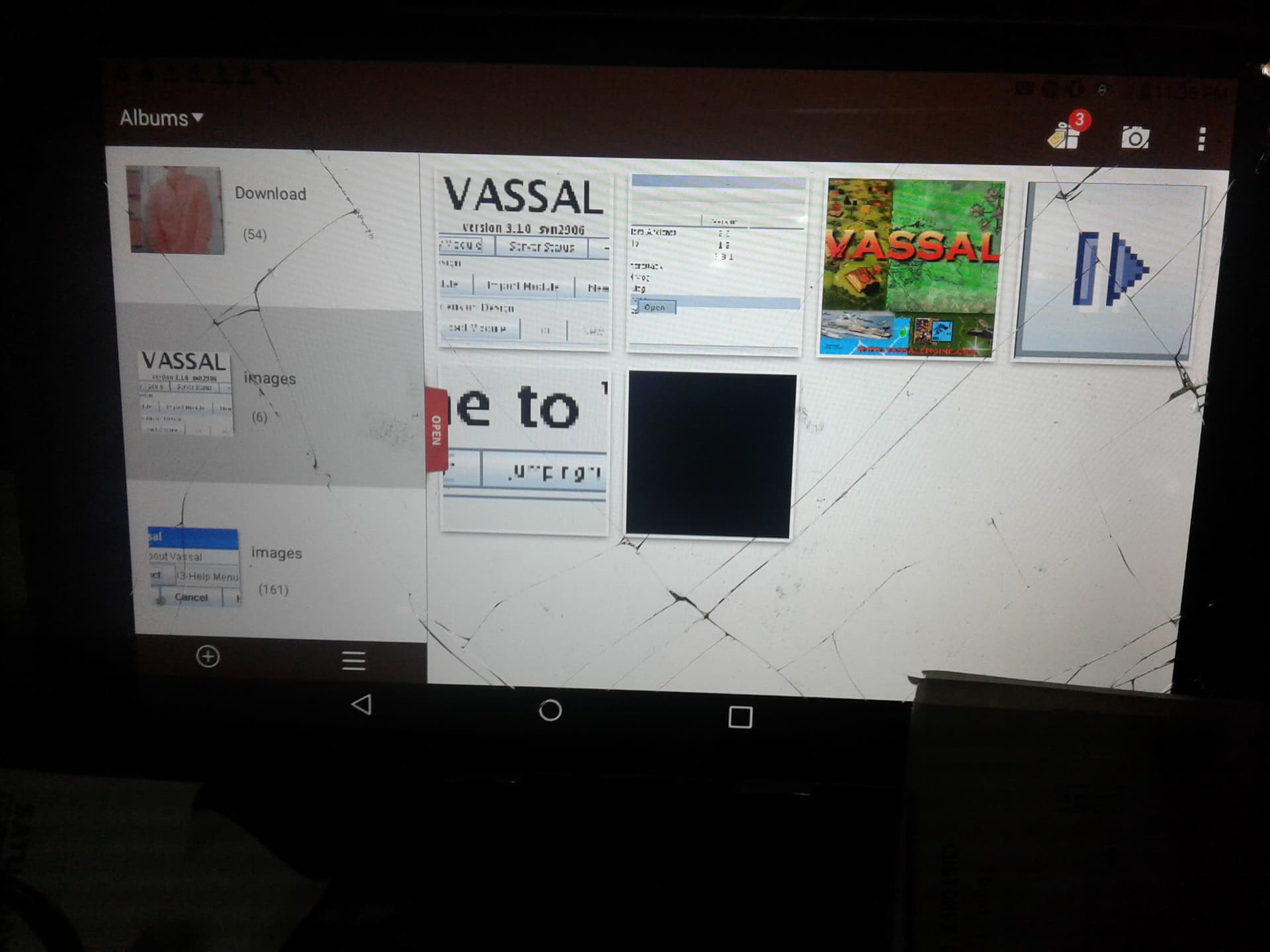
okay find a photo o the screens or dialogs i found on the att tab.
---
### Author:  [@cholmcc](https://forum.vassalengine.org/u/cholmcc)
#### Post date: [March 10, 2024, 11:56am UTC](https://forum.vassalengine.org/t/vassal-on-a-tablet-android-or-linux/79098/14 "2024-03-10T11:56:55Z")
From your screenshot it looks like you are viewing images (pictures - the app opened is `Albums`). This is not what you want.
> [@rayb](#):
>
> i have opened a page that i call the command line. there are 2 terninal icons. 1 for rooted and 1 for not.
> been there but didnt have any commands to enter.
Pick the one called `Terminal` or something like that (not the _root_ version). What do you mean by “didnt have any commands to enter” ? You should see prompt, often something like one of
```
>
$
~:>
~:$
```
You then need to type in the commands (see previous posts) yourself. If an on-screen keyboard isn’t shown, use whatever means defined to get that opened. That is, in your terminal do something like
```
> cd ~
```
(that is, type `c` `d` `[space]` `~`, followed by `[enter]`), and so on for the rest of the command listed in the previous posts.
Yours,
_Christian_
---
### Author:  [@rayb](https://forum.vassalengine.org/u/rayb)
#### Post date: [March 13, 2024, 8:55am UTC](https://forum.vassalengine.org/t/vassal-on-a-tablet-android-or-linux/79098/15 "2024-03-13T08:55:05Z")
this photo only shows 6. the other shows 161. i thought i was making progress but they are the screen and or dialogs for vassal.
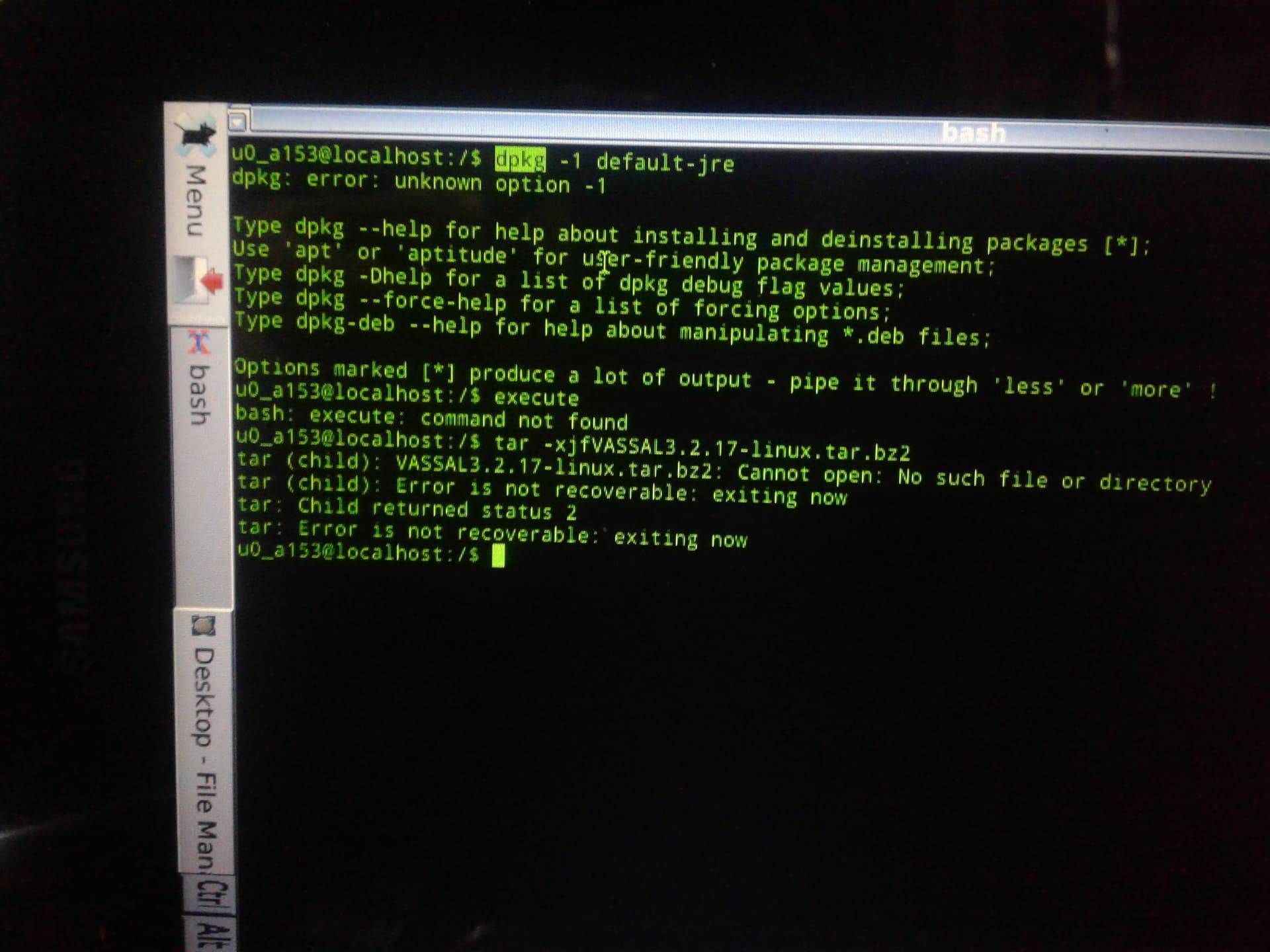
ok got the bluetooth keyboard working. typed some stuff on the command line after a $ sign.
dpkg -1 default jre etc. debian came back with dpkg error unknown option -1. also listed good dpkg commands. then tried the tar. xjf vassal etc. said no such file found. thought i had the whole thread printed out but missed the cd entries. will hand scribe those. one parsing query. after the initial command is a space then the option then something like xjf should there have been a space before vassal etc?
---
### Author:  [@rayb](https://forum.vassalengine.org/u/rayb)
#### Post date: [March 13, 2024, 8:57am UTC](https://forum.vassalengine.org/t/vassal-on-a-tablet-android-or-linux/79098/16 "2024-03-13T08:57:29Z")
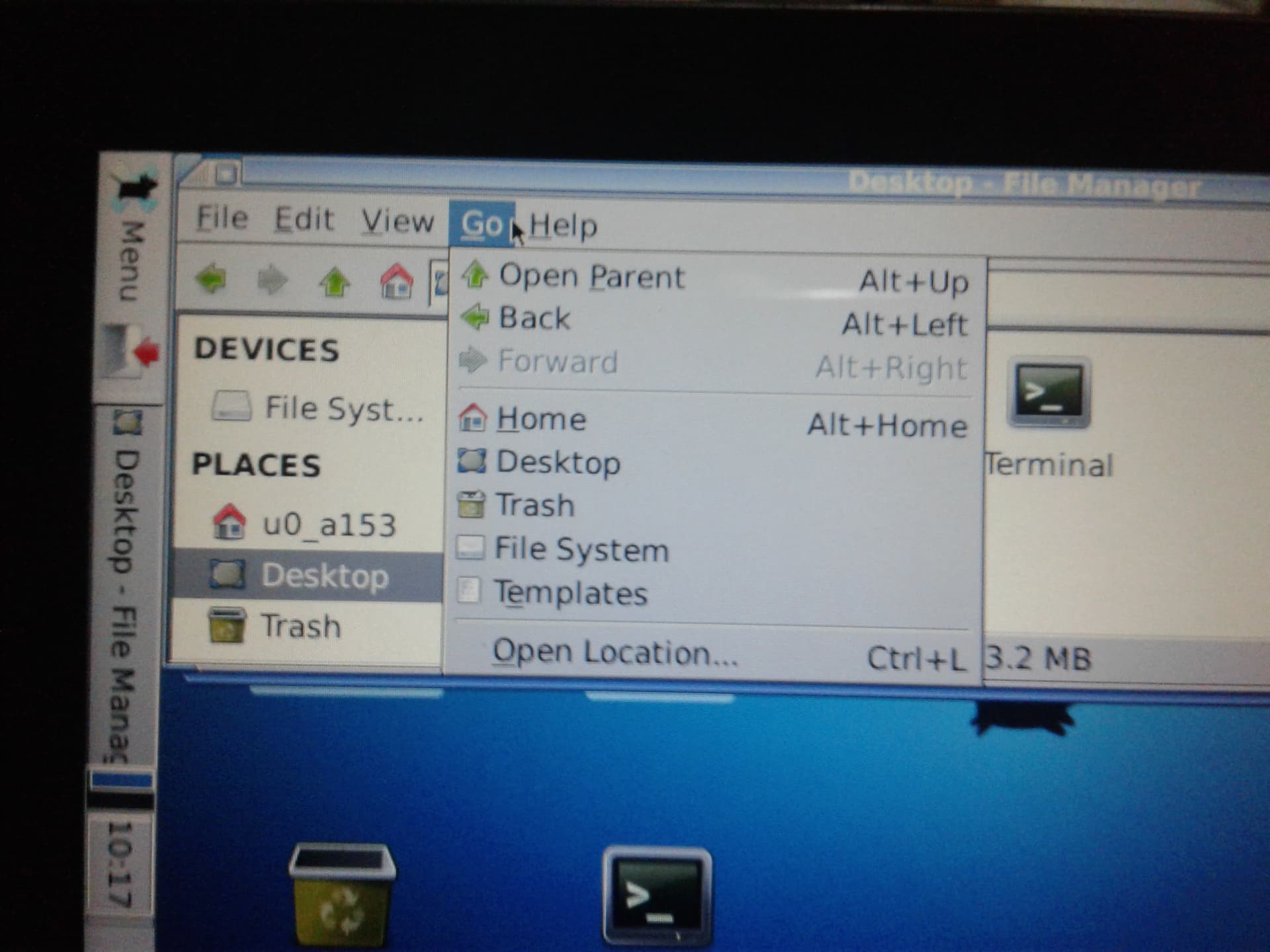
dimmed open command.
---
### Author:  [@rayb](https://forum.vassalengine.org/u/rayb)
#### Post date: [March 13, 2024, 8:58am UTC](https://forum.vassalengine.org/t/vassal-on-a-tablet-android-or-linux/79098/17 "2024-03-13T08:58:39Z")
sorry wrong photo. open command dimmed as forward is.
---
### Author:  [@uckelman](https://forum.vassalengine.org/u/uckelman)
#### Post date: [March 13, 2024, 11:29am UTC](https://forum.vassalengine.org/t/vassal-on-a-tablet-android-or-linux/79098/18 "2024-03-13T11:29:53Z")
Commands should be typed exactly as given if you want them to work correctly.
`dpkg -1 default-jre` won’t work because the option is supposed to be a lowercase L, not a 1.
`tar -xjvfVASSAL3.2.17-linux.tar.bz2` is missing a space between the options and the filename. This happens to work as expected because the `f` option requires a parameter following it—but if `f` didn’t require a parameter, omitting the space after the options would cause your whole filename to be interpreted as a sequence of options instead. However, `tar` failed anyway because the `VASSAL3.2.17-linux.tar.bz2` isn’t in the present working directory.
---
### Author:  [@rayb](https://forum.vassalengine.org/u/rayb)
#### Post date: [March 15, 2024, 9:24am UTC](https://forum.vassalengine.org/t/vassal-on-a-tablet-android-or-linux/79098/19 "2024-03-15T09:24:06Z")
tks. those lower case L’s always fool me. will try again. the cd command is what? change directory? so how do i get it to the right directory? i have to do the linux stuff at the table because of the keyboard. replying from the recliner. what is shhs or something like that in the An Linux file. if i try another linux install which one might come with the jre?
tks
---
### Author:  [@uckelman](https://forum.vassalengine.org/u/uckelman)
#### Post date: [March 15, 2024, 12:00pm UTC](https://forum.vassalengine.org/t/vassal-on-a-tablet-android-or-linux/79098/20 "2024-03-15T12:00:33Z")
`cd some_directory` will change the current directory to `some_directory`.
[Next page](https://forum.vassalengine.org/t/vassal-on-a-tablet-android-or-linux/79098.md?page=2)