# "Windows 32 bit" 3.3.1
**URL:** https://forum.vassalengine.org/t/windows-32-bit-3-3-1/10834
**Category:** Development
**Created:** [July 9, 2020, 2:51am UTC](https://forum.vassalengine.org/t/windows-32-bit-3-3-1/10834 "2020-07-09T02:51:26Z")
**Posts on this page:** 20
**Page:** 1
### Author:  [@Cattlesquat](https://forum.vassalengine.org/u/Cattlesquat)
#### Post date: [July 9, 2020, 2:51am UTC](https://forum.vassalengine.org/t/windows-32-bit-3-3-1/10834/1 "2020-07-09T02:51:26Z")
So I’m gonna suggest there probably ought to be a “Windows 32-bit” icon/link on the main download page ([vassalengine.org/download.php](http://www.vassalengine.org/download.php)) that leads to a page explaining where to get the 32-bit JDK and then points you at the “Other” Vassal download package, etc?
Otherwise, the long drip drip drip…
---
### Author:  [@uckelman](https://forum.vassalengine.org/u/uckelman)
#### Post date: [July 9, 2020, 6:47pm UTC](https://forum.vassalengine.org/t/windows-32-bit-3-3-1/10834/2 "2020-07-09T18:47:40Z")
Thus spake Cattlesquat:
> So I’m gonna suggest there probably ought to be a “Windows 32-bit”
> icon/link on the main download page
> ([vassalengine.org/download.php](http://www.vassalengine.org/download.php)[1]) that leads to a page
> explaining where to get the 32-bit JDK and then points you at the
> “Other” Vassal download package, etc?
>
> Otherwise, the long drip drip drip…
So…
I _could_ make an installer for 32-bit Windows. It wouldn’t be very
hard—it would amount to having one more JDK sitting around for jlink
to use, and having a second NSIS script containing only the 32-bit parts
I stripped out of the installer for 3.3.0.
The thing I’m dubious about is if in 2020, doing this is worth the effort.
–
J.
---
### Author:  [@Cattlesquat](https://forum.vassalengine.org/u/Cattlesquat)
#### Post date: [July 9, 2020, 7:04pm UTC](https://forum.vassalengine.org/t/windows-32-bit-3-3-1/10834/3 "2020-07-09T19:04:06Z")
Heh. This is one of the more benign reasons that video games like to “phone home” on the internet a lot – so the publishers can have an idea of how many people are _actually_ using the thing on just how old a platform and stuff.
“Anec-data-lly”, I was probably personally running 32-bit Windows until around late 2017 and there was no good excuse for that other than it still worked and I didn’t “need” to go through the hassle of getting a new machine yet.
My gut instinct tells me that based on the Vassal demographic, that the one or two “tech support” reports on this aren’t going to be the last ones. 🙂
Brian
---
### Author:  [@uckelman](https://forum.vassalengine.org/u/uckelman)
#### Post date: [July 9, 2020, 7:10pm UTC](https://forum.vassalengine.org/t/windows-32-bit-3-3-1/10834/4 "2020-07-09T19:10:32Z")
Thus spake Cattlesquat:
> Heh. This is one of the more benign reasons that video games like to
> “phone home” on the internet a lot – so the publishers can have an idea
> of how many people are _actually_ using the thing on just how old a
> platform and stuff.
>
> “Anec-data-lly”, I was probably personally running 32-bit Windows until
> around 2017 and there was no good excuse for that other than it still
> worked and I didn’t “need” to go through the hassle of getting a new
> machine yet.
>
> My gut instinct tells me that based on the Vassal demographic, that the
> one or two “tech support” reports on this aren’t going to be the last
> ones. 🙂
I really want to say “here’s a nickel, go buy yourself a modern computer”,
but I can already envision this problem becoming a time suck if I don’t make
32-bit Windows installer.
Sigh.
–
J.
---
### Author:  [@Flint1b](https://forum.vassalengine.org/u/Flint1b)
#### Post date: [July 9, 2020, 7:15pm UTC](https://forum.vassalengine.org/t/windows-32-bit-3-3-1/10834/5 "2020-07-09T19:15:22Z")
> [@uckelman](#):
>
> I _could_ make an installer for 32-bit Windows. It wouldn’t be very
> hard—it would amount to having one more JDK sitting around for jlink
> to use, and having a second NSIS script containing only the 32-bit parts
> I stripped out of the installer for 3.3.0.
If you’re already messing with the build script, you could automate it so it downloads and unzips the necessary JDKs automatically, of course only if they are not downloaded and unzipped yet. Adopt even has a REST API for this: [api.adoptopenjdk.net/](https://api.adoptopenjdk.net/)
But…
> [@uckelman](#):
>
> The thing I’m dubious about is if in 2020, doing this is worth the effort.
… and also with the advent of jpackage and Flint already doing experiments with packaging Vassal with it:
- [github.com/yanlyub/vassal/tree/ … t-jpackage](https://github.com/yanlyub/vassal/tree/experiment-jpackage)
- [travis-ci.com/github/yanlyub/va … /174784035](https://travis-ci.com/github/yanlyub/vassal/builds/174784035)
If Travis offers to run builds on linux/windows/mac, for FREE, why not use it 😃
Another option would be to automate the whole build so that it can run on a “naked” ubuntu machine, install all requirements first then build all 4 distributions.
---
### Author:  [@uckelman](https://forum.vassalengine.org/u/uckelman)
#### Post date: [July 10, 2020, 1:24pm UTC](https://forum.vassalengine.org/t/windows-32-bit-3-3-1/10834/6 "2020-07-10T13:24:03Z")
Here’s an installer for 32-bit Windows:
[vassalengine.org/~uckelman/t … ows-32.exe](http://www.vassalengine.org/~uckelman/tmp/VASSAL-3.3.1-280-g7ae220c1-windows-32.exe)
Please try it on 32-bit Windows. Does it run and install VASSAL? Does VASSAL run after you’ve installed it?
---
### Author:  [@RobS](https://forum.vassalengine.org/u/RobS)
#### Post date: [July 11, 2020, 3:23pm UTC](https://forum.vassalengine.org/t/windows-32-bit-3-3-1/10834/7 "2020-07-11T15:23:49Z")
It seemed to install okay, but when I click on the desktop icon to run it, two things happen.
Firstly, I get this error message:

Secondly, it opens a Chrome browser window (even without Chrome running) showing the front page of this website.
My system is 32-bit Win7.
According to my Control Panel, I have Java 8 Update 251 installed, although the Java website is “unable to verify” it. I’m sure it’s there because I manually uninstalled and reinstalled it just a few days ago.
---
### Author:  [@uckelman](https://forum.vassalengine.org/u/uckelman)
#### Post date: [July 11, 2020, 4:08pm UTC](https://forum.vassalengine.org/t/windows-32-bit-3-3-1/10834/8 "2020-07-11T16:08:41Z")
Thus spake RobS:
> Secondly, it opens a Chrome browser window (even without Chrome running)
> showing the front page of this website.
After doing what? When does that happen?
> According to my Control Panel, I have Java 8 Update 251 installed,
> although the Java website is “unable to verify” it. I’m sure it’s there
> because I manually uninstalled and reinstalled it just a few days ago.
What version of Java you have installed on Windows doesn’t matter from
3.3.0 onward, as we’re bundling Java with VASSAL now.
–
J.
---
### Author:  [@Cattlesquat](https://forum.vassalengine.org/u/Cattlesquat)
#### Post date: [July 11, 2020, 4:12pm UTC](https://forum.vassalengine.org/t/windows-32-bit-3-3-1/10834/9 "2020-07-11T16:12:41Z")
Hi Joel - I received the same error today when I installed the Chatter-PR-test link you sent me on Github. I’m on 64-bit windows to be clear, but of course I was theoretically getting a normal 64-bit windows version in that case. Something may have gone awry with windows builds.
---
### Author:  [@RobS](https://forum.vassalengine.org/u/RobS)
#### Post date: [July 11, 2020, 4:55pm UTC](https://forum.vassalengine.org/t/windows-32-bit-3-3-1/10834/10 "2020-07-11T16:55:02Z")
> [@uckelman](#):
>
> Thus spake RobS:
>
> > Secondly, it opens a Chrome browser window (even without Chrome running)
> > showing the front page of this website.
>
> After doing what? When does that happen?
After I click away the aforementioned error message.
> [@](#):
>
> > According to my Control Panel, I have Java 8 Update 251 installed,
> > although the Java website is “unable to verify” it. I’m sure it’s there
> > because I manually uninstalled and reinstalled it just a few days ago.
>
> What version of Java you have installed on Windows doesn’t matter from
> 3.3.0 onward, as we’re bundling Java with VASSAL now.
I uninstalled both Java 8 Update 251 and the new Vassal, reinstalled the new Vassal and still no joy, same error message and behavior as with Java 8 installed.
---
### Author:  [@uckelman](https://forum.vassalengine.org/u/uckelman)
#### Post date: [July 11, 2020, 5:13pm UTC](https://forum.vassalengine.org/t/windows-32-bit-3-3-1/10834/11 "2020-07-11T17:13:15Z")
Thus spake RobS:
> “uckelman” wrote:
>
> > Thus spake RobS:
> >
> > > Secondly, it opens a Chrome browser window (even without Chrome
> > > running)
> > > showing the front page of this website.
> >
> > After doing what? When does that happen?
>
> After I click away the aforementioned error message.
That’s going to be the launcher taking you to the URL we set there.
I’d forgotten that existed, as it hardly ever happens.
> > > According to my Control Panel, I have Java 8 Update 251 installed,
> > > although the Java website is “unable to verify” it. I’m sure it’s
> > > there
> > > because I manually uninstalled and reinstalled it just a few days
> > > ago.
> >
> > What version of Java you have installed on Windows doesn’t matter from
> > 3.3.0 onward, as we’re bundling Java with VASSAL now.
>
> I uninstalled both Java 8 Update 251 and the new Vassal, reinstalled the
> new Vassal and still no joy, same error message and behavior as with
> Java 8 installed.
That’s as expected. Neither Java 8 nor any other version of Java you have
installed will make a differencei—even if this hadn’t been a bad build.
The problem was that I messed up the symlinks when I added a 32-bit Windows
JDK to my builds setup, which is why you got a bundled JVM that wouldn’t
run. I believe I have it right now. Please try this new build:
[vassalengine.org/~uckelman/t … ows-32.exe](http://www.vassalengine.org/~uckelman/tmp/VASSAL-3.3.1-281-ga8de7892-32_bit_windows_installer-windows-32.exe)
–
J.
---
### Author:  [@RobS](https://forum.vassalengine.org/u/RobS)
#### Post date: [July 11, 2020, 8:28pm UTC](https://forum.vassalengine.org/t/windows-32-bit-3-3-1/10834/12 "2020-07-11T20:28:16Z")
> [@uckelman](#):
>
> The problem was that I messed up the symlinks when I added a 32-bit Windows
> JDK to my builds setup, which is why you got a bundled JVM that wouldn’t
> run. I believe I have it right now. Please try this new build:
>
> [vassalengine.org/~uckelman/t … ows-32.exe](http://www.vassalengine.org/~uckelman/tmp/VASSAL-3.3.1-281-ga8de7892-32_bit_windows_installer-windows-32.exe)
It again seems to install with no problem, but when I try to run it, it now shows this error message:
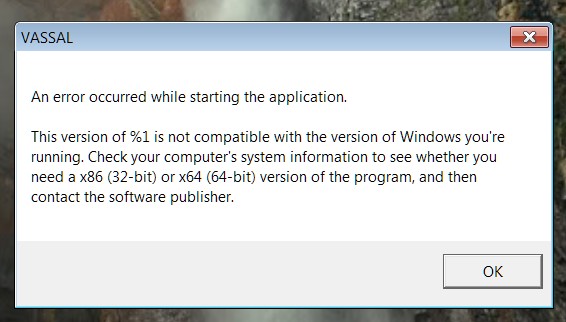
It also still opens a Chrome window for the Vassal website.
Here are my computer specs:
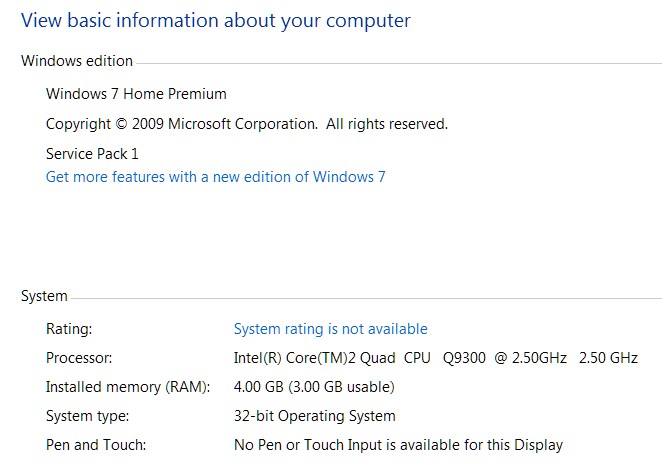
---
### Author:  [@RobS](https://forum.vassalengine.org/u/RobS)
#### Post date: [July 11, 2020, 8:32pm UTC](https://forum.vassalengine.org/t/windows-32-bit-3-3-1/10834/13 "2020-07-11T20:32:01Z")
I just want to add that the previous version of Vassal is perfectly okay for me. I’m not playing any PBEM games at the moment, nor do I plan to in the foreseeable future. I’m only planning to perhaps solo some games, for which the previous version is just fine.
I only replied to this thread after a private message from Cattlesquat asked me to try the new version.
That said, if the new version of Vassal can be made to run on my system, it would of course be nice.
---
### Author:  [@uckelman](https://forum.vassalengine.org/u/uckelman)
#### Post date: [July 11, 2020, 10:43pm UTC](https://forum.vassalengine.org/t/windows-32-bit-3-3-1/10834/14 "2020-07-11T22:43:38Z")
Thus spake RobS:
> “uckelman” wrote:
>
> > The problem was that I messed up the symlinks when I added a 32-bit
> > Windows
> > JDK to my builds setup, which is why you got a bundled JVM that
> > wouldn’t
> > run. I believe I have it right now. Please try this new build:
> >
> > [vassalengine.org/~uckelman/t](http://www.vassalengine.org/~uckelman/t) … ows-32.exe[1]
>
> It again seems to install with no problem, but when I try to run it, it
> now shows this error message:
I found what’s wrong. See below.
> It also still opens a Chrome window for the Vassal website.
That’s as expected when the launcher can’t start Java.
There’s no reason to think anything is wrong with your machine. It turns
out that I accidentally bundled 64-bit Java instead of 32-bit with that
test build.
I think I have it right this time. Please try this build:
[vassalengine.org/~uckelman/t … ows-32.exe](http://www.vassalengine.org/~uckelman/tmp/VASSAL-3.3.1-281-ga8de7892-windows-32.exe)
Thanks for testing these builds. It helps anyone who else who is still using
32-bit Windows have a 3.3 build they can install.
–
J.
---
### Author:  [@Cattlesquat](https://forum.vassalengine.org/u/Cattlesquat)
#### Post date: [July 11, 2020, 10:47pm UTC](https://forum.vassalengine.org/t/windows-32-bit-3-3-1/10834/15 "2020-07-11T22:47:25Z")
Hi Rob - you’re definitely not the only one with 32-bit Windows. You’re not even the only one so far and it’s super helpful you’re on here enough to get us over the hump of some testing to get it right. And ultimately this will mean less time spent on “tech support” by the devs. Brian
---
### Author:  [@RobS](https://forum.vassalengine.org/u/RobS)
#### Post date: [July 12, 2020, 12:56am UTC](https://forum.vassalengine.org/t/windows-32-bit-3-3-1/10834/16 "2020-07-12T00:56:18Z")
> [@uckelman](#):
>
> I think I have it right this time. Please try this build:
>
> [vassalengine.org/~uckelman/t … ows-32.exe](http://www.vassalengine.org/~uckelman/tmp/VASSAL-3.3.1-281-ga8de7892-windows-32.exe)
>
> Thanks for testing these builds. It helps anyone who else who is still using
> 32-bit Windows have a 3.3 build they can install.
Now I’m getting a bug report when I try to load a module. I’ve tried 2 different game modules.
I wasn’t doing anything else at the time, other than trying to run the modules. No other applications running. My AVG virus program does seem to want to check the new Vassal every step of the way, from the first time I install it, to the first time I start it, to the first time I try to run a module. This is something I’ve never seen AVG do before. Everything comes up as “Clean” though, so no virus issues.
Here are the report “details”:
2020-07-11 17:54:06,937 [0-main] INFO VASSAL.launch.StartUp - Starting
2020-07-11 17:54:06,937 [0-main] INFO VASSAL.launch.StartUp - OS Windows 7 6.1
2020-07-11 17:54:06,952 [0-main] INFO VASSAL.launch.StartUp - Java version 14.0.1
2020-07-11 17:54:06,952 [0-main] INFO VASSAL.launch.StartUp - VASSAL version 3.3.1-281-ga8de78922258
2020-07-11 17:54:07,077 [0-AWT-EventQueue-0] INFO VASSAL.launch.ModuleManager - Manager
2020-07-11 17:54:08,263 [0-SwingWorker-pool-2-thread-1] INFO VASSAL.launch.AbstractLaunchAction - Loading module file C:\Users\Rob\Desktop\Boardgames\Siege Of Orgun, The\SiegeOfOrgun\_13.vmod
2020-07-11 17:54:08,356 [0-SwingWorker-pool-2-thread-1] INFO VASSAL.launch.TilingHandler - No images to tile.
2020-07-11 17:54:08,356 [0-SwingWorker-pool-2-thread-1] INFO VASSAL.launch.AbstractLaunchAction - Loading module The Siege of Orgun
2020-07-11 17:54:08,372 [0-SwingWorker-pool-2-thread-1] INFO VASSAL.tools.io.ProcessLauncher - launching C:\Program Files\VASSAL-3.3.1-281-ga8de7892\jre\bin\java -Xms256M -Xmx512M -DVASSAL.id=1 -DVASSAL.port=52659 -Duser.home=C:\Users\Rob -Duser.dir=C:\Program Files\VASSAL-3.3.1-281-ga8de7892 -cp lib\Vengine.jar VASSAL.launch.Player --load – C:\Users\Rob\Desktop\Boardgames\Siege Of Orgun, The\SiegeOfOrgun\_13.vmod
2020-07-11 17:54:08,419 [0-AWT-EventQueue-0] ERROR VASSAL.tools.ProblemDialog -
java.util.concurrent.ExecutionException: java.io.IOException: Cannot run program “C:\Program Files\VASSAL-3.3.1-281-ga8de7892\jre\bin\java”: CreateProcess error=2, The system cannot find the file specified
at java.base/java.util.concurrent.FutureTask.report(Unknown Source)
at java.base/java.util.concurrent.FutureTask.get(Unknown Source)
at java.desktop/javax.swing.SwingWorker.get(Unknown Source)
at VASSAL.launch.AbstractLaunchAction$LaunchTask.done(AbstractLaunchAction.java:597)
at VASSAL.launch.Player$LaunchAction$1.done(Player.java:189)
at java.desktop/javax.swing.SwingWorker$5.run(Unknown Source)
at java.desktop/javax.swing.SwingWorker$DoSubmitAccumulativeRunnable.run(Unknown Source)
at java.desktop/sun.swing.AccumulativeRunnable.run(Unknown Source)
at java.desktop/javax.swing.SwingWorker$DoSubmitAccumulativeRunnable.actionPerformed(Unknown Source)
at java.desktop/javax.swing.Timer.fireActionPerformed(Unknown Source)
at java.desktop/javax.swing.Timer$DoPostEvent.run(Unknown Source)
at java.desktop/java.awt.event.InvocationEvent.dispatch(Unknown Source)
at java.desktop/java.awt.EventQueue.dispatchEventImpl(Unknown Source)
at java.desktop/java.awt.EventQueue$4.run(Unknown Source)
at java.desktop/java.awt.EventQueue$4.run(Unknown Source)
at java.base/java.security.AccessController.doPrivileged(Unknown Source)
at java.base/java.security.ProtectionDomain$JavaSecurityAccessImpl.doIntersectionPrivilege(Unknown Source)
at java.desktop/java.awt.EventQueue.dispatchEvent(Unknown Source)
at java.desktop/java.awt.EventDispatchThread.pumpOneEventForFilters(Unknown Source)
at java.desktop/java.awt.EventDispatchThread.pumpEventsForFilter(Unknown Source)
at java.desktop/java.awt.EventDispatchThread.pumpEventsForHierarchy(Unknown Source)
at java.desktop/java.awt.EventDispatchThread.pumpEvents(Unknown Source)
at java.desktop/java.awt.EventDispatchThread.pumpEvents(Unknown Source)
at java.desktop/java.awt.EventDispatchThread.run(Unknown Source)
Caused by: java.io.IOException: Cannot run program “C:\Program Files\VASSAL-3.3.1-281-ga8de7892\jre\bin\java”: CreateProcess error=2, The system cannot find the file specified
at java.base/java.lang.ProcessBuilder.start(Unknown Source)
at java.base/java.lang.ProcessBuilder.start(Unknown Source)
at VASSAL.tools.io.ProcessLauncher.launch(ProcessLauncher.java:110)
at VASSAL.tools.io.ProcessLauncher.launch(ProcessLauncher.java:86)
at VASSAL.tools.io.ProcessLauncher.launch(ProcessLauncher.java:64)
at VASSAL.launch.AbstractLaunchAction$LaunchTask.doInBackground(AbstractLaunchAction.java:482)
at VASSAL.launch.AbstractLaunchAction$LaunchTask.doInBackground(AbstractLaunchAction.java:240)
at java.desktop/javax.swing.SwingWorker$1.call(Unknown Source)
at java.base/java.util.concurrent.FutureTask.run(Unknown Source)
at java.desktop/javax.swing.SwingWorker.run(Unknown Source)
at java.base/java.util.concurrent.ThreadPoolExecutor.runWorker(Unknown Source)
at java.base/java.util.concurrent.ThreadPoolExecutor$Worker.run(Unknown Source)
at java.base/java.lang.Thread.run(Unknown Source)
Caused by: java.io.IOException: CreateProcess error=2, The system cannot find the file specified
at java.base/java.lang.ProcessImpl.create(Native Method)
at java.base/java.lang.ProcessImpl.(Unknown Source)
at java.base/java.lang.ProcessImpl.start(Unknown Source)
… 13 common frames omitted
2020-07-11 17:54:08,481 [0-pool-3-thread-1] ERROR VASSAL.tools.ErrorDialog -
java.lang.reflect.InvocationTargetException: null
at java.desktop/java.awt.EventQueue.invokeAndWait(Unknown Source)
at java.desktop/java.awt.EventQueue.invokeAndWait(Unknown Source)
at java.desktop/javax.swing.SwingUtilities.invokeAndWait(Unknown Source)
at VASSAL.tools.DialogUtils$1.run(DialogUtils.java:69)
at java.base/java.util.concurrent.Executors$RunnableAdapter.call(Unknown Source)
at java.base/java.util.concurrent.FutureTask.run(Unknown Source)
at java.base/java.util.concurrent.ThreadPoolExecutor.runWorker(Unknown Source)
at java.base/java.util.concurrent.ThreadPoolExecutor$Worker.run(Unknown Source)
at java.base/java.lang.Thread.run(Unknown Source)
Caused by: java.lang.NullPointerException: null
at java.desktop/javax.swing.BoxLayout.preferredLayoutSize(Unknown Source)
at java.desktop/javax.swing.plaf.basic.BasicOptionPaneUI.getPreferredSize(Unknown Source)
at java.desktop/javax.swing.JComponent.getPreferredSize(Unknown Source)
at java.desktop/java.awt.BorderLayout.preferredLayoutSize(Unknown Source)
at java.desktop/java.awt.Container.preferredSize(Unknown Source)
at java.desktop/java.awt.Container.getPreferredSize(Unknown Source)
at java.desktop/javax.swing.JComponent.getPreferredSize(Unknown Source)
at java.desktop/javax.swing.JRootPane$RootLayout.preferredLayoutSize(Unknown Source)
at java.desktop/java.awt.Container.preferredSize(Unknown Source)
at java.desktop/java.awt.Container.getPreferredSize(Unknown Source)
at java.desktop/javax.swing.JComponent.getPreferredSize(Unknown Source)
at java.desktop/java.awt.BorderLayout.preferredLayoutSize(Unknown Source)
at java.desktop/java.awt.Container.preferredSize(Unknown Source)
at java.desktop/java.awt.Container.getPreferredSize(Unknown Source)
at net.miginfocom.swing.MigLayout.adjustWindowSize(Unknown Source)
at net.miginfocom.swing.MigLayout.layoutContainer(Unknown Source)
at net.miginfocom.swing.MigLayout.preferredLayoutSize(Unknown Source)
at java.desktop/java.awt.Container.preferredSize(Unknown Source)
at java.desktop/java.awt.Container.getPreferredSize(Unknown Source)
at java.desktop/javax.swing.JComponent.getPreferredSize(Unknown Source)
at java.desktop/java.awt.GridBagLayout.GetLayoutInfo(Unknown Source)
at java.desktop/java.awt.GridBagLayout.getLayoutInfo(Unknown Source)
at java.desktop/java.awt.GridBagLayout.preferredLayoutSize(Unknown Source)
at java.desktop/java.awt.Container.preferredSize(Unknown Source)
at java.desktop/java.awt.Container.getPreferredSize(Unknown Source)
at java.desktop/javax.swing.JComponent.getPreferredSize(Unknown Source)
at java.desktop/java.awt.BorderLayout.preferredLayoutSize(Unknown Source)
at java.desktop/java.awt.Container.preferredSize(Unknown Source)
at java.desktop/java.awt.Container.getPreferredSize(Unknown Source)
at java.desktop/javax.swing.JComponent.getPreferredSize(Unknown Source)
at java.desktop/java.awt.BorderLayout.preferredLayoutSize(Unknown Source)
at java.desktop/java.awt.Container.preferredSize(Unknown Source)
at java.desktop/java.awt.Container.getPreferredSize(Unknown Source)
at java.desktop/javax.swing.JComponent.getPreferredSize(Unknown Source)
at java.desktop/javax.swing.BoxLayout.checkRequests(Unknown Source)
at java.desktop/javax.swing.BoxLayout.preferredLayoutSize(Unknown Source)
at java.desktop/javax.swing.plaf.basic.BasicOptionPaneUI.getPreferredSize(Unknown Source)
at java.desktop/javax.swing.JComponent.getPreferredSize(Unknown Source)
at java.desktop/java.awt.BorderLayout.preferredLayoutSize(Unknown Source)
at java.desktop/java.awt.Container.preferredSize(Unknown Source)
at java.desktop/java.awt.Container.getPreferredSize(Unknown Source)
at java.desktop/javax.swing.JComponent.getPreferredSize(Unknown Source)
at java.desktop/javax.swing.JRootPane$RootLayout.preferredLayoutSize(Unknown Source)
at java.desktop/java.awt.Container.preferredSize(Unknown Source)
at java.desktop/java.awt.Container.getPreferredSize(Unknown Source)
at java.desktop/javax.swing.JComponent.getPreferredSize(Unknown Source)
at java.desktop/java.awt.BorderLayout.preferredLayoutSize(Unknown Source)
at java.desktop/java.awt.Container.preferredSize(Unknown Source)
at java.desktop/java.awt.Container.getPreferredSize(Unknown Source)
at java.desktop/java.awt.Window.pack(Unknown Source)
at java.desktop/javax.swing.JOptionPane.initDialog(Unknown Source)
at java.desktop/javax.swing.JOptionPane.createDialog(Unknown Source)
at java.desktop/javax.swing.JOptionPane.createDialog(Unknown Source)
at VASSAL.tools.swing.DetailsDialog.showDialog(DetailsDialog.java:99)
at VASSAL.tools.ProblemDialog$4.run(ProblemDialog.java:273)
at java.desktop/java.awt.event.InvocationEvent.dispatch(Unknown Source)
at java.desktop/java.awt.EventQueue.dispatchEventImpl(Unknown Source)
at java.desktop/java.awt.EventQueue$4.run(Unknown Source)
at java.desktop/java.awt.EventQueue$4.run(Unknown Source)
at java.base/java.security.AccessController.doPrivileged(Unknown Source)
at java.base/java.security.ProtectionDomain$JavaSecurityAccessImpl.doIntersectionPrivilege(Unknown Source)
at java.desktop/java.awt.EventQueue.dispatchEvent(Unknown Source)
at java.desktop/java.awt.EventDispatchThread.pumpOneEventForFilters(Unknown Source)
at java.desktop/java.awt.EventDispatchThread.pumpEventsForFilter(Unknown Source)
at java.desktop/java.awt.EventDispatchThread.pumpEventsForHierarchy(Unknown Source)
at java.desktop/java.awt.EventDispatchThread.pumpEvents(Unknown Source)
at java.desktop/java.awt.EventDispatchThread.pumpEvents(Unknown Source)
at java.desktop/java.awt.EventDispatchThread.run(Unknown Source)
---
### Author:  [@uckelman](https://forum.vassalengine.org/u/uckelman)
#### Post date: [July 12, 2020, 8:12pm UTC](https://forum.vassalengine.org/t/windows-32-bit-3-3-1/10834/17 "2020-07-12T20:12:40Z")
Thus spake RobS:
> Here are the report “details”:
Thanks. We’re making progress. We know that the launcher started the
Module Manager with the bundled 32-bit Java now. Looks like we have
one more problem to resolve. Hang with us and we’ll get it.
> 2020-07-11 17:54:08,372 [0-SwingWorker-pool-2-thread-1] INFO
> VASSAL.tools.io.ProcessLauncher - launching C:\Program
> Files\VASSAL-3.3.1-281-ga8de7892\jre\bin\java -Xms256M -Xmx512M
> -DVASSAL.id=1 -DVASSAL.port=52659 -Duser.home=C:\Users\Rob
> -Duser.dir=C:\Program Files\VASSAL-3.3.1-281-ga8de7892 -cp
> lib\Vengine.jar VASSAL.launch.Player --load –
> C:\Users\Rob\Desktop\Boardgames\Siege Of Orgun, The\SiegeOfOrgun\_13.vmod
1. To what path did you install this build?
2. Does C:\Program Files\VASSAL-3.3.1-281-ga8de7892\jre\bin\java exist
on your system? (I suspect it doesn’t.)
–
J.
---
### Author:  [@uckelman](https://forum.vassalengine.org/u/uckelman)
#### Post date: [July 12, 2020, 8:31pm UTC](https://forum.vassalengine.org/t/windows-32-bit-3-3-1/10834/18 "2020-07-12T20:31:59Z")
I have a guess about what was wrong in the previous build. Please answer my two questions about the previous build, but also try this build, which contains an adjustment in our 32-bit installer:
[vassalengine.org/~uckelman/t … ows-32.exe](http://www.vassalengine.org/~uckelman/tmp/VASSAL-3.3.1-293-ge77c9850-32_bit_windows_installer-windows-32.exe)
---
### Author:  [@RobS](https://forum.vassalengine.org/u/RobS)
#### Post date: [July 13, 2020, 2:51am UTC](https://forum.vassalengine.org/t/windows-32-bit-3-3-1/10834/19 "2020-07-13T02:51:45Z")
> [@uckelman](#):
>
> Thanks. We’re making progress. We know that the launcher started the
> Module Manager with the bundled 32-bit Java now. Looks like we have
> one more problem to resolve. Hang with us and we’ll get it.
No problem, glad to help.
> [@](#):
>
> 1. To what path did you install this build?
Standard install to C:\Program files (see screenshot below).
> [@](#):
>
> 1. Does C:\Program Files\VASSAL-3.3.1-281-ga8de7892\jre\bin\java exist
> on your system? (I suspect it doesn’t.)
Here is what’s in the bin folder:
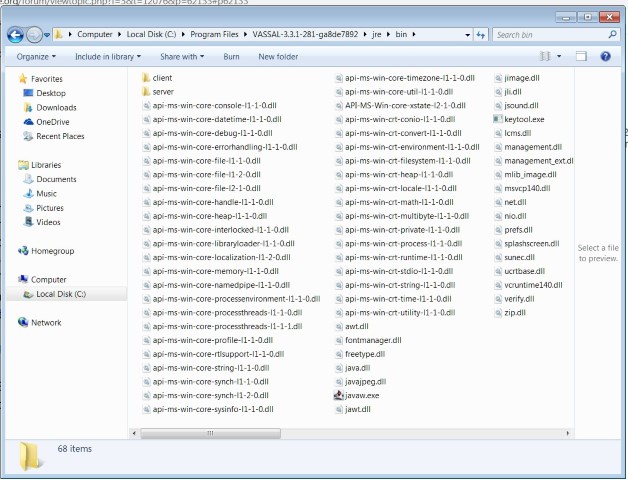
---
### Author:  [@RobS](https://forum.vassalengine.org/u/RobS)
#### Post date: [July 13, 2020, 3:14am UTC](https://forum.vassalengine.org/t/windows-32-bit-3-3-1/10834/20 "2020-07-13T03:14:00Z")
> [@uckelman](#):
>
> I have a guess about what was wrong in the previous build. Please answer my two questions about the previous build, but also try this build, which contains an adjustment in our 32-bit installer:
>
> [vassalengine.org/~uckelman/t … ows-32.exe](http://www.vassalengine.org/~uckelman/tmp/VASSAL-3.3.1-293-ge77c9850-32_bit_windows_installer-windows-32.exe)
Still getting an error message when I try to run a module. Don’t know whether this is the same error as previously:
2020-07-12 20:01:58,959 [0-main] INFO VASSAL.launch.StartUp - Starting
2020-07-12 20:01:58,967 [0-main] INFO VASSAL.launch.StartUp - OS Windows 7 6.1
2020-07-12 20:01:58,967 [0-main] INFO VASSAL.launch.StartUp - Java version 14.0.1
2020-07-12 20:01:58,970 [0-main] INFO VASSAL.launch.StartUp - VASSAL version 3.3.1-293-ge77c9850c1b6-32\_bit\_windows\_installer
2020-07-12 20:01:59,109 [0-AWT-EventQueue-0] INFO VASSAL.launch.ModuleManager - Manager
2020-07-12 20:05:44,140 [0-SwingWorker-pool-2-thread-1] INFO VASSAL.launch.AbstractLaunchAction - Loading module file C:\Users\Rob\Desktop\Boardgames\Siege Of Orgun, The\SiegeOfOrgun\_13.vmod
2020-07-12 20:05:44,220 [0-SwingWorker-pool-2-thread-1] INFO VASSAL.launch.TilingHandler - No images to tile.
2020-07-12 20:05:44,222 [0-SwingWorker-pool-2-thread-1] INFO VASSAL.launch.AbstractLaunchAction - Loading module The Siege of Orgun
2020-07-12 20:05:44,230 [0-SwingWorker-pool-2-thread-1] INFO VASSAL.tools.io.ProcessLauncher - launching C:\Program Files\VASSAL-3.3.1-293-ge77c9850-32\_bit\_windows\_installer\jre\bin\java -Xms256M -Xmx512M -DVASSAL.id=1 -DVASSAL.port=56475 -Duser.home=C:\Users\Rob -Duser.dir=C:\Program Files\VASSAL-3.3.1-293-ge77c9850-32\_bit\_windows\_installer -cp lib\Vengine.jar VASSAL.launch.Player --load – C:\Users\Rob\Desktop\Boardgames\Siege Of Orgun, The\SiegeOfOrgun\_13.vmod
2020-07-12 20:05:44,273 [0-AWT-EventQueue-0] ERROR VASSAL.tools.ProblemDialog -
java.util.concurrent.ExecutionException: java.io.IOException: Cannot run program “C:\Program Files\VASSAL-3.3.1-293-ge77c9850-32\_bit\_windows\_installer\jre\bin\java”: CreateProcess error=2, The system cannot find the file specified
at java.base/java.util.concurrent.FutureTask.report(Unknown Source)
at java.base/java.util.concurrent.FutureTask.get(Unknown Source)
at java.desktop/javax.swing.SwingWorker.get(Unknown Source)
at VASSAL.launch.AbstractLaunchAction$LaunchTask.done(AbstractLaunchAction.java:597)
at VASSAL.launch.Player$LaunchAction$1.done(Player.java:189)
at java.desktop/javax.swing.SwingWorker$5.run(Unknown Source)
at java.desktop/javax.swing.SwingWorker$DoSubmitAccumulativeRunnable.run(Unknown Source)
at java.desktop/sun.swing.AccumulativeRunnable.run(Unknown Source)
at java.desktop/javax.swing.SwingWorker$DoSubmitAccumulativeRunnable.actionPerformed(Unknown Source)
at java.desktop/javax.swing.Timer.fireActionPerformed(Unknown Source)
at java.desktop/javax.swing.Timer$DoPostEvent.run(Unknown Source)
at java.desktop/java.awt.event.InvocationEvent.dispatch(Unknown Source)
at java.desktop/java.awt.EventQueue.dispatchEventImpl(Unknown Source)
at java.desktop/java.awt.EventQueue$4.run(Unknown Source)
at java.desktop/java.awt.EventQueue$4.run(Unknown Source)
at java.base/java.security.AccessController.doPrivileged(Unknown Source)
at java.base/java.security.ProtectionDomain$JavaSecurityAccessImpl.doIntersectionPrivilege(Unknown Source)
at java.desktop/java.awt.EventQueue.dispatchEvent(Unknown Source)
at java.desktop/java.awt.EventDispatchThread.pumpOneEventForFilters(Unknown Source)
at java.desktop/java.awt.EventDispatchThread.pumpEventsForFilter(Unknown Source)
at java.desktop/java.awt.EventDispatchThread.pumpEventsForHierarchy(Unknown Source)
at java.desktop/java.awt.EventDispatchThread.pumpEvents(Unknown Source)
at java.desktop/java.awt.EventDispatchThread.pumpEvents(Unknown Source)
at java.desktop/java.awt.EventDispatchThread.run(Unknown Source)
Caused by: java.io.IOException: Cannot run program “C:\Program Files\VASSAL-3.3.1-293-ge77c9850-32\_bit\_windows\_installer\jre\bin\java”: CreateProcess error=2, The system cannot find the file specified
at java.base/java.lang.ProcessBuilder.start(Unknown Source)
at java.base/java.lang.ProcessBuilder.start(Unknown Source)
at VASSAL.tools.io.ProcessLauncher.launch(ProcessLauncher.java:110)
at VASSAL.tools.io.ProcessLauncher.launch(ProcessLauncher.java:86)
at VASSAL.tools.io.ProcessLauncher.launch(ProcessLauncher.java:64)
at VASSAL.launch.AbstractLaunchAction$LaunchTask.doInBackground(AbstractLaunchAction.java:482)
at VASSAL.launch.AbstractLaunchAction$LaunchTask.doInBackground(AbstractLaunchAction.java:240)
at java.desktop/javax.swing.SwingWorker$1.call(Unknown Source)
at java.base/java.util.concurrent.FutureTask.run(Unknown Source)
at java.desktop/javax.swing.SwingWorker.run(Unknown Source)
at java.base/java.util.concurrent.ThreadPoolExecutor.runWorker(Unknown Source)
at java.base/java.util.concurrent.ThreadPoolExecutor$Worker.run(Unknown Source)
at java.base/java.lang.Thread.run(Unknown Source)
Caused by: java.io.IOException: CreateProcess error=2, The system cannot find the file specified
at java.base/java.lang.ProcessImpl.create(Native Method)
at java.base/java.lang.ProcessImpl.(Unknown Source)
at java.base/java.lang.ProcessImpl.start(Unknown Source)
… 13 common frames omitted
2020-07-12 20:05:44,337 [0-pool-3-thread-1] ERROR VASSAL.tools.ErrorDialog -
java.lang.reflect.InvocationTargetException: null
at java.desktop/java.awt.EventQueue.invokeAndWait(Unknown Source)
at java.desktop/java.awt.EventQueue.invokeAndWait(Unknown Source)
at java.desktop/javax.swing.SwingUtilities.invokeAndWait(Unknown Source)
at VASSAL.tools.DialogUtils$1.run(DialogUtils.java:69)
at java.base/java.util.concurrent.Executors$RunnableAdapter.call(Unknown Source)
at java.base/java.util.concurrent.FutureTask.run(Unknown Source)
at java.base/java.util.concurrent.ThreadPoolExecutor.runWorker(Unknown Source)
at java.base/java.util.concurrent.ThreadPoolExecutor$Worker.run(Unknown Source)
at java.base/java.lang.Thread.run(Unknown Source)
Caused by: java.lang.NullPointerException: null
at java.desktop/javax.swing.BoxLayout.preferredLayoutSize(Unknown Source)
at java.desktop/javax.swing.plaf.basic.BasicOptionPaneUI.getPreferredSize(Unknown Source)
at java.desktop/javax.swing.JComponent.getPreferredSize(Unknown Source)
at java.desktop/java.awt.BorderLayout.preferredLayoutSize(Unknown Source)
at java.desktop/java.awt.Container.preferredSize(Unknown Source)
at java.desktop/java.awt.Container.getPreferredSize(Unknown Source)
at java.desktop/javax.swing.JComponent.getPreferredSize(Unknown Source)
at java.desktop/javax.swing.JRootPane$RootLayout.preferredLayoutSize(Unknown Source)
at java.desktop/java.awt.Container.preferredSize(Unknown Source)
at java.desktop/java.awt.Container.getPreferredSize(Unknown Source)
at java.desktop/javax.swing.JComponent.getPreferredSize(Unknown Source)
at java.desktop/java.awt.BorderLayout.preferredLayoutSize(Unknown Source)
at java.desktop/java.awt.Container.preferredSize(Unknown Source)
at java.desktop/java.awt.Container.getPreferredSize(Unknown Source)
at net.miginfocom.swing.MigLayout.adjustWindowSize(Unknown Source)
at net.miginfocom.swing.MigLayout.layoutContainer(Unknown Source)
at net.miginfocom.swing.MigLayout.preferredLayoutSize(Unknown Source)
at java.desktop/java.awt.Container.preferredSize(Unknown Source)
at java.desktop/java.awt.Container.getPreferredSize(Unknown Source)
at java.desktop/javax.swing.JComponent.getPreferredSize(Unknown Source)
at java.desktop/java.awt.GridBagLayout.GetLayoutInfo(Unknown Source)
at java.desktop/java.awt.GridBagLayout.getLayoutInfo(Unknown Source)
at java.desktop/java.awt.GridBagLayout.preferredLayoutSize(Unknown Source)
at java.desktop/java.awt.Container.preferredSize(Unknown Source)
at java.desktop/java.awt.Container.getPreferredSize(Unknown Source)
at java.desktop/javax.swing.JComponent.getPreferredSize(Unknown Source)
at java.desktop/java.awt.BorderLayout.preferredLayoutSize(Unknown Source)
at java.desktop/java.awt.Container.preferredSize(Unknown Source)
at java.desktop/java.awt.Container.getPreferredSize(Unknown Source)
at java.desktop/javax.swing.JComponent.getPreferredSize(Unknown Source)
at java.desktop/java.awt.BorderLayout.preferredLayoutSize(Unknown Source)
at java.desktop/java.awt.Container.preferredSize(Unknown Source)
at java.desktop/java.awt.Container.getPreferredSize(Unknown Source)
at java.desktop/javax.swing.JComponent.getPreferredSize(Unknown Source)
at java.desktop/javax.swing.BoxLayout.checkRequests(Unknown Source)
at java.desktop/javax.swing.BoxLayout.preferredLayoutSize(Unknown Source)
at java.desktop/javax.swing.plaf.basic.BasicOptionPaneUI.getPreferredSize(Unknown Source)
at java.desktop/javax.swing.JComponent.getPreferredSize(Unknown Source)
at java.desktop/java.awt.BorderLayout.preferredLayoutSize(Unknown Source)
at java.desktop/java.awt.Container.preferredSize(Unknown Source)
at java.desktop/java.awt.Container.getPreferredSize(Unknown Source)
at java.desktop/javax.swing.JComponent.getPreferredSize(Unknown Source)
at java.desktop/javax.swing.JRootPane$RootLayout.preferredLayoutSize(Unknown Source)
at java.desktop/java.awt.Container.preferredSize(Unknown Source)
at java.desktop/java.awt.Container.getPreferredSize(Unknown Source)
at java.desktop/javax.swing.JComponent.getPreferredSize(Unknown Source)
at java.desktop/java.awt.BorderLayout.preferredLayoutSize(Unknown Source)
at java.desktop/java.awt.Container.preferredSize(Unknown Source)
at java.desktop/java.awt.Container.getPreferredSize(Unknown Source)
at java.desktop/java.awt.Window.pack(Unknown Source)
at java.desktop/javax.swing.JOptionPane.initDialog(Unknown Source)
at java.desktop/javax.swing.JOptionPane.createDialog(Unknown Source)
at java.desktop/javax.swing.JOptionPane.createDialog(Unknown Source)
at VASSAL.tools.swing.DetailsDialog.showDialog(DetailsDialog.java:99)
at VASSAL.tools.ProblemDialog$4.run(ProblemDialog.java:273)
at java.desktop/java.awt.event.InvocationEvent.dispatch(Unknown Source)
at java.desktop/java.awt.EventQueue.dispatchEventImpl(Unknown Source)
at java.desktop/java.awt.EventQueue$4.run(Unknown Source)
at java.desktop/java.awt.EventQueue$4.run(Unknown Source)
at java.base/java.security.AccessController.doPrivileged(Unknown Source)
at java.base/java.security.ProtectionDomain$JavaSecurityAccessImpl.doIntersectionPrivilege(Unknown Source)
at java.desktop/java.awt.EventQueue.dispatchEvent(Unknown Source)
at java.desktop/java.awt.EventDispatchThread.pumpOneEventForFilters(Unknown Source)
at java.desktop/java.awt.EventDispatchThread.pumpEventsForFilter(Unknown Source)
at java.desktop/java.awt.EventDispatchThread.pumpEventsForHierarchy(Unknown Source)
at java.desktop/java.awt.EventDispatchThread.pumpEvents(Unknown Source)
at java.desktop/java.awt.EventDispatchThread.pumpEvents(Unknown Source)
at java.desktop/java.awt.EventDispatchThread.run(Unknown Source)
Note that I’m uninstalling the previous builds every time before installing the new ones.
Note also that in my C:\Programs folder, I’m not seeing the normal Vassal install as usual, but instead these two folders:

[Next page](https://forum.vassalengine.org/t/windows-32-bit-3-3-1/10834.md?page=2)