# "Windows 32 bit" 3.3.1
**URL:** https://forum.vassalengine.org/t/windows-32-bit-3-3-1/10834
**Category:** Development
**Created:** [July 9, 2020, 2:51am UTC](https://forum.vassalengine.org/t/windows-32-bit-3-3-1/10834 "2020-07-09T02:51:26Z")
**Posts on this page:** 20
**Page:** 2
### Author:  [@uckelman](https://forum.vassalengine.org/u/uckelman)
#### Post date: [July 13, 2020, 10:55am UTC](https://forum.vassalengine.org/t/windows-32-bit-3-3-1/10834/21 "2020-07-13T10:55:41Z")
I think I’ve spotted the problem. In your screenshot, I see javaw.exe, but no java.exe. Am I right that there’s no java.exe in that directory?
---
### Author:  [@RobS](https://forum.vassalengine.org/u/RobS)
#### Post date: [July 13, 2020, 2:07pm UTC](https://forum.vassalengine.org/t/windows-32-bit-3-3-1/10834/22 "2020-07-13T14:07:26Z")
> [@uckelman](#):
>
> I think I’ve spotted the problem. In your screenshot, I see javaw.exe, but no java.exe. Am I right that there’s no java.exe in that directory?
You are right, there is no java.exe in that directory.
---
### Author:  [@uckelman](https://forum.vassalengine.org/u/uckelman)
#### Post date: [July 13, 2020, 2:14pm UTC](https://forum.vassalengine.org/t/windows-32-bit-3-3-1/10834/23 "2020-07-13T14:14:49Z")
Thus spake RobS:
> “uckelman” wrote:
>
> > I think I’ve spotted the problem. In your screenshot, I see javaw.exe,
> > but no java.exe. Am I right that there’s no java.exe in that
> > directory?
>
> You are right, there is no java.exe in that directory.
That’s the cause of the most recent error message. The Module Manager is
trying to run java.exe, which isn’t there, but should be.
I’ll look into this further later today.
–
J.
---
### Author:  [@uckelman](https://forum.vassalengine.org/u/uckelman)
#### Post date: [July 13, 2020, 9:24pm UTC](https://forum.vassalengine.org/t/windows-32-bit-3-3-1/10834/24 "2020-07-13T21:24:43Z")
Try this build:
[vassalengine.org/~uckelman/t … ows-32.exe](http://www.vassalengine.org/~uckelman/tmp/VASSAL-3.3.1-315-g427241be-32_bit_windows_installer-windows-32.exe)
It should install to C:\Program Files\VASSAL-3.3.1-315-g427241be-32\_bit\_windows\_installer. There ought to be a java.exe in C:\Program Files\VASSAL-3.3.1-315-g427241be-32\_bit\_windows\_installer\jre\bin.
---
### Author:  [@RobS](https://forum.vassalengine.org/u/RobS)
#### Post date: [July 13, 2020, 10:46pm UTC](https://forum.vassalengine.org/t/windows-32-bit-3-3-1/10834/25 "2020-07-13T22:46:36Z")
> [@uckelman](#):
>
> Try this build:
>
> [vassalengine.org/~uckelman/t … ows-32.exe](http://www.vassalengine.org/~uckelman/tmp/VASSAL-3.3.1-315-g427241be-32_bit_windows_installer-windows-32.exe)
>
> It should install to C:\Program Files\VASSAL-3.3.1-315-g427241be-32\_bit\_windows\_installer. There ought to be a java.exe in C:\Program Files\VASSAL-3.3.1-315-g427241be-32\_bit\_windows\_installer\jre\bin.
No joy.
java.exe is not in that location:
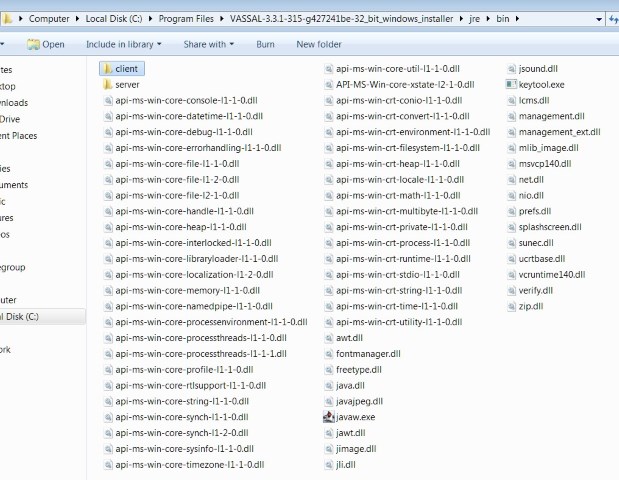
I’m also still getting an error when I try to load a module (let me know whether I need to keep posting these):
2020-07-13 15:45:06,554 [0-main] INFO VASSAL.launch.StartUp - Starting
2020-07-13 15:45:06,554 [0-main] INFO VASSAL.launch.StartUp - OS Windows 7 6.1
2020-07-13 15:45:06,554 [0-main] INFO VASSAL.launch.StartUp - Java version 14.0.1
2020-07-13 15:45:06,554 [0-main] INFO VASSAL.launch.StartUp - VASSAL version 3.3.1-315-g427241be54f5-32\_bit\_windows\_installer
2020-07-13 15:45:06,695 [0-AWT-EventQueue-0] INFO VASSAL.launch.ModuleManager - Manager
2020-07-13 15:45:09,721 [0-SwingWorker-pool-2-thread-1] INFO VASSAL.launch.AbstractLaunchAction - Loading module file C:\Users\Rob\Desktop\Boardgames\Siege Of Orgun, The\SiegeOfOrgun\_13.vmod
2020-07-13 15:45:09,815 [0-SwingWorker-pool-2-thread-1] INFO VASSAL.launch.TilingHandler - No images to tile.
2020-07-13 15:45:09,815 [0-SwingWorker-pool-2-thread-1] INFO VASSAL.launch.AbstractLaunchAction - Loading module The Siege of Orgun
2020-07-13 15:45:09,830 [0-SwingWorker-pool-2-thread-1] INFO VASSAL.tools.io.ProcessLauncher - launching C:\Program Files\VASSAL-3.3.1-315-g427241be-32\_bit\_windows\_installer\jre\bin\java -Xms256M -Xmx512M -DVASSAL.id=1 -DVASSAL.port=54876 -Duser.home=C:\Users\Rob -Duser.dir=C:\Program Files\VASSAL-3.3.1-315-g427241be-32\_bit\_windows\_installer -cp lib\Vengine.jar VASSAL.launch.Player --load – C:\Users\Rob\Desktop\Boardgames\Siege Of Orgun, The\SiegeOfOrgun\_13.vmod
2020-07-13 15:45:09,877 [0-AWT-EventQueue-0] ERROR VASSAL.tools.ProblemDialog -
java.util.concurrent.ExecutionException: java.io.IOException: Cannot run program “C:\Program Files\VASSAL-3.3.1-315-g427241be-32\_bit\_windows\_installer\jre\bin\java”: CreateProcess error=2, The system cannot find the file specified
at java.base/java.util.concurrent.FutureTask.report(Unknown Source)
at java.base/java.util.concurrent.FutureTask.get(Unknown Source)
at java.desktop/javax.swing.SwingWorker.get(Unknown Source)
at VASSAL.launch.AbstractLaunchAction$LaunchTask.done(AbstractLaunchAction.java:597)
at VASSAL.launch.Player$LaunchAction$1.done(Player.java:189)
at java.desktop/javax.swing.SwingWorker$5.run(Unknown Source)
at java.desktop/javax.swing.SwingWorker$DoSubmitAccumulativeRunnable.run(Unknown Source)
at java.desktop/sun.swing.AccumulativeRunnable.run(Unknown Source)
at java.desktop/javax.swing.SwingWorker$DoSubmitAccumulativeRunnable.actionPerformed(Unknown Source)
at java.desktop/javax.swing.Timer.fireActionPerformed(Unknown Source)
at java.desktop/javax.swing.Timer$DoPostEvent.run(Unknown Source)
at java.desktop/java.awt.event.InvocationEvent.dispatch(Unknown Source)
at java.desktop/java.awt.EventQueue.dispatchEventImpl(Unknown Source)
at java.desktop/java.awt.EventQueue$4.run(Unknown Source)
at java.desktop/java.awt.EventQueue$4.run(Unknown Source)
at java.base/java.security.AccessController.doPrivileged(Unknown Source)
at java.base/java.security.ProtectionDomain$JavaSecurityAccessImpl.doIntersectionPrivilege(Unknown Source)
at java.desktop/java.awt.EventQueue.dispatchEvent(Unknown Source)
at java.desktop/java.awt.EventDispatchThread.pumpOneEventForFilters(Unknown Source)
at java.desktop/java.awt.EventDispatchThread.pumpEventsForFilter(Unknown Source)
at java.desktop/java.awt.EventDispatchThread.pumpEventsForHierarchy(Unknown Source)
at java.desktop/java.awt.EventDispatchThread.pumpEvents(Unknown Source)
at java.desktop/java.awt.EventDispatchThread.pumpEvents(Unknown Source)
at java.desktop/java.awt.EventDispatchThread.run(Unknown Source)
Caused by: java.io.IOException: Cannot run program “C:\Program Files\VASSAL-3.3.1-315-g427241be-32\_bit\_windows\_installer\jre\bin\java”: CreateProcess error=2, The system cannot find the file specified
at java.base/java.lang.ProcessBuilder.start(Unknown Source)
at java.base/java.lang.ProcessBuilder.start(Unknown Source)
at VASSAL.tools.io.ProcessLauncher.launch(ProcessLauncher.java:110)
at VASSAL.tools.io.ProcessLauncher.launch(ProcessLauncher.java:86)
at VASSAL.tools.io.ProcessLauncher.launch(ProcessLauncher.java:64)
at VASSAL.launch.AbstractLaunchAction$LaunchTask.doInBackground(AbstractLaunchAction.java:482)
at VASSAL.launch.AbstractLaunchAction$LaunchTask.doInBackground(AbstractLaunchAction.java:240)
at java.desktop/javax.swing.SwingWorker$1.call(Unknown Source)
at java.base/java.util.concurrent.FutureTask.run(Unknown Source)
at java.desktop/javax.swing.SwingWorker.run(Unknown Source)
at java.base/java.util.concurrent.ThreadPoolExecutor.runWorker(Unknown Source)
at java.base/java.util.concurrent.ThreadPoolExecutor$Worker.run(Unknown Source)
at java.base/java.lang.Thread.run(Unknown Source)
Caused by: java.io.IOException: CreateProcess error=2, The system cannot find the file specified
at java.base/java.lang.ProcessImpl.create(Native Method)
at java.base/java.lang.ProcessImpl.(Unknown Source)
at java.base/java.lang.ProcessImpl.start(Unknown Source)
… 13 common frames omitted
2020-07-13 15:45:09,939 [0-pool-3-thread-1] ERROR VASSAL.tools.ErrorDialog -
java.lang.reflect.InvocationTargetException: null
at java.desktop/java.awt.EventQueue.invokeAndWait(Unknown Source)
at java.desktop/java.awt.EventQueue.invokeAndWait(Unknown Source)
at java.desktop/javax.swing.SwingUtilities.invokeAndWait(Unknown Source)
at VASSAL.tools.DialogUtils$1.run(DialogUtils.java:69)
at java.base/java.util.concurrent.Executors$RunnableAdapter.call(Unknown Source)
at java.base/java.util.concurrent.FutureTask.run(Unknown Source)
at java.base/java.util.concurrent.ThreadPoolExecutor.runWorker(Unknown Source)
at java.base/java.util.concurrent.ThreadPoolExecutor$Worker.run(Unknown Source)
at java.base/java.lang.Thread.run(Unknown Source)
Caused by: java.lang.NullPointerException: null
at java.desktop/javax.swing.BoxLayout.preferredLayoutSize(Unknown Source)
at java.desktop/javax.swing.plaf.basic.BasicOptionPaneUI.getPreferredSize(Unknown Source)
at java.desktop/javax.swing.JComponent.getPreferredSize(Unknown Source)
at java.desktop/java.awt.BorderLayout.preferredLayoutSize(Unknown Source)
at java.desktop/java.awt.Container.preferredSize(Unknown Source)
at java.desktop/java.awt.Container.getPreferredSize(Unknown Source)
at java.desktop/javax.swing.JComponent.getPreferredSize(Unknown Source)
at java.desktop/javax.swing.JRootPane$RootLayout.preferredLayoutSize(Unknown Source)
at java.desktop/java.awt.Container.preferredSize(Unknown Source)
at java.desktop/java.awt.Container.getPreferredSize(Unknown Source)
at java.desktop/javax.swing.JComponent.getPreferredSize(Unknown Source)
at java.desktop/java.awt.BorderLayout.preferredLayoutSize(Unknown Source)
at java.desktop/java.awt.Container.preferredSize(Unknown Source)
at java.desktop/java.awt.Container.getPreferredSize(Unknown Source)
at net.miginfocom.swing.MigLayout.adjustWindowSize(Unknown Source)
at net.miginfocom.swing.MigLayout.layoutContainer(Unknown Source)
at net.miginfocom.swing.MigLayout.preferredLayoutSize(Unknown Source)
at java.desktop/java.awt.Container.preferredSize(Unknown Source)
at java.desktop/java.awt.Container.getPreferredSize(Unknown Source)
at java.desktop/javax.swing.JComponent.getPreferredSize(Unknown Source)
at java.desktop/java.awt.GridBagLayout.GetLayoutInfo(Unknown Source)
at java.desktop/java.awt.GridBagLayout.getLayoutInfo(Unknown Source)
at java.desktop/java.awt.GridBagLayout.preferredLayoutSize(Unknown Source)
at java.desktop/java.awt.Container.preferredSize(Unknown Source)
at java.desktop/java.awt.Container.getPreferredSize(Unknown Source)
at java.desktop/javax.swing.JComponent.getPreferredSize(Unknown Source)
at java.desktop/java.awt.BorderLayout.preferredLayoutSize(Unknown Source)
at java.desktop/java.awt.Container.preferredSize(Unknown Source)
at java.desktop/java.awt.Container.getPreferredSize(Unknown Source)
at java.desktop/javax.swing.JComponent.getPreferredSize(Unknown Source)
at java.desktop/java.awt.BorderLayout.preferredLayoutSize(Unknown Source)
at java.desktop/java.awt.Container.preferredSize(Unknown Source)
at java.desktop/java.awt.Container.getPreferredSize(Unknown Source)
at java.desktop/javax.swing.JComponent.getPreferredSize(Unknown Source)
at java.desktop/javax.swing.BoxLayout.checkRequests(Unknown Source)
at java.desktop/javax.swing.BoxLayout.preferredLayoutSize(Unknown Source)
at java.desktop/javax.swing.plaf.basic.BasicOptionPaneUI.getPreferredSize(Unknown Source)
at java.desktop/javax.swing.JComponent.getPreferredSize(Unknown Source)
at java.desktop/java.awt.BorderLayout.preferredLayoutSize(Unknown Source)
at java.desktop/java.awt.Container.preferredSize(Unknown Source)
at java.desktop/java.awt.Container.getPreferredSize(Unknown Source)
at java.desktop/javax.swing.JComponent.getPreferredSize(Unknown Source)
at java.desktop/javax.swing.JRootPane$RootLayout.preferredLayoutSize(Unknown Source)
at java.desktop/java.awt.Container.preferredSize(Unknown Source)
at java.desktop/java.awt.Container.getPreferredSize(Unknown Source)
at java.desktop/javax.swing.JComponent.getPreferredSize(Unknown Source)
at java.desktop/java.awt.BorderLayout.preferredLayoutSize(Unknown Source)
at java.desktop/java.awt.Container.preferredSize(Unknown Source)
at java.desktop/java.awt.Container.getPreferredSize(Unknown Source)
at java.desktop/java.awt.Window.pack(Unknown Source)
at java.desktop/javax.swing.JOptionPane.initDialog(Unknown Source)
at java.desktop/javax.swing.JOptionPane.createDialog(Unknown Source)
at java.desktop/javax.swing.JOptionPane.createDialog(Unknown Source)
at VASSAL.tools.swing.DetailsDialog.showDialog(DetailsDialog.java:99)
at VASSAL.tools.ProblemDialog$4.run(ProblemDialog.java:273)
at java.desktop/java.awt.event.InvocationEvent.dispatch(Unknown Source)
at java.desktop/java.awt.EventQueue.dispatchEventImpl(Unknown Source)
at java.desktop/java.awt.EventQueue$4.run(Unknown Source)
at java.desktop/java.awt.EventQueue$4.run(Unknown Source)
at java.base/java.security.AccessController.doPrivileged(Unknown Source)
at java.base/java.security.ProtectionDomain$JavaSecurityAccessImpl.doIntersectionPrivilege(Unknown Source)
at java.desktop/java.awt.EventQueue.dispatchEvent(Unknown Source)
at java.desktop/java.awt.EventDispatchThread.pumpOneEventForFilters(Unknown Source)
at java.desktop/java.awt.EventDispatchThread.pumpEventsForFilter(Unknown Source)
at java.desktop/java.awt.EventDispatchThread.pumpEventsForHierarchy(Unknown Source)
at java.desktop/java.awt.EventDispatchThread.pumpEvents(Unknown Source)
at java.desktop/java.awt.EventDispatchThread.pumpEvents(Unknown Source)
at java.desktop/java.awt.EventDispatchThread.run(Unknown Source)
---
### Author:  [@Flint1b](https://forum.vassalengine.org/u/Flint1b)
#### Post date: [July 13, 2020, 10:55pm UTC](https://forum.vassalengine.org/t/windows-32-bit-3-3-1/10834/26 "2020-07-13T22:55:33Z")
How is this possible, which Java is used to start the ModuleManager, and why can’t the ModuleManager resolve the binary that it was started with? 😲
On my Linux it finds whatever java binary I use to start Vassal (I have about 10 different ones), and uses the exact same ones to start the Player/Editor, it even resolves the symlinks to their actual paths.
RobS, can you start Vassal (the ModuleManager), then open the task manager, there should be a java.exe, and find out the properties of that java.exe, by right-clicking it and selecting “Properties”? Most interesting information is, where is this java.exe exactly i.e. the full path to it.
---
### Author:  [@uckelman](https://forum.vassalengine.org/u/uckelman)
#### Post date: [July 13, 2020, 11:02pm UTC](https://forum.vassalengine.org/t/windows-32-bit-3-3-1/10834/27 "2020-07-13T23:02:41Z")
Thus spake RobS:
> “uckelman” wrote:
>
> > Try this build:
> >
> > [vassalengine.org/~uckelman/t](http://www.vassalengine.org/~uckelman/t) … ows-32.exe[1]
> >
> > It should install to C:\Program
> > Files\VASSAL-3.3.1-315-g427241be-32\_bit\_windows\_installer. There ought
> > to be a java.exe in C:\Program
> > Files\VASSAL-3.3.1-315-g427241be-32\_bit\_windows\_installer\jre\bin.
>
> No joy.
> java.exe is not in that location:
>
> I’m also still getting an error when I try to load a module (let me know
> whether I need to keep posting these):
The error message is hepful; please keep posting it.
> 2020-07-13 15:45:09,877 [0-AWT-EventQueue-0] ERROR
> VASSAL.tools.ProblemDialog -
> java.util.concurrent.ExecutionException: java.io.IOException: Cannot run
> program “C:\Program
> Files\VASSAL-3.3.1-315-g427241be-32\_bit\_windows\_installer\jre\bin\java”:
> CreateProcess error=2, The system cannot find the file specified
What this bit is saying is exactly what you determined above, which is that
java.exe isn’t there.
I’m baffled by that, as I installed this on my 64-bit Windows VM before
uploading it specifically to check that java.exe was in the package and
got installed. (It did.)
You’re able to start the Module Manager, and the errorLog shows that it’s
running in Java 14.0.1… so we need to figure out where the java.exe
that’s running the MM is.
Please try what Flint1b suggested. We need to figure out where that
java.exe is.
–
J.
---
### Author:  [@RobS](https://forum.vassalengine.org/u/RobS)
#### Post date: [July 13, 2020, 11:29pm UTC](https://forum.vassalengine.org/t/windows-32-bit-3-3-1/10834/28 "2020-07-13T23:29:13Z")
> [@Flint1b](#):
>
> RobS, can you start Vassal (the ModuleManager), then open the task manager, there should be a java.exe, and find out the properties of that java.exe, by right-clicking it and selecting “Properties”? Most interesting information is, where is this java.exe exactly i.e. the full path to it.
I don’t see java.exe running under the Task Manager Applications tab:
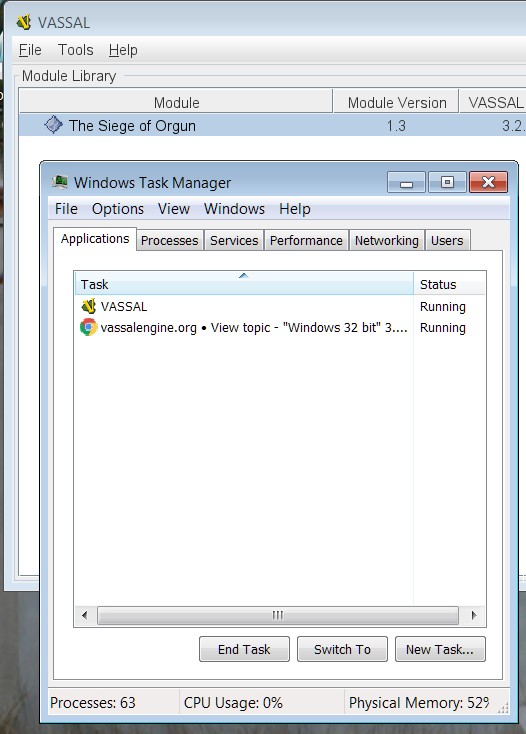
I do see javaw.exe running under the Task Manager Processes tab.
I also cannot find java.exe with search from the Win7 Start button.
---
### Author:  [@uckelman](https://forum.vassalengine.org/u/uckelman)
#### Post date: [July 13, 2020, 11:40pm UTC](https://forum.vassalengine.org/t/windows-32-bit-3-3-1/10834/29 "2020-07-13T23:40:21Z")
Thus spake RobS:
> “Flint1b” wrote:
>
> > RobS, can you start Vassal (the ModuleManager), then open the task
> > manager, there should be a java.exe, and find out the properties of
> > that java.exe, by right-clicking it and selecting “Properties”? Most
> > interesting information is, where is this java.exe exactly i.e. the
> > full path to it.
>
> I don’t see java.exe running under the Task Manager Applications tab:
Right. What you’re seeing there is VASSAL.exe, the launcher for the
Module Manager. I’d forgotten that would show up instead of java.exe.
> I do see javaw.exe running under the Task Manager Processes tab.
So, that has to be what’s running the MM. When you right-click on that
and go to Properties, what does it say for Location on the General tab?
> I also cannot find java.exe with search from the Win7 Start button.
Second thing to check:
When you run the installer, on the “Installing” page, there will be a
button labeled “Show Details”. If you click on that it will pop open
a text area showing what the installer has done. When installation
completes, if you right click in the text area, you’ll get a context
menu with the option “Copy Details to Clipboard”. Paste what that gives
you here. We should be able to see if/where the installer put java.exe
from that.
–
J.
---
### Author:  [@RobS](https://forum.vassalengine.org/u/RobS)
#### Post date: [July 14, 2020, 12:49am UTC](https://forum.vassalengine.org/t/windows-32-bit-3-3-1/10834/30 "2020-07-14T00:49:53Z")
> [@uckelman](#):
>
> > I do see javaw.exe running under the Task Manager Processes tab.
>
> So, that has to be what’s running the MM. When you right-click on that
> and go to Properties, what does it say for Location on the General tab?
The location for javaw.exe is in the Installer bin folder:
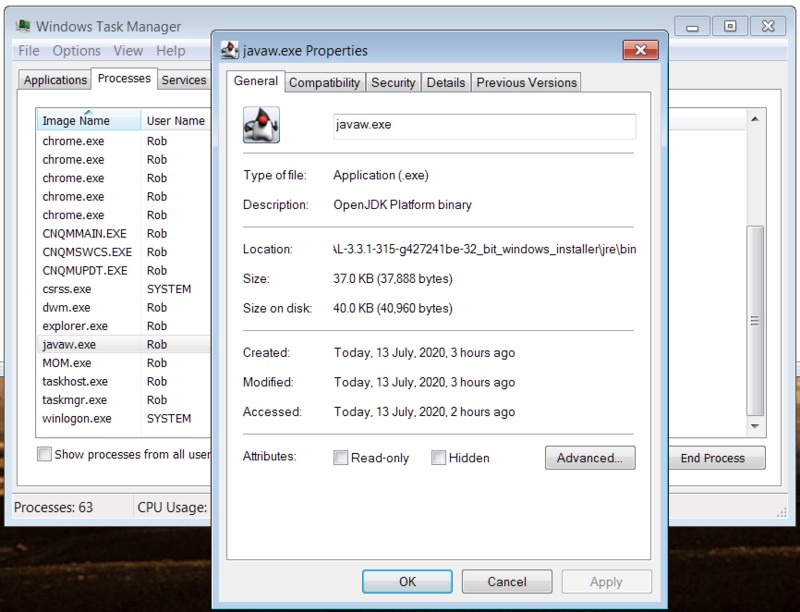
> [@](#):
>
> > I also cannot find java.exe with search from the Win7 Start button.
>
> Second thing to check:
>
> When you run the installer, on the “Installing” page, there will be a
> button labeled “Show Details”. If you click on that it will pop open
> a text area showing what the installer has done. When installation
> completes, if you right click in the text area, you’ll get a context
> menu with the option “Copy Details to Clipboard”. Paste what that gives
> you here. We should be able to see if/where the installer put java.exe
> from that.
Here it is:
Uninstall: VASSAL (3.3.1-315-g427241be-32\_bit\_windows\_installer)
Copy to C:\Users\Rob\AppData\Local\Temp
Execute: “C:\Users\Rob\AppData\Local\Temp\uninst.exe” /S \_?=C:\Program Files\VASSAL-3.3.1-315-g427241be-32\_bit\_windows\_installer
Delete file: C:\Users\Rob\AppData\Local\Temp\uninst.exe
Output folder: C:\Program Files\VASSAL-3.3.1-315-g427241be-32\_bit\_windows\_installer
Extract: LICENSE.txt
Extract: VASSAL.exe
Extract: CHANGES.txt
Extract: README.txt
Output folder: C:\Program Files\VASSAL-3.3.1-315-g427241be-32\_bit\_windows\_installer\doc
Extract: tour.mod
Extract: versionHistory.html
Extract: README.html
Extract: tour.log
Output folder: C:\Program Files\VASSAL-3.3.1-315-g427241be-32\_bit\_windows\_installer\doc\images
Extract: TakeTheTour.png
Extract: connect.gif
Extract: LibraryWindow.png
Extract: ConsoleWindow.png
Extract: StepForward.png
Extract: Splash.png
Output folder: C:\Program Files\VASSAL-3.3.1-315-g427241be-32\_bit\_windows\_installer\doc\userguide
Extract: userguide.pdf
Extract: userguide.doc
Output folder: C:\Program Files\VASSAL-3.3.1-315-g427241be-32\_bit\_windows\_installer\doc\ReferenceManual
Extract: Board.htm
Extract: NonRectangular.htm
Extract: ChartWindow.htm
Extract: SavedGameUpdater.htm
Extract: GamePieceLayouts.htm
Extract: PrivateWindow.htm
Extract: DoActionButton.htm
Extract: ReturnToDeck.htm
Extract: ReportChanges.htm
Extract: Extension.htm
Extract: Label.htm
Extract: SpecialDiceButton.htm
Extract: SetGlobalProperty.htm
Extract: Translations.htm
Extract: PlayerHand.htm
Extract: Hideable.htm
Extract: AreaOfEffect.htm
Extract: Expression.htm
Extract: PropertyMatchExpression.htm
Extract: GridNumbering.htm
Extract: GamePieceImage.htm
Extract: Inventory.htm
Extract: Layer.htm
Extract: PlaySound.htm
Extract: DeckGlobalKeyCommand.htm
Extract: MassPieceLoader.htm
Extract: DynamicProperty.htm
Extract: ModuleUpdater.htm
Extract: CalculatedProperty.htm
Extract: Mask.htm
Extract: TurnTracker.htm
Extract: HelpMenu.htm
Extract: UsePrototype.htm
Extract: IrregularGrid.htm
Extract: ToolbarMenu.htm
Extract: Deck.htm
Extract: Properties.htm
Extract: Pivot.htm
Extract: TriggerAction.htm
Extract: HexGrid.htm
Extract: GamePieceLayers.htm
Extract: MessageFormat.htm
Extract: RestrictCommands.htm
Extract: SetupStack.htm
Extract: GamePieceImageDefinitions.htm
Extract: ActionButton.htm
Extract: RectangularGrid.htm
Extract: index.htm
Extract: Map.htm
Extract: GameModule.htm
Extract: ZonedGrid.htm
Extract: PropertySheet.htm
Extract: PieceWindow.htm
Extract: Replace.htm
Extract: RestrictedAccess.htm
Extract: ExpressionBuilder.htm
Extract: Spreadsheet.htm
Extract: GlobalOptions.htm
Extract: Rotate.htm
Extract: GamePiece.htm
Extract: BasicPiece.htm
Extract: Prototypes.htm
Extract: MarkMoved.htm
Extract: GlobalKeyCommand.htm
Extract: Translate.htm
Extract: SendToLocation.htm
Extract: Marker.htm
Extract: GlobalProperties.htm
Extract: MultiActionButton.htm
Extract: SubMenu.htm
Extract: PropertyMarker.htm
Extract: GlobalHotKey.htm
Extract: NonStacking.htm
Extract: MovementTrail.htm
Output folder: C:\Program Files\VASSAL-3.3.1-315-g427241be-32\_bit\_windows\_installer\doc\ReferenceManual\images
Extract: UsePrototype.png
Extract: textboxinstance.png
Extract: symbolitem.png
Extract: TurnTrackerGlobalHotkey.png
Extract: SendToLocationL.png
Extract: TranslateVassal.png
Extract: Spreadsheet.png
Extract: propertysheet-fieldtypes.png
Extract: Replace.png
Extract: ExpressionBuilder2.png
Extract: Label.png
Extract: imagelayouttextbox.png
Extract: symbolinstance.png
Extract: PropertyMarker.png
Extract: StartupGlobalKeyCommand.png
Extract: Board2.png
Extract: CounterGlobalKeyCommand.png
Extract: Delete.png
Extract: GamePiece.png
Extract: RectangularGrid.png
Extract: imagelayouttext1.png
Extract: PropertySheet.png
Extract: Pivot.png
Extract: PropertyMatchExpression2.png
Extract: SendToLocationZ.png
Extract: TurnTrackerTurnWindow.gif
Extract: Zoomer.png
Extract: GridNumbering2.png
Extract: PropertyMatchExpression.png
Extract: ReturnToDeck2.png
Extract: imageitem.png
Extract: Rotate.png
Extract: MassPieceLoader-2.png
Extract: ReportChanges.png
Extract: FontStyle.png
Extract: SpecialDieFace.png
Extract: Inventory.png
Extract: MassPieceLoader-3.png
Extract: PanelWidget2.png
Extract: SendToLocationA.png
Extract: Map.png
Extract: TurnTrackerCounter.png
Extract: PrivateMap.png
Extract: imagelayoutbuttons.png
Extract: SetGlobalProperty.png
Extract: NotesWindow.png
Extract: CalculatedProperty.png
Extract: imagelayoutvisualizer.png
Extract: Board.png
Extract: Expression.png
Extract: RandomTextButton.png
Extract: ChangePropertyButton.png
Extract: GameModule.png
Extract: MultiActionButton.png
Extract: ZoneHighlighter.png
Extract: ChartMap.png
Extract: Layer.png
Extract: ReportChanges2.png
Extract: ExpressionBuilder.png
Extract: TurnTrackerList.png
Extract: BasicPiece.png
Extract: propertysheet-edit5.png
Extract: HtmlChart.png
Extract: ShapeItemInstance.png
Extract: NonRectangular.png
Extract: BoardPicker.png
Extract: HidePieces.png
Extract: PanelWidget.png
Extract: SimpleExpression3.png
Extract: PlayerHand.png
Extract: DynamicProperty.png
Extract: NonStacking.png
Extract: Rotate2.png
Extract: GlobalProperty.png
Extract: DeckGlobalKeyCommand.png
Extract: property\_sheet\_map.png
Extract: TriggerAction4.png
Extract: PieceRecenterer.png
Extract: AtStartStack.png
Extract: TranslateModule.png
Extract: textinstance.png
Extract: calculator.png
Extract: PlayerSides.png
Extract: Layer2.png
Extract: HexGrid.png
Extract: GlobalKeyCommand.png
Extract: Marker.png
Extract: CalculatedProperty2.png
Extract: Mask.png
Extract: UseGridLocation.png
Extract: ActionButton.png
Extract: ReturnToDeck.png
Extract: AboutScreen.png
Extract: AreaOfEffect.png
Extract: GlobalOptions.png
Extract: TurnTracker.png
Extract: TriggerAction3.png
Extract: HelpFile.png
Extract: NamedColor.png
Extract: GridNumbering.png
Extract: ModuleUpdater.png
Extract: RestrictedAccess.png
Extract: MarkMoved.png
Extract: TriggerAction.png
Extract: ImageCapture.png
Extract: MovementTrail.png
Extract: Deck.png
Extract: SendToLocationR.png
Extract: GamePieceLayerControl.png
Extract: InternetDiceButton.png
Extract: LOS\_Thread.png
Extract: RestrictCommands.png
Extract: propertysheet-edit2.png
Extract: SendToLocationG.png
Extract: LastMoveHighlighter.png
Extract: imagedefn.png
Extract: DiceButton.png
Extract: MassPieceLoader.png
Extract: PredefinedSetup2.png
Extract: IrregularGrid.png
Extract: SimpleExpression1.png
Extract: PieceWindow.png
Extract: MapShading.png
Extract: SubMenu.png
Extract: InventoryWindow.png
Extract: CounterDetailViewer.png
Extract: NotesWindow2.png
Extract: Chart.png
Extract: StackingOptions.png
Extract: Tutorial.png
Extract: GlobalHotkey.png
Extract: TriggerAction2.png
Extract: ReportFormat.png
Extract: imagelayoutitems.png
Extract: PredefinedSetup1.png
Extract: Translate.png
Extract: configuration\_window.png
Extract: SpecialDiceButton.png
Extract: ToolbarMenu.png
Extract: ShapeItem.png
Extract: GamePieceLayers.png
Extract: SpecialDie.png
Extract: SimpleExpression2.png
Extract: Hideable.png
Extract: GamePieceImageDefinitions.png
Extract: createInstaller.png
Extract: Spreadsheet2.png
Extract: AreaOfEffectSample1.png
Extract: ChartWindow.png
Extract: imagelayout.png
Extract: PlaySound.png
Extract: Zone.png
Extract: SelectionHighlighter.png
Extract: Clone.png
Extract: HtmlHelpFile.png
Extract: AreaOfEffectSample2.png
Extract: SavedGameUpdater.png
Extract: propertysheet-edit4.png
Extract: OverviewWindow.png
Extract: DoActionButton.png
Extract: PrototypeDefinition.png
Output folder: C:\Program Files\VASSAL-3.3.1-315-g427241be-32\_bit\_windows\_installer\jre
Extract: release
Output folder: C:\Program Files\VASSAL-3.3.1-315-g427241be-32\_bit\_windows\_installer\jre\bin
Extract: api-ms-win-core-processthreads-l1-1-0.dll
Extract: java.exe
Extract: api-ms-win-core-profile-l1-1-0.dll
Extract: api-ms-win-core-sysinfo-l1-1-0.dll
Extract: api-ms-win-core-datetime-l1-1-0.dll
Extract: api-ms-win-core-interlocked-l1-1-0.dll
Extract: api-ms-win-crt-process-l1-1-0.dll
Extract: api-ms-win-crt-conio-l1-1-0.dll
Extract: api-ms-win-core-heap-l1-1-0.dll
Extract: jawt.dll
Extract: api-ms-win-crt-convert-l1-1-0.dll
Extract: api-ms-win-core-memory-l1-1-0.dll
Extract: api-ms-win-core-file-l1-1-0.dll
Extract: msvcp140.dll
Extract: api-ms-win-crt-stdio-l1-1-0.dll
Extract: api-ms-win-crt-runtime-l1-1-0.dll
Extract: api-ms-win-crt-time-l1-1-0.dll
Extract: verify.dll
Extract: api-ms-win-core-localization-l1-2-0.dll
Extract: mlib\_image.dll
Extract: javajpeg.dll
Extract: splashscreen.dll
Extract: prefs.dll
Extract: management.dll
Extract: api-ms-win-core-libraryloader-l1-1-0.dll
Extract: freetype.dll
Extract: jli.dll
Extract: api-ms-win-core-rtlsupport-l1-1-0.dll
Extract: api-ms-win-core-file-l2-1-0.dll
Extract: api-ms-win-core-timezone-l1-1-0.dll
Extract: zip.dll
Extract: jsound.dll
Extract: api-ms-win-core-string-l1-1-0.dll
Extract: api-ms-win-core-synch-l1-2-0.dll
Extract: api-ms-win-core-util-l1-1-0.dll
Extract: api-ms-win-core-synch-l1-1-0.dll
Extract: api-ms-win-crt-multibyte-l1-1-0.dll
Extract: net.dll
Extract: api-ms-win-core-processenvironment-l1-1-0.dll
Extract: fontmanager.dll
Extract: api-ms-win-core-debug-l1-1-0.dll
Extract: api-ms-win-crt-environment-l1-1-0.dll
Extract: keytool.exe
Extract: api-ms-win-core-handle-l1-1-0.dll
Extract: jimage.dll
Extract: API-MS-Win-core-xstate-l2-1-0.dll
Extract: management\_ext.dll
Extract: nio.dll
Extract: api-ms-win-core-errorhandling-l1-1-0.dll
Extract: sunec.dll
Extract: api-ms-win-crt-private-l1-1-0.dll
Extract: javaw.exe
Extract: vcruntime140.dll
Extract: api-ms-win-core-namedpipe-l1-1-0.dll
Extract: ucrtbase.dll
Extract: java.dll
Extract: api-ms-win-crt-heap-l1-1-0.dll
Extract: api-ms-win-crt-string-l1-1-0.dll
Extract: api-ms-win-crt-utility-l1-1-0.dll
Extract: api-ms-win-crt-locale-l1-1-0.dll
Extract: api-ms-win-core-processthreads-l1-1-1.dll
Extract: api-ms-win-crt-filesystem-l1-1-0.dll
Extract: lcms.dll
Extract: awt.dll
Extract: api-ms-win-core-file-l1-2-0.dll
Extract: api-ms-win-core-console-l1-1-0.dll
Extract: api-ms-win-crt-math-l1-1-0.dll
Output folder: C:\Program Files\VASSAL-3.3.1-315-g427241be-32\_bit\_windows\_installer\jre\bin\server
Extract: jvm.dll
Output folder: C:\Program Files\VASSAL-3.3.1-315-g427241be-32\_bit\_windows\_installer\jre\bin\client
Extract: jvm.dll
Output folder: C:\Program Files\VASSAL-3.3.1-315-g427241be-32\_bit\_windows\_installer\jre\conf
Extract: sound.properties
Extract: net.properties
Extract: logging.properties
Output folder: C:\Program Files\VASSAL-3.3.1-315-g427241be-32\_bit\_windows\_installer\jre\conf\security
Extract: java.policy
Extract: java.security
Output folder: C:\Program Files\VASSAL-3.3.1-315-g427241be-32\_bit\_windows\_installer\jre\conf\security\policy
Extract: README.txt
Output folder: C:\Program Files\VASSAL-3.3.1-315-g427241be-32\_bit\_windows\_installer\jre\conf\security\policy\limited
Extract: default\_local.policy
Extract: exempt\_local.policy
Extract: default\_US\_export.policy
Output folder: C:\Program Files\VASSAL-3.3.1-315-g427241be-32\_bit\_windows\_installer\jre\conf\security\policy\unlimited
Extract: default\_local.policy
Extract: default\_US\_export.policy
Output folder: C:\Program Files\VASSAL-3.3.1-315-g427241be-32\_bit\_windows\_installer\jre\lib
Extract: jvm.lib
Extract: jrt-fs.jar
Extract: fontconfig.properties.src
Extract: psfontj2d.properties
Extract: tzmappings
Extract: jvm.cfg
Extract: psfont.properties.ja
Extract: jawt.lib
Extract: classlist
Extract: tzdb.dat
Extract: fontconfig.bfc
Extract: modules… 100%
Output folder: C:\Program Files\VASSAL-3.3.1-315-g427241be-32\_bit\_windows\_installer\jre\lib\security
Extract: blacklisted.certs
Extract: default.policy
Extract: public\_suffix\_list.dat
Extract: cacerts
Output folder: C:\Program Files\VASSAL-3.3.1-315-g427241be-32\_bit\_windows\_installer\jre\legal
Output folder: C:\Program Files\VASSAL-3.3.1-315-g427241be-32\_bit\_windows\_installer\jre\legal\java.sql
Extract: ASSEMBLY\_EXCEPTION
Extract: ADDITIONAL\_LICENSE\_INFO
Extract: LICENSE
Output folder: C:\Program Files\VASSAL-3.3.1-315-g427241be-32\_bit\_windows\_installer\jre\legal\jdk.xml.dom
Extract: ASSEMBLY\_EXCEPTION
Extract: ADDITIONAL\_LICENSE\_INFO
Extract: LICENSE
Output folder: C:\Program Files\VASSAL-3.3.1-315-g427241be-32\_bit\_windows\_installer\jre\legal\java.xml
Extract: ASSEMBLY\_EXCEPTION
Extract: bcel.md
Extract: xalan.md
Extract: jcup.md
Extract: ADDITIONAL\_LICENSE\_INFO
Extract: LICENSE
Extract: xerces.md
Extract: dom.md
Output folder: C:\Program Files\VASSAL-3.3.1-315-g427241be-32\_bit\_windows\_installer\jre\legal\java.naming
Extract: ASSEMBLY\_EXCEPTION
Extract: ADDITIONAL\_LICENSE\_INFO
Extract: LICENSE
Output folder: C:\Program Files\VASSAL-3.3.1-315-g427241be-32\_bit\_windows\_installer\jre\legal\jdk.crypto.ec
Extract: ASSEMBLY\_EXCEPTION
Extract: ecc.md
Extract: ADDITIONAL\_LICENSE\_INFO
Extract: LICENSE
Output folder: C:\Program Files\VASSAL-3.3.1-315-g427241be-32\_bit\_windows\_installer\jre\legal\java.prefs
Extract: ASSEMBLY\_EXCEPTION
Extract: ADDITIONAL\_LICENSE\_INFO
Extract: LICENSE
Output folder: C:\Program Files\VASSAL-3.3.1-315-g427241be-32\_bit\_windows\_installer\jre\legal\java.desktop
Extract: freetype.md
Extract: ASSEMBLY\_EXCEPTION
Extract: mesa3d.md
Extract: giflib.md
Extract: colorimaging.md
Extract: ADDITIONAL\_LICENSE\_INFO
Extract: lcms.md
Extract: LICENSE
Extract: libpng.md
Extract: jpeg.md
Extract: harfbuzz.md
Output folder: C:\Program Files\VASSAL-3.3.1-315-g427241be-32\_bit\_windows\_installer\jre\legal\java.security.sasl
Extract: ASSEMBLY\_EXCEPTION
Extract: ADDITIONAL\_LICENSE\_INFO
Extract: LICENSE
Output folder: C:\Program Files\VASSAL-3.3.1-315-g427241be-32\_bit\_windows\_installer\jre\legal\java.logging
Extract: ASSEMBLY\_EXCEPTION
Extract: ADDITIONAL\_LICENSE\_INFO
Extract: LICENSE
Output folder: C:\Program Files\VASSAL-3.3.1-315-g427241be-32\_bit\_windows\_installer\jre\legal\java.datatransfer
Extract: ASSEMBLY\_EXCEPTION
Extract: ADDITIONAL\_LICENSE\_INFO
Extract: LICENSE
Output folder: C:\Program Files\VASSAL-3.3.1-315-g427241be-32\_bit\_windows\_installer\jre\legal\jdk.management
Extract: ASSEMBLY\_EXCEPTION
Extract: ADDITIONAL\_LICENSE\_INFO
Extract: LICENSE
Output folder: C:\Program Files\VASSAL-3.3.1-315-g427241be-32\_bit\_windows\_installer\jre\legal\java.base
Extract: ASSEMBLY\_EXCEPTION
Extract: icu.md
Extract: unicode.md
Extract: asm.md
Extract: c-libutl.md
Extract: public\_suffix.md
Extract: cldr.md
Extract: ADDITIONAL\_LICENSE\_INFO
Extract: LICENSE
Extract: aes.md
Extract: zlib.md
Output folder: C:\Program Files\VASSAL-3.3.1-315-g427241be-32\_bit\_windows\_installer\jre\legal\java.management
Extract: ASSEMBLY\_EXCEPTION
Extract: ADDITIONAL\_LICENSE\_INFO
Extract: LICENSE
Output folder: C:\Program Files\VASSAL-3.3.1-315-g427241be-32\_bit\_windows\_installer\jre\legal\java.transaction.xa
Extract: ASSEMBLY\_EXCEPTION
Extract: ADDITIONAL\_LICENSE\_INFO
Extract: LICENSE
Output folder: C:\Program Files\VASSAL-3.3.1-315-g427241be-32\_bit\_windows\_installer\lib
Extract: batik-anim-1.13.jar
Extract: jlayer-1.0.1.jar
Extract: wizard-0.998.1.jar
Extract: smack-3.0.4.jar
Extract: commons-logging-1.0.4.jar
Extract: Vengine.jar… 100%
Extract: batik-codec-1.13.jar
Extract: batik-css-1.13.jar
Extract: smackx-3.0.4.jar
Extract: xml-apis-ext-1.3.04.jar
Extract: miglayout-swing-4.2.jar
Extract: batik-swing-1.13.jar
Extract: timingframework-1.0.jar
Extract: logback-classic-1.2.3.jar
Extract: batik-svggen-1.13.jar
Extract: batik-bridge-1.13.jar
Extract: batik-svg-dom-1.13.jar
Extract: batik-transcoder-1.13.jar
Extract: batik-gvt-1.13.jar
Extract: batik-parser-1.13.jar
Extract: janino-3.0.6.jar
Extract: batik-i18n-1.13.jar
Extract: batik-extension-1.13.jar
Extract: batik-script-1.13.jar
Extract: batik-dom-1.13.jar
Extract: logback-core-1.2.3.jar
Extract: java-getopt-1.0.13.jar
Extract: slf4j-api-1.7.30.jar
Extract: batik-awt-util-1.13.jar
Extract: batik-gui-util-1.13.jar
Extract: batik-constants-1.13.jar
Extract: batik-xml-1.13.jar
Extract: xmlgraphics-commons-2.4.jar
Extract: batik-util-1.13.jar
Extract: batik-shared-resources-1.13.jar
Extract: commons-codec-1.14.jar
Extract: swingx-all-1.6.5.jar
Extract: commons-io-2.7.jar
Extract: commons-compiler-3.0.6.jar
Extract: miglayout-core-4.2.jar
Extract: commons-lang3-3.10.jar
Extract: batik-ext-1.13.jar
Created uninstaller: C:\Program Files\VASSAL-3.3.1-315-g427241be-32\_bit\_windows\_installer\uninst.exe
Output folder: C:\Program Files\VASSAL-3.3.1-315-g427241be-32\_bit\_windows\_installer
Create shortcut: C:\Users\Rob\Desktop\VASSAL.lnk
Create folder: C:\Users\Rob\AppData\Roaming\Microsoft\Windows\Start Menu\Programs\VASSAL
Create shortcut: C:\Users\Rob\AppData\Roaming\Microsoft\Windows\Start Menu\Programs\VASSAL\VASSAL.lnk
Create shortcut: C:\Users\Rob\AppData\Roaming\Microsoft\Internet Explorer\Quick Launch\VASSAL.lnk
Completed
---
### Author:  [@Flint1b](https://forum.vassalengine.org/u/Flint1b)
#### Post date: [July 14, 2020, 9:48am UTC](https://forum.vassalengine.org/t/windows-32-bit-3-3-1/10834/31 "2020-07-14T09:48:58Z")
> [@RobS](#):
>
> (…)
> Output folder: C:\Program Files\VASSAL-3.3.1-315-g427241be-32\_bit\_windows\_installer\jre\bin
> Extract: api-ms-win-core-processthreads-l1-1-0.dll
> Extract: java.exe
> Extract: api-ms-win-core-profile-l1-1-0.dll
> (…)
Oh my… Good luck with that, Joel. It will be better for my and the users’ nervous system if I stay out of 1st level support.
---
### Author:  [@jrwatts](https://forum.vassalengine.org/u/jrwatts)
#### Post date: [July 14, 2020, 10:34am UTC](https://forum.vassalengine.org/t/windows-32-bit-3-3-1/10834/32 "2020-07-14T10:34:56Z")
Wow, that is…bizarre. Out of curiosity, what anti-virus are you running? The only thing I can think of is the AV is quarantining java.exe…
Edit: Possibly the following link is relevant: [https://superuser.com/questions/732332/something-deleted-java-exe-how-to-find-what-it-was](https://superuser.com/questions/732332/something-deleted-java-exe-how-to-find-what-it-was)
---
### Author:  [@uckelman](https://forum.vassalengine.org/u/uckelman)
#### Post date: [July 14, 2020, 11:18am UTC](https://forum.vassalengine.org/t/windows-32-bit-3-3-1/10834/33 "2020-07-14T11:18:10Z")
Thus spake RobS:
> Output folder: C:\Program
> Files\VASSAL-3.3.1-315-g427241be-32\_bit\_windows\_installer\jre\bin
> Extract: api-ms-win-core-processthreads-l1-1-0.dll
> Extract: java.exe
This bit of the install log shows java.exe being extracted into the
location we expect. We’ve never had a problem with the installer
failing to write the files that it says it is, so I’m inclined to
believe the log. I also checked the installer on a 64-bit Windows
machine before uploading it, and java.exe was written out succesfully
there. It would be very, very stange for the installer to successfully
unpack every file on 64-bit Windows, but on 32-bit Windows fail to
unpack a single file right in the middle of installation—which it
nonetheless claims that it unpacked.
To recap, we have:
1. A screenshot from the file browser with java.exe missing.
2. An error messsage from Java in VASSAL’s errorLog saying it can’t find
java.exe.
3. The launcher running the Module Manager using javaw.exe instead.
4. The installer claiming that it installed java.exe in the expected place.
Now that I’ve checked on what exactly the launcher does, I can say that #3
is normal. #4 is also normal. #2 is what should happen when #1 occurs. I
can’t see any reason why #1 should occur.
Do we have anyone else around with a 32-bit Windows machine who can test
this? It would be helpful to know what the most recent test build does on
a different machine.
–
J.
---
### Author:  [@RobS](https://forum.vassalengine.org/u/RobS)
#### Post date: [July 14, 2020, 2:19pm UTC](https://forum.vassalengine.org/t/windows-32-bit-3-3-1/10834/34 "2020-07-14T14:19:21Z")
> [@jrwatts](#):
>
> Wow, that is…bizarre. Out of curiosity, what anti-virus are you running? The only thing I can think of is the AV is quarantining java.exe…
>
> Edit: Possibly the following link is relevant: [https://superuser.com/questions/732332/something-deleted-java-exe-how-to-find-what-it-was](https://superuser.com/questions/732332/something-deleted-java-exe-how-to-find-what-it-was)
My AVG anti-virus indeed seems to be the problem.
Firstly, I’ve noticed that AVG does a quick “15 second” check during every step of the installation process, which I’ve never seen it do for any other program I’ve ever installed, but maybe that’s just something new that AVG does, I don’t know. It even says it sends the Installer file to their “labs”, which report back after about 5 minutes that the program is “Clear”. Then it does another “15 second” check when I actually run Vassal, and then another check when I load a module. It does all these things the first time around, but not thereafter.
It also runs a quick virus check when I uninstall Vassal.
It does all of these things the first time I go through the process, but not thereafter.
I just went through the process of twice uninstalling Vassal and reinstalling it. After both of these installs, java.exe was where it was supposed to be, in the bin folder:
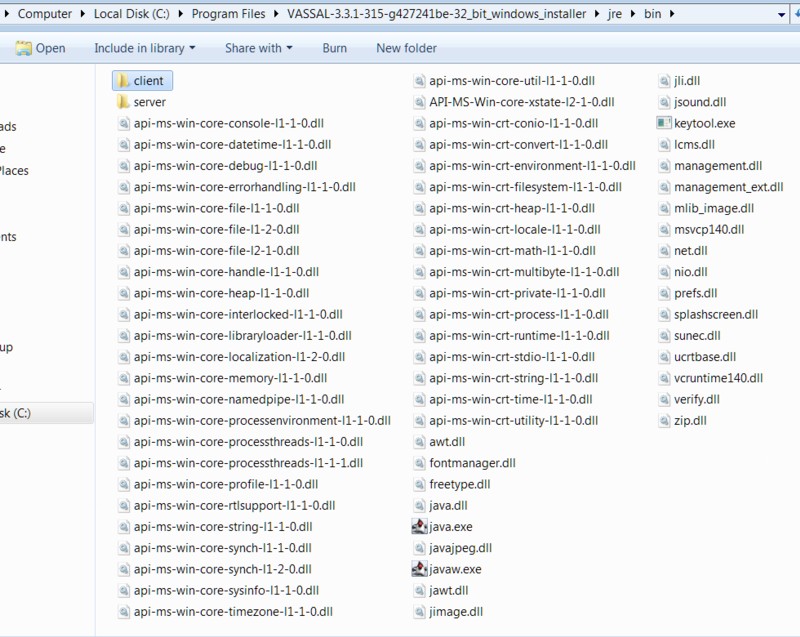
Since I had already installed this version yesterday for the first time, AVG did not do any of it’s checks, except when I try to load a game module, at which point it removes java.exe and quarantines it.
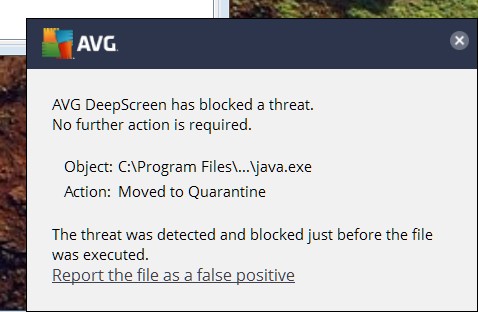
I’m sorry for not realizing this issue earlier, but since the AVG “Lab” said everything was good to go, I ignored this. I’ve tried reporting it as a False Positive, but the little window that opens up doesn’t give me enough time to fill out all the info. I will try again.
When I go into AVG quarantine and tell it to restore java.exe and make it an exception, it doesn’t restore it to the Vassal Install folder, but creates another similar folder, right next to the Vassal Install folder in C:\Program Files, and puts java.exe in there.
Edit: When I tell it to restore without making it an exception, it does put it back into the correct bin folder.
I hope all of that made sense.
---
### Author:  [@RobS](https://forum.vassalengine.org/u/RobS)
#### Post date: [July 14, 2020, 2:52pm UTC](https://forum.vassalengine.org/t/windows-32-bit-3-3-1/10834/35 "2020-07-14T14:52:08Z")
I’ve added
VASSAL-3.3.1-315-g427241be-32\_bit\_windows\_installer-windows-32.exe
to my AVG exceptions and Vassal 3.3.1 appears to run fine now. I tried it with 2 game modules and they both loaded okay.
I did have Vassal in my exceptions list before and I don’t know why AVG ignored that.
However, I think other people might run into the problem I described in my previous post, wherein AVG quarantines java.exe. when they try to run a module.
---
### Author:  [@uckelman](https://forum.vassalengine.org/u/uckelman)
#### Post date: [July 14, 2020, 4:05pm UTC](https://forum.vassalengine.org/t/windows-32-bit-3-3-1/10834/36 "2020-07-14T16:05:49Z")
Wow, that is crazy-making, having your AV software swipe an executable you need right when you try to run it…
Good work spotting that. I wonder what we can do to prevent this from happening?
---
### Author:  [@RobS](https://forum.vassalengine.org/u/RobS)
#### Post date: [July 14, 2020, 4:34pm UTC](https://forum.vassalengine.org/t/windows-32-bit-3-3-1/10834/37 "2020-07-14T16:34:11Z")
> [@uckelman](#):
>
> Wow, that is crazy-making, having your AV software swipe an executable you need right when you try to run it…
>
> Good work spotting that. I wonder what we can do to prevent this from happening?
If I can be of any more “help”, let me know.
---
### Author:  [@Flint1b](https://forum.vassalengine.org/u/Flint1b)
#### Post date: [July 14, 2020, 11:44pm UTC](https://forum.vassalengine.org/t/windows-32-bit-3-3-1/10834/38 "2020-07-14T23:44:29Z")
> [@uckelman](#):
>
> I wonder what we can do to prevent this from happening?
Some search results talk about signing the executable that is created with launch4j, there is apparently an extra tool for this in the launch4j distribution. But then there are also reports that even the signed versions are detected as false positives by some AVs. It looks like there was/is some windows virus or malware that can be distributed inside a modified java binary, and some AVs just go nuts when they see an application bring their own JVM.
What we can do…
- try to sign the releases
- tell users to stop using AVG as it’s a malware and security vulnerability in itself [en.wikipedia.org/wiki/AVG\_AntiVirus#Controversy](https://en.wikipedia.org/wiki/AVG_AntiVirus#Controversy)
- tell users to stop using AVs in general as they are usually worse than the viruses they are supposed to protect from
- learn from the best and write a list of “Known Incompatible Software” like minecraft does: [minecraftirc.net/support-articl … -software/](https://minecraftirc.net/support-articles/known-incompatible-software/) - oh look, AVG is first on that list, but only due to being first in alphabetical order, the rest of the list is made up of almost all other AVs, who would have thought that 😃
- send letters to AV manufacturers and ask them how to get Vassal binaries onto their whitelists
- tell users to install to some place other than “C:\Program Files” to not get any issues with windows UAC
- tell users to download Java and “Vassal other” distro, unzip and run the .bat file
Also:
- produce a live-usb linux with Vassal preinstalled, and an instruction how to copy that onto an USB drive and boot from that
- or a virtualbox VM
- or a docker image
---
### Author:  [@RobS](https://forum.vassalengine.org/u/RobS)
#### Post date: [July 15, 2020, 1:09pm UTC](https://forum.vassalengine.org/t/windows-32-bit-3-3-1/10834/39 "2020-07-15T13:09:18Z")
If I can be of any more help, send me a private message because this is not a forum I normally read.
---
### Author:  [@uckelman](https://forum.vassalengine.org/u/uckelman)
#### Post date: [July 15, 2020, 1:53pm UTC](https://forum.vassalengine.org/t/windows-32-bit-3-3-1/10834/40 "2020-07-15T13:53:24Z")
Thus spake RobS:
> If I can be of any more help, send me a private message because this is
> not a forum I normally read.
As we’ve verified that the 32-bit build works when nothing is stealing it’s
kidneys and leaving it in a bathtub full of ice, I think we’re sorted.
Thanks very much for your persistence in helping us troubleshoot.
–
J.
[Previous page](https://forum.vassalengine.org/t/windows-32-bit-3-3-1/10834.md?page=1)
[Next page](https://forum.vassalengine.org/t/windows-32-bit-3-3-1/10834.md?page=3)