I’m working on a Battle of the Bulge module with Profile - woody8297 - Vassal and for whatever reason we can’t get the movement trails to come back on after they have been toggled off. Any chance one of you masters could take a look and see where we went wrong? Set it up exactly (supposedly) like the Afrika Korps module where it works just fine. Here is the module (which is obviously a work in progress) :
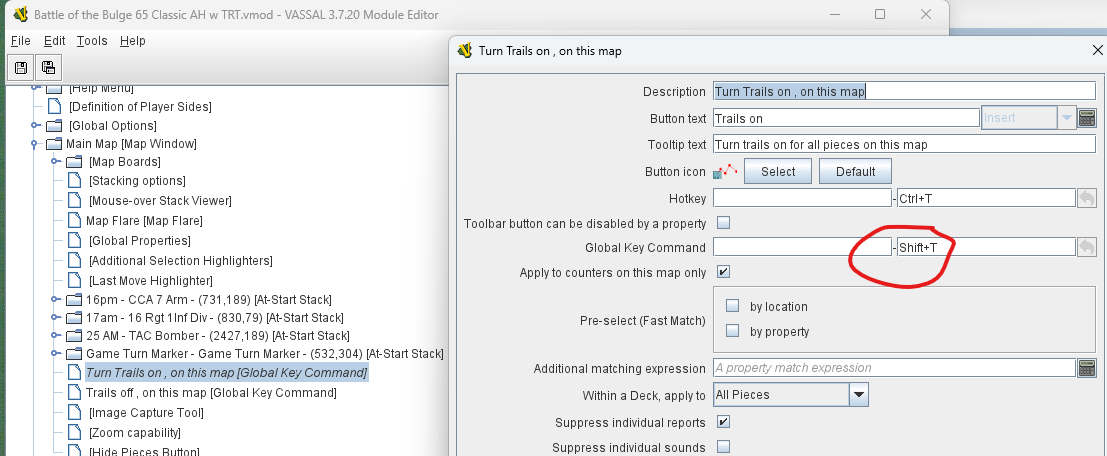
User presses the global button Trails On, Trails Off, or Trails toggle.
This sends the corresponding key commands TrailsOn, TrailsOff, and TrailsToggle to the Game Turn Marker on the current map.
The Game Turn Marker then sets the Global Property MovementTrails to true, false, or {!MovementTrails}, respectively
The Game Turn Marker then sends the Global Key Command Shift-T, Alt-T, or Ctrl-T to all pieces on the current map - and within the zone Hexes.
This may seem a bit convoluted, but the point is, if a user drags a piece from another map or zone into the Hexes zone, then the module can enable or disable movement trails for that piece based on the value of the Global Property MovementTrails.
All this requires that the piece Game Turn Marker is present on the map. If not, then the global hotkeys will send their command to no-where.
In your set-up - US setup, cards[?] loaded there is noGame Turn Marker on the map, and so the global hotkeys goes no-where.
If you start with the save New Game: Pieces in their starting positions, then the Game Turn Marker piece is on the map, and the commands works as intended.
If you turn on Debug in the Preferences→Battle of the Bulge dialog, you should be able to trace this in the chat log.
In short, the fix seems to be to re-add the Game Turn Marker to your US setup, cards[?] loaded save. It also seems like you need to update all the pieces in that save, because they do not have all the commands you need. Remember, if you change anything in a piece (prototype) definition, then that does not propagate to saves made before the change - the pieces in the save will still have the old definition. You can possibly use the Refresh Counters tool. If that does not work, try to redo the save from scratch.
A few other points:
What do you mean by cards loaded? As far as I know, there are no cards in this - rather old - game.
I see you use my ak.ObliqueHexNumbering class to do the hex-numbering. Perhaps you want to leave a note pointing to the source repository so that - should the need arise - someone else can rebuild that custom code. It is generally a problem with custom code, that it goes out of sync with Vassal, and then the module will stop working. The way to fix it, is typically to rebuild the custom code against a newer Vassal, but for that someone will need access to the code.
Thanks for weighing in. Frank said you might. I’ll get this post in front of him. I am just now starting to learn the Vassal system by looking over his shoulder. Your help is much appreciated!
Even doing this the command does work for me. Either from the menu or from turn marker context menu.
You have a spelling error in Game Turn Marker → TurnOnTrailsCounters - the map name is Main map - it must be Main Map.
With those two fixes:
Making sure the Game Turn Marker is present on the Map
Fix the spelling in TurnOnTrailsCounters
it should work for you.
No, that would be wrong. The Global Hotkey need to send TurnOnTrails to Game Turn Marker so that it can register the state and then delegate the Shift-T global key command to all pieces on the map and in the Hexes zone. See also the previous post for more on the logic.
Got it. I didn’t realize from his original question that it is setup to do the extra states via the Game Turn Marker. Thought he was just looking for the simple toggle on/off via the menu. The additional steps add a little more control to the whole process.