New to Vassal and trying to play ASL. I’ve created an account (so I assume that means I have the Vassal engine) but when I goto Modules for ASL, it has me download VASL 6.7.1. After I do that, nothing happens. I cant get past this to do anything else. What am I not doing right?
FYI: I’m using a MACBOOK.
It does not. Creating an account on our site just means you have an account on our site. If you want Vassal, you need to download and install it. See here for downloads.
When you say “nothing happens”, what’s the action you’re taking after which nothing happens?
When i click to download VASL 6.7.1, a popup window appears with a small label at the top that says “Module Library” and in the middle of the window I get “To start playing download a module and open it using the File menu.” It also include a link to the modules.
After clicking on the modules link, it loops me back to the VASSEL homepage to download VASL 6.7.1. I cant get past this loop.
What are you viewing when you click at this point? I.e., what webpage are you currently on where you’re clicking a link? More information is needed here.
It sounds an awful lot to me like you don’t have the core VASSAL software successfully installed yet. Downloading any module won’t do anything for you if you don’t have the VASSAL application to run it.
Visit the main VASSAL homepage and look for a prominent blue button towards the top middle of the screen where you can download the installer for the VASSAL application itself. Once the installer is downloaded, run it–this installs the application. Then you can run it and successfully open any modules you download, including VASL.
would it be possible to chat on here somewhere or even talk by phone?
I have dragged the VASSEL icon into my applications as directed and then when i go into the Applications folder and try to open it, I get the popup window i described.
For some reason, I have no options to do anything after dragging it over. This is the eternal loop Im stuck in. I have no options anywhere to click on anything else to get past it.
OK, from this it now sounds like you do have VASSAL installed and you are a Mac user.
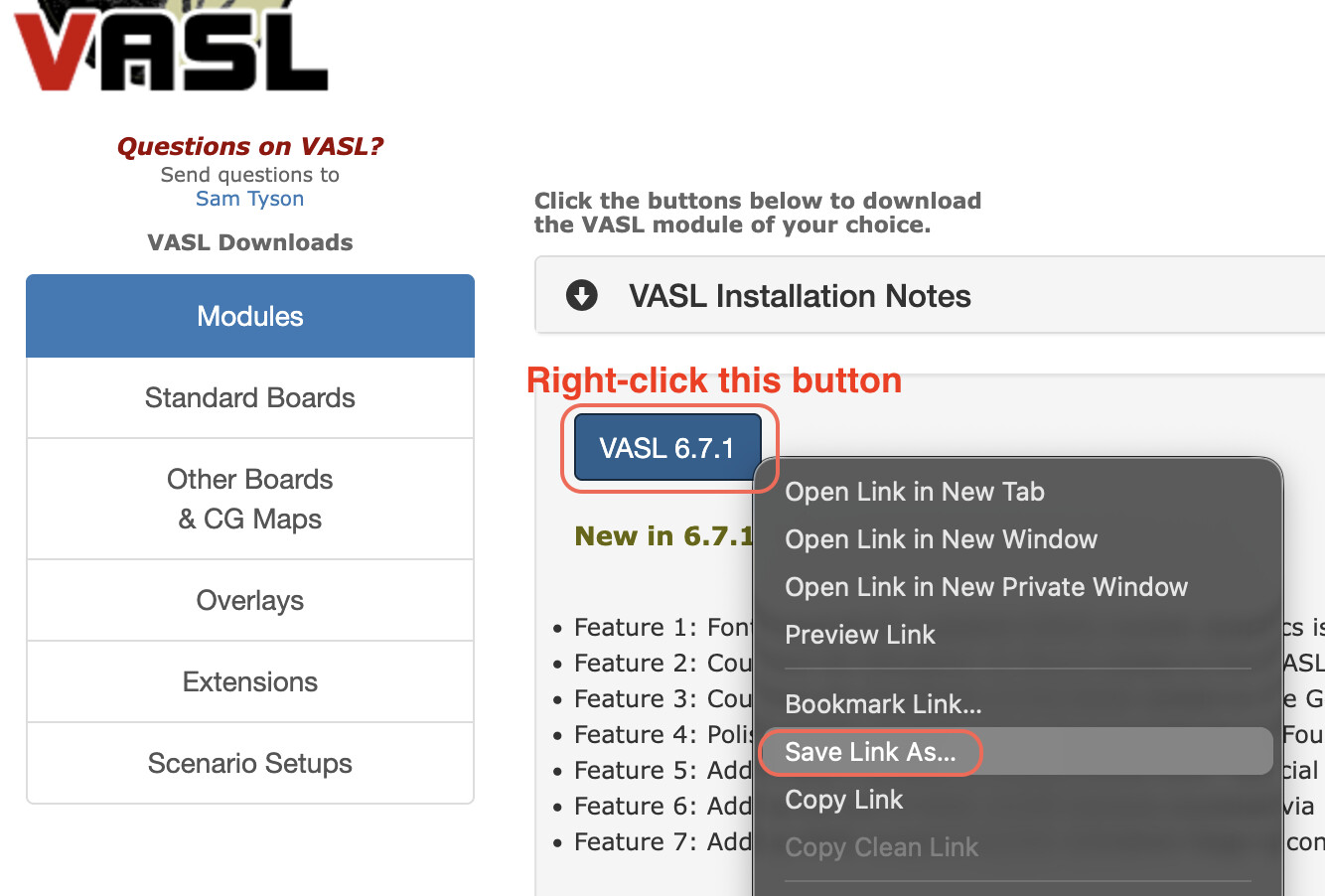
From here, you need to download the VASL module so you can open it with the VASSAL application. Navigate to the VASL website. Right-click the blue button that says VASL 6.7.1 and choose “Save link as” in your browser like so:
This should result in a file being downloaded to your computer. The precise filename should be: vasl-6.7.1.vmod, and you will need to know exactly what folder on your computer it’s located in after being downloaded–on a Mac, this will very likely be the Downloads folder in your home directory.
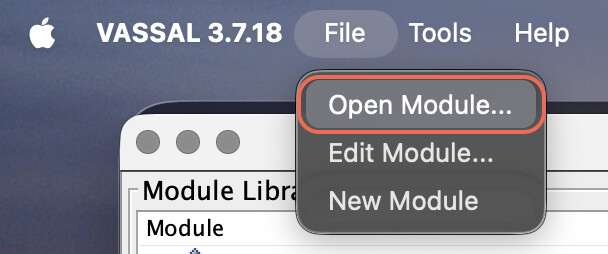
Now launch the VASSAL application. From its File menu, choose “Open Module…”
Navigate to the VASL module file that you downloaded and choose it. It should open and that should get you going.
This did the trick!! I made it to game setup page. Thank you so much for helping me out. I’m looking forward to diving into the game series. 

I appreciate your patience as I know tech support via chat can be challenging.
1 Like