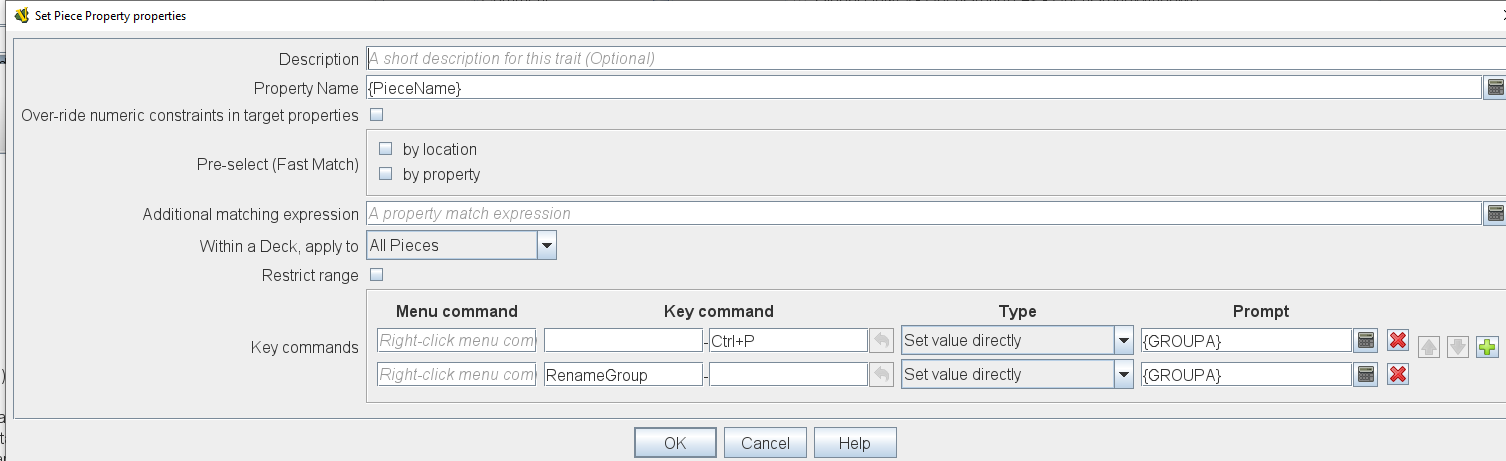
I’m attempting to change the name of a piece (e.g., “Group Block” to “Army Group North”), using the “Set Piece Property.” (GROUPA is a Global Property BTW). Is this a known bug or I am doing something wrong in how I’m trying to do this???
The value of GROUPA is changing correctly (verified), but the PieceName (as seen during movement on the map) shows no change from original.
Inside braces {...}, names are variable references, and evaluates to the value stored in that variable. So
{PieceName}
evaluates to what ever the pieces name is. That is, in your Property name field, you should have PieceNamewithout braces.
A piece’s PieceName can be changed in many ways. Some traits that change the PieceName property are Layer, Mask, and Text Label.
It sounds like you would like the user to be able to change the PieceName from some generic name - say Group Block - to a more specific name - say Army Group North. Perhaps the best way to do that is to use a Text Label
Background color: null - so that it is transparent
Property: GivenName
Then, a user may change the name of a piece through the context menu (Right-click or Mouse-2).
Another trait is Basic Name which changes the BasicName property - but does not allow for any user change.
It is not clear that you can change PieceName via a Set Piece Property trait. PieceName is kinda special in the system of properties, as many things can affect that property.
The braces were inserted by the expression editor, when I selected the PieceName property. I also tried removing the braces to see if that had any effect and it did not.
I’m already using a label to display the (trimmed) new name on the Piece. However, I specifically want to change the $PieceName$, because the Main Map is configured to report (to chat) that the $PieceName$ moves from $oldLocation$ to $location$. Thus I want the chat log to be able to report (for example): Army Group North moved from Tula to Moscow.
If the piece already has a Text Label, then set the Name format to $GROUPA$ or {GROUPA}. From the description it sounds like the Label text field is not empty (i.e. the trimmed new name) in which case you should be good to go, otherwise it will need a Key command to effect the name change.
Set Piece Property is not appropriate here. It sets existing dynamic properties of other pieces. PieceName is not a dynamic property.
Rlament answered you mostly as I would. “Set piece property” is designed to set DYNAMIC properties in OTHER pieces. BasicName is not a dynamic property, for one, so you had no chance to start. Looking at your syntax, you left map and property match blank, so you were telling Vassal to change BasicName to some value in EVERY piece in the module. “Set piece property” is like a global key command without the command.
Me, I wouldn’t use a text label for this. I would define in my pieces a dynamic property, say “info”, which would hold the name. Then I could change it. In my maps where it reports messages, I’d replace $PieceName$ et. al. to $info$. I’d do something similar in my mouse-over definition.
Thanks to everyone who replied - I appreciate all the help…
I didn’t realize the trait I was trying to use could NOT change PieceName/BasicName AND that without matching criteria defined it could have tried to alter a whole ton of pieces.
I solved the problem by defining a dynamic “LongName” property and then inserting that into an existing label definition for how to display the name.