I’ve made a little thing to allow the Fast Forward of logs w/ option to append to them, if anyone wants to try it out. It’s the “LoadLogForAppend” on Builds of vassalengine/vassal and the two new options are on the Tools menu. I often want to keep appending to the same log (starting from the original board state) rather than only make successive logs.
3 Likes
Seems like this will be a good alternative to lots of logfiles for PBEM where cloud storage is used and perhaps recovery during online games.
My first test went as follows:-
-
Opened a log file normally from the wizard (Load Game)
-
Opened using Tools… option as shown:
That asked me if I wanted to save the existing game; answered no and the new file opened correctly:

So far so good. -
At this point, I was thinking, can I quickly merge in an existing log file. So tried,
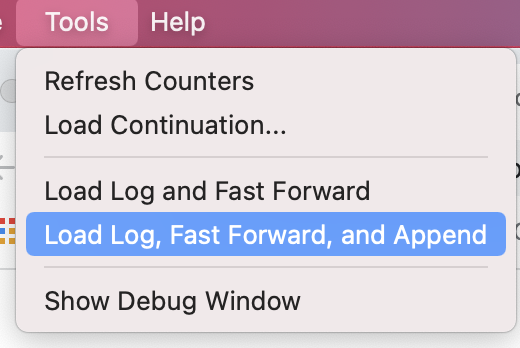
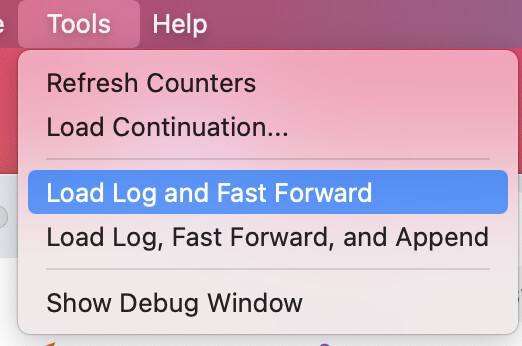
This also gave a prompt to save the existing game; at this point I cancelled and the game was left in a corrupt state (cards moved off decks). I’m guessing maybe the game state was duplicated.
Repeating step (3) but selecting “No” to save game, gave me the valid state at the end of the 2nd log file as expected.
In conclusion,
-
Would be nice if cancelling the “Save Game?” prompt gave a more graceful outcome. I suspect this is a more generic issue, as I have seen similar in online games.
-
Would a merge/fast-forward option be useful as well?
Mark
1 Like
Oh thanks that’s good testing. I actually discovered that the “cancel” button on that dialog shouldn’t really be there (in the sense that it’s WAY too late to cancel by the time we ask you). Really we should be asking you earlier (before we e.g. do all the loading of a game) if you want to save/cancel, but for the moment I’ve removed the cancel because as you discovered it’s a bugfest – and it is indeed as you suggest a more generic issue w/ loading games in general.
How would a “merge/fast-forward” work? I’m not sure what you’re trying to achieve there? Glue two existing logfiles together when one happens to pick up from the leave-off point of the other? That can presently be done with Load Continuation although the risks of making a mess are of course high. I’m not sure there’s a way for me to make a merge/fast-forward like that any less “super risky” than what one can presently do?
Brian
2 Likes
Yes, pretty much. But point taken; people could easily end up glueing two incompatible game states together. Better to see how the new feature goes without the extra potential trouble of load continuation variant.
1 Like
Append for me will be a novelty I almost never use, but just the ability to, for example, view a log, get distracted by family, come back to it another day and be able to skip to the end of the log to start logging myself would be nice.
1 Like
I see this style of log file handling as my standard and probably only method. So the end result will be one smooth flowing log file from setup to finish.
Sweeeeet!!!
1 Like
I see this is an old thread, but: on MacOS Tahoe 26.5.2 “Load Log Fast Forward & Append” function no longer works; it used to until very recently (like last week). Now, it successfully fast-forwards, but then writes to the chat window "Log fast-forwarded but no logging started. Remember to begin new logfile if you wish to append." Then the menus are greyed out until I do some other operation; so clearly some condition is being thrown and not fully handled. The behavior is consistent with versions 3.7.24, .23, .22, and .21, I did try those. IMPORTANT: the problem may be specific to MacOS Tahoe 26.5.2; it works correctly at least in Windows 11 Pro 25H2 under Parallels. I don’t know where to look for more detailed Vassal diagnostic information, any help before I try to figure out how to run from source under a debugger (have not tried that).
Sounds like something went slightly awry with the latest version. If you get source building/running on your own machine, you could try using the “git bisect” system to narrow down what the breaking commit was – once you had latest running you’d do “git bisect start” to turn things on, and presumably that latest build isn’t working so you’d say “git bisect bad”. And then you’d check out a version you think works (e.g. “git checkout 3.7.24” if you think that works) and you’d build it and verify that it works and if so you’d do “git bisect good”. Once it has a known “good” and “bad”’ build it will automatically check out another in between build and then you build and run that one, and you do either “git bisect good” or “git bisect bad” depending on whether it works right or not. And eventually after ~6-10 tries it would tell you the breaking commit and you’d tell someone here or better yet on the Discord. Be sure to include the git “hash” of the commit (weird 10 digit hexadecimal number). You can use “git bisect reset” to clear the bisect stuff when you’re done (or if you need to start over). It will involve the irritation/pain of building the thing about 10 times but can very accurately pinpoint the problem for folks on the dev team.
Thank you, I"m trying that (it’s slow) but I have been running the latest distributions (3.7.21, 22, 23, 24…) consistently for I guess years, and I just noticed this startling this week. When I go back to those builds the same behavior as now. I can keep going back further, I suppose. If’ it’s something from Tahoe 26.5.1 to 26.5.2 (and I have no idea what that would be) that would at least more consistent with when this started happening. Thank you for your quick advice!
You should be able to see any exception thrown in the errorLog (see How to report problems).
I assume you are running on MacOS. What you need to run Vassal in a debugger (jdb), you need the following
- A full Java Development Kit (JDK) - preferably the same same version as used by Vassal.
- For Vassal 3.7.24 it is Temurin 26.0.1+8 - install per instructions.
- If you have
homebrew, you can also use their formula.
- The source code of Vassal.
- Open a terminal and change directory where you want to store the code - say
~/.$ cd ~ - Clone the Vassal source code
$ git clone https://github.com/vassalengine/vassal.git - Checkout the release you are working on - say
3.7.24$ cd vassal $ git checkout 3.7.24
- Open a terminal and change directory where you want to store the code - say
Now you need to run Vassal in the debugger (jdb). Let us assume your module is called Module,vmod. To run Vassal in the debugger with that module, do
$ jdb \
    -classpath /Applications/VASSAL.app/Contents/Resources/Java/Vengine.jar \
    -sourcepath ~/vassal/vassal-app/src/main/java \
    VASSAL.launch.Player --load Module.java
This will start the debugger, but Vassal isn’t running yet. If you found, when looking in the errorLog that the exception java.lang.FooException was thrown, then you can make sure you will catch that in the debugger with
jdb$ catch all java.long.FooException
To start Vassal, do
jdb$ run
Once the application is up and running, do the interactions that will trigger the problem. The debugger should break at that point and pause the application. Use the help command in jdb to get information about what you can do. For example print, list, and so on.
Yours,
Christian
Wow! Christian, I tried jdb as suggested, but not getting past line 52 of Launcher.java, i.e., it can’t even initialize the Logger. So, likely a classpath problem which I’ll continue to look at tomorrow. Thanks again!
Perhaps try to change directory to the regular installation directory of Vassal, and do the same there
$ cd /Applications/VASSAL.app
$ jdb \
    -classpath Contents/Resources/Java/Vengine.jar \
    -sourcepath ~/vassal/vassal-app/src/main/java \
    VASSAL.launch.Player --load ~/Documents/Module.java
(above assumes that Module.vmod is in your Documents directory).
Yours,
Christian
I built a fat jar to try to take care of the import issues but no luck so far. I did just notice Christian’s comment from a year ago in the pom.xml, and I am indeed on openjdk 25.0.3:
          <!-- This does not work with Java 25 -->

            <groupId>com.github.spotbugs</groupId>
but I doubt that’s the issue; nothing else suggests spotbugs is involved.
Currently it is throwing a parse error when trying to do an XML parse on savedata (obfuscated, not xml) and that doesn’t seem right. Then it is trying to parse empty string “” as an integer in the save dialog call to getMnemonic() and that is where it fails.
Spotbugs cannot possibly be involved. It’s not a runtime dependency.
Before even trying to bisect the code, I recommend finding the first released version of Vassal that exhibits the problem. However, if I understand correctly, you had 3.7.24 working, so this may be fruitless. In that case, the we need to know the exact steps and inputs which let you reproduce the problem.