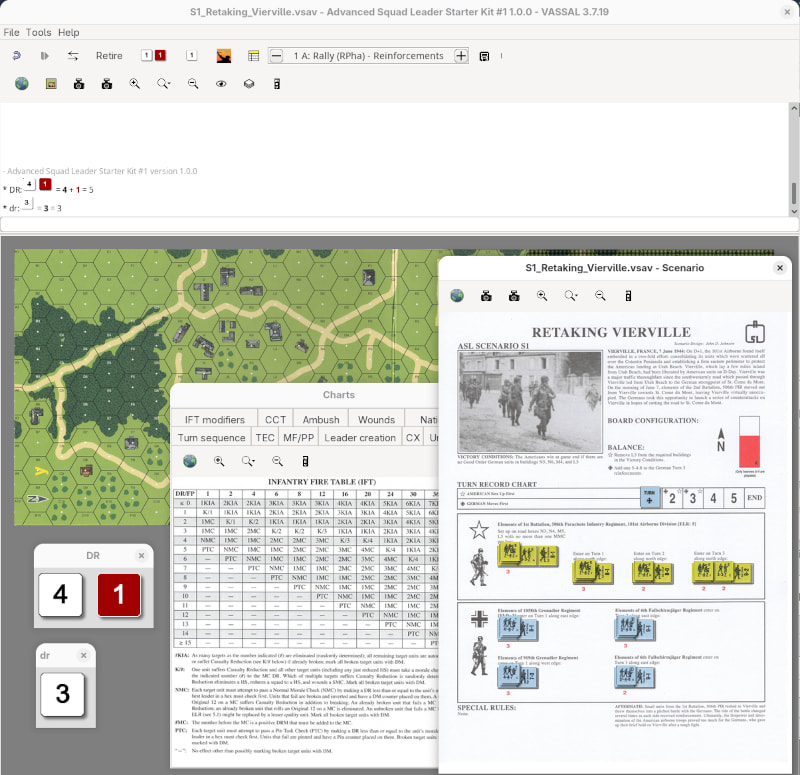
The module is intended to be a gentle introduction into the world of Advanced Squad Leader (ASL) and Vassal, much like the game it self.
If you want to play the full ASL in Vassal, then you should look at the Advanced Squad Leader module (a.k.a. VASL) and its web-site.
The module features:
Turn tracker interface in the toolbar. Some actions are only available in certain phases of the game.
Units are annotated with status rather than placing markers on them. This allows the units to carry the information with them when moved around the boards.
Declaring actions is done through the context menu of the units and supporting weapons.
The module automatically places units in CC if they are in the same hex as an enemy unit at the start of the CCPh phase. If the unit remains in the same hex as an enemy unit at the end of the CCPh, then a Melee marker is placed on the unit.
Units in Melee cannot declare Prep fire, First Fire, or Final Fire, nor deploy a smoke grenade.
If a unit is placed in CX then the module automatically removes that in its following turn, and also disables that option in that following turn.
Other status are cleared automatically, such as Pin, DM, Prep Fire, First Fire, Final Fire, and so on.
Units can be demoted - if they fail a MC with more than its ELR.
Units may suffer a reduction - as a result of a Casualty Reduction.
Tables are available in the toolbar menu.
Unplayable hexes are shaded.
The Show context menu item will list unit capabilities and stats in the chat as a table.
Symbolic dice.
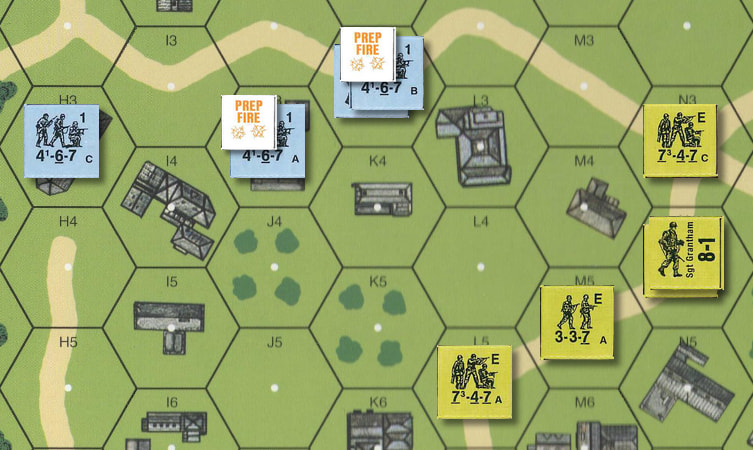
Pieces have drop shadows to make them visually appear to be placed on the boards.
This is a logical and welcome approach to the system outside of the monstrosity that is VASL. The Starter Kits are meant to be just that, starter kits.
Truly an excellent idea! A training version that guides the beginner player! Regarding the problems I’ve noticed: I started a game of scenario 1 and I noticed, firstly, that I no longer had access to placing “First Fire” counters during player B’s move, whereas I was able to do so during player A’s move, and secondly, that placing a PIN counter didn’t prevent the squad from moving (which would be a great feature!). Thank you and good luck with the development of this module!!
The major change is that actions are limited to the side that can do an action. For example, declaring Prep Fire is only possible for the side in-turn in the PFPh phase, and First Fire - and Final Fire - is only possible for the side out-of-turn in the MPh phase.
Also, the module now reports the faction (Allied or Axis) currently in turn, rather than the more generic Side (A or B).
Regarding “First Fire” during the opponent’s movement phase, I think I’ve figured out what happened: I selected the stack WITH the leader, and that must have eliminated the option to access the “First Fire” counter via a right-click.
Another issue I noticed: when trying to place a “Residual” counter in a hex, a counter appears for every unit in the stack—which results in a lot of them!
Finally, placing units off-board is difficult, especially at the top, because there isn’t enough space.
I think this depends on which counter is on top of the stack. If the SMC (Single-Man-Counter, or Leader) is on top, then that could remove the First Fire option.
You have probably selected the entire stack. Select one MMC (Multi-Man-Counter, or Squad or half-Squad). and then select Residual Fire option.
Place the entering counters on the edge of a hex. By that, you also indicate the hex which the unit will enter through. There’s a relatively large margin around the hexes exactly to facilitate placing reinforcements.
Regarding Residual Fire, wouldn’t it be possible for any selection—whether an MMC, the entire stack, or even the hex itself—to yield the same result: placing just a single Residual Fire counter? This would greatly simplify matters and help anticipate similar elements, such as Acquisition counters, if you ever develop the module for SK2 and 3. For example, Area Acquisition would be linked to a hex not to a specific unit.
Regarding off-board placement in Scenario 1, I can’t seem to get anything other than a very narrow space that doesn’t allow for a clear view of the squad or stack at the top of the map (which corresponds to the west edge in this scenario). This makes me apprehensive about more complex scenarios where there might be numerous off-board units, sometimes stacked one behind the other (hence the value of the off-board hex grid placement option in VASL).
In any case, I think the idea of ​​an introductory module that prevents players from making mistakes and strictly guides their actions is absolutely brilliant. I hope you manage to develop it for the entire SK series!
I made some changes to the module, so that now you select a hex (holding down Shift), and then from a context menu - or by pressing Ctrl-G - you can place the Residual Fire marker in the hex.
I made the margins around the boards larger so that you should be able to fit pieces in there. Of course, if you have a very tall stack, they may extend beyond the window. In that case, the stack should be split up.
Hi! Thanks for these very useful new updates! I started a new game to see what’s still missing. I’d say: the ability to apply the quality reduction (ELR) or/and casualty reduction from a right-click and also the ability to place units under PrepFire counters in the Advancing Fire Phase. Furthermore, I wonder if the inability to place a leader under PrepFire, First/Final Fire isn’t somewhat problematic, because 1) it allows us to know if he directed a shot or not, and 2) it simply allows us to fire if the leader uses a support weapon. Along the same lines, we should be able to place a SW under Fire Counters to see if it was used by a squad or not (while keeping the squad itself free of counters if it didn’t use its inherent FP). One very useful feature in VASL, and probably not the most complex to add, is the ability to mark the locations of units to be rallied with a red circle (or other symbol) in Rally Phase. On the positive side: I love the “Movement Trail” (very practical!) and also the fact that the Turn Counter advances automatically without player intervention on the scenario sheet (this prevents forgetting). The automatic placement of CC counters then MELEE is also excellent!
Units that can be demoted or reduced have those actions in their context menu. Take the scenario S6: Released from the East. The German Elite I squad, for example, can be demoted (Ctrl-/), or reduced (Ctrl-.). Units that cannot be demoted or reduced, say the American Elite A squad, does not have those actions available.
Maybe I missed that in the rules, but what would be the justification to put a Prep Fire marker on a unit during AFPh? The point of the Prep Fire marker is, as I read the rules, to mark those units that cannot fire during AFPh. In any case, the rules says
Remove all Prep Fire [and Bounding Fire] counters at the end of the AFPh.
so placing a Prep Fire marker has no lasting effect. Is what you are asking for, a way to mark those units that have fired, so that one doesn’t accidentally fire with the same unit twice? If that’s the idea, then I understand your sentiment, but I’m not sure it is a good idea. Both players should pay attention, and should call-out any illegal actions.
Again, I may have missed this in the rules, but where does it say to add a Prep Fire marker to a leader that supported other units in Prep Fire. Yes, a leader can only lend its DRM to onePrep Fire, First/Final Fire, or Advancing Fire attack per player turn, but the rules doesn’t indicate that a marker should be added. Again, I think the players need to be vigilant.
As for a leader using SW on its own - I don’t think the rules allow for that. May be I’ve overlooked that - could you please give a reference?
As I read the rules, First/Final Fire of an SW is marked on its owning unit, no matter what. Therefore, it does not make sense to mark SW’s with First/Final Fire independently.
With respect to SW and Prep Fire - I think you may be right that the SW should have its own Prep Fire marker - the AFPh rules seem to support that. However, the PFPh rules says
After resolving each attack during the PFPh, the firing unit (and Weapon) is marked with a Prep Fire marker
One reading of that rule would be - as with First/Final Fire and SW’s - that the Prep Fire status is marked on the owning unit - not the SW. Could you shed some more light on this?
I’m not sure I see the utility in this. A unit that can be rallied is already marked as Broken. One side simply goes through all Broken units (first self-rally, then those with a good-order leader) and rolls for rally. If a unit fails to rally, it is simply left Broken. If what you want, is a way to keep taps on which Broken unit has already been rolled for, I would say the same thing as before - the players have to be vigilant that no one attempts a double rally, or has overlooked a unit.
A general note on vigilance: When playing PBEM or on-line, players should make a habit of declaring their intentions in the chat. For example, American Major K Tyson in Cy4 attempts to self-rally, followed by the die roll. Or, Soviet First Line A and B squad in AAz5 with Capt Gorelev fires First Fire at .... In that way, players can scroll back through the log and see if there are any inconsistencies.
(In most of my other modules this is handled automatically by the user of combat markers. Something similar could probably be added to this module, though it won’t be as straight forward due to ASLs many rules and conditions)
As for the “demote” option, I simply hadn’t noticed it—my apologies! But, that term isn’t used in the rules. Perhaps “Quality reduction” would be clearer for those familiar with the ASL system?
As for the “Casualty reduction” I can’t find the line in the drop-down menu.
Regarding the “Prep Fire” counter used to mark units firing during the Advancing Fire Phase: that’s a common habit among physical board game players, since there are no specific counters for that phase. I’ve always seen people do it that way. In VASL, they created a specific counter (“Adv Fired”) to address this gap, yet I still see quite a few video creators who prefer using the “Prep” counter. In any case, it’s very useful for avoiding firing the same stack or unit twice, especially when playing solo!
As for leaders (SMC), the rules explicitly address the case I’m mentioning : “A single SMC may fire one MG as Area Fire, while two SMC stacked together may fire any one MG at full FP.” (4.1 Machine Guns).
And being able to place a fire counter on the support weapon makes it possible to distinguish the support weapon’s use from the squad’s inherent firepower.
The tool for highlighting hexes requiring action during the Rally Phase is really handy in VASL; it indicates not only which units need rallying—whether under DM or NOT—but also which malfunctioning weapons might be repairable. Personally, I use it a lot so I don’t overlook anything!
“Quality reduction” is such a bad tern, and I prefer “demotion”. However, I take your point about what the rules use. I’ve change Demote to Reduce quality. The menu entries are actions and should be imperative.
It is called Reduce. Again, “Casualty reduction” is a rather poor term - sounds like the casualties are reduced - which is quite the opposite of what is meant. But, again, the point about what the rules use, is good, so I’ve changed it from Reduce to Reduce due to casualties.
It is worth considering why no such marker is available in the physical game - it is not really needed. Units that are not marked with Prep Fire can fire, and the players should take care to follow the rules and not fire twice with the same unit. I’ve always seen people do it that way.
The module in question isn’t meant to be as comprehensive as VASL. However, for those that need it, I made Prep Fire available in AFPh too.
OK, I’ve overlooked that one. Out of curiosity, shouldn’t a unit posses an SW before it can use it? And
OK, reading through the rules again, I think it is clear that the state of SW’s is independent of its owning unit:
A squad may fire any one Weapon at no cost to its own FP. A squad may fire two Weapons (and a HS/crew fire one Weapon) but forfeits its own FP for the current and any remaining fire phases in that Player Turn
I’ve added the functionality of highlighting hexes in 6 different colours. This can be done at any time, and the highlights are never automatically cleared. This can be used in anyway people may see fit.
We are having a problem with rallying. We are in scenario 2, turn 2 for the allies. There is a broken axis leader, who should be able to rally during the allies turn (if my understanding is correct), however, “rally” is only available for the allied player on the right click menu.
Hi Christian!
I played a bit this morning to see the changes, and [EDIT] SOMETIMES I don’t see the “Reduce due to casualties” option in the right-click menu. The option isn’t showing up for me.
[EDIT] I discovered other problems while progressing through my playthrough of the “War of the Rats” scenario. Specifically, the fire counters that can now be placed on SWs aren’t automatically removed like they do on squads with the Phases.
[EDIT2] I was playing through Scenario 2, “War of the Rats,” when I realized that during the German Turn 2, I was unable to rally the Russian units (even though rallying is permitted for BOTH players). Another issue (though a far less significant one!) is that when you place a stack under a Fire counter, even Demolition Charges are marked (which is more amusing than truly bothersome).
Remember, when you select an entire stack and you send a command to it, it will hit all counters in the stack. If the counters accept the command, then they will react to it. If you want to avoid certain counters from getting the command, then you need to not select that counter.
However, I’ve disabled the Prep Fire, and First/Final Fire actions from explosives satchels.
While looking into some if these things, I also found some other issues that I’ve fixed.
Furthermore, I’ve made it possible to clear hex outlines by colour rather than clearing all outlines.
And finally, I’ve added the possibility to use combat markers:
Select the belligerents (attackers and defenders, use Ctrl-Mouse1 to add to the selection)
Press Ctrl-X or select Declare combat from the context menu
All belligerents will get the same numbered combat marker
A list of belligerents is printed in the chat log.
Combat markers are cleared automatically on phase change. They can also be cleared manually by select a belligerent and then press Ctrl-Y or selecting Clear combat from the context menu.
Combat markers are meant to make it easier to track and communicate which units fire at which other units.
I tried the latest version (1.5) and I’m still having the following problems:
Fire counters (Prep Fire, Final Fire) persist on SWs (mainly MGs) even when the phase change should remove them (except for Demolition Charges, of course). It’s therefore necessary to clear them one by one using Set status/clear.
Also, a detail that’s not insignificant: it’s not possible for the attacking player to self-rally a unit of their choice (“3.1.e The ATTACKER only may attempt to self-rally one additional MMC without a box around its broken side morale.”)
My original idea was, that the attacker would simply do the unit self-rally in the unit-rally sub-phase. However, it does make sense to have it possible in the self-rally sub-phase. It does take a bit of extra bookkeeping, but I did put it in.