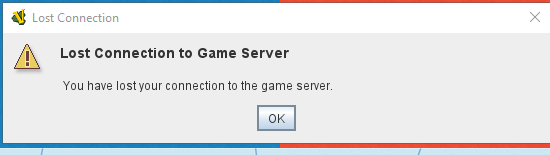
I’m trying to create an online room to connect with my friends and play, but I keep getting this error. It wasn’t happening before — I don’t know what changed, but I’ve started having this problem recently. Could someone please help me figure out how to fix it?
Has anyone else run into this and managed to solve it?
- Unable to establish connection to server: Connection timed out: connect
- Disconnected.
- Connecting...
- Unable to establish connection to server: Connection timed out: connect
- Disconnected.
Additional info that might help others diagnose it:
Also, to clarify: the question above was about when it fails to connect at all and gives that timeout error. But even when it does successfully connect, it drops about 30 seconds into the game with this message: "Lost connection to server.
"Sorry, were you able to find a solution to my problem?
Here’s the complete error log file:
2026-08-09 15:26:42,293 [13288-main] INFO VASSAL.launch.StartUp - Starting
2026-08-09 15:26:42,319 [13288-main] INFO VASSAL.launch.StartUp - OS Windows 10 10.0 amd64
2026-08-09 15:26:42,320 [13288-main] INFO VASSAL.launch.StartUp - Java version 26.0.1
2026-08-09 15:26:42,320 [13288-main] INFO VASSAL.launch.StartUp - Java home D:\Program Files\VASSAL-3.7.26\jre
2026-08-09 15:26:42,320 [13288-main] INFO VASSAL.launch.StartUp - VASSAL version 3.7.26
2026-08-09 15:26:42,518 [13288-AWT-EventQueue-0] INFO VASSAL.launch.ModuleManager - Manager
2026-08-09 15:27:24,258 [13288-SwingWorker-pool-2-thread-1] INFO VASSAL.launch.AbstractLaunchAction - Loading module file F:\BoardGame\Vassal Modules\Trium& Tragedy\C&T_v2-0.vmod
2026-08-09 15:27:32,602 [13288-SwingWorker-pool-2-thread-1] INFO VASSAL.launch.TilingHandler - No images to tile.
2026-08-09 15:27:32,604 [13288-SwingWorker-pool-2-thread-1] INFO VASSAL.launch.AbstractLaunchAction - Loading module Conquest & Tragedy
2026-08-09 15:27:32,606 [13288-SwingWorker-pool-2-thread-1] INFO VASSAL.launch.AbstractLaunchAction - JVM maximum heap size: 1024 MB
2026-08-09 15:27:32,621 [13288-SwingWorker-pool-2-thread-1] INFO VASSAL.tools.io.ProcessLauncher - launching D:\Program Files\VASSAL-3.7.26\jre\bin\java -Xms1024M -Xmx1024M -Duser.home=C:\Users\OmidAmir -Duser.dir=D:\Program Files\VASSAL-3.7.26 -cp lib\Vengine.jar VASSAL.launch.Player --load – F:\BoardGame\Vassal Modules\Trium& Tragedy\C&T_v2-0.vmod
2026-08-09 15:27:33,866 [8752-main] INFO VASSAL.launch.StartUp - Starting
2026-08-09 15:27:33,882 [8752-main] INFO VASSAL.launch.StartUp - OS Windows 10 10.0 amd64
2026-08-09 15:27:33,882 [8752-main] INFO VASSAL.launch.StartUp - Java version 26.0.1
2026-08-09 15:27:33,883 [8752-main] INFO VASSAL.launch.StartUp - Java home D:\Program Files\VASSAL-3.7.26\jre
2026-08-09 15:27:33,883 [8752-main] INFO VASSAL.launch.StartUp - VASSAL version 3.7.26
2026-08-09 15:27:33,883 [8752-main] INFO VASSAL.launch.Launcher - Player
2026-08-09 15:27:38,282 [8752-AWT-EventQueue-0] INFO VASSAL.build.GameModule - Conquest & Tragedy version 2.0
2026-08-09 15:28:40,460 [8752-AWT-EventQueue-0] ERROR VASSAL.chat.HttpMessageServer - IOException retrieving welcome message
java.io.IOException: Failed to GET /util/motd?module=Conquest%20%26%20Tragedy
at VASSAL.chat.HttpRequestWrapper.doGet(HttpRequestWrapper.java:104)
at VASSAL.chat.HttpRequestWrapper.doGet(HttpRequestWrapper.java:54)
at VASSAL.chat.HttpMessageServer.getWelcomeMessage(HttpMessageServer.java:73)
at VASSAL.chat.node.NodeClient.setConnected(NodeClient.java:163)
at VASSAL.chat.HybridClient.setConnected(HybridClient.java:90)
at VASSAL.chat.DynamicClient.access$001(DynamicClient.java:39)
at VASSAL.chat.DynamicClient$1.done(DynamicClient.java:64)
at java.desktop/javax.swing.SwingWorker$4.run(SwingWorker.java:747)
at java.desktop/javax.swing.SwingWorker$DoSubmitAccumulativeRunnable.run(SwingWorker.java:837)
at java.desktop/sun.swing.AccumulativeRunnable.run(AccumulativeRunnable.java:112)
at java.desktop/javax.swing.SwingWorker$DoSubmitAccumulativeRunnable.actionPerformed(SwingWorker.java:847)
at java.desktop/javax.swing.Timer.fireActionPerformed(Timer.java:289)
at java.desktop/javax.swing.Timer$DoPostEvent.run(Timer.java:221)
at java.desktop/java.awt.event.InvocationEvent.dispatch(InvocationEvent.java:323)
at java.desktop/java.awt.EventQueue.dispatchEventImpl(EventQueue.java:714)
at java.desktop/java.awt.EventQueue.dispatchEvent(EventQueue.java:693)
at java.desktop/java.awt.EventDispatchThread.pumpOneEventForFilters(EventDispatchThread.java:203)
at java.desktop/java.awt.EventDispatchThread.pumpEventsForFilter(EventDispatchThread.java:124)
at java.desktop/java.awt.EventDispatchThread.pumpEventsForHierarchy(EventDispatchThread.java:113)
at java.desktop/java.awt.EventDispatchThread.pumpEvents(EventDispatchThread.java:109)
at java.desktop/java.awt.EventDispatchThread.pumpEvents(EventDispatchThread.java:101)
at java.desktop/java.awt.EventDispatchThread.run(EventDispatchThread.java:90)
Caused by: java.net.SocketException: Connection reset
at java.base/sun.nio.ch.NioSocketImpl.implRead(NioSocketImpl.java:315)
at java.base/sun.nio.ch.NioSocketImpl.read(NioSocketImpl.java:360)
at java.base/sun.nio.ch.NioSocketImpl$1.read(NioSocketImpl.java:802)
at java.base/java.net.Socket$SocketInputStream.implRead(Socket.java:984)
at java.base/java.net.Socket$SocketInputStream.read(Socket.java:974)
at java.base/sun.security.ssl.SSLSocketInputRecord.read(SSLSocketInputRecord.java:489)
at java.base/sun.security.ssl.SSLSocketInputRecord.readHeader(SSLSocketInputRecord.java:483)
at java.base/sun.security.ssl.SSLSocketInputRecord.bytesInCompletePacket(SSLSocketInputRecord.java:70)
at java.base/sun.security.ssl.SSLSocketImpl.readApplicationRecord(SSLSocketImpl.java:1461)
at java.base/sun.security.ssl.SSLSocketImpl$AppInputStream.read(SSLSocketImpl.java:1068)
at org.apache.hc.core5.http.impl.io.SessionInputBufferImpl.fillBuffer(SessionInputBufferImpl.java:149)
at org.apache.hc.core5.http.impl.io.SessionInputBufferImpl.readLine(SessionInputBufferImpl.java:280)
at org.apache.hc.core5.http.impl.io.AbstractMessageParser.parse(AbstractMessageParser.java:250)
at org.apache.hc.core5.http.impl.io.AbstractMessageParser.parse(AbstractMessageParser.java:56)
at org.apache.hc.core5.http.impl.io.DefaultBHttpClientConnection.receiveResponseHeader(DefaultBHttpClientConnection.java:331)
at org.apache.hc.core5.http.impl.io.HttpRequestExecutor.execute(HttpRequestExecutor.java:197)
at org.apache.hc.client5.http.impl.classic.InternalExecRuntime.lambda$execute$0(InternalExecRuntime.java:236)
at org.apache.hc.client5.http.impl.io.PoolingHttpClientConnectionManager$InternalConnectionEndpoint.execute(PoolingHttpClientConnectionManager.java:851)
at org.apache.hc.client5.http.impl.classic.InternalExecRuntime.execute(InternalExecRuntime.java:233)
at org.apache.hc.client5.http.impl.classic.InternalExecRuntime.execute(InternalExecRuntime.java:209)
at org.apache.hc.client5.http.impl.classic.MinimalHttpClient.doExecute(MinimalHttpClient.java:147)
at org.apache.hc.client5.http.impl.classic.CloseableHttpClient.execute(CloseableHttpClient.java:245)
at org.apache.hc.client5.http.impl.classic.CloseableHttpClient.execute(CloseableHttpClient.java:188)
at org.apache.hc.client5.http.impl.classic.CloseableHttpClient.execute(CloseableHttpClient.java:162)
at VASSAL.chat.HttpRequestWrapper.doGet(HttpRequestWrapper.java:101)
… 21 common frames omitted
2026-08-09 15:29:15,276 [8752-read game.vassalengine.org/172.237.96.19] ERROR VASSAL.chat.node.NodeClientFactory - Lost connection to server
Unfortunately I can’t upload the actual original file — it won’t let me.
Thanks for the reply, but I have to push back on the “connectivity issue on your end” conclusion.
I’ve tested this extensively:
On my regular ISP connection, on a different network entirely, and through a VPN — same disconnect pattern every time.
Meanwhile, I connect without any issues to other real-time services like Tabletop Simulator, Steam/Arena, and Rally — no drops, no latency spikes, nothing. If my connection itself were unstable, I’d expect to see problems there too, and I don’t.
That strongly points to something specific to the VASSAL server/module connection path, not my local network.
Also, I’d like to point out: there’s a new build released almost every week, but this core connectivity issue — which has been open since mid-2025 — still hasn’t been addressed. Instead it feels like new issues keep getting introduced with each release while the most fundamental one (users losing connection entirely) stays unresolved.
Two questions:
Is there any way to connect via P2P instead of routing through the default game server, to rule out the server as the bottleneck?
Is there an alternative/backup server I could try connecting to instead of the default one, at least until this is fixed?
Would really appreciate a real look into this rather than another “check your connection” reply
There have been 7 releases so far in 2026. We’re in the 33rd week of the year now.
There are 94 items in the change log for 2026 releases. Five of those are fixes for regressions introduced this year.
We welcome constructive suggestions for investigating further.
I’m happy to provide whatever information is needed if someone chooses to investigate further. Do you have any suggestions for how to proceed with that?
If you look up that error, it can point to settings on the local network, or even on the remote host. However,
would indicate that the local network is likely at fault. Could be a DNS setting, router filtering, and so on.
Have you tried with a different machine (preferably a Windows 11, MacOSX, or Linux machine) on the same network? If so, what do you see?
Have you tried with the same machine on a different network?
If you do a WWW search on the above error java.net.SocketException: Connection reset - you will find many suggestions as to what to do.
Could you point to the original Github issue or forum post? The most relevant post I could find was Lost Connection to Game Server from January 2025. Incidentally, this is why it is important to close resolved threads so that it is easier to find solutions to problems.
You can also try to debug Vassal, to see if you can pin-point the problem more specifically.
Great. Please consider to mark your post as the solution to the problem. That really help others find the solution to their problems. Only you as OP can do that.