Some thoughts on stacks

Board games have flat objects that can sit atop other flat objects. (The height of things like wooden cubes is basically never relevant in game terms—you can consider them to be flat.)

The arrangement of pieces in pretty much every board game forms a tree, rooted at some game object like a map or a display. Usually these trees are broad and not very deep. (For games which have multiple maps, displays, or whatever, there are multiple trees, so we have a forest, not a single tree.)

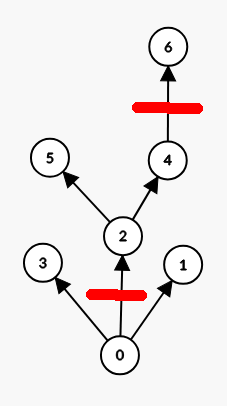
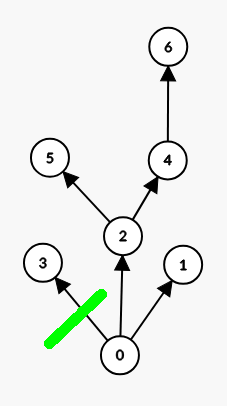
When you move pieces, you’re doing surgery on the tree they’re in (and possibly on the tree they’re moving into, if that’s a different one). On the source side of a move, you’re making one or two cuts to a branch of the tree, which bracket what portion of the tree you’re moving. One cut is between a piece and its parent; the other, optional, cut, is between a piece on the branch reachable from the piece after the first cut. On the destination side of a move, you’re making a single cut, where the top and bottom of of the moving fragment will be inserted.

E.g., here is a tree with source cuts marked in red between pieces 0 and 2, and 4 and 6:

and here is the same tree with a destination cut marked in green between pieces 0 and 3:
Finally, here is the tree with the fragment from 2 to 4 moved from where it started, between 0 and 6, to between 0 and 3 instead.
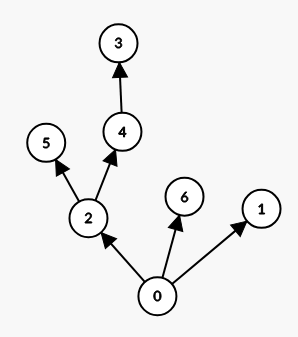
This way of formalizing moves is sufficiently general to capture the moves one typically sees in board games, such as moving a single unstacked piece, moving a piece from one stack to another, moving an entire stack, moving a portion of a stack possibly combining with another stack at the destination, moving a display that has other pieces atop it but not stacked with it.

Notice that this is my first mention of stacking since the post title. The stacking tree maps onto what games tend to consider stacks, but uncomfortably so.

Semantically, in many games, stacks are not the same as a sequence of pieces which are atop one another. Referring back to the first diagram in the example, piece 2 would generally not be considered to be part of a stack. Why? The reason is that stacks are linear, but piece 2 has two children. If you think of piece 2 as a moveable display which has pieces on it, it would be unusual to describe 2, 4, 6 as a stack—though it might be common to describe 4 and 6 as a stack on 2.

For practical reasons, stacks in physical games tend strongly to be of pieces which are the same dimensions, or if not, then declining dimensions from bottom to top. Stacks with small pieces below larger pieces tend to topple over, so physical games are designed to avoid this.

Generally the meaning of a stack in a physical game is that all of the pieces in the stack are in the same location, namely the one below the piece on the bottom of the stack. For these games, that the pieces in the stack are not physically all in the same location is a concession to the fact that two physical objects cannot occupy the same space, so piling them up in the spot they’re intended to be is the nearest option. For some games, the stack order matters, as does the fact that each piece in a stack obscures the face of the piece below it.

This brings me to a question: Is it useful to explicitly represent stacks, in addition to stacking?

V3 has stacks in the save format. Unfortunately they were poorly designed, in that it was possible to get empty stacks on maps in some circumstances. (I believe we fixed this long ago, and it’s something that a properly designed stack type would never allow to begin with.) I had been hoping to represent as game objects in V4 only things which are real objects—which stacks are not. I haven’t worked out to my satisfaction yet how to approach this.

1 Like

Since stacking order is important to some games, I really don’t see any way to get around needing to have them as game objects.

You could make stacks optional for games that don’t require them, but I suspect that would make the engine coding harder, while only possibly making module generation a bit simpler for those that don’t need stacks, so I don’t know if that’s worth pursuing.

:s/tree their in/tree they’re in/

Piece 2 in your example could be a tank in Squad Leader / ASL , that has both a turret marker on it, and a passenger half-squad carrying a support weapon.

The turret marker and the squad with the weapon are all stacked on the tank, but in game terms, the squad with support weapon is logically distinct from the tank’s turret position indicator.

While a stack isn’t a physical item, it is a assembly, constructed by a player or players, which many game rules speak of as an entity, with the physical pieces as subcomponents.

I think your tree / forest idea is very good, especially for games with isomorphic board which can be arranged in different ways. (SL , ASL, Submarine… if, say, a convoy starts to run off an edge, an empty map can be placed to allow the convoy to continue on, through another few miles of ocean.

I wasn’t suggesting having no stacking—stacking is clearly needed. What’s under consideration is having no explicit stacks.

If you don’t have explicit stacks, where will you store the stacking info? Will it just be implied by the piece location in the tree? If so, how does that work when 2 nodes are children of the same parent, like 4 & 5 in your first diagram?

I had been thinking about pieces having a property called a “stacking group”. If one piece is atop another and they’re in the same stacking group, then they’re a stack.

1 Like

That makes sense, since it allows us to differentiate between two pieces that belong together (a stack) as opposed to two pieces that happen to be in the same location. Of course, this begs the question of how to represent those 2 different things in the UI, but that can be dealt with later, once the data representation is nailed down.

First of all, I think that the basic premise of a board game engine is that it represents (or could represent) a physical game with physical playing pieces. This puts a limit to the size and complexity of the engine. Among other things, a board game engine is always 2D.

Stacks of playing pieces only occur if two or more pieces have the same x,y coordinate in the 2D space, by snapping to the same grid point or occupying the same default grid position (which is the minimum distance below which two playing pieces are said to be in the same position).

Stacks should only be a question of rendering. You may render something 3D in a 2D space, but it is only a question of rendering. This has the important consequence that there are no data structures holding stacks. You do not update a data structure each time you move a playing piece from one stack to another stack.

What playing pieces occupy the same x,y coordinate (are in the same stack) is generated each time this information is needed. This makes the code simple and avoids many bugs from not updating the stack data structures correctly. The downside is that this stack generation takes time for games with 100+ playing pieces on the board. In my engine I looked at this for the C++ part. I made a std::map where the x,y location pair is hashed with a particular counter:

static std::map<std::pair<int, int>, std::map<int, Counter *>> countersHash;

Unfortunately the C++ part rarely generate stacks. It is the Luau part that does this the most and here is where you can save time. I need to look more into this. But the point is the downside: generating stacks takes time.

Since stacks are just a matter of rendering, a method must exist to render stacks in proper order, starting from bottom and going up. I devised a very simple way of doing this, the variable zorder. A zorder value is just an integer that means nothing in itself. Only its relative value means something. Each time you move a playing piece, zorder is assign a number higher that any other zorder on the map. When you render a stack, the stack is ordered by zorder, lowest value at the bottom. When you move a playing piece within a stack, the zorders of all playing pieces above it are assigned a new and higher value.

Playing pieces with higher zorder are given a greater offset. This gives the impression of something 3D. It is also possible the give playing pieces a constant offset to put them apart from the rest of the stack (to give the impression that they do not belong to the stack).

Perhaps I have not answered the question. Maybe it can be useful to consider playing pieces in the same location as not belonging to the same stack. It would be helpful to give an example.

That BEGETS the question on how to represent those 2 different things in the UI.

To Beg a question is the employment of a particular logical fallacy: basing a proof of an assertion by using the assertion itself as evidence that the assertion is true.

Usually, it’s a malformed attempt to do inductive reasoning (Most inductive proofs for any assertion X by assuming that NOT X is true, followed by a chain of reasoning show that a conclusion leads to a known false condition)

The position in a stack in some games is important. For example, “The top regiment takes the hits before the regiments stacked below it, but ignore any officer counters stacked on top.” With manual processing of the rules, that is intuitive and quite easy. Without stacking position and purpose being some object that can be accessed and computed this might be hard to automate.
Maybe the zonder value would be sufficient…??? Or some other solution… ???

Good point.

There should be a methodology by which a player or referee can re-arrange the order of a stack … drag and drop? (and hopefully, moving the base of a sub-stack should drag the entire sub-stack accordingly)

I hope I am not being too self-promotive now. This is the VASSAL forum and I am a guest …

In GameTop you can of course reorder a stack interactively by selecting one or more counters in the stack and dragging them to the counter in the stack you want them to be on (you can’t drag something to the bottom; the bottom counter needs to be dragged instead).

But you can also reorder a stack programmatically by simply assigning counters a new zorder with script.

Place a counter on top of the stack (top_zorder() gives the new, highest zorder):

Counter[id].zorder = top_zorder()

Switch places in a stack:

local zorder = Counter[one].zorder
Counter[one].zorder = Counter[two].zorder
Counter[two].zorder = zorder

Place counter one in stack CounterStack on a counter with zorder somewhere (CounterStack is sorted according to zorder, lowest zorder first, where the lowest zorder is at the bottom of the stack):

Counter[one].zorder = top_zorder()

for id, v in pairs(CounterStack) do
    if Counter[id].zorder > somewhere then
        Counter[id].zorder = top_zorder()    
    end         
end    

Note: when using pairs(stack) you need to consider that not all elements in a Lua table are counters, so you need to make a test like this:

if type(id) == "string" and id ~= '__index' and type(v) ~= 'function' and v.deleted == false then
    ...
end

Doing this programmatically is the huge advantage of using script. Functionality like this can be made by the module developer for implementing features of stacks (and much else too).

Players don’t have access to scripts in-game.

So a GUI interface to run a script would need to be provided in the module by module creator.

Interesting. I have not thought about that. That players themselves can create and run scripts in-game. There is nothing that prevents it. Luau script can be compiled and run while the game is running. I have used this feature to implement script event-handlers.

A text edit window to write a script and a button to run it … no problem.

The problem is rather this: a player needs to have much knowledge about Lua and how to do things in GameTop with script. If the script does not work, it may corrupt the whole game and even lead to a crash. A player script may accidentally delete counters and do much havoc.

Therefore I am not sure if this is a good idea. It is wiser to let the module developer create the necessary scripts beforehand. Or at least it must be made very clear what dangers are involved.

I would never encourage random players to write scripts and run them, on an ad-hoc basis, in a running game, for the simple reason that nobody writes 100% bug-free code every time.

It’s best for the module designer to work all that stuff out, and provide a GUI interface, so that it can be tested and debugged in game-LIKE conditions, not tested in the middle of an actual game.

Let the player specify the necessary inputs by mouse clicks and/or typing.

Ok, you are talking about a developer tool that can check chucks of script while the game is running.

Script that generate the start-up can be tested (without restarting the application) with File->Reload.

Script that is executed while the game is running can be tested with a special window that has the ability to compile and run the script. This can easily be added.

There are few particular developer tools in GameTop, but File->Reload is one of them. Another is the ability to show the grid points and grid boundaries (show_grid). These tools must be disabled or hidden when a release is made. The disabling/hiding of menu choices is itself just script.

I realize I am likely posting in the wrong place, given that I am not a developer but merely a player.
I simply hope that a player’s perspective might contribute to your work.
I have always found it quite difficult to manipulate “stacks”—meaning groups of units sharing the same map location—ever since I started using Vassal back in 2010.
Several years ago, I submitted a post on the forum proposing an improvement to the “Mouse Over Stack Viewer,” which currently only allows one to view a stack’s contents without enabling interaction with the units inside.
Since my request went unanswered, I tried to come up with a DIY workaround.
I utilized the “Game Piece Inventory Window,” restricting its scope to the stack’s location, creating a window I named “Hex Inventory,” where one can interact normally with each unit in the stack. Currently, opening the Hex Inventory simply requires clicking an invisible action button positioned over the center of the topmost unit in the stack; all units in the game must possess this button.
To move a unit out of the stack, I introduced a “Move Adjacent” prototype, which allows a unit to move into any of the six hexes adjacent to the stack’s location. Then you can further move normally the unit to the final position.
The greatest limitation of this Hex Inventory is that only one unit can be moved at a time.
Hoping to see a smarter, less restrictive solution than the one described above in the near future, I wish all you developers the very best in your work.

Panther_2010 :grinning_face:

Funny you should mention this. This was exactly one of the problems I wanted to do something about in my engine. I created so-called offsetless stacking, see my GitHub wiki.

Such a stack shows the number of counters in the stack with a number in the top-right corner (if it has more than one counter). By double-clicking you open a window where all counters are displayed flat and you can drag a counter to a new position in the stack. You can only drag one counter at a time (maybe that can be fixed). You can also drag a counter to the bottom of the stack (which you can’t do with an offset stack).

You can switch between offset and offsetless stacks by going to Edit->Setting->General and ticking Offless-less stacks and Open stack with window. GUI updating must be done by yourself by some wheel scrolling, I noticed …