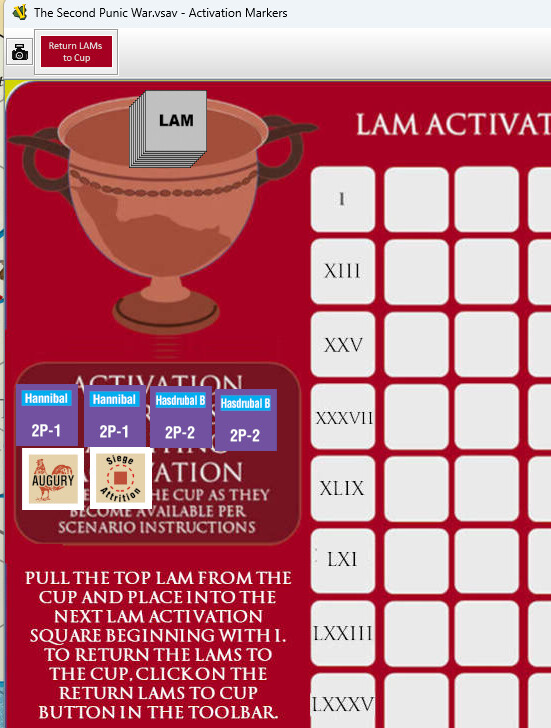
Module mentions in the LAM Activation Board there is a button to return all LAM’s to the cup. But I can’t find such a button… Any idea?
Good catch. I’ll add that in the next module update. That fix would probably be backwards compatible for any saved games you might have, I would think. IN the interim, you can select all of the LAMs collectively and right click return to cup.
Thanks,
Rob
Thank you Rob for your good work!
This is how it will appear in the upcoming v1.0.3 module update. It is set up to only return the LAMs in the white grid area of the board, and ignore LAMS outside of the grid.
Thanks again for the heads up and feel free to send any oopsies you come across in the module.
The 1.0.3 update may wait awhile before being posted so I can accumulate as many fixes as possible.
In the 1.0.5 version, we encountered a minor issue with the Egyptian unit counters for the Carthage scenarios (Carthage minor combat units). We could not add (or subtract) strength from these counters. I have downloaded the new 1.1.1 module, but the problem seems to persist.
Fixed and v1.1.2 has been uploaded to the webpage at GMT Games - Thunderbolt Deluxe
Also, FYI for future postings. Your post should have been under the ‘Module Support’ forum category. We’ve all done it but just letting you know for future postings. The ‘Technical Support and Bugs’ category is for the larger Vassal Engine problems, not limited to just a module design.
I’ve recommended a process where forum posts that originate with module support questions originate from that module’s homepage which would automatically post as a ‘Module Support’ topic. There was some headway towards that discussion recently, but it has not reached fruition yet.
Thanks for the notification for the Egypt counters. Not sure how the problem was limited to just their counters, as I generally copy and paste to create new counters to maintain consistency once the process gets going. Apparently, I deviated on the Egypt counters for some reason.
Thanks - note that I attempted to post initially in the Module Support forum, but ended up here when I was told that the topic name I had chosen had already been used.
See this PR - screenshots here.
Even so, you should post to Module Support and then make a more descriptive title 
@jtbmap Please remember to mark the solution to your issue - it helps others find the solution to their problems. Only you, as OP, can do it.
Yours,
Christian
I’ve changed the post category.
Sure - how do I do this?