Guys,
I can’t open any pdf files that are listed in the dropdown Help menu. This is common acrss all my VASSAL modules.
No issues opening pdf docs from within any other wargame dropdown menus.
Anybody else experienced this?
Thanks
Paul
Guys,
I can’t open any pdf files that are listed in the dropdown Help menu. This is common acrss all my VASSAL modules.
No issues opening pdf docs from within any other wargame dropdown menus.
Anybody else experienced this?
Thanks
Paul
When you say “my VASSAL modules”, do you mean modules created by you, or do you mean any module? I ask because …
… I’m not entirely sure what you mean by “within any other wargame dropdown menus”. Do you mean some other application than Vassal?
Please take a look at How to report problems - in particular
I cannot off-hand reproduce your problem (Vassal 3.7.19, Linux, any module).
Yours,
Christian
Thanks Christian,
I’m using Windows 11 with the latest version of VASSAL. The problem occurs across VASSAL and all the modules I’ve downloaded. If I click on any PDF linked document from the drop down help menu, nothing happens. No document opens. TBH I think it’s a ‘me’ issue, but thus far I’ve been unable to resolve it. Nothing, as far as I can see, is showing up in the error log. I was hoping that another user may have experienced a similar issue.
It’s not happening in any other PC game I own where PDF files are linked to drop down menus in a similar fashion. It’s specific to VASSAL.
Thanks
Paul
I do not think it is an 1D-10T error  but rather a problem with your particular setup
What happens, on Windows, when you select the Help menu-entry corresponding to a PDF, is that Vassal
java.io.tmpdir. That property is typically set by a call to GetTempPath system routine (see also here), if not set already. That means, you can pass, for example, -Djava.io.tmpdir=C:\Temp to the java process, to change the temporary directory, or you can set the environment variable %TEMP% to something.errorLog.C:\Temp\Vassal0123456789ABCDEF.pdfstart primative (VASSAL.tools.BrowserSupport#openURI). That is, if the temporary file is C:\Temp\pdfhelp_0123456789ABCDEF.pdf then the commandstart C:\Temp\pdfhelp_0123456789ABCDEF.pdf
errorLog.Perhaps, a way to hunt down the problem could go as follows:
java.io.tmpdir points to.
%TMP% to some well defined, existing directory, say C:\TemperrorLog that says what the problem is.C:\Temp\pdfhelp_123456789abcdef.pdf, then hit Win+R and type in to the dialogstart C:\Temp\pdfhelp_123456789abcdef.pdf
Win+R again and typecmd
start C:\Temp\pdfhelp_123456789abcdef.pdf
C:\Documents and Settings\<username>\VASSAL\prefs\<module_name>
Hopefully you will get some clue as to what goes wrong from the above.
Perhaps you could give a name of a module where you do see the problem, and perhaps also post the errorLog - the message may not be obvious on first glance.
Yours,
Christian
Thanks Christian,
Most of what you’ve written is beyond by limited PC skillset.
I’ve added my error log after opening the Wing Leader Mod and trying to open the the help files
2026-01-05 14:41:55,015 [34636-main] INFO VASSAL.launch.StartUp - Starting
2026-01-05 14:41:55,019 [34636-main] INFO VASSAL.launch.StartUp - OS Windows 11 10.0 amd64
2026-01-05 14:41:55,019 [34636-main] INFO VASSAL.launch.StartUp - Java version 25
2026-01-05 14:41:55,019 [34636-main] INFO VASSAL.launch.StartUp - Java home C:\Program Files\VASSAL-3.7.19\jre
2026-01-05 14:41:55,019 [34636-main] INFO VASSAL.launch.StartUp - VASSAL version 3.7.19
2026-01-05 14:41:55,175 [34636-AWT-EventQueue-0] INFO VASSAL.launch.ModuleManager - Manager
2026-01-05 14:42:51,444 [34636-SwingWorker-pool-2-thread-1] INFO VASSAL.launch.AbstractLaunchAction - Loading module file H:\VASSAL\VASSAL Modules\Wing Leader\WL_v5.vmod
2026-01-05 14:42:51,704 [34636-SwingWorker-pool-2-thread-1] INFO VASSAL.launch.TilingHandler - No images to tile.
2026-01-05 14:42:51,957 [34636-SwingWorker-pool-2-thread-1] INFO VASSAL.launch.TilingHandler - No images to tile.
2026-01-05 14:42:51,979 [34636-SwingWorker-pool-2-thread-1] INFO VASSAL.launch.TilingHandler - No images to tile.
2026-01-05 14:42:51,992 [34636-SwingWorker-pool-2-thread-1] INFO VASSAL.launch.TilingHandler - No images to tile.
2026-01-05 14:42:51,993 [34636-SwingWorker-pool-2-thread-1] INFO VASSAL.launch.AbstractLaunchAction - Loading module Wing Leader
2026-01-05 14:42:51,995 [34636-SwingWorker-pool-2-thread-1] INFO VASSAL.launch.AbstractLaunchAction - JVM maximum heap size: 1024 MB
2026-01-05 14:42:51,999 [34636-SwingWorker-pool-2-thread-1] INFO VASSAL.tools.io.ProcessLauncher - launching C:\Program Files\VASSAL-3.7.19\jre\bin\java -Xms1024M -Xmx1024M -Duser.home=C:\Users\paulr -Duser.dir=C:\Program Files\VASSAL-3.7.19 -cp lib\Vengine.jar -Dsun.java2d.d3d=false VASSAL.launch.Player --load – H:\VASSAL\VASSAL Modules\Wing Leader\WL_v5.vmod
2026-01-05 14:42:52,326 [40412-main] INFO VASSAL.launch.StartUp - Starting
2026-01-05 14:42:52,330 [40412-main] INFO VASSAL.launch.StartUp - OS Windows 11 10.0 amd64
2026-01-05 14:42:52,330 [40412-main] INFO VASSAL.launch.StartUp - Java version 25
2026-01-05 14:42:52,330 [40412-main] INFO VASSAL.launch.StartUp - Java home C:\Program Files\VASSAL-3.7.19\jre
2026-01-05 14:42:52,330 [40412-main] INFO VASSAL.launch.StartUp - VASSAL version 3.7.19
2026-01-05 14:42:52,331 [40412-main] INFO VASSAL.launch.Launcher - Player
2026-01-05 14:42:55,365 [40412-AWT-EventQueue-0] INFO VASSAL.build.GameModule - Wing Leader version 5.00
2026-01-05 14:42:55,389 [40412-AWT-EventQueue-0] WARN VASSAL.build.GameModule - No more than one [Last Move Highlighter] allowed in Main Map [Map Window]
2026-01-05 14:42:55,392 [40412-AWT-EventQueue-0] INFO VASSAL.build.module.ExtensionsLoader - Loading extension H:\VASSAL\VASSAL Modules\Wing Leader\WL_v5_ext\WL_ADCs_v1.1.vmdx
2026-01-05 14:42:55,417 [40412-AWT-EventQueue-0] INFO VASSAL.build.module.ExtensionsLoader - Extension WL_ADCs_v1.1 v1.1 loaded
2026-01-05 14:42:55,417 [40412-AWT-EventQueue-0] INFO VASSAL.build.module.ExtensionsLoader - Loading extension H:\VASSAL\VASSAL Modules\Wing Leader\WL_v5_ext\WL_Charts_v1.vmdx
2026-01-05 14:42:55,424 [40412-AWT-EventQueue-0] INFO VASSAL.build.module.ExtensionsLoader - Extension WL_Charts_v1 v1.00 loaded
2026-01-05 14:42:55,424 [40412-AWT-EventQueue-0] INFO VASSAL.build.module.ExtensionsLoader - Loading extension H:\VASSAL\VASSAL Modules\Wing Leader\WL_v5_ext\WL_Fandom_v2.vmdx
2026-01-05 14:42:55,519 [40412-AWT-EventQueue-0] INFO VASSAL.build.module.ExtensionsLoader - Extension WL_Fandom_v2 v2.00 loaded
Success of sorts
The files are being loaded to
C:\Users\paulr\AppData\Local\Temp
all the files are prefixed with vassal_12345678….etc
the question is why can’t I see them when I click on the menu item?
I should add that these files in the temp folder are html files, not pdf files.
Thanks
Paul
There are no PDFs in Wing Leader nor in any of the extensions.
Question: Do you have some other module which does have a PDF in it where you see the problem?
If you want to check if there is indeed a PDF in a module, you can open the module in the Vassal Editor and check the relevant documentation entry, or open the module with some Zip tool (you may need to rename the module to end in .zip to “trick” the Windows file associations). For example
$ unzip -l WL_v5.vmod
Archive:  WL_v5.vmod
  Length      Date    Time    Name
---------  ---------- -----   ----
   711240  2021-04-16 13:29   help/Aircraft_Menu_Help
    18212  2021-04-16 13:29   help/Controls_Window_Help
    95997  2021-04-16 13:29   help/Counter_Window_Help
     2200  2021-04-16 13:29   help/Keyboard_Shortcuts
   240578  2021-04-16 13:29   help/Main_Map_Help
   188006  2021-05-17 10:41   help/Module_Notes
    26626  2021-04-16 13:29   help/Using_Extensions
   164981  2021-04-16 13:29   help/Wing_Display_Help
   188006  2021-05-17 10:42   help/Wing_Leader_VASSAL_Module_Notes
...
Note, all the files help/... are really Zip archives of HTML and PNG files. Also note, that only Module_Notes is referenced from the module. The rest of the help entries are not linked and cannot therefore be opened from the Vassal Player.
That’s because they are all HTML files - not PDFs.
Question: When you select the Wing Leader VASSAL Module Notes entry in the Help, do you then see a new page in your Web-browser? The help should be displayed there.
Yours,
Christian
Thanks Christian,
You’ve been a great help thus far.
I was looking for pdf files as well and couldn’t find any when I went into edit mode. I added a link to a pdf file in the help drop down menus and that created a folder with a PDF file in the temp folder. Clicking on a link where no file is linked just creates an empty folder.
Learning a lot here.
Question: When you select the Wing Leader VASSAL Module Notes entry in the Help, do you then see a new page in your Web-browser? No. Nothing opens in my browser.
But I’m still not seeing the html files on screen when I click on the link in the drop down menu.
I can open them manually by going to the temp folder.
What am I missing here.
just running through a few things using chatgpt
This has come up consistently
VASSAL uses Java’s Desktop.getDesktop().open(file)
On Windows 11, that call can silently fail
The file is extracted correctly to AppData\Local\Temp
Double-click works, but Java’s open call does nothing
This is a known issue affecting:
Java 8–17
Apps that rely on Desktop.open() (VASSAL, some Eclipse tools, etc.)
Is there any basis for this? Chatgpt can be less than helpful at times.
Thanks
Paul
I’m not sure I entirely get what you did or see. Did you,
Perhaps you could take another module, say Anzio Beachhead (by yours truly), which does contain a PDF file, and then try to open that through the Vassal player (Help→Show rules for the Anzio Beachhead), and then see if you see the PDF file open up.
errorLog (see How to report problems).Did you check all running browser (Edge, Chrome, Firefox, …) instances to see if a new tab was opened up? Vassal may not necessarily focus the browser nor raise it to the foreground.
I guess the temporary folder is
C:\Users\paulr\AppData\Local\Temp
Assuming that is correct, and the created sub-directory is something like
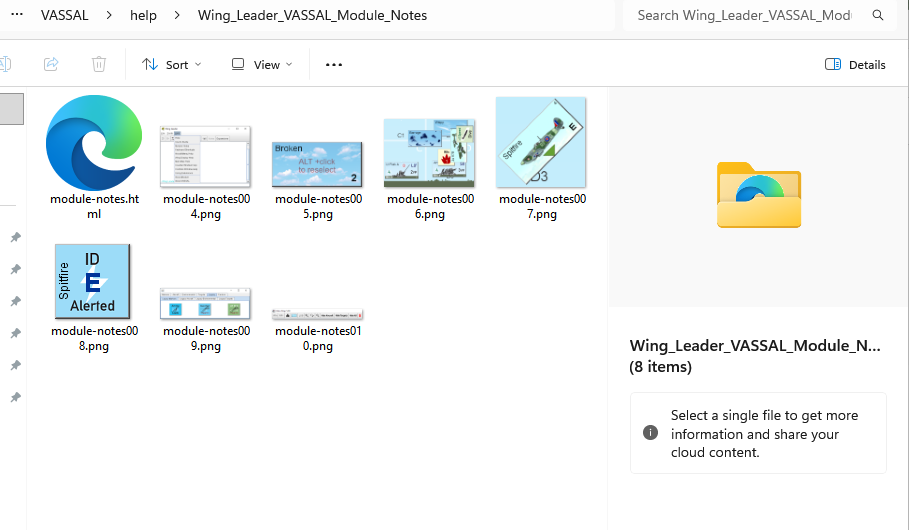
vassal_12345678\123456789\VASSAL\help\Wing_Leader_VASSAL_Module_Notes\
with the file module-notes.html in it.
If so, then
Win+R (Windows key on the keyboard held down and then press R). cmd
C:\>
C:\> start C:\Users\paulr\AppData\Local\Temp\vassal_12345678\123456789\VASSAL\help\Wing_Leader_VASSAL_Module_Notes\module-notes.html
module-notes.html. If that is the case, then something truly odd is going on, and we’d need to do a much deeper dive.module-notes.html file above. If the path is correct, then the error message should give some indication as to what is going on.Yours,
Christian
When you say “command”, do you mean:
C:\> start C:\Users\paulr\AppData\Local\Temp\vassal_12345678\123456789\VASSAL\help\Wing_Leader_VASSAL_Module_Notes\module-notes.html
So it seems that your machine decides to open the destination in Explorer rather than in some browser.
Perhaps try,
Win+Rcmd followed by pressing Run in the dialogC:\> cd C:\Users\paulr\AppData\Local\Temp\vassal_12345678\123456789\VASSAL\help\Wing_Leader_VASSAL_Module_Notes
C:\Users\paulr\AppData\Local\Temp\vassal_12345678\123456789\VASSAL\help\Wing_Leader_VASSAL_Module_Notes\:> start module-notes.html
If in all the above cases, an Explorer window is opened, then for some reason your set-up does not invoke the appropriate application when the start primitive is used. Perhaps a solution can be found on the web - I don’t have one off the top of my head.
Yours,
Christian
Hi Christian,
if I extend the line to this
C:/Users/paulr/AppData/Local/Temp/vassal_1775138140270519432/VASSAL/help/Wing_Leader_VASSAL_Module_Notes/module-notes.html
then it opens in a browser window
The files, assuming they are in the vassal vmod file, are being loaded into the appdata/temp folder. what isn’t happening is that the files aren’t opening in a window on my desktop monitor when I click on the help menu items.
I click on the wing leader module notes, for example, and nothing visible happens, no explorer window or browser window opens showing me the html file or pdf file. I can see the folder with the html file and images if I open the appdata/temp folder and look for the VASSAL folder and click on the appropriate PDF or HTML file so the correct file association is definitely in place.
If I start VASSAL and look at the help dropdown menu in the main window all the items on the drop down menu function as expected except Help and Vassal Users Guide. When I go to the appdata/temp folder an empty VASSAL folder has been generated.
It’s a puzzler. it’s only happening with the drop down help menu in VASSAL.
Thanks
Paul
Hi Paul,
Thank you for the summary.
errorLog.errorLog.C:\> start ...I’m afraid it will be hard to further investigate the problem. The best way would be to run Vassal in the Java debugger and break on VASSAL.tools.BrowserSupport#openURI to see what goes on there. If you are up for it, it can be done, but requires a bit of work, probably including installing a full Java Development Kit, and heavy use of a terminal.
If someone else can reproduce the problem, and who already has some experience with debugging, then that would be beneficial. Otherwise, I think it will be a bit of a mouthful.
Yours,
Christian
Hi Christian,
Yes, that sounds like a mountain I don’t want to climb. VASSAL works, I just can’t open the files to my desktop from the module help drop down menu if they are in pdf or html format. I’ve created a shortcut to the temp folder. if I need to look at the files they are only a couple of clicks away.
I have edited VASSAL modules in the past, functionality, scenario creation etc. but my programming skills are limited to a very brief introduction to turbo pascal over 25 years ago. Anything beyond if, then, else is way beyond my knowledge or skillset.
From what I’ve learned over the last day or so am I right in thinking that if VASSAL generates a folder in the appdata/temp folder but there is no content in that folder then the module did not contain the file and or the menu function on the drop down menu wasn’t implemented in any meaningful way within the module?
Vassal users guide button seems to do this in the modules I’ve looked at.
Many thanks for the time you’ve put in on this. Much appreciated.
Thanks
Paul
When ever you start Vassal, and irrespective of whether you requested anything from the Help menu (in the module player or module manager), a directory
C:\Users\USERNAME\AppData\Local\Temp\vassal_LARGE-NUMBER
where USERNAME is your user name (in your case paulr) and LARGE-NUMBER is some random large number, is created (and is removed when VASSAL terminates).
That is, you will get that directory no matter what.
If you now request a Help menu entry corresponding to a HTML archive, a directory like
C:\Users\USERNAME\AppData\Local\Temp\vassal_LARGE-NUMBER\VASSAL\help\ENTRY-TITLE
where ENTRY-TITLE is the (escaped) entry’s title, should be created. If there are no files in that directory, it could mean the HTML archive put in the module is empty or failed to extract. That should be diagnosed in the errorLog though.
The Vassal User’s Guide entry in the Help menu (module or module-manager) does not point to a file in the module(s). Instead, it points to a file in the file system where Vassal was installed. If Vassal is installed in
C:\Program Files\VASSAL
then I believe the user’s guide PDF is in
C:\Program Files\VASSAL-VERSION\doc\userguide\userguide.pdf
where VERSION is the version number of VASSAL - e.g., 3.7.19.
Yours,
Christian