Have not yet had any problems with other modules but as most of my PBEM gaming is with Last Hundred Yards this has become a major inconvenience for casual and league play. Am currently using v3.7.23. Issue first presented after updating to v.22. I uninstalled and reinstalled vassal and JRE all to no avail. Attached is error message my opponent is receiving and link to offending log file itself. Mahalo. PAVE
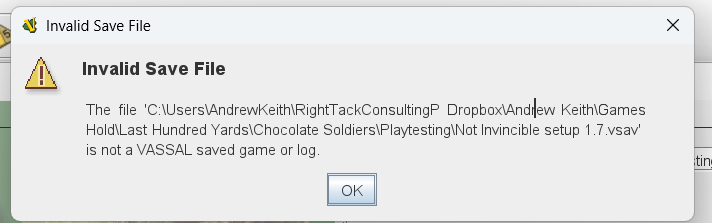
This is a waste of time at best and harmful for debugging at worst. Do not do this unless you’ve identified the problem and know reinstalling will solve it.
Btw, it looks like you’re on Windows. The Vassal Windows packages all come with their own JRE—they will not use one you’ve installed separately, so there is no point to installing a JRE at all if you have nothing else that uses it.
Where can we get the module the save was written with?
My assumption is that you (and the opponent?) mean to be using this with the current latest version (5.0.2) of the Last Hundred Yards module. If that’s not accurate, please add more information.
The reason the saved game file you posted will not load in that module is that it was produced with an entirely different module. Inspecting the moduledata file inside the .vsav shows the following metadata:
<?xml version="1.0" encoding="UTF-8" standalone="no"?>
<data version="1">
  <version>* 8 *</version>
  <extra1>Pacific Theater of Operations</extra1>
  <extra2>Game Design by Mike Denson</extra2>
  <VassalVersion>3.7.20</VassalVersion>
  <dateSaved>1772812659037</dateSaved>
  <description>Pacific Mission Pack</description>
  <name>LHY PTO Playtest</name>
</data>
So if this is a two-person game, one of you is producing files using a module named LHY PTO Playtest, version * 8 *. Both participants need to be using that exact same module for things to work.
I’ve tried it. You can’t. It’s not the correct module. Hence my question about where we can get the module.
Thanks all for quick reply. Double checking with opponent now. Took it for granted we were both using the PTO mod (as it’s a pacific scenario not ETO). Will apprise…
The Opponent Here,
I am using LHY PTO Playtest *8*

Soooo, any other ideas or am i just SOL?
I don’t know what else there is to do other than ensure you are using the LHY PTO Playtest module. If you are verifiably doing that already and the log/save still won’t open in it, something else is going on.
Where can we get the module the log is intended to be used with?
If you are a member of the playtest group — from the playtest coordinator. Referring to * PTO 8 *
I just send same save game file to another player who is using vassal 3.7.24 and PTO playtest v8.0 and he opened it w/o problems. This issue may defy solution 
Probably not. However, it is hard to give advice when the module in question is not available to inspect.
Also, your save (not log) file contains some funny characters e.g., U+009E - as well as French swear words - which may cause problems. The originating module also seems to have spurious \ in some report fields of Report Action traits. For example,
<span style="color:blue\;">Time Lapse is <\/span>$timeLapseResult$ minutes â<U+009E>¡ Total Time Lapse is now <span style="color:green\;">0$gpHour$:$gp10Minutes$$gpMinute$<\/span> <span style="color:red\;">(HH:MM)<\/span>
which may cause problems when decoding the pieces. The way pieces are encoded, both in the module and in saves is rather cryptic - and is rather fragile. One need to be especially careful with \ and ,.
If you want more help figuring out your problem, you need to post your module somewhere. Note, one can make pre-releases in the Game Library by appending a pre-release identifier to a release number e.g., 0.0.1-alpha. Of course, the module need to set the same version number. A pre-release is a way to signal to users that this particular release is not for general consumption.
Also, please remember to tick off the solution to your problem. That really helps others find the solution to their problem. Only you as OP can do that.
Yours,
Christian
Thx Christian. I’ve queried the powers that be regarding access to the module itself. By way of an update, I just started another LHY game using a different module (LHY Europe 5.0.2) and my opponent received same error. I asked him to send me starting file instead and it opened ok (so far). This suggests to me that the problem may be local to me; however, others in community have indicated similar problems of late. Hope springs eternal…
I’ve been checking this thread for activity every week or so. And I just noted your reference to french curse words in the logfile. I typically use them in my passwords. Presumably that’s NOT the problem.
I had an epiphany of sorts a couple of weeks ago. I started thinking about what I typically do in every game I play. And it struck me. Since I’ve had to start using reading glasses I have begun tweaking module provided label markers or embedded text options thusly for enhanced legibility:
my text then follows.As a test I restarted a couple of games deleting the offending text markers or starting afresh refraining from the practice. Sadly, after one or two file exchanges the problem manifested itself again.
From a high of nearly a dozen pbem vassal matches I’m down to two (Fixing to start a third, BCS-Danger Forward). Whatever this is it started with vassal v22. In hopes of reinvigorating the investigation am posting the PTO 8 mod here: Dropbox
mahalo
pave
Can you provide a set of instructions for what you expect another user could do to replicate your problem?
I loaded this module, put some pieces on the map, and created a saved game file. Separately, I recorded a log in which I added some more pieces to the map, rolled some dice, wrote a comment to the log.
For both the saved game file and the logfile, I was able to reopen them without any issues (and play back, in the case of the logfile).
If this is not what’s meant to be tested, or not something sufficient to introduce the problem you experience, please supply more details and/or instructions.
Hi Joel. Many thanks for your looksee. Reviewing my previous comments it appears the html text i posted was dropped by the text editor. I’ll repeat it here without the brackets:
html font size=8 font color=“red” — after this my text would follow.
I never remembered to put the /html tag at the end but subsequent tests with it appended made no difference. The log files playback just fine for me too. Its only when someone else tries to open them that it fails — and not every time.
That it’s impacting other modules besides just LHY suggests a basic engine issue. mahalo.
If you are referring to Saving game or creating log closes Vassal, then that problem seems unrelated to yours. That problem seemed to have something to do with cloud storage (OneDrive specifically) and inaccessible locations, while yours seems more like corrupted files.
It isn’t  - just an observation, and a hint that
 .vsav files can be cracked 
Tinkering with the .vmod - especially piece (or prototype) definitions is a big no-no while PBEM’ing. You and your opponent(s) must use the exact same module (.vmod), and you should preferably also use the same Vassal release. The reason is that Vassal has a rather peculiar way of encoding pieces and states of pieces, and slight descrepancies can cause massive problems.
One way to make sure you an your opponent(s) are in fact using the same module, is to exchange checksums of your modules. Each player does
$ sha512sum ModuleFile.vmod > PlayerName.sha512
where ModuleFile.vmod is the filename of the used module by that player, and PlayerName is the name of the player - say Alice. Eachp player then ships that off the file PlayerName.sha512 to the other player(s). Upon receiving that file, each player then does
$ sha512sum -c PlayerName.sha512 ModuleFile.vmod
where PlayerName is the name of the other player, and ModuleFile.vmod is the filename of the player that received PlayerName.sha512. If this last command did not report OK, then the modules does not match, and the players shoul syncronise their .vmods.
Given
and that @JoelCFC25’s tests are valid, then I think
is probably the most reasonable explanation.
Perhaps you can run similar tests to those suggested in Saving game or creating log closes Vassal - just because the problem isn’t the same, it doesn’t mean that the method of diagnoses are different.
Yours,
Christian
So from here–now that you’ve provided the module at issue–I would suggest posting a save or logfile that you’ve created and I’ll load it to see what happens.
Yes. Tumbled to that very idea last night. I’ll start a playtest scenario for the PTO module that originally presented (and remains a big issue as playtesters hard to come by these days). Will post the .vlog file here unless it would be easier to just exchange via email. I remain optimistic. Many thanks for efforts thus far.
Use three back-ticks ``` before and after such code to make it come up verbose, e.g.,
<html font size=8 font color=“red”> — after this my text would follow.
See also How to format posts.
Yours,
Christian