I can easily copy / paste inside a module folders / pieces / traits, etc. But I can’t do it between different modules.
If I could it would save me a lot of trouble when designing new modules; instead of beginning from scratch I could get some things from my older modules / games.
Is there a way to do it or is it definitely impossible?
You haven’t missed out too much. This feature was only added in past couple of years or so (in Vassal 3.7 if I recall correctly). It’s a great time saver, I agree.
Right click on a node in the source module and choose “Export to XML”. Open the destination module, right-click on the appropriate parent node for the exported bits and choose “Import from XML”.
Everything in the Editor is structured like a series of folders with items in them (possibly including more folders). Once you export something, it can only be imported into another module at the same place in the hierarchy where it belongs.
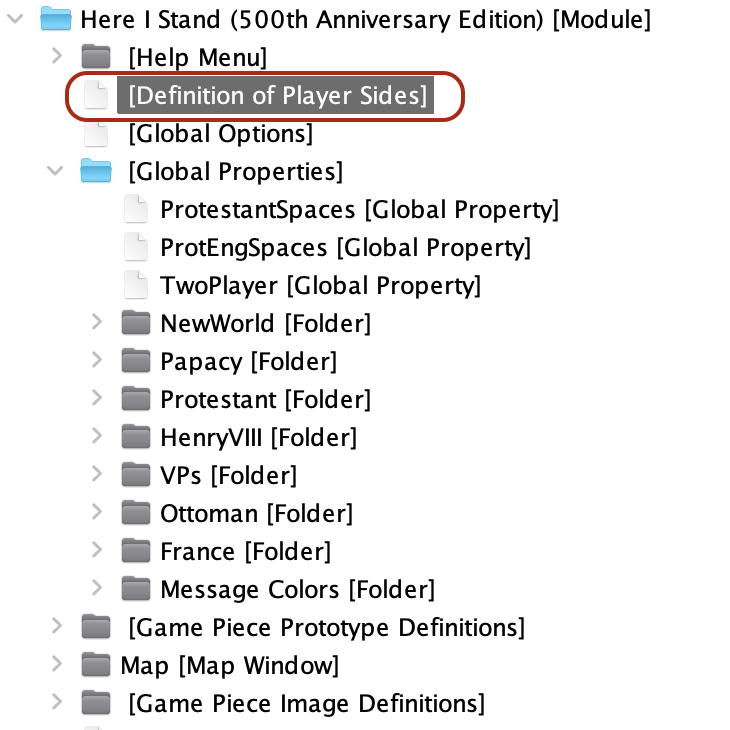
Example: If I export the circled item (the definition of player sides) from a module as XML, when I go to another module to import it in, I have to right-click on the top-most node to import the XML (in the pictured source module below, the top-most node is titled: Here I Stand (500th Anniversary Edition) [Module]). Player sides are a top-level module item, I couldn’t right-click a Map Window or some other node and expect to be able to import it there.
The Editor is opened by right-clicking a module in your VASSAL module library view and choosing “Edit Module”.
I don’t mean to be unkind, but this import/export functionality is only going to be of use if you are heavy into module editing, and it doesn’t sound like you are since you didn’t even recognize that as the Editor.
You may not need any of this for your VASSAL use case–e.g., if you only play modules.
Unfortunately I fear you are correct. But I gots to try! It’s part of the fun. I gave up on software back in the Pascal days. Outside of doing some surface work in AutoCadd 20 years ago I have confined myself to making the chips, not using them. There are some very good people out there putting these to use, no need for me to muck up the waters.
Thanks again!
My you and yours have a very merry non-denominational winter solicits festival!!!