Hello, i created a chart window with multiple drop-down menus, looks fine, saving the module and when i open the module normaly the chart window just opens a small window and all i see is “fleet”, see the small image.
If i duplicate the entire chart, the left of the two will always work (if i swap places with the two the one on the right always works and the left gets the “empty” window.
To makes things wierder when i send this to a friend it all works for him, but he has to load all the files in the fleet chart every time. i thought that you ony do that once and then its done? He could remove the “not working” chart, and the other fleet chart works but not for me?
Anyone know of a solution for this? Wierd that 2 people have 2 different problems..
Have you tried to resize the window using the Desktop handles? Vassal remembers the size of windows from one invocation to the next. This is stored in the modules preference file. If your module is called Foo Bar, then the preference file is Foo_20_Bar and is stored in
You can try to delete that file to go back to the “factory settings” of the module.
What do you mean “load all the files in the fleet chart”?
Perhaps you could share your module and give precise instructions on how to recreate your problem. See also How to report problems. Also remember to tick off the solution when you have it - that really helps others find the solution to their problems.
Just to be clear - this is a different problem than the one above.
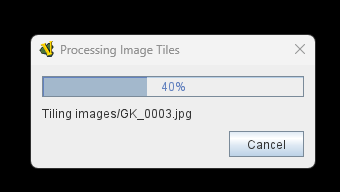
The dialog with the progress bar you show is the dialog that pops up when Vassal creates tiles of the images used in the module (mainly for maps and similar). This should only happen if the images in the module are newer than the already made tiles.
The tiles are stored in
OS
Path
C:\Users\USERNAME\AppData\Roaming\VASSAL\tiles\
~/Library/Application Support/VASSAL/tiles/
~/.VASSAL/tiles/
The exact name of the directory and file is encoded from the image file name and the tile numbers (horizontal and vertical indexes).
Your friends’ problem might have several causes
Your friend is opening a new module file every time
The time on your friends computer is out of wack.
The file system where the tiles are stored is not reporting the right modification time - this could be the case for cloud storage, for example.
There’s no more room on the file system that the tiles are stored on
…
To get closer to a solution, your friend should post more details - How to report problems - in particular your friend shuold start a new Vassal session (quit completely) and load the module, then your friend should post the relevant part of the errorLog - remember to put ``` before and after to make it easier to read.