Hello again,
I’m having more fun with WIF CE. The game is playing nicely now. However, there is something I wish to add: Control Markers.
The Germans are advancing into the USSR and I have to pay careful attention to the hex control to know where the Soviets can cut them off. I created a German hex control marker and added it under the markers pieces. Here is what it looks like in play:
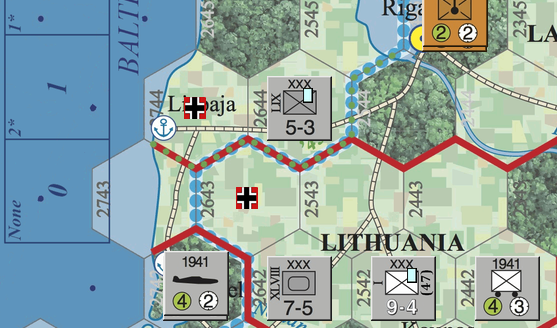
However, there is something I need help with. There are these red and white buttons at the top of the screen that allow you to hide/show certain units (hide land, aircraft, ships, etc). One of the buttons is also for markers. I put my piece with the other marker pieces that can be turned on and off with the marker toggle button. The German control marker I made does not hide/show when the existing markers button is toggled. They remain unchanged on the map until I delete them. Is there a way I can make them hide show with the marker toggle button? Better yet, can I make a whole new toggle button just for control counters? Please advise.