CountStack(expr) issues

I tried to use CountStack(expr) to count the counters in a stack that have a given property (Type = FSA), but I obtained always a zero result. This is because I’m surely not using the correct syntax in the BeanShell, and I don’t know how to make this command working. I tried several espressions but none worked.

Please, someone can kindly explain which is the correct syntax to be used?

Thank you

I use $StackSize$ in a Text Label

I need to know the number of the counters in a given stack that have a given property, not the number of all the counters in the stack. I tried to insert an expression like “Type = FSA” in the CountStack(expr), but It doesn’t work, giving a 0 result everytime.

This syntax doesn’t work : CountStack(“Type==FSA”) like many others I tried.

I need to know which is the correct syntax. ( I hate Beanshell….).

Many Thanks

panther_2010

:joy:

Try this then:
Game Piece Prototype: “Name of Type Piece” Marker: Property name: Unit (This is the Property to Count) Property Value: 1
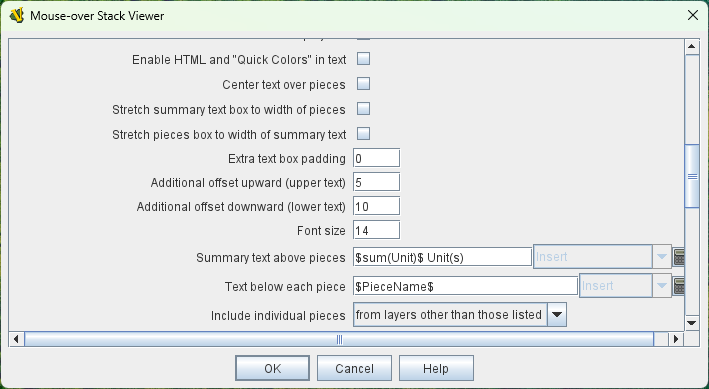
Mouse over Stack:-

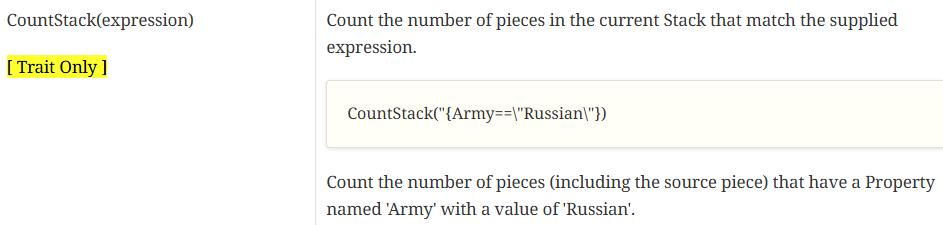
Have you looked at the Sum and Count functions reference page? There’s an example of what you need to do–although I see that it’s flawed in that it’s missing a quote between the closing brace and closing right paren:

Because the parameter you’re passing to CountStack is itself a string, you need to escape the quote marks that denote the text string you want to match on the righthand side of your expression.

So:

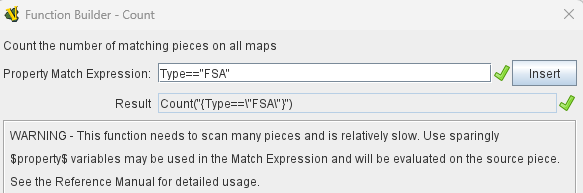
CountStack("{Type==\"FSA\"}")

The Function Builder in VASSAL will construct it correctly:

You are right. I inserted the string as Type==”FSA” in the expr and this was the correct syntax. Now it works. Damned Beanshell!

Thnak you a lot!

panther_2010 :grinning_face:

Perhaps a word of explanation will help you understand the syntax better.

As with most other programming languages, when you write

Type=FSA

you are doing an assignment. That is, you assign the value of the variable FSA to the variable Type. Thus, the first problem you had was you were not doing a comparison but an assignment.

Secondly, when you do

Type==FSA

you are comparing the values of the two variables Type and FSA. If the variable FSA is not defined, then that causes an error.

Finally, when you do

Type=="FSA"

you are comparing the value of the variable Type to the value - or constant - "FSA", which is the correct way for you to do it.

This is true of practically any programming language - not just BeanShell.

The confusion could have arisen because the older Vassal expression parser made some very odd assumptions about variables and values (FSA on the right-hand side is a value, but a variable on the left-hand side. .$FSA$ is the value of of the variable FSA everywhere), which are not entirely self-consistent.

Hopefully that clears things up a bit.

Yours,
Christian

Hello,

many thanks for your explanation.

I’m not a computer programmer nor a computer savior. Beanshell syntax is just like arab language for me : I don’t understand anything.

In the modules I’ m working on, If possible, I avoid using Beanshell and I strongly prefer the older Vassal expressions because I usually had no problems using them. On the contrary, I have severe difficulties when I use Beanshell expressions. IMHO a good tutorial “Beanshell for Dummies” could help a lot the guys that, like me, that don’t have a great knowledge of computer programming.

Be well.

panther_2010

:upside_down_face:

You can take a look at the BeanShell Quick Start. However, Vassal doesn’t really exploit the full capability of BeanShell, and many of the things covered there are not really relevant. In fact, the most relevant part for Vassal is to understand the difference between variables and values, as outlined a previous post in this thread.

Another feature, is the ternary condition operator:

boolean-expression ? then-expression : else-expression

This expression evaluates to then-expression if boolean-expression evaluates to true (or a non-zero value, or a non-empty string - in case of Vassal), otherwise to the else-expression. For example,

Type == "FSA" ? 1 : 0

evaluates to 1 if the variable Type has the string value "FSA", otherwise it evaluates to 0.

Finally, there’s understanding call-sequences. You can call functions, such as CountStack but you must take care to pass the function arguments that the function expects. For example, CountStack expects either

  • The name of a property - e.g., "Type",
  • An expression - e.g., Type=="FSA", or
  • A property and an expression.

Sometimes the functions are “embedded” in a class - more correctly named methods or member functions like the String functions. For example, to test if a variable A, which holds a string value, contains the (sub-)string “B”, one should do

A.contains("B")

One can old-style property value references - $property$ - and BeanShell code, it is important to note that the values are substituted in before the BeanShell expression is evaluated. Suppose a piece has the property $A$, which contains the value B (no type - old-style properties have no type), and you want to compare the value to some other value - say "C", then one must do

{"$A$" == "C"}

because B (without quotes) is substituted in for $A$ to yield the BeanShell expression

"B" == "C"

If you did not quote the $A$ substitution, you would get the expression

B == "C"

which will compare the value of the variable (or property) A to the value (or constant) "C", which is not the same thing. Incidentally, this “substitution” mechanism is what one uses when one piece asks another piece to compare that second pieces property to the value of the first piece. I.e., piece a has the property A with the value aaa, and piece a then asks piece b to compare its property B’s value to the value of A. It would do so by doing

{ B == "$A$" }

which will result in the expression

B == "aaa"

being evaluated in the context of piece b.

That’s more or less what there is to know about BeanShell code in Vassal. You can also refer to the reference manual - for example Properties and Expressions for specific features. Most of these contains a fair bit of examples to help you understand how they work.

Yours,
Christian