How could I do player-specific scrap yard for destroyed pieces?

I am creating a Scrap Yard map for pieces destroyed during the game.

Am I able to define the zones within that Scrap Yard to be player-linked? I.e. when a player marks a game piece as Destroyed on the main map (through an action/key shortcut), it would move to that player’s Scrap Yard (zone) to a square grid, to the next free space…

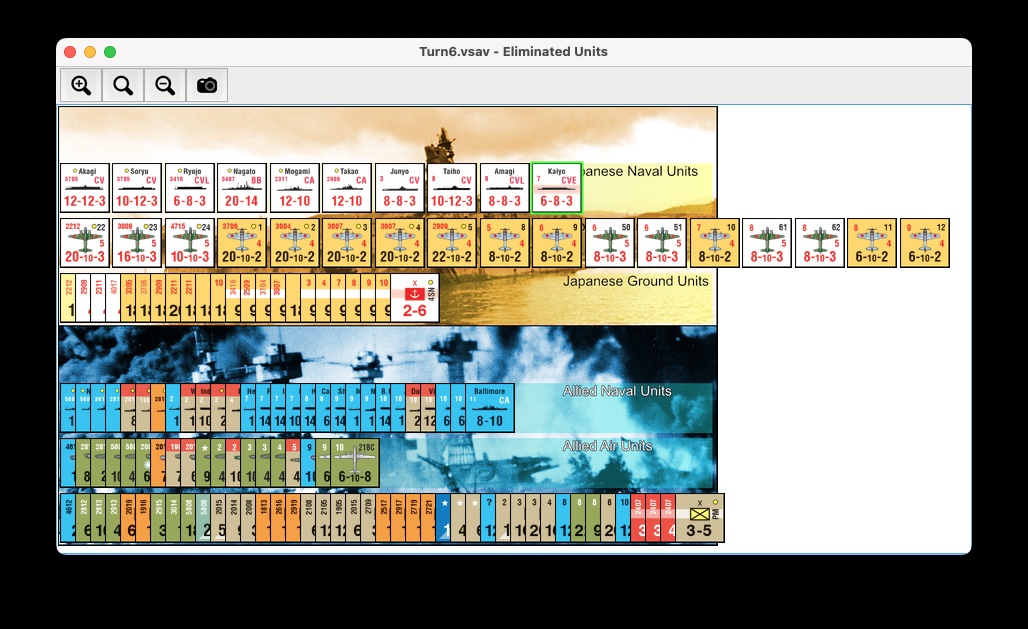
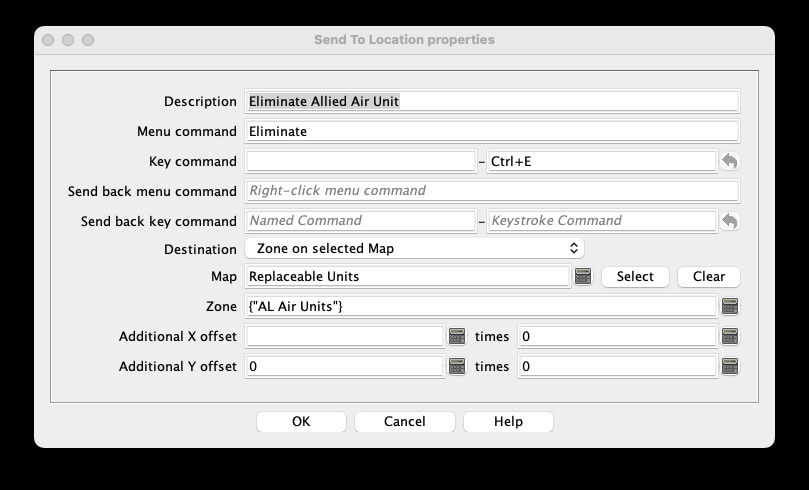
Sending an eliminated unit to a side-specific (or unit-type-specific, etc) Zone on a Map can be done using the Send to Location trait, such as this example from Empire of the Sun:

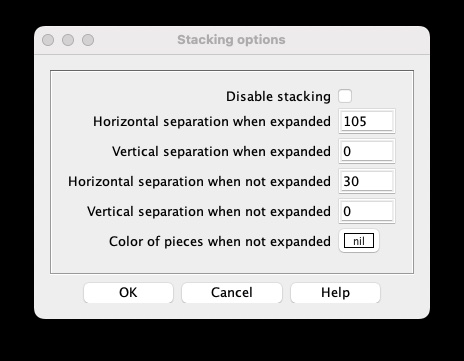
The tricky part would be getting the units sent to that zone to automatically distribute themselves into a square grid. I don’t know if that is possible (but if so would like to learn about that). However, they can be arranged into a horizontal row by sending them all to the identical destination and defining Stacking options for the destination Map Window something like this (again from EotS):

The Horizontal separation when expanded is set to just greater than the width of the game pieces, so when the top two “stacks” in that Window are expanded, they are arrayed in a horizontal array like this:

As you can see, when enough eliminated units are added to the “stack”, they fan out so wide that they can extend far beyond the bounds of the Map Window, but you still may want to consider this approach.

Cheers,
Jim Hunter.

1 Like

Thinking about this some more, you could try something like this:

  • Define a two-dimensional rectangular grid within each Zone, say 10 wide by 5 high.
  • Define the Send To Location trait to always send each newly eliminated unit to the first grid location (1,1) within its corresponding Zone.
  • Define some command (e.g. MovedOnElimUnitsMap) to be sent to all units ending their move in the Eliminated Units Map Window, using the Key command to apply to all units ending movement on this map field of the Map Window trait.
  • A Trigger would listen for that command, use the CountStack() function to detect when it is stacked with another unit which already occupied that grid location, and if so to send itself a TryNextGridLoc command.
  • [Begin hand waving..] This would activate a set of Trigger, Dynamic Property and Send To Location traits which would calculate the X and Y coordinates of the next grid location and send the unit to that location, which again generates the MovedOnElimUnitsMap command and repeats the process.

This should cause each newly eliminated unit to start in grid (1,1) of its corresponding Zone, and ripple through the grid until it finds an empty location to stop in. You would have to detect when the “next grid location” is the start of a new row. You might also need to handle the case where more units are added to the map than there are grid locations.

Sounds fun!

Cheers,
Jim Hunter.

1 Like

If you don’t want the pieces stacked, you could instead add a Rectangular Grid to the Scrap Yard map, and then use the “Grid Location” option of Send to Location (instead of using zones), along with a Global Property (GP) per player to track how many units have already been sent.

So, the destination of your Send to Location would be something like {(PlayerSide == “Axis” ? “A” : “B”) + (GetProperty(PlayerSide + “DestroyedCount”) < 10 ? "0" : "") + GetProperty(PlayerSide + “DestroyedCount”)}, assuming you have two player sides, one of them called “Axis”, and define your Grid Numbering to use a single letter for the row followed by 2 digits for the column (this will break if more than 100 units could be destroyed for a single side; a more complicated formula could be used to allow for more units).

You would also need to replace the Send to Location with a Trigger Action, which would call the existing Send to Location, then call a new Set Global Property trait, set to modify {PlayerSide + “DestroyedCount”}, to increment it by 1.

If you have more than 2 sides, the Send to Location expression is a bit more complicated: `{(PlayerSide == “Side 1” ? “A” : PlayerSide == "Side 2" ? “B” : PlayerSide == "Side 3" ? "C" : "D") + (GetProperty(PlayerSide + “DestroyedCount”) < 10 ? "0" : "") + GetProperty(PlayerSide + “DestroyedCount”)}, for example, if you have 4 sides.

If you want to put different types of units in different rows, it gets even more complicated: `{(PlayerSide == “Axis” ? (UnitType == "Infantry" ? “A” : UnitType == "Armor" ? “B” : "C") : (UnitType == "Infantry" ? "D" : UnitType == "Armor" ? "E" : "F") + (GetProperty(PlayerSide + “DestroyedCount”) < 10 ? "0" : "") + GetProperty(PlayerSide + “DestroyedCount”)}, for example, if you have 2 sides and 3 types of units.

If you would rather have a separate Scrap Yard map for each side, you would could create a “Scrap Yard” map for each side, named (for example) “AxisScrapYard” and “AllliesScrapYard”, then set the destination Map in your Send to Location to be {PlayerSide + “ScrapYard”}. That would then simplify the location part of the Send to Location.

Warning: I’m typing all of this without actually testing it, so there may be some syntax or logic errors!
1 Like

Why not just use the Additional {X,Y} offset with some global properties - e.g.,

  • TriigerAction trait
    • Listening to key Ctrl-E and menu command Eliminate
    • Executing keys
      • MoveToScrapYard
      • IncrementScrapyard
  • CalculatedProperty
    • Name CurrentScrapyardX
    • Expression {(int)GetProperty(Faction + "ScrapyardX")}
  • CalculatedProperty
    • Name CurrentScrapyardY
    • Expression {(int)GetProperty(Faction + "ScrapyardY")}
  • SendtoLocation trait
    • Listen to key MoveToScrapYard
    • Move to Zone {Faction+"Scrapyard"}
    • X offset: {CurrentScarpyardX)}
    • Y offset: {CurrentScarpyardY)}
  • SetGlobalProperty trait
    • Target property Faction+"ScrapyardX"
    • Listening for key IncrementScrapyard
      • Expression: {CurrentScrapyardX>ScrapyardWidth ? ScrapyardX0 : CurrentScrapyardX +ScrapyardDx}
    • Listening for key ResetScrapyard
      • Expression {ScrapyardX0}
  • SetGlobalProperty trait
    • Target property Faction+"ScrapyardY"
    • Listening for key IncrementScrapyard
      • Expression: {CurrentScrapyardY + (CurrentScrapyardX<=ScrapyardX0 ? ScrapyardDy : 0)}
    • Listening for key ResetScrapyard
      • Expression {ScrapyardY0}

The pieces should of course define the property Faction to be the name of the side (e.g., Axis and Allied) and the board contain the corresponding zones (e.g., AxisScrapyard and AlliedScrapyard).

If a piece can be recovered from the scrapyard, it can send the GlobalKeyCommand Ctrl-E to all units in the current zone after resetting the global properties {Faction+"ScrapyardX"} and {Faction+"ScrapyardY"} via ResetScrapyard. The global properties used should have appropriate values

  • ScrapyardDx equal to typical piece width
  • ScrapyardDy equal to typical piece height
  • ScrapyardX0 equal to at least ScrapyardDx / 2 plus any margin
  • ScrapyardY0 equal to at least ScrapyardDy / 2 plus any margin
  • ScrapyardWidth equal to (N-1) * ScrapyardDx + 2 * ScrapyardX0, where N is the maximum number of columns in the scrapyard.

Yours,
Christian

1 Like

Thx very much folks!

One specific thing I want to ask though - does Vassal somehow recognize the players by their name (e.g. what you set in your Vassal app) and can it define Zones base on a given player - not by the faction he selects at the start of the game?

Cause faction-wise there will be 5+ in the game (basically based on empires I add, as it is a spaceship combat game), so a player chooses a certain faction at the start. If I were to make the Scrap Yard have separate Zones for each faction, it could easily grow too large.

So the question is if I can make the Scrap Yard have say 4 Zones (I do not envision more than 3-4 players playing a game which is primarily aimed at 2 players, but could manageably be done in 3-4) and those would “belong” to players that start the game as a faction?

$PlayerName$ or {PlayerName} will return the name of the current player; $PlayerID$ or {PlayerID} is a customizable property which, by default, returns a combination of $PlayerName$ and $PlayerSide$.

So, if you want to stick with Zones, give them generic names (“Zone1” through “Zone4”, for example), and then you will need a GP for each Zone to store which Player and/or Side is associated with each Zone, plus a 5th GP to count the number of players. Actually setting those GPs is a bit complicated, as you need each player to somehow run a Set Global Property which will increment the player count GP, then set the matching zone GP to the current PlayerName, PlayerSide, or PlayerID (doesn’t matter which unless you intend to display or report this value to the players).

1 Like

I actually named the Zones the same as the player sides (Red, Blue…) and can reference them as “Send to Zone” - $PlayerSide$. Now I just have to define global variables to store the amount of counters that was sent to each Zone, to be able to offset the placement by X*100 (that is the rectangular grid size in each Zone) and those should be reference able with something like $PlayerSide$_NumberOfPieces…