Joe
September 26, 2025, 11:32am
1
I am reporting placing a Marker one hex above the game piece:
$PlayerName$ ($PlayerSide$) - $newPieceName$ placed a Mine in $location$
How can I report the hex above the game piece’s location? Game piece is in hex 0902, the marker is placed above it into hex 0901.
How about placing the Report Action trait in the Mine piece ?
If you are using Place Marker to place the Mine then add a Key Command that will immediately execute on it (triggering the report). You can also pass any Dynamic Properties from the parent piece that you might want to use in the Report Action.
Alternatively, a simple way to report from the Parent piece would be to set a Global Property from the Mine piece (triggered on placement) that saves its LocationName, which you can then report from the Parent as part of the placement command.
2 Likes
Joe
September 29, 2025, 6:42am
3
Thx, but I would need to see an example for the Global Property, as I don’t know the quirks of that (and my syntax is probably wrong as well).
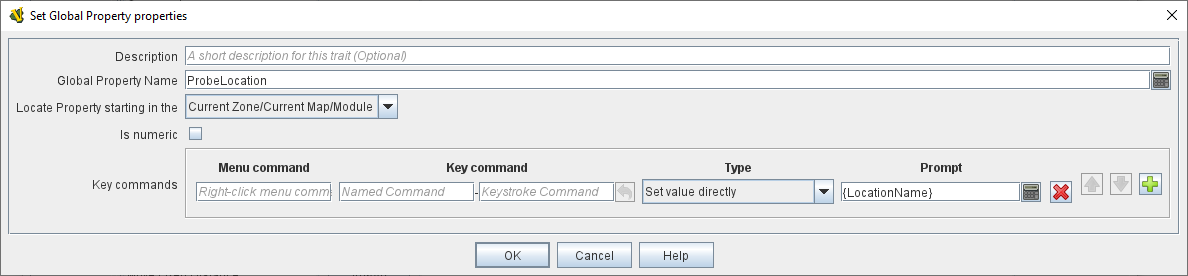
This is the trait in the Probe marker definition:
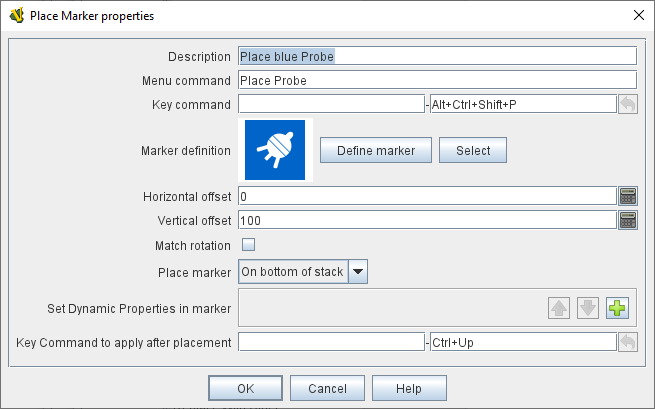
This is the Place Marker trait of the parent counter (space shp):
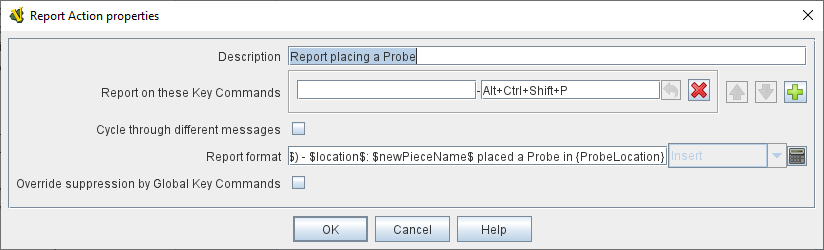
This is the Report Action trait in the space ship counter placing the Probe:
cholmcc
September 29, 2025, 11:50am
4
Your best option is probably to parse out the coordinates of the current LocationName.
Suppose the hex grid uses a numbering like CCRR where CC is the hex-column, possibly zero-padded, and RR is the zero-padded hex row. Then, an expression like
Integer.parseInt(LocationName.substring(LocationName.startsWith("0")?1:0,2));
gives the column number, and
Integer.parseInt(LocationName.substring(LocationName.substring(2,3).startsWith("0")?3:2,4));
gives the row number.
If the format of the hex coordinates are CCRR where CC are letters and RR are zero-padded numbers, then
LocationName.substring(0,2);
gives the column coordinate.
These calculations can be stored in a Calculated Property , and then you can use those properties to format your report - e.g.,
{BasicName + " in " + LocationName + " places a probe in "+Column+""+(Row+1)}
Yours,Christian
1 Like
Joe
September 30, 2025, 7:58am
5
Thx Christian! One small nitpick - when I add the (Row-1) it reports the row without the leading 0 (should be 1504):
Joe (Red) - 1505: BB Indomitable 5 placed a Mine in 154
jrwatts
September 30, 2025, 9:00am
6
Unfortunately, I don’t believe BeanShell in VASSAL supports string formatting codes, so the best solution I’m aware of is a bit hacky:
{BasicName + " in " + LocationName + " places a probe in " + Column + "" + (Row + 1 < 10 ? "0" : "") + (Row + 1)}
which prints a leading zero before the Row if it’s less than 10.
2 Likes
Joe
September 30, 2025, 9:10am
7
Even if whacky, it works, thx!
cholmcc
September 30, 2025, 10:50am
8
You can try with String.format, e.g.,
{BasicName + " in " + LocationName + " places a probe in "+String.format("%02d%02d",Column,(Row+1))}
Maybe it works.
Yours,Christian
1 Like
jrwatts
September 30, 2025, 7:58pm
9
String.format didn’t work when I tried with VASSAL 3.5.x, but it might have been added since.
Joe
October 12, 2025, 5:58am
11
For some reason I though this worked, but turns out ti does not…It still reports:
* Joe (Red) - 603: BB Indomitable 3 placed a Seeker 1 in 602
Joe
October 12, 2025, 6:24am
12
Just realized I did not have the same condition for the Column when it was lower than 10, so I added that and now it all works correctly