In my module, each player has a number of tokens, in five different colors.
A player can play one single token or a pair of same-colored tokens as one, and at the end of the turn he is forced to discard all the remaining tokens but one.
So, to implement these mechanics i’d need to count how many tokens of the same color, and what’s the total of them.
Now, i’m trying to grasp what Attachment traits are, i feel that they are powerful and useful, but i still don’t get how to work with them. But seems to me that this could be a good use-case.
The tokens are “simple” pieces with a “Color” marker and a “Owner” Dynamic property (“1) for Player1, “2” for Player2), and two menu commands (“Play”, “Discard”) to which i would like to add “Play a pair” if there’s the pair.
Could someone kickstart me on how to to use attachments to detect a pair, and count all the tokens of a player?
Attachment trait and associated traits & functions might help here, yes.
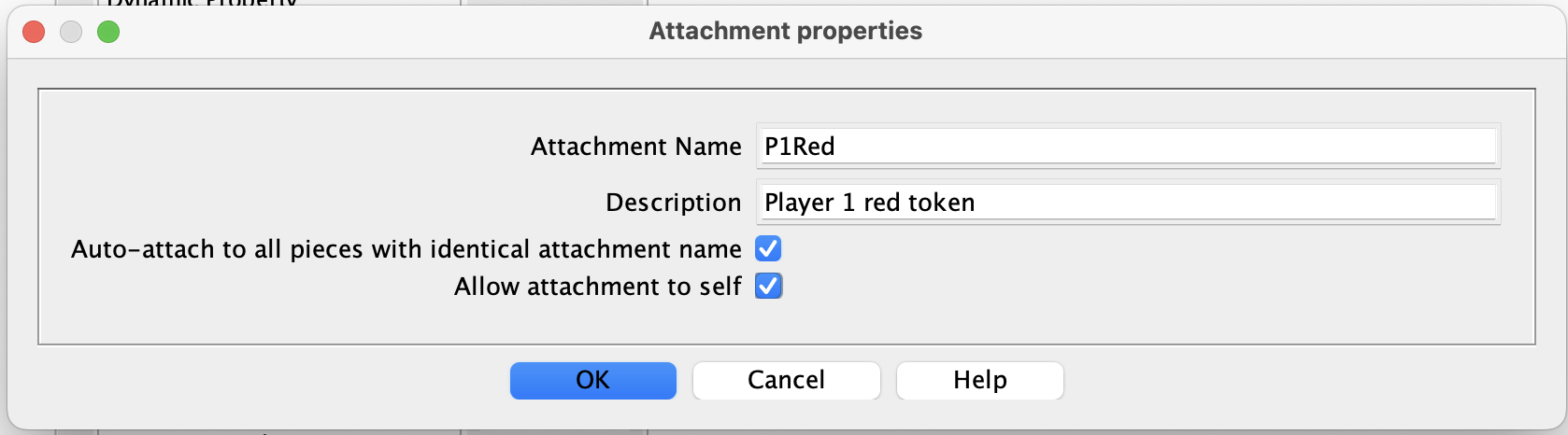
Assuming that a player’s tokens remains with that player throughout the game, then a simple method would be to use the Attachment trait’s Auto-attach feature, adding a trait like this to each Token piece (via Prototypes for ease of maintenance). The Attachment trait would be named after the player id and the color, with self-attach checked. e.g. for Player1’s red token, the Attachment name could be P1Red, as shown here:
After doing this, you will find that the tokens have a property defined in the form:
P<Owner><Color>_AttachCount
This property will be equal to the number of pieces of that player’s color in the game, but this will include those not yet deployed. To count up the tokens within a group on the current map, use CountAttach(), e.g. CountAttach(“P1Red”,“{CurrentMap == \"$CurrentMap$\"}”)
To do similar from a different piece on the map or from a map button you could use something like: {CountMap(CurrentMap, “P1Red_AttachCount”)}.
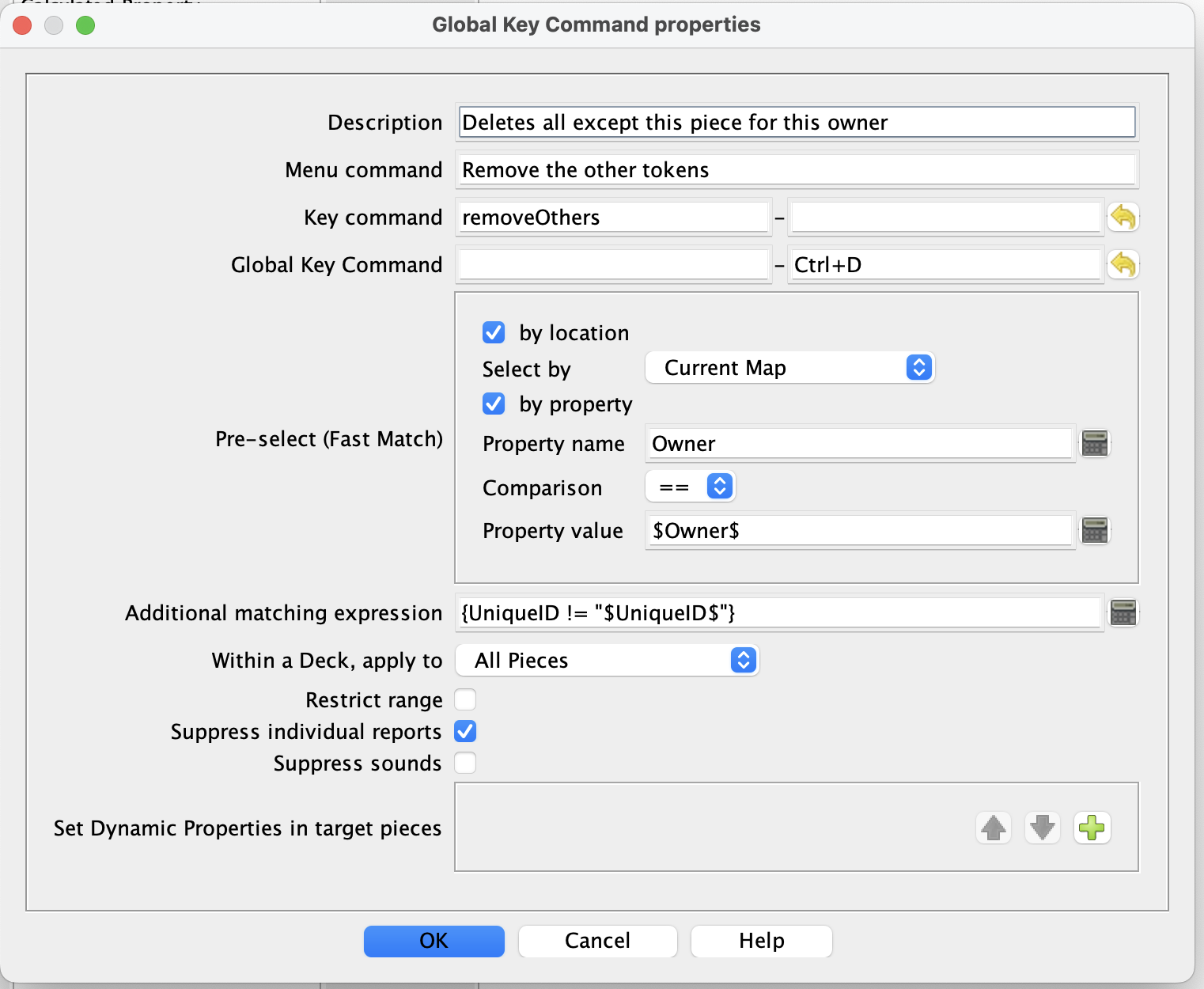
To delete all pieces, except one, you may not need attachments, e.g. this GKC would issue the “delete” (e.g. Ctrl+D) command to all pieces in the owner group, except the one from which it is executed:
Nope, they get randomly pulled down from a Palette, and deleted when discarded…
… but this is true anyway, so i’ll start to look at it. THANKS!
BTW: what’s the logical meaning of using the “Allow attachment to self” option? Aren’t the piece “mutually” attached? Or attachment are a “one-way-only” … thing?
OK, so the process of setting up the attachments will have to use the “advanced” (non-auto settings). If you are going to use Attachments for this module, then as each token gets placed, it should set up an attachment to other pieces with the same “Owner” and possibly “Color”. If you are used to using Global Key Commands, the process is very similar.
Auto-attach is two way, the option “Allow attachment to self” determines whether or not the piece will attach to itself as well. This might be useful or it could be inconvenient depending on the use that you make of the Attachment.
“Advanced” mode as the same option. Also, you can have the attachment one way or two-way. Here, I think you want two way, to ensure that “old” and “new” pieces have identical attachments.
Have a go and come back if you get stuck. Attachments is, in my view, one of the most powerful features in the Vassal arsenal. The possibilities are perhaps more that you need for this application but if you are planning on more module work anything you learn here will be good for the future.