New Project: Advanced Squad Leader: Starter Kit #1

Hi Christian!

I’ve just discovered a new problem.
During a German Defensive fire Phase, I got a PIN result against two Soviet units already marked with a Counter “Prep Fire”. The problem is that the “PIN” removes the “Prep Fire”, whereas both should remain. This could lead to forgetting that these units fired in Prep Fire.

Less importantly: I left a comment when saving a game in progress, but I can’t find it anywhere when I reopen the game. So, the usefulness of the comment function isn’t clear.

Yours,

Stéphane (“Thidal”)

There’s been a lot of “problems” with this module :frowning: - a testament to the complexity of ASL - even in a “Starter Kit” :woozy_face:

Yeah, I found that problem too, and I’ve already made a fix for it. I was gonna hold off on making an update, but it did it anyway.

This update (1.7.0) has a fair bit of improvements.

What do you mean by “left a comment”?

Do you mean you wrote something in the pop-up window that is shown when you save a game? If so, then I think that is only saved if you’ve set up a save folder for the module, and if you saved the game there. Then the comment will be shown in the Module Manager as the save files description.

If you meant that you wrote a message in the chat, then those are not saved in a save file (.vsav). Only the current state ot the game components (maps, boards, pieces) are saved in a save file.

If you want to keep a log of chat messages and so on, you need to start a log file (.vlog) from the File menu (Begin Logfile…). That will record everything going on in a session, and you can then later play it back (or send it to co-player in case of PBEM).

Yours,
Christian

Hi!
As for comments, I tend to play solo so much that I forget about the online aspect! That said, it would be nice to be able to leave notes for myself when saving—so I don’t forget to do something when I pick up the game again later, for instance.

I’d also like to point out that some SWs are missing from the scenario setup for SIMPLE EQUATION (for instance, there is one German LMG instead of the expected three); since cloning isn’t possible (a handy VASL feature), you have to fetch the missing support weapons one by one.

I think this module will be really useful for beginners! Thanks for your hard work!

Yours,

Stéphane

I’ve added the Notes tool to the module. I believe the notes are also saved to a .vsav.

I believe I have fixed that.

I’m not a big fan of the Clone trait - especially when there’s a limited counter-mix, as there is for ASLSK#1. (Full ASL is a different story). The Clone trait can very easily be misused - both by users and developers - to pull pieces out of thin air in an unmanagegable fashion.

I hope so. I have added a tutorial to make it even more beginner-friendly :smile:.

To fire up the tutorial, simply load the module as per-usual, but instead of New offline game, Look for remote game, or Load save, select Load Tutorial. You can then step through the tutorial by using the Forward button on PgDn.

The tutorial plays through a turn and a bit of S1: Retaking Vierville. It has commentary that explains how to use the module at different times, and a few words on rules here and there. The tutorial is based on this video by Counter Attack, which is why I sometimes overrule dice rolls.

The newest version is 1.8.1

Tanks again for your feedback.

Yours,
Christian

Hi Christian!
Great update! Thanks!
The tutorial is an excellent idea.
I went through the whole thing. Here are a few observations:
It seems to me that during the Allied Turn 1 Close Combat phase, you forget to halve the value of PINNED units.
Regarding LOS checks, I think players should be told that they cannot perform them before firing.
As for off-board placement, I get the impression that—for instructional purposes—you place the units side-by-side and only stack them when movement begins. A player might point out that proper procedure dictates units be placed exactly in their actual state (stacked or not) and in front of the correct entry hex.
Finally, a note on terminology—which has nothing to do with the tutorial itself—but why use “team” for “Half Squads” when the rules always use “HS”? Perhaps it’s in anticipation of CREWs appearing in later modules (if you have the energy to create a module for ASLSK 2, 3, and 4… I’d love that, of course!!).
I started a wargaming club in France that includes young players and newcomers. I think it will be fantastic to introduce them to ASL using your module!
Yours,
Stéphane

No. Defenders (in this case the German pinned units) are not halved, only when they counter attack. Check the CCT legend - it says

by Pinned unit [emphasis added]

It doesn’t say by/vs, or similarly, as it says with the other modifiers. This was actually a comment under the video that inspired the tutorial.

I’m less concerned with the rules in this tutorial - though I strive to follow them - and more with the functionality of the module. Yes, you are right, §3.2.1 says

Neither player may make a LOS check until after an attack has been declared.

Hopefully the player have read the rules thoroughly :smile:

The rules says (§3.3)

Units enter from offboard—either at the start of a scenario or as reinforcements—as directed by the scenario card, including turn and location of entry. Units are set up offboard along the specified edge(s) of the map at the start of their RPh in the Player Turn of entry.

I don’t see any requirements as to stacking (which doesn’t make sense because units can peel off a stack at any point, AFAIK), and there’s no other requirement than the edge on the placement. Clearly, if the Scenario Card is more specific, then that should be followed, but in general, I don’t think there’s any such requirements. Maybe the procedure you refer to is a convention rather than a rule. But please point out where I might be wrong.

Because a Team is the next level down from a Squad in the NATO hierarchy. ASL’s vocabulary is sometimes a bit funny. For example “Half-squad” instead of Team, and Casualty reduction, when the casualties are not reduced, or Quality reduction, instead of demotion.

That’s a biiiig parenthesis as I actually don’t own those games. I know the rules for all 4 SKs are available from MMP (I refer to them in the module), but I would like to have them physically too, and then there’s the graphics which isn’t directly available at any reasonable resolution (VASL uses relative low resolution graphics - probably to now strain the system too much given all the stuff they put on top of Vassal).

I’m glad that you find the module useful, and I hope your fellow gamers do too. ASL is such a complicated system, and I really wanted Vassal to help me un-complicate it - that was the aim of the module - I hope I have had some measure of success.

BTW, in the next release, you will also have tables that give the probability of IFT outcomes given FP, DRM, and Cower. That should also help starting players make more informed decisions as to what to attack when :smile: Some of the probabilities are quite surprising. For example, if you have FP=4 and Cower=-1, you have roughly 20% chance of 1MC or PTC, 11% for NMC, 40% for no effect, and very small chances for K/1 and 2MC. Compare that to the case with no Cower, where the PTC chance is lower by roughly 4% point, and the NMC increased similarly. Adding DRM=-1 drastically reduced the chances of “-”, and allows for a 1KIA result.

Thanks again for your feedback.

Yours,
Christian

I have updated Advanced Squad Leader: Starter Kit #1 to version 1.8.2. This includes

  • A document on some of the probabilities involved with the game.

    • Probability of rolling a 2d6 (DR) less than some value
    • Probability of rolling a 1d6 (dr) less than some value
    • Probabilities of Infantry Fire Table (IFT) outcomes given
      • A particular Fire Power (FP)
      • A particular Die Roll Modifier (DRM) in the range from -3 to +3
      • A particular Cower penalty in the range from -2 to 0

    These tables can be used to access the probability of a particular fire attack.

  • Notes/Errata on the Tutorial

Yours,
Christian

Hi Christian!
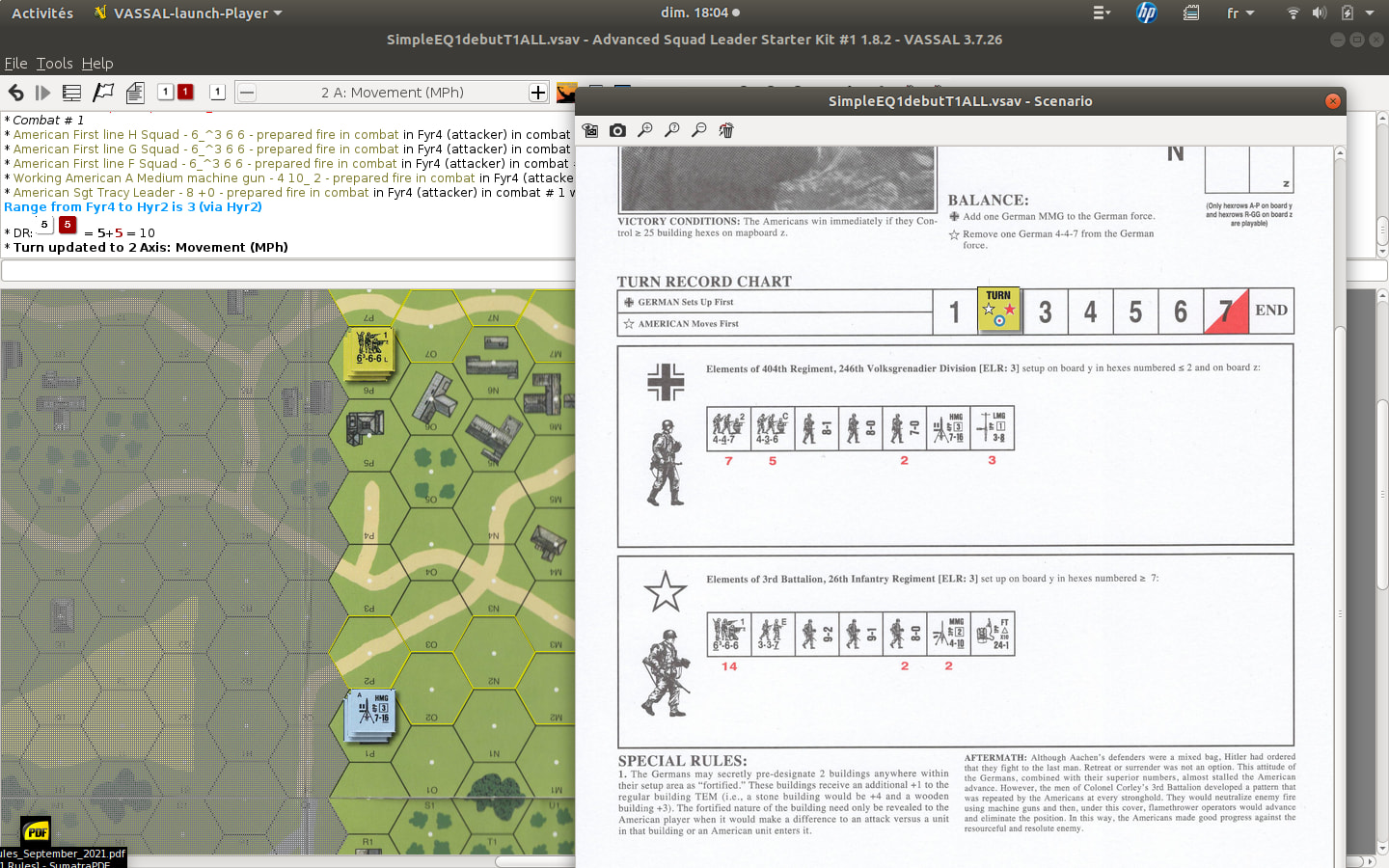
I just spotted a new minor bug: while in the Allied Turn 2 (SIMPLE EQUATION scenario), after finishing the American Prep Fire phase and pressing the “+” button, the chat system displays “Axis Movement,” even though it is actually the Allied turn (see screenshot).


Yours,
Stéphane

I cannot reproduce this. Did you at some point switch directly to a phase? What do you see in the previous phase changes? What do you see on the next phase change?

I see you use Gnome - great. Remember, if you are on a Debian or RedHat based system, you can use the provided .deb or .rpm packages to install Vassal.

Yours,
Christian

Hi Christian!
I’ve just run a few tests.
In my SIMPLE EQUATION game, there is still a mismatch in the chat log between the green line (Allied turn or Axis turn) and the black line (indicating the phases). Regardless of whether it is the Allied or Axis turn, the phases are displayed for the wrong side.
However, I tried to reproduce the error by creating a new game—either SIMPLE EQUATION or RETAKING VIERVILLE—and there were no issues; the turns and phases were perfectly aligned!
The only explanation I can see for my problem is that I started the game using one version of the module and continued it with another. For some reason, this caused this bug.
I won’t be able to run tests on my Linux computer over the next few days as I’ll be traveling. But I think this issue was minor anyway.
Yours,
Stéphane

Great!

I think your analysis is very likely correct.

Possible incompatibilities in the module is why I have a note on the version numbers on the Game Library page,

Note about version numbers: While the version numbering follows the overall semantic versioning scheme - i.e., major.minor.patch - it deviates in one important aspect.

  • patch is updated when small, non-breaking, changes are made
  • minor is updated when the changes is likely to break saves and logs generated with previous versions of the module. In many cases, the Update piece definitions tool may help.
  • major is updated when major changes are made to the module.

In other words, if you started a game with - say 1.7.0 - and saved it, then opened the save with a later version with a different minor number - say 1.8.0 - then there may be incompatibilities that can break the module.

This is not a general rule for all modules in Game Library - though I would highly recommend to adopt a scheme like this - but it does apply to the module I did as main author.

Yours,
Christian

1 Like

Well, I stand corrected: Following a recent discussion I’ve modified the module to restrict movement of units according to the rules (I believe). That is, movement is allowed when

  • First turn and the phase is Rally (RPha) - Reinforcements, or
  • In the Rout phase (RtPh) and the unit is Broken and not in Melee. or
  • The unit is in turn, and
    • in Good Order (not Broken nor in Melee),
    • is not marked with a PrepFire marker,
    • is not marked with a Pinned marker, and
    • the phase is one of
      • Rally (RPha) - Reinforcements,
      • Movement (MPh)
      • Advance (APh)

I’ve also added cursors to the Infantry Fire Table - which can be moved using Shift+←, Shift+→, Shift+↑, and Shift+↓ - as to make it easier to cross-reference the FP and DR.

These changes are in release 2.0.0 of the module

(note, I bumped the major version because this new release relies on custom code, as discussed in the above mentioned thread).

Yours,
Christian

Hi Christian!

Here’s some great news to make the module even more useful for beginners! Can’t wait to try it!

Yours,

Stéphane

1 Like

Hi Christian!
My first (and major!) issue with the new features in version 2.0.0 cropped up during unit placement. It is impossible to move the entire set of counters for the side currently deploying on the map in order to reposition them more precisely—or, more generally, to make any changes at all during the placement phase. It’s frustrating. But I assume version 2.0.1 will provide a solution, right?
Yours,

Stéphane

Do you mean, that

  • once you’ve put initial pieces on the map (not the margins), you can no longer adjust their position? or
  • once you’ve placed reinforcements on the margin of the map, you can no longer adjust their position? or
  • …?

In a sense, the restriction is kinda on purpose. If one makes a mistake, one should probably use Ctrl+Z to undo the change. But, if you give a bit more info, perhaps it will make more sense. Thanks.

Yours,
Christian

I think I know what you mean. Try 2.1.0 and see if that fixes it (minor version bump because changes is not backward compatible for saves and logs).

Yours,
Christian

Hi Christian!

I tested the latest version and, indeed, this time the problem during placement is fixed!

Thanks!

Yours,

Stéphane

Hi Christian!

I had a complete beginner test the module today. He gave me the following feedback (I’m passing it on without correction):

  1. He would like the module to prevent overstacking.
  2. He would have liked the module to prevent movement beyond what is possible in the unit’s current state (carrying SW, presence of a leader).
  3. He would have appreciated the ability to move units or stacks using the keyboard once they are selected.

Yours,

Stéphane

Yeah, that would be nice, but unfortunately not really all that feasible in Vassal. Consider what it would entail: You need to reject a move that causes overstacking (whether in the destination hex or some intermediate hex) - and that’s not really feasible with Vassal.

Another nice thing to do, but unfortunately not doable in Vassal. In fact, all but limiting movement in the first place, when it comes to movement and keeping track of movement factors (and all that entails) is not really feasible. The problem is, that Vassal would need to provide a lot more about the current state of the game than it does, and also provide much more scripting capabilities. Vassal 4 promises to provide these things.

That could be done, but would likely be a bit cumbersome. One could designate the keys w, e, d, s, a, and q to move up, up-right, down-right, down, down-left, and up-left, respectively. However, those keys will also be echoed into the chat, which is kinda annoying too. If the keys are prefixed by say Ctrl+, then the they will not be echoed, but then you’d have to use the key-modifier, and it would take up those key combinations from other actions.

It could be made optional whether to enable those keys for movement.

However, I think the general paradigm of Vassal modules is that you use the mouse/pointer to move pieces, which makes me think that key-strokes for movement could potentially be more confusing than it is worth.

In summary, the first two requests are almost impossible to implement with the current Vassal. Vassal 4 promises to address those issues. The third request could be done, but I’m not convinced that it won’t cause more confusion than good.

As always, thank you for the input.

Yours,
Christian

Hi Christian!
I pretty much agree with everything you wrote, but regarding the last point, I have to say that the ability to move using the keys—especially with the movement-tracking system you created in the module—would, I think, be a good thing; it would avoid “jumping” over hexes and making the path harder to read. But that’s just my opinion!
Yours,

Stéphane