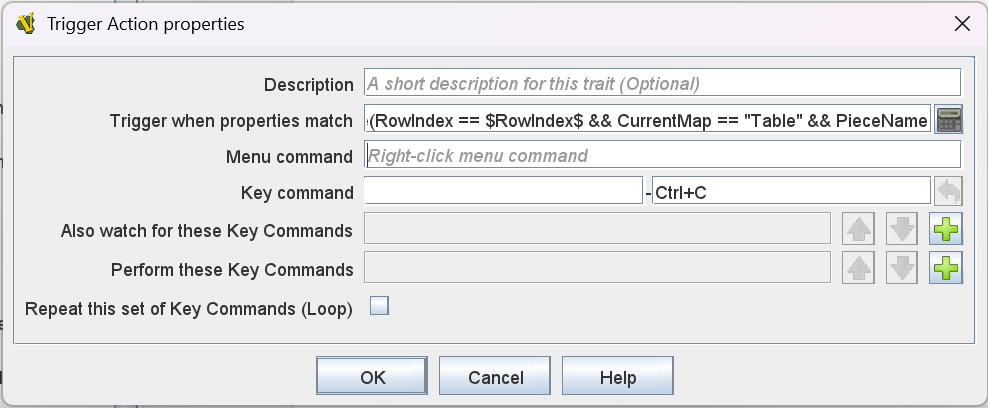
Are you referencing some document or the like? Please provide the source for the above - I cannot seem to find it.
You need two Trigger Action traits - one for the true condition and one for the false condition. If you want the command visible in the context menu, then you may need three Trigger Action traits - one to steer the call, and the other two for the true and false conditions.
Without context menu command
- Trigger Action
- Name: Control-C if properties match
- Command: empty
- Key:
Ctrl-C
- Action keys:
[Ctrl-J,Ctrl-C] (or IncrRowIndex and CheckSlotAgain)
- Property:
{RowIndex == $RowIndex$ && PieceName != $PieceName$ && CurrentMap == "YourMapName"}
- Trigger Action
- Name: Control-C if properties do not match
- Command: empty
- Key:
Ctrl-C
- Action keys:
[Ctrl-M] (or MoveToSlot)
- Property:
{RowIndex != $RowIndex$ || PieceName == $PieceName$ || CurrentMap != "YourMapName"}
If you need a visible command from the context menu, add the two above Trigger Action traits, but replace the Key in both cases with somethine else - say doCtrlC (named command), and add another trigger trait
- Trigger Action
- Name: Steer Control-C
- Command:
"Do the command" (Context menu entry)
- Key:
Ctrl-C
- Action keys:
[doCtrlC]
The reason is, that Vassal will always try to add commands with context menu titles - even if their conditions are disjoint.
BTW, your condition seems off. The condition is executed in the context of the piece, which means that PieceName and $PieceName$ as well as RowIndex and $RowIndex$ will always be the same. Thus, your test is always false. However, if you Piece’s name is A, then
{PieceName!=$PieceName$}
will effectively become
{String("A")!=A}
which will cause an exception, because the variable A is not defined, and you cannot compare a string to an undefined value. Instead, you need
{PieceName!="$PieceName$"}
which will become
{String("A") != "A"}
which is valid. In short, it seems you need to remove the PieceName!=$PieceName$ and RowIndex==$RowIndex$ from your condition.
The pattern PropertyName == $PropertyName$ is really most useful when a command is sent from one piece to another - as in Global Key Command, Place Marker, Replace with Other, Set Piece Property, or Attachment, when matching against other pieces. For example, piece A with property Foo with value "Bar" want to send a command to other pieces with the properpty Baz that has value "Bar", then a selection criteria would be
{Baz == "$Foo$"}
Note the quotes - the $...$ expressions are substituted, on the sender side, with the literal value of the property on the sender side - before the comparison is done on the receiver side.
Yours,
Christian