Place Marker dynamic properties

So, I have a piece that has a couple different text properties (that can be set by the user as is typical for the trait). I want to be able to clone it keeping the current value for one, and incrementing the other (which is generally a numeric sequence number).

So, set up the text fields as slaved to Dynamic Properties, handle the value setting through user prompts. Then use Place Marker to place a new instance of the piece and copy the values from the old one, incrementing the sequence as it goes.
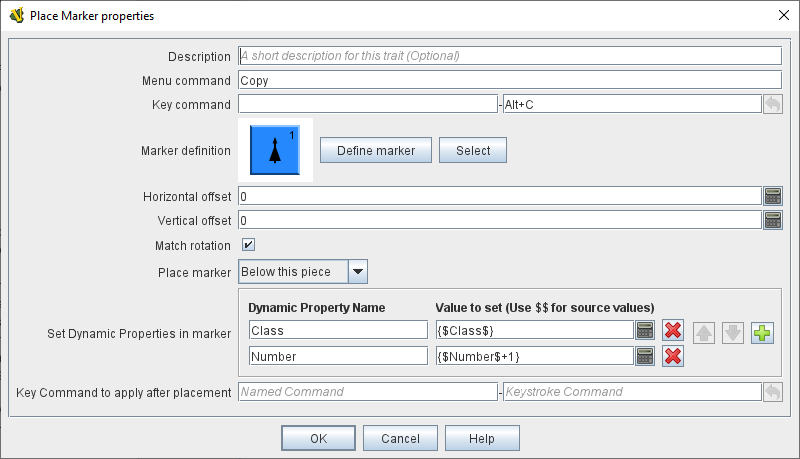
It seems this only works for numeric values. Normally $Number$ is numeric, and if it is, the new marker increments the number fine. But it doesn’t have to be numeric, and if it isn’t, the new marker drops back to the default of “1” instead of keeping the original value (possibly doing something odd, thanks to the ‘+1’). $Class$ is typically text, (“D”, “CA”, etc), and that just loses the value completely in the new marker.

(Aside #1: Is there a way to define a prototype setting up these text labels/dynamic properties, have a piece use the prototype, and define its own starting value?)

(Aside #2: Is it possible to increment letters? Property has value “A”, you tell it ‘$example$+1’ and it becomes “B”. Not what I want here, but I might elsewhere.)

In the case that Number isn’t a numeric value, and you do the Copy command, do you then see messages in the chat? Or in your errorLog?

The reason why the Class Property isn’t set correctly is likely because setting the Number property failed miserably.

If the value of the Number property in the source piece is not a numeric value, then the BeanShell expression

{$Number$+1}

could fail miserably, though, sometimes, if Number has a string value, then the + will be interpreted as concatenation. E.g., if Number="A" in the source, then the copy will get Number="A1". You can check that Number is an integer or double in the source with

{ Number instanceof Integer || Number instanceof Double ? Number : Integer.parseInt(Number) }

but those calculations are probably best done in a CalculatedPropertyTrait.

Short answer - No.

  1. Traits, and particularly traits like Dynamic Property have parameters (or type) and state.
  2. Pieces that include a Prototype, include the traits of the prototype, as defined in the prototype, at the exact spot where the prototype is referenced, in the list of piece traits.
  3. However, this “unrolling” of prototypes only happens when a piece is instantised - for example by dragging the piece from a Game Piece Palette, by an At-Start Stack, or similar.
  4. Only when the prototypes are unrolled into the piece do the piece gain an individual state.

In other words. If your piece with the Number property lives in the Game Piece Palette, then it isn’t a true piece (i.e., it does not have individual state - value of Number). When you do drag it to the map, then it becomes a “real” piece and it gains individual state (value of Number).

You can also place your piece on some map using an At-Start Stack, and if you press the “reposition stack”, then you can probably manipulate the piece a bit by right clicking the piece.

Sure. If you Property Number has the value A, then

{ (char)((int)Number.charAt(0) + 1) }

will give you the value “B”.

Yours,
Christian

Forcing the Number dynamic property into numeric mode caused no changes in behavior.

Creating counter, values “D” and “1”, and then using the “Copy” command generates a new counter with values “” and “2”, with no messages in chat, and no entries in the error log after the starting of the module.

The earlier version, with dynamic properties that are not declared as numeric, and no default value for $Class$ given behaved the same way. Any input Class value would be ignored in the copy, and no messages would fire. (And just verified nothing in the error log under that setup either.)

The last part gets a bit beyond me.

A1 - About what I figured, though I was more thinking in terms of a value in the piece that transfers over to the prototype-generated property when pulled off the pallet (an ‘on create’ trigger).

The numeric setting of a Dynamic Property only affects the user facing interface - BeanShell variables are dynamically typed (can change type at any time).

$...$ references in BeanShell expressions are (textually) substituted before the BeanShell expression is evaluated (see also here). Thus, if you source Class property has the value A, then

{$Class$}

will become

{A}

before it is evaluated That is a reference to some (non-existent) property A. A reference to an non-existing variable typically gives you back the empty string. If you know Class contains a string value, then your expression should be

{"$Class$"}

which then becomes

{"A"}

before BeanShell evaluation.

For the Number property, if it has the value 41 in the source piece, then

{$Number$+1}

becomes

{41+1}

before BeanShell evaluation, which, of course, evaluates correctly to 42.

Note, if Number in the source piece has a string value, say X, then

{$Number$+1} -> {X+1}

which again is a reference to a non-existing property. As before, that will give you the empty string, so you have

{""+1}

which evaluates to "1".

Perhaps you can give a link to your module so that we can see for ourselves what goes wrong. Please also give a few words on how to reproduce the problem.

Yours,
Christian

Try http://www.rindis.com/SFB%200.4.3.vmod

Go to Pieces → Federation → Markers → Drone

Pull into a new game (any set up).

Default values - Class = “”, Number = “1”

Use alt-c Copy - new counter, should have “” and “2”. This is fine.

Use control-n to set Number to, say, “A”. Alt-c = “” and “1”. Defaulting back to 1 is acceptable, but I’d kind of like it to stay as-is, and possibly iterate through letters if the value is just a single letter.

Use control-c to set Class to, say, “D”. Alt-c = “” and “2”. This is the real problem. Class should just be directly copied over without changes, and it never does. Since the Number part works, this what I find befuddling.