Please teach me how to use Text Label and $pieceName$ for different windows

I’m really struggling with Text Labels; after two days of trial & error this is what i have on the screen:
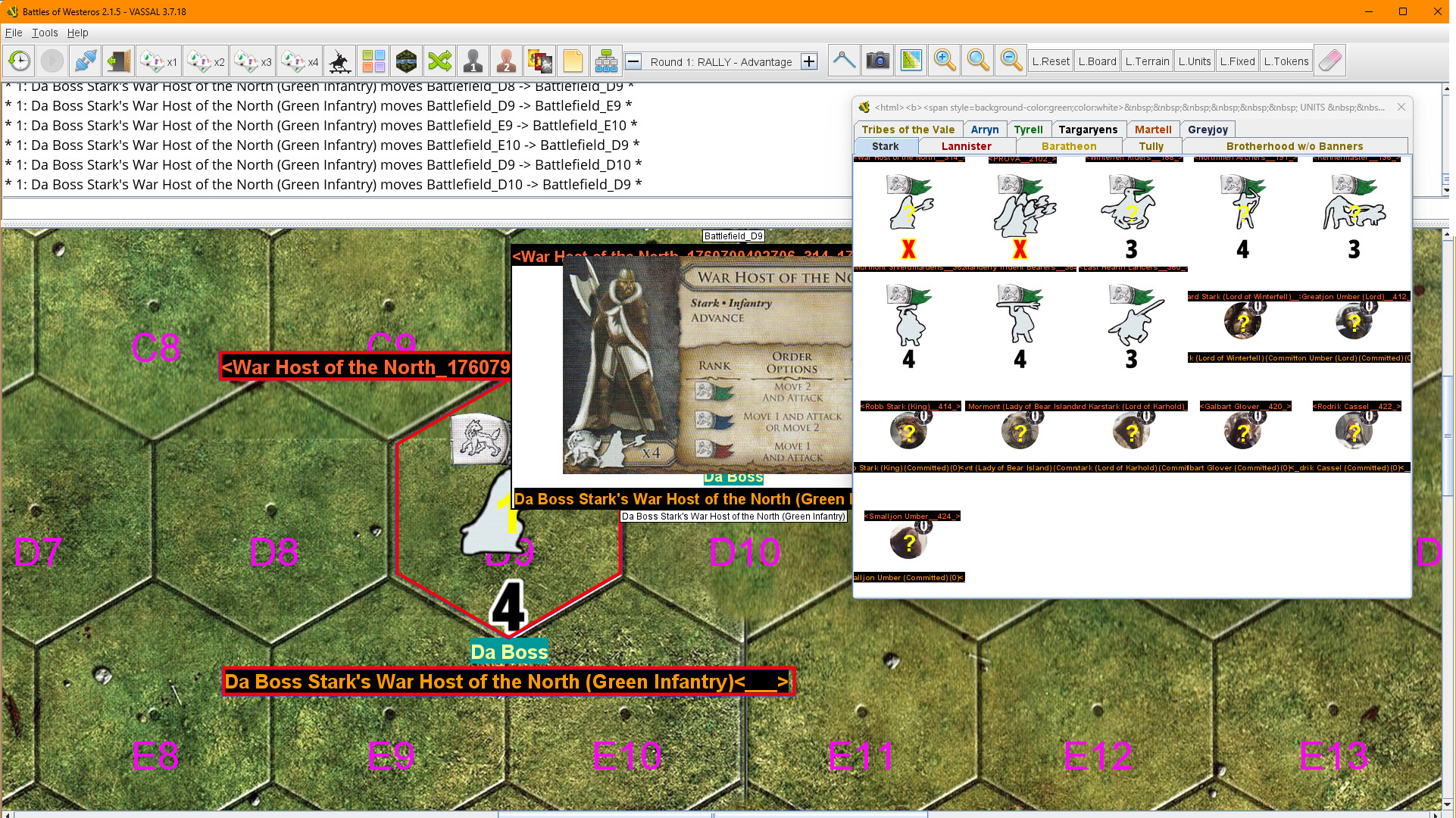
What you see is a Piece made in this way:

  • a BaseGamePiece prototype (which should be used on every piece in the game) with a Text Label traits which allows the players to add a description (property name “PieceDescription”) if needed. This is the Yellow-on-Teal text.
  • This prototype is included in the Unit prototype, which adds Properties and Markers (House, Color and Class) to the Piece Name, and I’m happy with the result in the movement report.
  • Then there’s another prototype called “Debug” which shows some labels around the pieces if a Global Property is true, and is included in the BaseGamePiece prototype (at least until the module is almost finished). This creates the text with black background.

My two days of working on this all produced the right PieceName for the report, but i would like to see it … just on the report. On the MouseOver view, and in the Game Piece Palette window, i’d like just the BasicName (“War Host of the North”), with not Debug or Description Labels.

  1. How can I obtain this?
  2. There’s a way to show the Debug Labels only when the Piece is selected?
  3. And in the case that this is relevant to questions 1 and 2: how can i remove the automatic movement report from the main map, and having movement reports just from the Unit prototype?

If you leave Name format field empty of the Text Label trait, then the PieceName Beanshell property (and $pieceName$ substitution) will not be modified by the label.

Note that the Beanshell property BasicName should not be modified in any way.

However, you cannot use the BasicName property in the map Auto-report report formats. That must use the $pieceName$ substitution. Likewise, the Mouse-over Stack Viewer will always use $pieceName$.

In your Mouse-over Stack Viewer, if you set the text to displayed under the pieces to be

{BasicName}

then the un-decorated name will be shown. For the Game Piece Palette the BasicName is used - not PieceName nor $pieceName$.

If the label is set via a Dynamic Property, rather than by the Text Label it self, then the label can be a BeanShell expression that is non-empty only under certain conditions. For example, the text label could be configured to by

{Selected ? DebugLabel : ""}

where the property DebugLabel is set by a Dynamic Property.

You cannot. Either you have automatic movement reports for all pieces on a map, or you have none. At least that’s how I understand things to be.

This is really to do with how the auto-reporting format string is interpreted. It is not executed for each piece, nor is it executed in the scope of the piece properties. Thus, $pieceName$, $location$, $previousLocation$, etc. are not properties of piece(s), but rather of the move, and that move has no concept of what is being moved or not.

Another “problem” is that Name format of a Text Label trait isn’t evaluated as a BeanShell expression, and so you cannot do too fancy stuff there. You can remedy some of it via an indirect label (Dynamic Property sets the label, Text Label displays it under certain conditions, as well as modify the name of the piece too).

Yours,
Christian