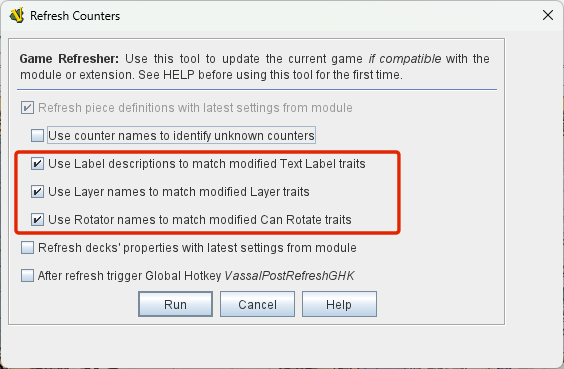
After a module update I need to update the pieces in some existing games and I am using the Refresh Counters tool. It refreshes the counters but changes some of the Layer traits. It seems to change which level of the Layer trait is being displayed. The change is not consistent. Some go up, some go down and some stay where they are.
The changed Layers are all parts of different prototypes and none of the changed Layers have been modified before running the Refresh Counters tool.
Since the module is using these Layers to indicate different statuses to have them changed mid-game by a Counter Refresh is a problem. Right now, in most games, the piece density is low and it is manageable to manually correct the changes but in the future it will be a real problem.
Yup it sure does. plays hell when i am making changes to modules with pre-defined setups. also does the same to text labels. As far as I can tell, when you “Refresh Pieces” it will set them back to a “New” state, for anything you modified.
Thanks. You are correct, when I uncheck them it does not cause the issues. I was a bit hesitant to mark this as the solution since you said you weren’t sure why it worked that way. However, with my experience doing an update with them unchecked, and Jeff Coyle chiming in indicating the same I am marking this solved. Thanks for the assist. It is greatly appreciated.
I will take this opportunity to direct your attention to the tool vsavwrite.py that I made. You can find a bit more here. You provide the script with your module (.vmod) and a JSON (.json) file, the latter contains your set-up of pieces in a somewhat human-readable format, and then it writes a save file .vsav for you.
The benefit of that, is that you can generate the save (or setup) from data (the JSON file), and it will automatically have the latest and greatest pieces.
Beware that the script is not omnipotent. If you need additional set-up, you may need to write some Python code - using the pywargame API - but then you can practically do almost anything you like.