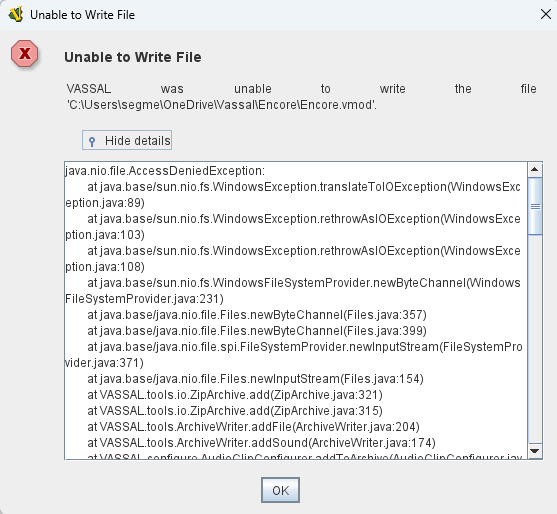
In version 3.7.19, When trying edit or include a new simbolic dice button, this window is showed.
Some suggestions? The button works, if previous exist, but don’t oermit any modifications
Please post the complete error log.
Wait, never mind. The problem is that something else has the file you’re trying to write to open and Windows doesn’t allow writing to an already open file.
I can see from and the path that you’re trying to write to a file in cloud storage. Cloud storage like OneDrive has background processes which open files for synchronization with cloud storage. You can avoid the problem by keeping the file you’re editing in local storage.
This looks like issue 14418 “Unable to Write File” errors when clicking on a component in the Editor
It’s related to the changes in the new release of Java.
It’s not. Look at the exception type. The exception type in 14418 is an IOException. The exception type here is an AccessDeniedException.
On Mac it’s IOException`, on Windows AccessDeniedException
OK, but I’ve always stored my files on OneDrive, and this didn’t happen in version 3.7.18.
And it only happens with the “Symbolic Dice Button,” no other
I also receive this Error with Symbolic Dice and my files are local, D Drive. Went back to Vassal 3.7.18 and I can edit without issue. I also updated my Java.
Error:
"Unable to Write File
VASSAL was unable to write the file ‘D:\Users\Tim\Downloads\Congress_of_Vienna_1.0.8.vmod’.
java.nio.file.AccessDeniedException:
at java.base/sun.nio.fs.WindowsException.translateToIOException(WindowsException.java:89)
at java.base/sun.nio.fs.WindowsException.rethrowAsIOException(WindowsException.java:103)
at java.base/sun.nio.fs.WindowsException.rethrowAsIOException(WindowsException.java:108)
at java.base/sun.nio.fs.WindowsFileSystemProvider.newByteChannel(WindowsFileSystemProvider.java:231)
at java.base/java.nio.file.Files.newByteChannel(Files.java:357)
at java.base/java.nio.file.Files.newByteChannel(Files.java:399)
at java.base/java.nio.file.spi.FileSystemProvider.newInputStream(FileSystemProvider.java:371)
at java.base/java.nio.file.Files.newInputStream(Files.java:154)
at VASSAL.tools.io.ZipArchive.add(ZipArchive.java:321)
at VASSAL.tools.io.ZipArchive.add(ZipArchive.java:315)
at VASSAL.tools.ArchiveWriter.addFile(ArchiveWriter.java:204)
at VASSAL.tools.ArchiveWriter.addSound(ArchiveWriter.java:174)
at VASSAL.configure.AudioClipConfigurer.addToArchive(AudioClipConfigurer.java:71)
at VASSAL.configure.FileConfigurer.setValue(FileConfigurer.java:98)
at VASSAL.configure.AudioClipConfigurer.setValue(AudioClipConfigurer.java:168)
at VASSAL.configure.FileConfigurer.setValue(FileConfigurer.java:116)
at VASSAL.configure.AudioClipConfigurer.setValue(AudioClipConfigurer.java:179)
at VASSAL.configure.AutoConfigurer.(AutoConfigurer.java:92)
at VASSAL.build.AbstractConfigurable.getConfigurer(AbstractConfigurable.java:212)
at VASSAL.configure.ConfigureTree.updateEditMenu(ConfigureTree.java:1833)
at VASSAL.configure.ConfigureTree.valueChanged(ConfigureTree.java:1800)
at java.desktop/javax.swing.JTree.fireValueChanged(JTree.java:3019)
at java.desktop/javax.swing.JTree$TreeSelectionRedirector.valueChanged(JTree.java:3520)
at java.desktop/javax.swing.tree.DefaultTreeSelectionModel.fireValueChanged(DefaultTreeSelectionModel.java:650)
at java.desktop/javax.swing.tree.DefaultTreeSelectionModel.notifyPathChange(DefaultTreeSelectionModel.java:1120)
at java.desktop/javax.swing.tree.DefaultTreeSelectionModel.setSelectionPaths(DefaultTreeSelectionModel.java:306)
at java.desktop/javax.swing.tree.DefaultTreeSelectionModel.setSelectionPath(DefaultTreeSelectionModel.java:200)
at java.desktop/javax.swing.JTree.setSelectionPath(JTree.java:1709)
at java.desktop/javax.swing.plaf.basic.BasicTreeUI.selectPathForEvent(BasicTreeUI.java:2820)
at java.desktop/javax.swing.plaf.basic.BasicTreeUI$Handler.handleSelection(BasicTreeUI.java:4158)
at java.desktop/javax.swing.plaf.basic.BasicTreeUI$Handler.mousePressedDND(BasicTreeUI.java:4135)
at java.desktop/javax.swing.plaf.basic.BasicTreeUI$Handler.mousePressed(BasicTreeUI.java:4094)
at java.desktop/java.awt.AWTEventMulticaster.mousePressed(AWTEventMulticaster.java:289)
at java.desktop/java.awt.Component.processMouseEvent(Component.java:6573)
at java.desktop/javax.swing.JComponent.processMouseEvent(JComponent.java:3404)
at java.desktop/java.awt.Component.processEvent(Component.java:6341)
at java.desktop/java.awt.Container.processEvent(Container.java:2260)
at java.desktop/java.awt.Component.dispatchEventImpl(Component.java:4958)
at java.desktop/java.awt.Container.dispatchEventImpl(Container.java:2318)
at java.desktop/java.awt.Component.dispatchEvent(Component.java:4790)
at java.desktop/java.awt.LightweightDispatcher.retargetMouseEvent(Container.java:4917)
at java.desktop/java.awt.LightweightDispatcher.processMouseEvent(Container.java:4557)
at java.desktop/java.awt.LightweightDispatcher.dispatchEvent(Container.java:4501)
at java.desktop/java.awt.Container.dispatchEventImpl(Container.java:2304)
at java.desktop/java.awt.Window.dispatchEventImpl(Window.java:2671)
at java.desktop/java.awt.Component.dispatchEvent(Component.java:4790)
at java.desktop/java.awt.EventQueue.dispatchEventImpl(EventQueue.java:725)
at java.desktop/java.awt.EventQueue.dispatchEvent(EventQueue.java:702)
at java.desktop/java.awt.EventDispatchThread.pumpOneEventForFilters(EventDispatchThread.java:203)
at java.desktop/java.awt.EventDispatchThread.pumpEventsForFilter(EventDispatchThread.java:124)
at java.desktop/java.awt.EventDispatchThread.pumpEventsForHierarchy(EventDispatchThread.java:113)
at java.desktop/java.awt.EventDispatchThread.pumpEvents(EventDispatchThread.java:109)
at java.desktop/java.awt.EventDispatchThread.pumpEvents(EventDispatchThread.java:101)
at java.desktop/java.awt.EventDispatchThread.run(EventDispatchThread.java:90)"
Looks like it happens when the Vassal editor tries to add a file to the Zip file (the ,vmod file). More specifically, some audio clip.
I believe I’ve seen a similar issue before - also when adding a Symbolic Dice Button. Off-hand, it could seem like Play a sound is configured to true and Sound clip is set to some audio file. However, I seem to remember something like the above happining even if Play a sound is configured to false. I think the solution was to add a sounds directory to the Zip archive. Perhaps try that?
Another possibility could be that Play a sound_ is configured to true and Sound clip is set to some audio file, but you do not have the right permissions to read that audio file (maybe it lives on a remote drive or something). Perhaps check that.
Note, Vassal comes with its own Java installation on Windows (and MacOS), which means it doesn’t really matter which Java you install on the system. You can get Vassal to use the system Java, by replacing
C:\Program Files\VASSAL-<version>\jre
with a link or such to the system JRE - say
C:\Program Files\OpenJDK-20
Or, you can execute the Vassal Vengine.jar directly with your system JRE
> java C:\Program Files\VASSAL-<version>\lib\Vengine.jar
I think it could be - notice the calls
In the stack trace. If an empty string is passed, that could trigger the Java 25 API issue.
Yours,
Christian
Christian, The Sound has nothing to do with the error. The error happened when I was adding Symbolic dice from scratch. After adding symbolic dice, clicking on the Symbolic Dice entry throws the error. It also, happens in other modules as soon as the Symbolic dice entry is clicked on. As I said Editing 3.7.18 works perfect, but 3.7.19 does not work at all. As a retired IT person, the newest Vassal release seems to be the issue, after doing several tests.
Tim
I went back and added a Sound to the Symbolic Dice in Version 3.7.18. Now I can edit the Module in Vassal 3.7.19, without an error. Looks like 3.7.19, does not like not having a sound, tied to the Symbolic dice. FYI, the Symbolic dice were added from scratch when the error occurred.
I guess this shows that it indeed had something to do with the sound clip configuration of Symbolic Dice Button  If you read through 14418 I think there’s a good chance it is related to the change in Java 25 - and not in Vassal proper.
As I said earlier, I seem to remember to seeing a similar issue with previous version of Vassal but using the same version (25) of the JRE. A test of that assertion would be to run the Vassal JAR with an earlier version of the JRE.
OK, so I guess you’re comfortable running commands from the commmand line. Fire up your favorite terminal - say cmd or PowerShell, and do
cd C:\Program Files\VASSAL-<version>
where <version> is the version of Vassal installed. Then do
C:\Program Files\OpenJDK\<version>\bin\java -jar lib\Vengine.jar
where <version> ins the installed version of OpenJDK, to run the Vassal JAR with a system installed JRE (rather than the one embedded in the Vassal installation).
My guess is, if you run any version of Vassal with OpenJDK 25, you will see the problem you describe. If you run any version of Vassal with an OpenJDK older than 25, you will not see the issue.
You can also take the appropriate installer from this build of a PR and see if that works.
Your input on this would be valuable to help resolve the issue.
Yours,
Christian
Ran the commands and got this in Vassal and OpenJDK: Error: Unable to access jarfile lib\Vengine.jar
So Java broke this and that is what is installed in the new Version of VASSAL 3.7.19.
I don’t have access to Fix for change in `java.io.File` API in Java 25 · vassalengine/vassal@e386e6d · GitHub to download a build.
Here’s what I did:
C:\Program Files\VASSAL-3.7.19
C:\Program Files. The JDK ends up inC:\Program Files\jdk-24.0.2
Win+R key and type cmd, then press Enter)$ C:
$ cd "Program Files\VASSAL-3.7.19"
$ ..\jdk-24.0.2\bin\java.exe -jar lib\Vengine.jar
YYYY-MM-DD HH:MM:SS,MSS [PID-main] INFO  VASSAL.launch.StartUp - Starting
YYYY-MM-DD HH:MM:SS,MSS [PID-main] INFO  VASSAL.launch.StartUp - OS Windows 10 10.0 amd64
YYYY-MM-DD HH:MM:SS,MSS [PID-main] INFO  VASSAL.launch.StartUp - Java version 24.0.2
YYYY-MM-DD HH:MM:SS,MSS [PID-main] INFO  VASSAL.launch.StartUp - Java home c:\Program Files\jdk-24.0.2
YYYY-MM-DD HH:MM:SS,MSS [PID-main] INFO  VASSAL.launch.StartUp - VASSAL version 3.7.19
YYYY-MM-DD HH:MM:SS,MSS [PID-AWT-EventQueue-0] INFO  VASSAL.launch.ModuleManager - Manager
That’s bit of an odd assertion. It is unlikely that “Java broke this”, and more likely that you got something wrong when you tried this.
Ah, OK, you may need to be signed in on GitHub before the download button is visible to you. I think it is enough that you sign in to GitHub - you do not need any special privileges on the Vassal repository. You can try this direct link though I’m not certain it will work. If you cannot sign into GitHub or the link does not work for you, then you can get the patched version of Vassal from Google Drive here. But note, I will remove that file from the Google Drive in the very near future, so please pick it up as soon as you can.
Thank you for giving these things a try and your feedback.
Yours,
Christian
Taking your module Berlim do Somnium (BTW, it’s “Berlin” in English), opening it up in the editor of Vassal 3.7.19,
YYYY-MM-DD HH:MM:SS,MMS [%PARSER_ERROR[pid]-main] INFO  VASSAL.launch.StartUp - Starting
YYYY-MM-DD HH:MM:SS,MMS [%PARSER_ERROR[pid]-main] INFO  VASSAL.launch.StartUp - OS Linux 6.12.11-amd64 amd64
YYYY-MM-DD HH:MM:SS,MMS [%PARSER_ERROR[pid]-main] INFO  VASSAL.launch.StartUp - Java version 25.0.1
YYYY-MM-DD HH:MM:SS,MMS [%PARSER_ERROR[pid]-main] INFO  VASSAL.launch.StartUp - Java home /usr/lib/jvm/java-25-openjdk-amd64
YYYY-MM-DD HH:MM:SS,MMS [%PARSER_ERROR[pid]-main] INFO  VASSAL.launch.StartUp - VASSAL version 3.7.19
and trying to add a Symbolic Dice Button - just adding not doing any configuration, I get
java.io.IOException: Is a directory
	at java.base/sun.nio.ch.UnixFileDispatcherImpl.read0(Native Method)
	at java.base/sun.nio.ch.UnixFileDispatcherImpl.read(UnixFileDispatcherImpl.java:51)
	at java.base/sun.nio.ch.IOUtil.readIntoNativeBuffer(IOUtil.java:341)
	at java.base/sun.nio.ch.IOUtil.read(IOUtil.java:307)
	at java.base/sun.nio.ch.IOUtil.read(IOUtil.java:284)
	at java.base/sun.nio.ch.FileChannelImpl.implRead(FileChannelImpl.java:251)
	at java.base/sun.nio.ch.FileChannelImpl.read(FileChannelImpl.java:231)
	at java.base/sun.nio.ch.ChannelInputStream.read(ChannelInputStream.java:90)
	at java.base/sun.nio.ch.ChannelInputStream.read(ChannelInputStream.java:119)
	at java.base/java.io.InputStream.transferTo(InputStream.java:795)
	at java.base/sun.nio.ch.ChannelInputStream.transferTo(ChannelInputStream.java:290)
	at VASSAL.tools.io.ZipArchive.add(ZipArchive.java:336)
	at VASSAL.tools.io.ZipArchive.add(ZipArchive.java:322)
	at VASSAL.tools.io.ZipArchive.add(ZipArchive.java:315)
	at VASSAL.tools.ArchiveWriter.addFile(ArchiveWriter.java:204)
	at VASSAL.tools.ArchiveWriter.addSound(ArchiveWriter.java:174)
	at VASSAL.configure.AudioClipConfigurer.addToArchive(AudioClipConfigurer.java:71)
	at VASSAL.configure.FileConfigurer.setValue(FileConfigurer.java:98)
	at VASSAL.configure.AudioClipConfigurer.setValue(AudioClipConfigurer.java:168)
	at VASSAL.configure.FileConfigurer.setValue(FileConfigurer.java:116)
	at VASSAL.configure.AudioClipConfigurer.setValue(AudioClipConfigurer.java:179)
  ...
Doing the same using Java 21,
YYYY-MD-DD HH:MM:SS:MMS [%PARSER_ERROR[pid]-main] INFO  VASSAL.launch.StartUp - Starting
YYYY-MD-DD HH:MM:SS:MMS [%PARSER_ERROR[pid]-main] INFO  VASSAL.launch.StartUp - OS Linux 6.12.11-amd64 amd64
YYYY-MD-DD HH:MM:SS:MMS [%PARSER_ERROR[pid]-main] INFO  VASSAL.launch.StartUp - Java version 21.0.10-ea
YYYY-MD-DD HH:MM:SS:MMS [%PARSER_ERROR[pid]-main] INFO  VASSAL.launch.StartUp - Java home /usr/lib/jvm/java-21-openjdk-amd64
YYYY-MD-DD HH:MM:SS:MMS [%PARSER_ERROR[pid]-main] INFO  VASSAL.launch.StartUp - VASSAL version 3.7.19
I do not get that problem.
Also, if I use this build of a PR, I do not see the problem either. So indeed, I think the problem is the same as in 14418, and that the PR Fix for change in java.io.File API in Java 25 does indeed fix it.
That you see a java.nio.file.AccessDeniedException (Windows) rather than a java.io.IOException (Linux) exception is likely due to an implementation detail of java.nio.file.Files.newInputStream which, when passed an empty string or path to user’s home directory on Windows throws the java.nio.file.AccessDeniedException while on Linux, it succeeds, and the exception doesn’t occur until the directory is read from (which won’t work).
@uckelman - I think this makes it clear that PR 14433 should likely be merged.
Yours,
Christian
With the Vassal 3.7.20 Released the issue should be fixed.
Please remember to tick of the appropriate post to mark the issue as solved. That will help others find solutions to similar problems. Only the original poster can do that.
Yours,
Christian
Indeed, with Vassal version 3.7.20, the problem is solved.
Great!
Please remember to mark the post that solves the issue - only you can do it. That helps other users find solutions to their problems.
Yours,
Christian