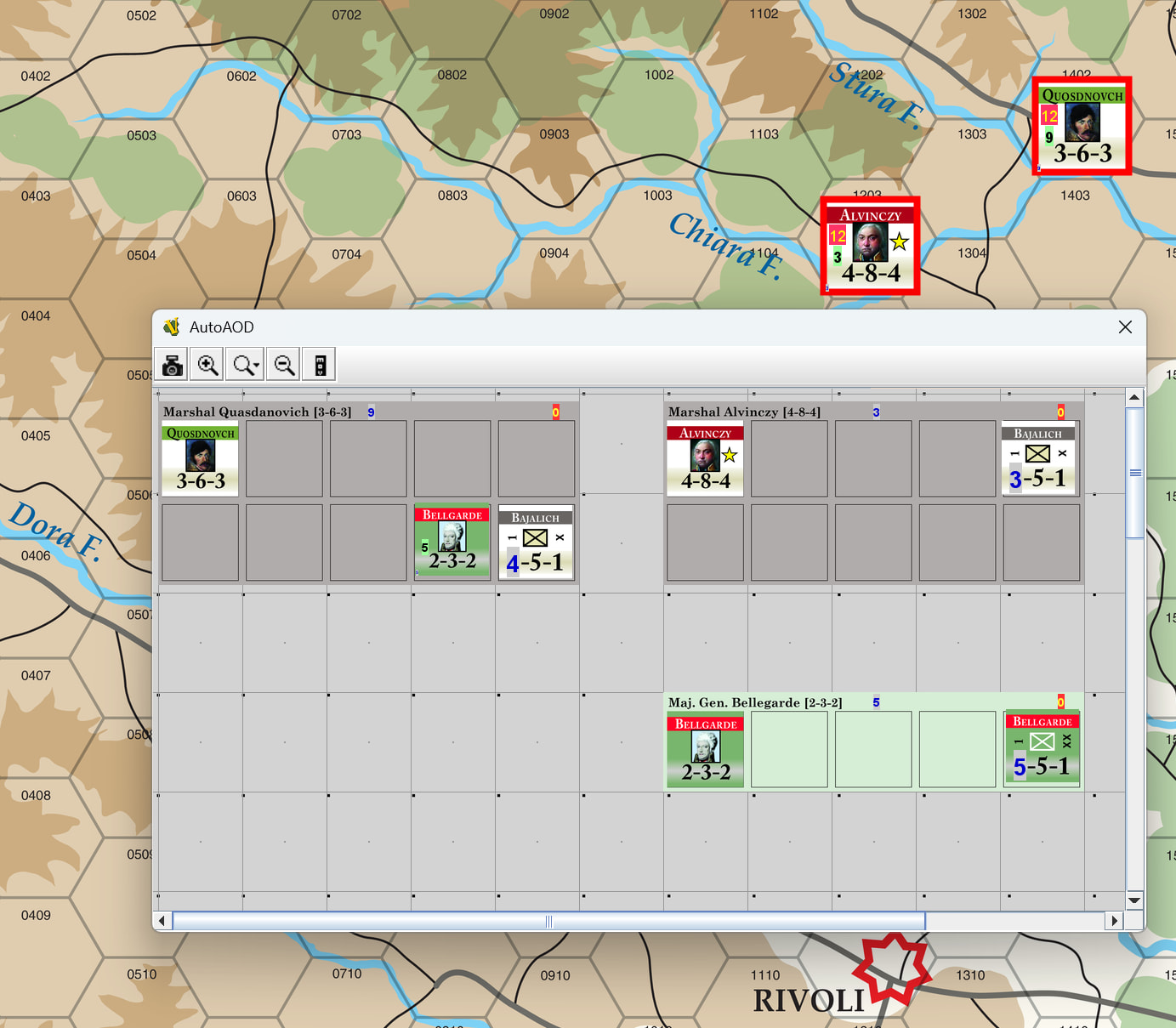
I have a game where there are leaders counters on the main map and leader mats on a private map.
The mats contain the combat units.
I’d like to sum the SPs of the combat units and show them on the leader.
I build a previous release of the game as few years ago with the old Sum function. It worked but was a bit sluggish. I ran the same module on a recent version of vassal and it worked much faster.
I am now rebuilding the module from scratch and would like to use the newer functions.
so I have a leader counter BasicName pd_leader_BELLGARDE
If I just do SumMap(“MATSP”,“AutoAOD”)
It sums just fine but for all the mats on that board.
So I am confident that it is the property match expression that is incorrect.
If I put this expression in a text label the name looks correct.
`{$BasicName$.replace("_leader_","-mat-")}`
I tried to add .trim() but it caused an expression error.
If you want the leader counter on the privat window to know about properties of the leader counters on the main map, make those two counters Attachments one way or the other. I do something similar in Littoral Commander: Indo-Pacific: The unit counters on the main map are associated with a tracker card on another map. When the hit points on the tracker goes to zero, then both the counter on the main map and the tracker are eliminated. When the resource count of Long Range Strike (LRS) - for example - hits zero on the tracker card, it is no longer possible to declare LRS combat with the counter on the main map - and so on.
I hardcoded a property LNAME and managed to match to it as an attachment and a SumMap using LNAME=“$LNAME$”
In practise though the easiest mapping is through the leader name.
And the leader name is part of the basicname. I am using nat-type-leadername for the basicnames.
In the end I asked copilot to give it a go… and it got it right first time.
Is there way to initialise markers or dynamic properties based on an expression?
I tried extracting the leadername to a calculated property but that creates an infinite loop and I then have to kill the JRE.
I have been really surprised how well copilot has worked and how VASSAL aware it was.
I didn’t know anything about graphics. It guided me through snipping the countersheet images, scaling the map, OCRing the counters to create a register and so on.
The benefit of using an Attachment trait, is that Vassal does not have to query every single piece on the map. Indead, it only needs to query the attached or attached to piece(s).
Actually not a very good suggestion. This will query all pieces on the map, which potentially can be a great deal, and will be relatively slow.
If your leader counter is indeed a Mat - and the units are Mat Cargo - then addressing the carried units with selection criteria
{CurrentMatID == $MatID$}
will be more efficent. If the carried units need to address the carrier (the mat), then the selection would be
{MatID == $CurrentMatID$}
Mat and Mat Cargo traits are - however - really only useful if the leader counter does indeed carry around other counters, and these counters may change their leader - or mat. You should of course use Mat based sum and count functions.
If carried counters are only ever associated with a single specific leader counter, then the Attachment trait is more suitable. You should of course use Attachment based sum and count functions.
“aware” is a funny adjective to use about a piece of mechanics that guesses most of the time
What you can do is provide a command for Dynamic Property - say initLeader - which will set the property to its initial calculated value. You can then trigger that command by a Startup GKC.
There are two counters for each leader, a regular counter on the main map and a mat on the organisational chart. The mat holds all the units that a leader commands. The units are mat cargo.
Typically, each side has less than 20 leaders on the map and less than 40 counters on the org chart.
My previous version used the same number of counters. It has just older art and was hacked from another module.
but it runs very fast with the deprecated sum function in the recent versions of vassal.
I would prefer, though, to use the plain leadername as an attachment. But I haven’t figured out a way on how to get the leader names into a marker or into the attachment name automatically.
All up there are about 100 leaders and a100 mats to cover all the scenarios.
The only way I can think off is to export the leaders as an xml.Edit the names and the then delete and reimport.
At the moment I just have one prototype that covers all leaders from all sides.
I had a look at the shell script before but I don’t have a linux box at home.
It didn’t take long to snip the counters with copilot/imagemagick. I got stuck on the bevelling. so I’ll have another look at those later.
vassal-python and pywargame might be what I am looking for. Are they up to date? And widely used?
The one thing that was easier than expected was scanning all the counters with easyocr in python. It extracted all the horizontal text with perhaps 2 corrections in 500+ counters.
Having a counter register in excel made it easy to generate the mat images using pillow in python. I would love to use it to initialise marker or dynamic property traits for each counter.
True, I am still getting used to dealing with AI and how to describe it accurately.
I would make the two leader counters of each leader Attached to each other so they can effectively communicate.
Some questions:
Are there counters for the units on the main map? If so, I would also make them Attached to their counter-parts on the org-map.
Can units change between leaders?
If not, then you can fix the leader Attachement of each unit - or possibly prototype - explicitly mentioning the leader Attachement name
If they can, then you can use Key Command to apply to all units ending movement on this map of the org-map (see Map Window) to discover which leader ( Mat) a unit is currently sitting on.
The name of an Attachement trait is not an expression, so you can only give it a constant value.
But, I think that you want is that
The pair of Leader counters are mutually Attached to each other.
If there are unit counters on the main map and on the org-map, then those pairs are also mutually Attached to each other.
The unit counters on the org-map are notAttached to the leaders on the org-map.
Instead, they are Mat Cargo, as the probably do not need to communicate with their leaders.
I don’t know what the status of vassal-python is.
pywargame is actively maintained - by yours truly. I have no idea how much it is used by other people. Personally I use it all the time, and I know of a hand-full of other people who are or have used it.
If you use pywargame you can keep the counter stats, etc., externally in some sort of database (a spreadsheet, JSON files, SQLite, …) and then read it via Python and then use pywargame to build - or patch - your counters.
If you have a MacOS machine, then you should be able to use the script too. If you are on Windows, you may have some luck with the so-called “PowerShell”. Alternatively, there’s Windows Subsystem for Linux - which will give you a almost full Linux installation.
The “Intelligence” part of AI is certainly a misnomer of epic proportions
That is a shame that would mean that we to hardcode all the attachment names. I had hoped the prototypes would be more flexible.
Your python module looks great. I am getting f-string expression part cannot include a backslash errors even on an empty vmod.
I am a bit of a python newby any idea what might be happening there?
Prototypes are directly substituted in when piece are built, and unfortunately they can not be parameterised - which would be kinda nice.
Thanks. I hope you will find it useful. Please let me know if you have any troubles, complaints, suggestions, etc.
Does the error come from pywargame or your code?
If the error comes from pywargame, then please make a new Issue at GitLab. There, just like here, you can use MarkDown to mark-up your text. Please provide the full error message and other relevant information and code. You may want to link to the issue from here so that others may easily find it.
If the error comes from your code, it is probably because you have something like
It is supposed to look like this.
Each leader has a mat. The mat contains the combat units and subordinate leaders by the leader.
The total SP are summed per mat just using the SumMat. (blue number on mat and green number on leader).
The strength are passed from the mats to the leader counters using SumMap.
Leaders on the map can also belong to a multihex force.
The leaders on the main map belong to Force Red and have the force strength calculated using SumMap.
This way I just have 3 prototypes, Leaders, Mats and Units.
The only specific marker is the leader initiative used in a hidden init roll. I briefly thought of embedding the init in the image name to make it available through BasicName. But that didn’t feel quite right either.
I had a play with the attachment property but having to hard code all the names felt a bit painful.
It is such a shame that we can have expressions in Marker & Dynamic Property Initialisation & Attachment names. It would just be evaluated once on startup. But I am not familiar with the internal architecture and there is bound to be a good reason for it.
All the numbers are just text labels until I figure out how to do layered graphics like the GCACW counters.
OK, so as far as I can tell, the individual units - say “Bajalich” are never present on the board - only their commander - say “Quasdanovich” - are represented on the main map. Is that correct?
However, a commander may also be sub-ordinate to another commander - say “Bellegarde” to “Quasdanovich”. Can the sub-ordinate commander be present on the main map too? That would complicate matters a bit.
How does the Commander pieces on your organisational chart (AutoAOD map) look like? Are they, for example for “Quasdanovich”, a piece that spans several rows and columns - like the gray area indicates?
OK, so that seems straight forward.
That, I don’t quite get. If the large gray piece “Quasdanovich” on “AutoAOD” has the property - say - TotalSP with value 9 - calculated using SumMat - then why would you need to do another calculation to get the same value on the main map? If the commander piece on the map - say “Quasdanovich” is Attached to the equivalent piece on the “AutoAOD”, it can simply get that value with GetAttachProperty. This is by far the most efficient way to do that.
Everytime you use something like SumMap your performance will suffer.
Note that there’s no reason to think that you couldn’t use a pieces name as its attachment name. E.g., the two pieces for the commander “Quasdanovich” - the map representation and the AutoAOD representation - could have the attachment “Quasdanovich”. Yes, you would need to add that trait to individual pieces and they cannot be in a prototype, but on the other hand, it is fairly straight-forward.
Of course, if you use pywargame, you can ensure proper reference in code
How does the module make that assignment? Is it a user choice, or built in to the module. Again, it may make sense to make this a kind of mutual a Attachement, depending on how long that assignment may last.
In most of the modules I’ve done, I have logic that allows the user to calculate combat odds. The user selects all belligerents of a combat, and then press a short-cut key, button, or select from the context menu. The module then sums up attacking and defending combat factors - possibly with modifiers due to terrain and features - and calculates the combat odds. An odds marker is then placed on one of the defending stacks and a combat marker placed on all belligerents. The user can then select the odds marker, press a short-cut key, button, or select a context menu item to resolve the combat. A combat result marker then replaces the combat odds marker. If this is something like what you want to do, you can check out one of the modules I’ve done.
How do you set the text labels? Be careful about setting them (directly or indirectly) by a calculation like SumMap - or similar. Every time the label has to be redrawn - which happens relatively often - the expression has to be reevaluated which can potentially be costly. That also applies to Layer trait with Levels follow expression value.
If you use a Dynamic Property - rather than a Calculated Property - to store the calculation in, then a new value will only be calculated on a specific request - for example when a piece is removed from or added to the “AutoAOD” commander piece mat, or when commanders are attached to or detached from a task force on the main map.
The combat unit pieces like Bajalich are only on the Mats in the AOD map.
The leaders (Commander is jargon in this game for a special type of leader) are either on the map or are subordinate on another leader’s mat. But never on both.
The top left counter image on the mats is just decoration and part of the mat image.
The middle rating of a leader is his command span and detrmines how many other leader the can carry on the mat. So there are large and small mats depending on the leaders command span.
Forces are determined by the user. A leader can join Force Red, Force Blue etc.
I tried the attachments. Using CountAttach() I could get see the right number of attached counters. But I tried numerous variations of attachmentname_SP, $attachmentname_SP$ etc.
but no cigar.
I realise that vassal was designed to ripple through properties using key commands.
But the Sum and Count functions seemed nice work arounds. Specially since they are supposed to be lightning fast in recent versions.
I first tried Sum and Count in 2022 and was a bit sluggish.
The combat odds are pretty straight forward in this game. The attrition table is a different beast though. I’ll have a look at that after I get everything else functional.
OK, I think I gather that from the graphics too. Enforcing the number of attached leaders on another leader mat may be a bit of challenge. In Vassal, in general, it can be a little tricky to prohibit specific moves.
OK. How do you see that implemented? And what is the impact of being part of a specific force?
One possible implementation could be to have pieces in the same force join in in the same attachment. Then your pieces would have an attachment trait for each possible force (RedAttachment, BlueAttachment, …). Visually, you can make force membership be a Layer or Border Outline trait that adds the force colour to the piece - it seems like you have something like that now.
The real question, and whether it is needed to set up some sort of attachment or the like, between pieces of the same force, is whether there are certain actions that can be taken in or by the module, that depends on the force a piece belongs to, or if it is merely a convenience for the players.
Rather than attachments, you could also have separate windows (or hands) for each force. So that if a user places Quasdanovich in the RedForce window, it is considered to be part of the red force. Because the on-map piece is attached to its in-force piece, it can now about the force assignment and display the proper graphics to indicate that. It could be handled by Command when piece ends movement on this map option in the force windows, which sends a command to the tracker piece, which in turn sets a property in the on-map piece.
If your attachment name is acttachmentName, and you want to sum the property SP of each attached piece, then use
{SumAttach("attachementName","SP")}
See also Attachment based sum and count functions. Note that if you for some reason need to exclude the piece calling the function from the sum, you may need to do something like
Remember, $...$ variables are expanded (replaced by their value in the calling piece) before the expression is evaluated on the target pieces. Thus, if piece Quasdanovich calls the function, and it is sent to “Bellgarde”, then the expression evaluated in that last piece is
OK, I think I gather that from the graphics too. Enforcing the number of attached leaders on another leader mat may be a bit of challenge. In Vassal, in general, it can be a little tricky to prohibit specific moves.
I wasn’t planning to reinforce any of the rules. You can stack on more combat units than is allowed.
OK. How do you see that implemented? And what is the impact of being part of a specific force?Blockquote
The multihex force allows you to move multiple units as one activation.
The downside is that the attrition is calculated over the whole force.
Moving large stacks is quite expensive in attrition losses.
I am not calculating attrition.
I am only automating a couple things.
counting the SP of a force. The cardboard AODs are very elegant as a one to many database but there is a lot of counting.
In practise we all use yellow stickers with our leaders and SPs.
Doing the secret initiative roll.
The init roll determines if and how far you can move. Seeing the roll on an opponents hidden unit gives you a very big clue who it is.
As a work around I instantiated another 1d6 that tells you how far the piece can move instead of the dr result. There is also a markup on the unit so you can distinguish between having a failed a init roll and not having rolled yet)
All the rest is pretty standard masking etc.
I might make some mile post counters and depot markups so you can easily check the length of the line of communications.
Attachment Name:
The name for this Attachment trait. This name can be used by the piece to read properties from attached pieces. For example if the Attachment name were Sibling, then the property Sibling_LocationName would contain the LocationName property of the first currently attached piece.
I had hoped this syntax would work but I did end up going with the SumAttach version.
Understandable. One way one could try to do it would be with a command when ending movement on this map - or similar - that counts the number of already placed Mat Cargo pieces on the Mat, and if that has already hit the limit, then an Undo command is sent to the module.
OK, so you basically only want some sort of graphical indication that a particular piece belongs to a particular force, right? Then a set of simple Border Outline traits would work.
Dynamic Property:
Name: Force
Commands:
Menu: Join Red Force, Expression: {"Red"}
Menu: Join Blue Force, Expression: {"Blue"}
…
Calculated Property
Name: IsRedForce
Expression: {Force=="Red"}
Calculated Property
Name: IsBlue
Expression: {Force=="Blue"}
…
Border Outline
Colour: 0xFF0000
Property: IsRed
Border Outline
Colour: 0x0000FF
Property: IsBlue
…
Wait - do you want to sum up the strength points of a force (multi-hex selection), or units (and possible leaders) attached to a single leader? If you want to sum up the strength points of a force, then perhaps they should be mutual attachments so as to make the summing effective and easy to manage.
BTW, what is the acronym AOD?
I think, if you want to sum of strength points of a force, it would make sense to have one AOD per force as outlined before. If, for example, initiative rolls are done by force rather than by stack (leader), then that would facilitate some more automation. Of course, if the initiative roll is per stack, you do not really need that because you already have the stack mat on the AOD. BTW, I guess the AODs are Player Hand or Private Window.
You can always use the function Random
{Random(6)}
to get a random integer between 1 and 6, both inclusive. That is, you do not need a dice component to do this.
The crucial point here, is that references like <attachment name>_<property>only looks at the first attached unit. Thus it will not work to sum up the property.